# slice-upload-utils
**Repository Path**: ywenhao/slice-upload-utils
## Basic Information
- **Project Name**: slice-upload-utils
- **Description**: No description available
- **Primary Language**: TypeScript
- **License**: MIT
- **Default Branch**: main
- **Homepage**: None
- **GVP Project**: No
## Statistics
- **Stars**: 0
- **Forks**: 0
- **Created**: 2026-05-31
- **Last Updated**: 2026-05-31
## Categories & Tags
**Categories**: Uncategorized
**Tags**: None
## README
# slice-upload-utils
[](https://www.npmjs.com/package/slice-upload-utils)
[English](./README.md) | 简体中文
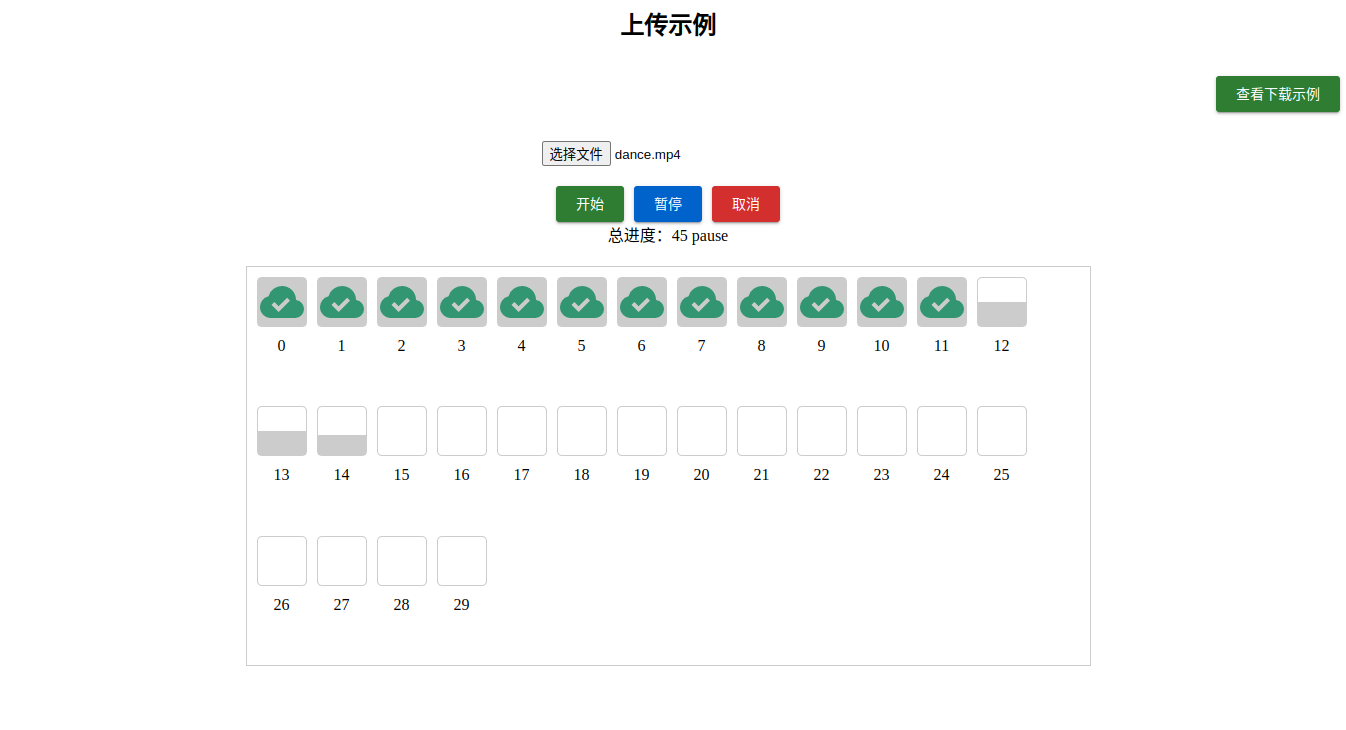
## 介绍
`slice-upload-utils` 提供大文件分片上传、分片下载、断点续传、秒传、暂停、取消,以及 Vue / React hooks。
上传侧会先把文件切片并计算 `preHash`、`chunkHash`。默认使用抽样 hash,适合大多数业务;需要严格校验时可以开启 `realPreHash` 或 `realChunkHash`,代价是更长的计算时间。
下载侧使用 HTTP Range 请求并发拉取分片,完成后按顺序合并为一个 `File`,默认会自动保存。
## 安装
```shell
pnpm add slice-upload-utils
```
## 入口
```ts
import { defineSliceDownload, defineSliceUpload } from 'slice-upload-utils'
import { useSliceDownload, useSliceUpload } from 'slice-upload-utils/vue'
import { useSliceDownload as useReactSliceDownload } from 'slice-upload-utils/react'
```
Vue hooks 仍保留在主入口导出以兼容旧代码;新代码推荐使用 `slice-upload-utils/vue` 和 `slice-upload-utils/react` 这类明确入口。
包只提供 ESM 产物,推荐在 Vite、Nuxt、Next、现代 Node ESM 或其他支持 ESM 的打包环境中使用。
## 本地 Playground
```shell
pnpm dev
```
`pnpm dev` 会同时启动:
- Vue 示例:`playground/vue`
- 本地上传下载服务:`playground/server`
Vue 示例通过 Vite proxy 访问 `/api`,对应服务端地址是 `http://127.0.0.1:10010`。
仓库里的 `playground/fixtures/mp4.zip` 会在 server 启动时作为测试下载文件暴露出来。它是 Git LFS 文件,只用于 GitHub 仓库、playground 和测试;npm 发布包只包含 `dist`,不会把该文件打进包里。
首次拉取仓库前需要先安装并启用 Git LFS,后续 `git pull` 才会自动把 LFS 指针替换成真实文件:
```shell
git lfs install
git pull
```
如果已经拉到了 134 字节的指针文件,补执行:
```shell
git lfs pull --include=playground/fixtures/mp4.zip
```
## 上传用法
推荐在 `request` 里使用 `params.ajaxRequest`。它已经绑定当前分片,适合并发上传、异步预检、重试、暂停和取消。
### Vue
```vue
```
### React
```tsx
import { useState } from 'react'
import type { PreVerifyUploadParams, UploadFinishParams, UploadParams } from 'slice-upload-utils'
import { useSliceUpload } from 'slice-upload-utils/react'
// 每个分片 2 MiB,可按后端限制调整。
const chunkSize = 1024 ** 2 * 2
export function UploadPanel() {
const [file, setFile] = useState(null)
// 绑定当前文件和上传流程回调。
const upload = useSliceUpload({
chunkSize,
file,
request: uploadChunk,
preVerifyRequest,
onFinish: mergeChunks,
})
return (
<>
setFile(event.target.files?.[0] ?? null)} />
)
}
async function preVerifyRequest(params: PreVerifyUploadParams) {
// 询问服务端哪些分片已经存在。
// 返回 true 表示秒传完成,返回 chunkHash[] 表示可断点续传。
const result = await fetch('/api/upload/verify', {
body: JSON.stringify(params),
headers: { 'Content-Type': 'application/json' },
method: 'POST',
}).then((res) => res.json())
return result.data as string[] | true
}
async function uploadChunk(params: UploadParams) {
// ajaxRequest 已绑定当前分片,其余字段作为表单字段提交。
const { ajaxRequest, ...fields } = params
const data = new FormData()
// playground 协议要求每个分片请求都带上 chunkSize。
data.append('chunkSize', String(chunkSize))
Object.entries(fields).forEach(([key, value]) => {
if (value === null || value === undefined) return
data.append(key, typeof value === 'number' ? String(value) : value)
})
const result = await ajaxRequest<{ code: number }>({
data,
url: '/api/upload/chunk',
})
return result.code === 200
}
async function mergeChunks(params: UploadFinishParams) {
// 所有缺失分片上传成功后调用,用于通知服务端合并。
await fetch('/api/upload/merge', {
body: JSON.stringify(params),
headers: { 'Content-Type': 'application/json' },
method: 'POST',
})
}
```
`useSliceUpload` 常用返回值:
```ts
const { start, pause, cancel, chunks, progress, status, instance } = upload
```
## 下载用法
下载前通常先请求文件元信息,再调用 `setFileOptions`,最后 `start()`。`params.ajaxRequest` 会自动带上当前分片的 `Range` header。
### Vue
```vue
```
### React
```tsx
import type { DownloadParams } from 'slice-upload-utils'
import { useSliceDownload } from 'slice-upload-utils/react'
function DownloadButton() {
// autoSave 会在所有 Range 分片完成后自动保存合并后的文件。
const download = useSliceDownload({
autoSave: true,
request: downloadChunk,
})
async function downloadChunk(params: DownloadParams) {
// ajaxRequest 会自动为当前分片带上 Range header。
return params.ajaxRequest({
url: `/api/files/${encodeURIComponent(params.filename)}/content`,
})
}
async function handleDownload() {
// 先获取文件元信息,让 hook 知道文件名、大小和 MIME 类型。
const meta = await fetch('/api/files/mp4.zip/meta')
.then((res) => res.json())
.then((res) => res.data)
// 文件信息异步获取时,需要先 setFileOptions,再 start()。
download.setFileOptions({
filename: meta.filename,
fileSize: meta.fileSize,
fileType: meta.fileType,
})
await download.start()
}
return (
<>
)
}
```
`useSliceDownload` 常用返回值:
```ts
const { start, pause, cancel, setFileOptions, chunks, progress, status, instance } = download
```
## 服务端接口约定
仓库内置了一个无框架依赖的 Node playground server,可作为后端协议参考。
### `POST /api/upload/verify`
请求体:
```json
{
"preHash": "file-hash",
"filename": "demo.txt",
"chunkSize": 2097152,
"chunkTotal": 10
}
```
返回:
```json
{
"code": 200,
"data": ["uploaded-chunk-hash"]
}
```
当所有分片都已存在时,`data` 返回 `true`,客户端会直接进入完成态。
### `POST /api/upload/chunk`
`multipart/form-data` 字段:
- `chunk`
- `index`
- `chunkTotal`
- `preHash`
- `filename`
- `chunkHash`
- `chunkSize`
### `POST /api/upload/merge`
上传完成后调用,服务端按 `index` 合并分片:
```json
{
"preHash": "file-hash",
"filename": "demo.txt",
"chunkSize": 2097152,
"chunkTotal": 10
}
```
### `GET /api/files/:filename/meta`
返回下载前需要的文件元信息:
```json
{
"code": 200,
"data": {
"filename": "demo.txt",
"fileSize": 1024,
"fileType": "text/plain; charset=utf-8",
"url": "/api/files/demo.txt/content"
}
}
```
### `GET /api/files/:filename/content`
支持 `Range: bytes=start-end`。客户端分片下载时会自动发送 Range header。
## API 速览
### 上传选项
```ts
interface UseSliceUploadOptions {
/**
* 上传文件
*/
file: Ref
/**
* 上传请求函数
*/
request: UploadRequest
/**
* 报错处理函数
*/
onError?: UploadEventType['error']
/**
* 上传完成函数
*/
onFinish?: UploadEventType['finish']
/**
* 预检函数
*/
preVerifyRequest?: PreVerifyUploadRequest
/**
* 分片大小,单位:字节
* @default 1024 * 1024 * 2 字节
*/
chunkSize?: number
/**
* 并发上传数
* @default 3
*/
poolCount?: number
/**
* 请求失败后,重试次数
* @default 3
*/
retryCount?: number
/**
* 请求失败后,重试间隔时间,单位:毫秒
* @default 300 毫秒
*/
retryDelay?: number
/**
* 请求超时时间,单位:毫秒
* @default 15000 毫秒
*/
timeout?: number
/**
* 计算整个文件的 hash,开启后比较耗时间
* @default false
*/
realPreHash?: boolean
/**
* 计算分片文件的 hash,开启后比较耗时间
* @default false
*/
realChunkHash?: boolean
}
```
### 下载选项
```ts
interface UseSliceDownloadOptions {
/**
* 文件大小,单位:字节
*/
fileSize?: number
/**
* 文件名称
*/
filename?: string
/**
* 文件 MIME 类型
* @default application/octet-stream
* @see https://developer.mozilla.org/zh-CN/docs/Web/HTTP/Basics_of_HTTP/MIME_types/Common_types
*/
fileType?: string
/**
* 是否自动保存
* @default true
*/
autoSave?: boolean
/**
* 分片大小,单位:字节
* @default 1024 * 1024 * 2 字节
*/
chunkSize?: number
/**
* 并发下载数
* @default 3
*/
poolCount?: number
/**
* 请求失败后,重试次数
* @default 3
*/
retryCount?: number
/**
* 请求失败后,重试间隔时间,单位:毫秒
* @default 300 毫秒
*/
retryDelay?: number
/**
* 请求超时时间,单位:毫秒
* @default 15000 毫秒
*/
timeout?: number
/**
* 下载请求函数
*/
request: DownloadRequest
/**
* 报错处理函数
*/
onError?: DownloadEventType['error']
/**
* 下载完成函数
*/
onFinish?: DownloadEventType['finish']
}
```
## 验收
```shell
pnpm format:check
pnpm typecheck
pnpm lint
pnpm test -- --run
pnpm build
```
## License
[MIT](./LICENSE) License © 2023 [Ywenhao](https://github.com/ywenhao)