# EasyCore.EventBus
**Repository Path**: wzhy-0521/easy-core.-event-bus
## Basic Information
- **Project Name**: EasyCore.EventBus
- **Description**: EasyCore.EventBus
- **Primary Language**: Unknown
- **License**: MIT
- **Default Branch**: master
- **Homepage**: None
- **GVP Project**: No
## Statistics
- **Stars**: 6
- **Forks**: 1
- **Created**: 2025-02-14
- **Last Updated**: 2026-07-21
## Categories & Tags
**Categories**: Uncategorized
**Tags**: EasyCore
## README
# 🚌 EasyCore.EventBus
> **EasyCore.EventBus** 是面向 .NET 8 的轻量级事件总线库。统一本地(进程内)与分布式(跨进程)发布-订阅模型,通过可插拔适配器对接 RabbitMQ / Kafka / Pulsar / Redis Streams,帮助你快速落地事件驱动架构(EDA)。






仓库:[github.com/RockyWang0521/EasyCore.EventBus](https://github.com/RockyWang0521/EasyCore.EventBus)
---
## 🌍 Language
- **中文(当前文档)**
- English: [README.en.md](README.en.md)
---
## 📚 目录
### 🧭 第一部分:总览与架构
- [1. 🎯 项目定位](#1-项目定位)
- [2. 🏗 架构与模块关系](#2-架构与模块关系)
- [3. 📦 NuGet / 项目清单](#3-nuget--项目清单)
- [4. 📊 传输选型对比](#4-传输选型对比)
### 🚀 第二部分:快速上手
- [5. ⚙ 环境要求](#5-环境要求)
- [6. 📥 安装](#6-安装)
- [7. ⚡ 三分钟快速开始](#7-三分钟快速开始)
- [8. 🧩 事件与处理器模型](#8-事件与处理器模型)
### 🏭 第三部分:配置 · Demo · 生产
- [9. 🔁 重试与失败回调](#9-重试与失败回调)
- [10. 🔌 传输配置](#10-传输配置)
- [11. 🧪 Demo 项目](#11-demo-项目)
- [12. ✅ 生产清单](#12-生产清单)
- [13. ❓ FAQ](#13-faq)
- [14. 📄 License](#14-license)
- [🤝 贡献](#-贡献)
---
## 1. 🎯 项目定位
EasyCore.EventBus 解决「在 .NET 中用同一套 API 做进程内解耦与跨服务消息」的问题:
| 痛点 | EasyCore.EventBus 做法 |
|---|---|
| 本地与分布式两套写法 | 统一 `IEvent` + `PublishAsync`,本地 / 分布式仅 Handler 接口不同 |
| 消息中间件绑定深 | 核心抽象 + `EventBus.*` 适配器,按需引用 |
| Handler 手写注册繁琐 | `EventTypeScanner` 自动发现并注册 Handler |
| 消费失败难重试 | `RetryCount` / `RetryInterval` / `FailureCallback` + 消息头覆盖 |
| 想单独用 MQ 客户端 | `EasyCore.RabbitMQ` 等 infra 包可独立使用 |
### 1.1 设计原则
| 原则 | 说明 |
|---|---|
| **低摩擦接入** | `services.AddEasyCoreEventBus(...)` 一条扩展方法即可 |
| **本地优先** | 不传 `action` 时仅注册 `ILocalEventBus` |
| **传输可插拔** | RabbitMQ / Kafka / Pulsar / Redis Streams 独立适配器 |
| **失败可感知** | 重试耗尽触发 `FailureCallback`,并写日志 |
| **扫描自动化** | 实现 `ILocalEventHandler` / `IDistributedEventHandler` 即自动入 DI |
### 1.2 解决方案目录
```text
EasyCore.EventBus/
├── src/
│ ├── EasyCore.EventBus/ # 核心:本地/分布式抽象、Dispatcher、HostedService
│ ├── EasyCore.EventBus.RabbitMQ/ # EventBus → RabbitMQ 适配器
│ ├── EasyCore.EventBus.Kafka/ # EventBus → Kafka 适配器
│ ├── EasyCore.EventBus.Pulsar/ # EventBus → Pulsar 适配器
│ ├── EasyCore.EventBus.RedisStreams/ # EventBus → Redis Streams 适配器
│ ├── EasyCore.RabbitMQ/ # RabbitMQ 基础设施(可独立使用)
│ ├── EasyCore.Kafka/
│ ├── EasyCore.Pulsar/
│ └── EasyCore.RedisStreams/
├── demo/
│ ├── Infra/ # 基础设施独立客户端 Demo(无 EventBus)
│ ├── RabbitMq/ # EventBus Publish + Subscribe
│ ├── Kafka/
│ ├── Pulsar/
│ ├── Redis/
│ └── Winform/ # 本地 / 分布式 WinForms 示例
├── tests/EasyCore.EventBus.Tests/
├── docs/svg/ # README 架构图 / 时序图
└── png/EasyCoreLogo.png
```
---
## 2. 🏗 架构与模块关系
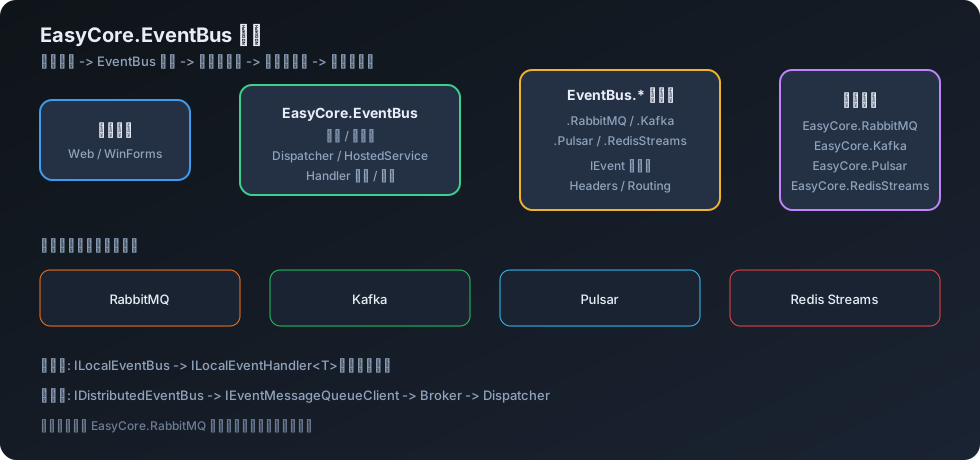
### 2.1 组件关系图
### 2.2 消息生命周期
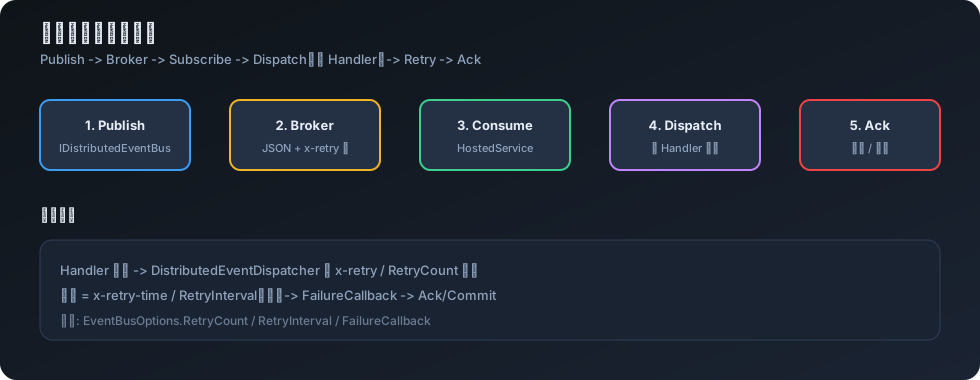
### 2.3 数据流(文字版)
```text
Publisher
│
├─ ILocalEventBus.PublishAsync ──────────► ILocalEventHandler[]
│
└─ IDistributedEventBus.PublishAsync ────► IEventMessageQueueClient (MQ)
│
▼
EventBusHostedService
│
▼
DistributedEventDispatcher
│
▼
IDistributedEventHandler[]
(重试 / FailureCallback)
```
三层结构:
| 层 | 包 | 职责 |
|---|---|---|
| 核心 | `EasyCore.EventBus` | 抽象、扫描、调度、HostedService |
| 适配器 | `EasyCore.EventBus.*` | 把 EventBus 接到具体中间件 |
| 基础设施 | `EasyCore.*` | 纯 MQ 客户端,可脱离 EventBus 使用 |
---
## 3. 📦 NuGet / 项目清单
| 包名 | 职责 | 是否必须 |
|---|---|---|
| `EasyCore.EventBus` | 核心:本地 / 分布式抽象、Dispatcher、自动扫描 | ✅ |
| `EasyCore.EventBus.RabbitMQ` | RabbitMQ 适配器 | 按需 |
| `EasyCore.EventBus.Kafka` | Kafka 适配器 | 按需 |
| `EasyCore.EventBus.Pulsar` | Pulsar 适配器 | 按需 |
| `EasyCore.EventBus.RedisStreams` | Redis Streams 适配器 | 按需 |
| `EasyCore.RabbitMQ` | RabbitMQ 基础设施客户端 | 可选(适配器会间接依赖) |
| `EasyCore.Kafka` | Kafka 基础设施客户端 | 可选 |
| `EasyCore.Pulsar` | Pulsar 基础设施客户端 | 可选 |
| `EasyCore.RedisStreams` | Redis Streams 基础设施客户端 | 可选 |
> 引用某个 `EasyCore.EventBus.*` 适配器即可获得对应传输能力;若只需裸客户端 API,可单独引用 `EasyCore.RabbitMQ` 等 infra 包。
---
## 4. 📊 传输选型对比
| 能力 | 本地 | RabbitMQ | Kafka | Pulsar | Redis Streams |
|---|---|---|---|---|---|
| 包 | 核心即可 | `.RabbitMQ` | `.Kafka` | `.Pulsar` | `.RedisStreams` |
| 跨进程 | ❌ | ✅ | ✅ | ✅ | ✅ |
| 典型场景 | 模块解耦 | 企业集成 / AMQP | 高吞吐日志流 | 云原生消息 | 轻量队列 |
| 配置入口 | — | `options.RabbitMQ(...)` | `options.Kafka(...)` | `options.Pulsar(...)` | `options.RedisStreams(...)` |
### 4.1 选型决策树
```text
是否需要跨进程 / 跨服务?
├── 否 → 仅 services.AddEasyCoreEventBus() + ILocalEventBus
└── 是 → 选已有中间件
├── RabbitMQ → EasyCore.EventBus.RabbitMQ
├── Apache Kafka → EasyCore.EventBus.Kafka
├── Apache Pulsar → EasyCore.EventBus.Pulsar
└── Redis Streams → EasyCore.EventBus.RedisStreams
```
---
## 5. ⚙ 环境要求
| 项 | 要求 |
|---|---|
| .NET | 8.0+ |
| 宿主 | ASP.NET Core / Generic Host / WinForms + Hosting |
| 中间件 | 分布式场景需对应 Broker 可达 |
| DI | `Microsoft.Extensions.DependencyInjection` |
---
## 6. 📥 安装
```bash
# 核心(本地 EventBus 必需)
dotnet add package EasyCore.EventBus
# 按需选择其一(或组合,视场景而定)
dotnet add package EasyCore.EventBus.RabbitMQ
dotnet add package EasyCore.EventBus.Kafka
dotnet add package EasyCore.EventBus.Pulsar
dotnet add package EasyCore.EventBus.RedisStreams
```
---
## 7. ⚡ 三分钟快速开始
### 7️⃣.1️⃣ 本地 EventBus(进程内)
**定义事件**(实现 `IEvent`):
```csharp
using EasyCore.EventBus.Event;
public class OrderCreatedEvent : IEvent
{
public string OrderId { get; set; } = "";
}
```
**定义处理器**(实现 `ILocalEventHandler`,自动扫描注册):
```csharp
using EasyCore.EventBus.Event;
public class OrderCreatedLocalHandler : ILocalEventHandler
{
public Task HandleAsync(OrderCreatedEvent eventMessage)
{
Console.WriteLine($"Local: {eventMessage.OrderId}");
return Task.CompletedTask;
}
}
```
**注册并发布**:
```csharp
using EasyCore.EventBus;
using EasyCore.EventBus.Local;
// 仅本地:不传 action 即可
services.AddEasyCoreEventBus();
// 注入后发布
public class OrderService(ILocalEventBus localEventBus)
{
public Task CreateAsync(string orderId) =>
localEventBus.PublishAsync(new OrderCreatedEvent { OrderId = orderId });
}
```
### 7️⃣.2️⃣ 分布式 EventBus(RabbitMQ Web)
**订阅端** `Program.cs`:
```csharp
using EasyCore.EventBus;
using EasyCore.EventBus.RabbitMQ;
var builder = WebApplication.CreateBuilder(args);
builder.Services.AddControllers();
builder.Services.AddEasyCoreEventBus(options =>
{
options.RabbitMQ(opt =>
{
opt.HostName = "localhost";
opt.UserName = "guest";
opt.Password = "guest";
opt.Port = 5672;
});
options.RetryCount = 3;
options.RetryInterval = 3;
options.FailureCallback = (eventName, payload) =>
{
// 重试耗尽后的兜底(写日志 / 告警 / 入库)
Console.WriteLine($"Failed: {eventName}, payload={payload}");
};
});
var app = builder.Build();
app.MapControllers();
app.Run();
```
也可简写:`options.RabbitMQ("localhost");`
**事件 + 分布式处理器**:
```csharp
using EasyCore.EventBus.Event;
public class WebEventMessage : IEvent
{
public string? Message { get; set; }
}
public class MyEventHandler : IDistributedEventHandler
{
private readonly ILogger _logger;
public MyEventHandler(ILogger logger) => _logger = logger;
public Task HandleAsync(WebEventMessage eventMessage)
{
_logger.LogInformation("Received: {Message}", eventMessage.Message);
return Task.CompletedTask;
}
}
```
**发布端**:
```csharp
using EasyCore.EventBus.Distributed;
[ApiController]
[Route("api/[controller]")]
public class PublishController(IDistributedEventBus distributedEventBus) : ControllerBase
{
[HttpPost]
public async Task Publish()
{
await distributedEventBus.PublishAsync(new WebEventMessage
{
Message = "Hello, world!"
});
}
}
```
> 配置了传输扩展后,框架会注册 `IDistributedEventBus` 与 `EventBusHostedService`,在 Host 启动时连接并订阅。
---
## 8. 🧩 事件与处理器模型
| 概念 | 类型 | 说明 |
|---|---|---|
| 事件标记 | `IEvent` | 所有事件消息必须实现 |
| 本地总线 | `ILocalEventBus` | 进程内 `PublishAsync` |
| 本地处理器 | `ILocalEventHandler` | `T : IEvent`,同进程消费 |
| 分布式总线 | `IDistributedEventBus` | `PublishAsync` / `Publish` 发往 MQ |
| 分布式处理器 | `IDistributedEventHandler` | 跨进程消费 |
| 调度器 | `DistributedEventDispatcher` | 反序列化、多 Handler、重试 |
同一事件类型可注册多个 Handler;本地按顺序调用,分布式由 `DistributedEventDispatcher` 统一调度。
---
## 9. 🔁 重试与失败回调
### 9.1 `EventBusOptions`
| 属性 | 默认 | 说明 |
|---|---|---|
| `RetryCount` | `3` | 首次失败后的**额外**重试次数 |
| `RetryInterval` | `3` | 重试间隔(秒) |
| `FailureCallback` | `null` | 重试耗尽(或反序列化失败)时回调 `(eventTypeName, payloadJson?)` |
总尝试次数 ≈ `max(1, RetryCount + 1)`。
### 9.2 消息头覆盖
| Header | 常量 | 含义 |
|---|---|---|
| `x-retry` | `EventMessageHeaders.Retry` | 覆盖本条消息的最大重试次数 |
| `x-retry-time` | `EventMessageHeaders.RetryInterval` | 覆盖重试间隔(秒) |
由 `DistributedEventDispatcher.ParseRetryHeaders(...)` 解析;缺失或非法时回退到 `EventBusOptions` 默认值。
---
## 10. 🔌 传输配置
### 10.1 RabbitMQ
```csharp
options.RabbitMQ("localhost");
// 或
options.RabbitMQ(opt =>
{
opt.HostName = "localhost";
opt.UserName = "guest";
opt.Password = "guest";
opt.Port = 5672;
opt.ExchangeName = "EasyCore.EventBus";
opt.QueueName = "EasyCore.Queue";
opt.ExchangeType = "topic";
opt.VirtualHost = "/";
});
```
### 10.2 Kafka
```csharp
options.Kafka("localhost:9092");
// 或
options.Kafka(opt =>
{
opt.BootstrapServers = "localhost:9092";
opt.TopicName = "EasyCore.Topic";
opt.GroupId = "EasyCore.GroupId";
});
```
### 10.3 Pulsar
```csharp
options.Pulsar("pulsar://localhost:6650");
// 或
options.Pulsar(opt =>
{
opt.ServiceUrl = "pulsar://localhost:6650";
});
```
### 10.4 Redis Streams
```csharp
options.RedisStreams(new List { "localhost:6379" });
// 或
options.RedisStreams(opt =>
{
opt.EndPoints = new List { "localhost:6379" };
opt.Password = null;
opt.ConsumerGroup = "RedisGroup";
});
```
---
## 11. 🧪 Demo 项目
| 目录 | 说明 | 命令示例 |
|---|---|---|
| [`demo/RabbitMq`](demo/RabbitMq) | EventBus:`Web.RabbitMQ` 订阅 + `Web.RabbitMQ.Publish` 发布 | `dotnet run --project demo/RabbitMq/Web.RabbitMQ` |
| [`demo/Kafka`](demo/Kafka) | EventBus:Kafka 发布 / 订阅成对 | `dotnet run --project demo/Kafka/Web.Kafka` |
| [`demo/Pulsar`](demo/Pulsar) | EventBus:Pulsar 发布 / 订阅成对 | `dotnet run --project demo/Pulsar/Web.Pulsar` |
| [`demo/Redis`](demo/Redis) | EventBus:Redis Streams 发布 / 订阅 | `dotnet run --project demo/Redis/Web.Redis` |
| [`demo/Winform`](demo/Winform) | 本地 / 分布式 WinForms + Web | 打开对应 `.csproj` 运行 |
| [`demo/Infra`](demo/Infra) | **仅基础设施包**:`IRabbitMQClient` / `IKafkaClient` / `IPulsarClient` / `IRedisStreamsClient` | `dotnet run --project demo/Infra/Web.Infra.RabbitMQ` |
完整说明见 [`demo/README.md`](demo/README.md)。
建议:
- **EventBus**:分别启动 Subscribe 与 Publish,对 Publish 的 `POST /api/Publish`(或 `/one`、`/batch`)发请求。
- **Infra**:单进程即可,Swagger → `POST /api/messages`;后台 HostedService 自动订阅并打日志。
---
## 12. ✅ 生产清单
- [ ] 凭证放入配置中心 / 密钥库,勿硬编码
- [ ] 按业务评估 `RetryCount` / `RetryInterval`,并实现 `FailureCallback`(告警或死信落库)
- [ ] 订阅端与发布端使用同一套事件类型与序列化约定
- [ ] 多实例消费时确认中间件的竞争消费 / Consumer Group 语义符合预期
- [ ] 监控 Broker 积压、连接断开与 Handler 异常日志
- [ ] 上线前用对应 `demo/*` 在目标环境打通连通性
- [ ] 仅本地解耦时不要挂载传输扩展,避免无意义的 HostedService
---
## 13. ❓ FAQ
**Q: 入口方法是 `AddAppEventBus` 吗?**
A: 不是。正确入口是 `services.AddEasyCoreEventBus(options => { ... })`。
**Q: 只想用本地事件,还要装 RabbitMQ 包吗?**
A: 不需要。仅引用 `EasyCore.EventBus` 并调用 `services.AddEasyCoreEventBus()` 即可。
**Q: Handler 需要手动 `AddTransient` 吗?**
A: 一般不需要。实现 `ILocalEventHandler` / `IDistributedEventHandler` 后,由 `EventTypeScanner` 在注册时自动扫描入 DI。
**Q: 分布式 Handler 什么时候开始消费?**
A: 配置了传输扩展后会注册 `EventBusHostedService`;Host 启动时 `ConnectAsync` + `SubscribeAsync`。
**Q: `RetryCount = 3` 一共试几次?**
A: 约 4 次(1 次首次 + 3 次额外重试)。消息头 `x-retry` 可覆盖该值。
**Q: 可以同时配置多个传输吗?**
A: 扩展点支持注册多个 `IEventOptionsExtension`,但实际以当前适配器实现为准;生产环境建议一个宿主绑定一种主传输,避免拓扑混乱。
**Q: infra 包和适配器包有何区别?**
A: `EasyCore.EventBus.*` 面向事件总线场景;`EasyCore.RabbitMQ` 等是底层客户端,可单独用于非 EventBus 场景。
---
## 14. 📄 License
**MIT** — 详见 [LICENSE](LICENSE) 与各包 `PackageLicenseExpression`。
你可以在 MIT 或 Apache-2.0 任一许可下使用本软件。
---
## 🤝 贡献
1. Fork 并创建特性分支
2. 在 `tests/EasyCore.EventBus.Tests` 补充测试
3. 执行 `dotnet test` 与 `dotnet build EasyCore.EventBus.sln`
4. 提交 Pull Request
欢迎 Issue / PR 🚀