# SysMocap
**Repository Path**: suppermanljr/SysMocap
## Basic Information
- **Project Name**: SysMocap
- **Description**: No description available
- **Primary Language**: Unknown
- **License**: MPL-2.0
- **Default Branch**: main
- **Homepage**: None
- **GVP Project**: No
## Statistics
- **Stars**: 0
- **Forks**: 0
- **Created**: 2026-05-31
- **Last Updated**: 2026-06-04
## Categories & Tags
**Categories**: Uncategorized
**Tags**: None
## README

 SysMocap



English Version | 中文版本
跨平台的实时视频驱动动作捕捉及3D虚拟形象生成系统 for VTuber/Live/AR/VR.
提供用于Windows,macOS的可执行文件包(包括M系列芯片),可在Linux上通过源代码运行
[立刻下载](https://github.com/xianfei/SysMocap/releases)
(这是一个多语言软件,支持中文和英文)
本科毕业设计作品。
### 特色
🌟 好看的用户图形界面(得益于Material Design 3自动取色系统),且支持深色模式


🌟 简单易用,只需拖拽即可导入虚拟形象模型
https://user-images.githubusercontent.com/8101613/167257555-8b8d4b99-f99f-4b79-8891-967b8723e3f8.mp4
🌟 动作转发系统支持支持WebXR API (HTTPS only,用于VR和AR技术)
https://user-images.githubusercontent.com/8101613/167257906-596919a5-4c0e-4795-865f-384a15c0d39f.mp4
🌟 带有骨骼控制器和变装工具的模型查看器

🌟 可导入至OBS进行直播使用

🌟 支持全身动作捕捉


🌟 支持自动检测骨骼类型并完成映射( for All VRM files and Mixamo Format FBX files)

🌟 支持通过手动进行骨骼映射来驱动各种骨骼类型FBX、GLB、GLTF模型文件

🌟 你可以使用 [VRoid Studio](https://vroid.com/en/studio) 来创作属于自己的虚拟形象并导入至该系统,同时支持VRM 0.x & 1.0!
 ### 更多效果展示
🌟 面部

🌟 半身

🌟 半身与手部

🌟 全身

### 系统架构

### 如何下载该应用程序 (Windows & macOS):
[立刻下载](https://github.com/xianfei/SysMocap/releases)
版本说明:
**Windows 免安装版本**:解压后直接运行 `SysMocap.exe` 即可
- `SysMocap-Windows-x64-<版本号>.7z`: Windows 64位版本,适用于使用x86_64处理器(AMD、Intel等)64位Windows 10 & 11操作系统
- `SysMocap-Windows-arm64-<版本号>.7z`: Windows ARM 64位版本,适用于使用arm64处理器(高通骁龙等)64位Windows 10 & 11操作系统
**Windows 安装包**:双击安装即可(安装包为英文,软件支持中文)
### 更多效果展示
🌟 面部

🌟 半身

🌟 半身与手部

🌟 全身

### 系统架构

### 如何下载该应用程序 (Windows & macOS):
[立刻下载](https://github.com/xianfei/SysMocap/releases)
版本说明:
**Windows 免安装版本**:解压后直接运行 `SysMocap.exe` 即可
- `SysMocap-Windows-x64-<版本号>.7z`: Windows 64位版本,适用于使用x86_64处理器(AMD、Intel等)64位Windows 10 & 11操作系统
- `SysMocap-Windows-arm64-<版本号>.7z`: Windows ARM 64位版本,适用于使用arm64处理器(高通骁龙等)64位Windows 10 & 11操作系统
**Windows 安装包**:双击安装即可(安装包为英文,软件支持中文)
 - `SysMocap-Windows-x64-installer-<版本号>.msi`: Windows 64位版本,适用于使用x86_64处理器(AMD、Intel等)64位Windows 10 & 11操作系统
- `SysMocap-Windows-arm64-installer-<版本号>.msi`: Windows ARM 64位版本,适用于使用arm64处理器(高通骁龙等)64位Windows 10 & 11操作系统
**macOS DMG镜像**:拖动 `SysMocap.app` 到应用程序文件夹即可
- `SysMocap-Windows-x64-installer-<版本号>.msi`: Windows 64位版本,适用于使用x86_64处理器(AMD、Intel等)64位Windows 10 & 11操作系统
- `SysMocap-Windows-arm64-installer-<版本号>.msi`: Windows ARM 64位版本,适用于使用arm64处理器(高通骁龙等)64位Windows 10 & 11操作系统
**macOS DMG镜像**:拖动 `SysMocap.app` 到应用程序文件夹即可
 - `SysMocap-macOS-x64-<版本号>.dmg`: 适用于Intel芯片的苹果电脑及黑苹果设备,macOS 10.15+操作系统
- `SysMocap-macOS-arm64-<版本号>.dmg`: 适用于使用M系列芯片(Apple Silicon)的苹果电脑
**针对macOS用户的额外说明:**
- You need set Gatekeeper to Anywhere in System Settings (在终端中执行 `sudo spctl --master-disable`)
- `SysMocap-macOS-x64-<版本号>.dmg`: 适用于Intel芯片的苹果电脑及黑苹果设备,macOS 10.15+操作系统
- `SysMocap-macOS-arm64-<版本号>.dmg`: 适用于使用M系列芯片(Apple Silicon)的苹果电脑
**针对macOS用户的额外说明:**
- You need set Gatekeeper to Anywhere in System Settings (在终端中执行 `sudo spctl --master-disable`)
 - 如果你遇到 `“SysMocap” is damaged and can’t be opened. You should move it to the Trash.`(大概中文是 被损坏 您应该移动到废纸篓),
请在终端中执行 `sudo xattr -r -d com.apple.quarantine /Applications/SysMocap.app`
### 如何使用源代码运行 (需要最新版 Node.js):
```shell
git clone https://github.com/xianfei/SysMocap.git
cd SysMocap
npm i
npm start
```
### 注意
1. HTTP & HTTPS 在动作捕捉转发中将会使用**同一个端口**。
### 需要的骨骼节点 (glTF/glb/FBX Model File):
(对于其他类型的骨骼,你可以在本程序中进行手动映射和坐标系转换)
- Hips (Main Node, both Position and Rotation. Ratation only for other nodes)
- Neck
- Chest
- Spine
- RightUpperArm
- RightLowerArm
- LeftUpperArm
- LeftLowerArm
- LeftUpperLeg
- LeftLowerLeg
- RightUpperLeg
- RightLowerLeg
### Star 历史
[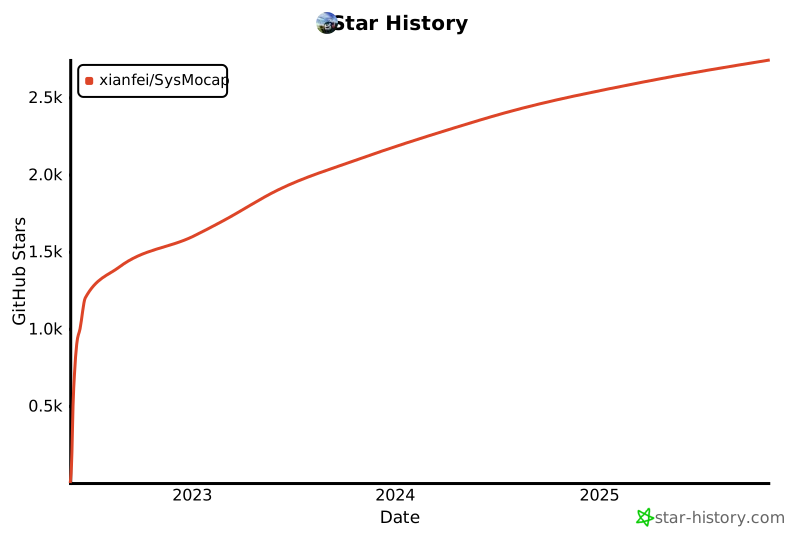](https://star-history.com/#xianfei/SysMocap&Date)
### 引用
BibTeX:
```
@INPROCEEDINGS{9974484,
author={Song, Wenfeng and Wang, Xianfei and Gao, Yang and Hao, Aimin and Hou, Xia},
booktitle={2022 IEEE International Symposium on Mixed and Augmented Reality Adjunct (ISMAR-Adjunct)},
title={Real-time Expressive Avatar Animation Generation based on Monocular Videos},
year={2022},
volume={},
number={},
pages={429-434},
doi={10.1109/ISMAR-Adjunct57072.2022.00092}}
```
GB/T 7714 (国内高校毕业论文写这个就行)
```
Song W, Wang X, Gao Y, et al. Real-time Expressive Avatar Animation Generation based on Monocular Videos[C]//2022 IEEE International Symposium on Mixed and Augmented Reality Adjunct (ISMAR-Adjunct). IEEE Computer Society, 2022: 429-434.
```
- 如果你遇到 `“SysMocap” is damaged and can’t be opened. You should move it to the Trash.`(大概中文是 被损坏 您应该移动到废纸篓),
请在终端中执行 `sudo xattr -r -d com.apple.quarantine /Applications/SysMocap.app`
### 如何使用源代码运行 (需要最新版 Node.js):
```shell
git clone https://github.com/xianfei/SysMocap.git
cd SysMocap
npm i
npm start
```
### 注意
1. HTTP & HTTPS 在动作捕捉转发中将会使用**同一个端口**。
### 需要的骨骼节点 (glTF/glb/FBX Model File):
(对于其他类型的骨骼,你可以在本程序中进行手动映射和坐标系转换)
- Hips (Main Node, both Position and Rotation. Ratation only for other nodes)
- Neck
- Chest
- Spine
- RightUpperArm
- RightLowerArm
- LeftUpperArm
- LeftLowerArm
- LeftUpperLeg
- LeftLowerLeg
- RightUpperLeg
- RightLowerLeg
### Star 历史
[](https://star-history.com/#xianfei/SysMocap&Date)
### 引用
BibTeX:
```
@INPROCEEDINGS{9974484,
author={Song, Wenfeng and Wang, Xianfei and Gao, Yang and Hao, Aimin and Hou, Xia},
booktitle={2022 IEEE International Symposium on Mixed and Augmented Reality Adjunct (ISMAR-Adjunct)},
title={Real-time Expressive Avatar Animation Generation based on Monocular Videos},
year={2022},
volume={},
number={},
pages={429-434},
doi={10.1109/ISMAR-Adjunct57072.2022.00092}}
```
GB/T 7714 (国内高校毕业论文写这个就行)
```
Song W, Wang X, Gao Y, et al. Real-time Expressive Avatar Animation Generation based on Monocular Videos[C]//2022 IEEE International Symposium on Mixed and Augmented Reality Adjunct (ISMAR-Adjunct). IEEE Computer Society, 2022: 429-434.
```