# pingnoo
**Repository Path**: sueble/pingnoo
## Basic Information
- **Project Name**: pingnoo
- **Description**: No description available
- **Primary Language**: C++
- **License**: GPL-3.0
- **Default Branch**: master
- **Homepage**: None
- **GVP Project**: No
## Statistics
- **Stars**: 0
- **Forks**: 0
- **Created**: 2025-04-12
- **Last Updated**: 2025-04-12
## Categories & Tags
**Categories**: Uncategorized
**Tags**: None
## README
# Pingnoo
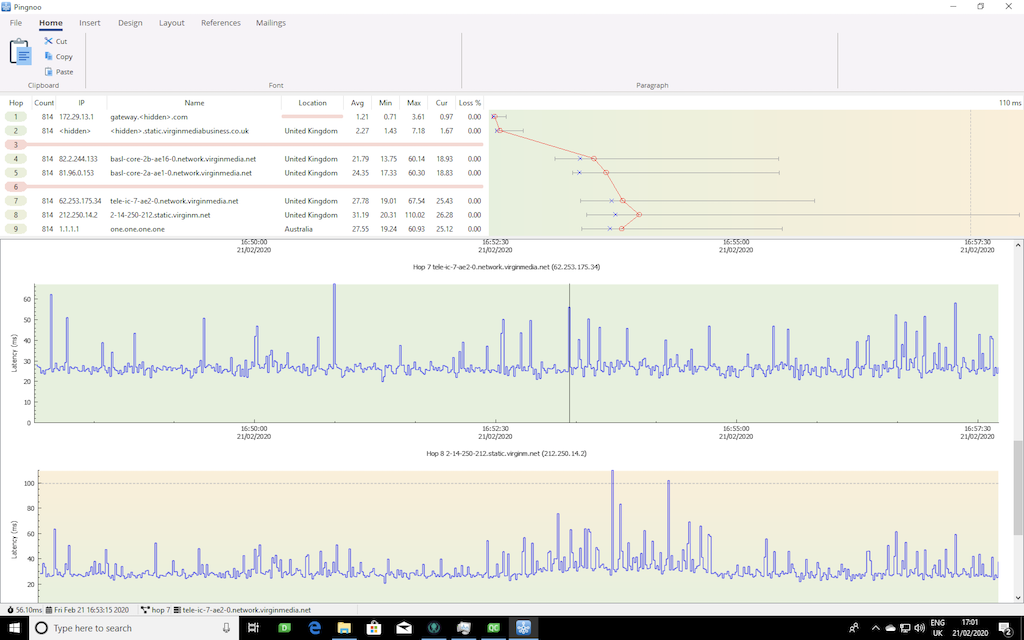
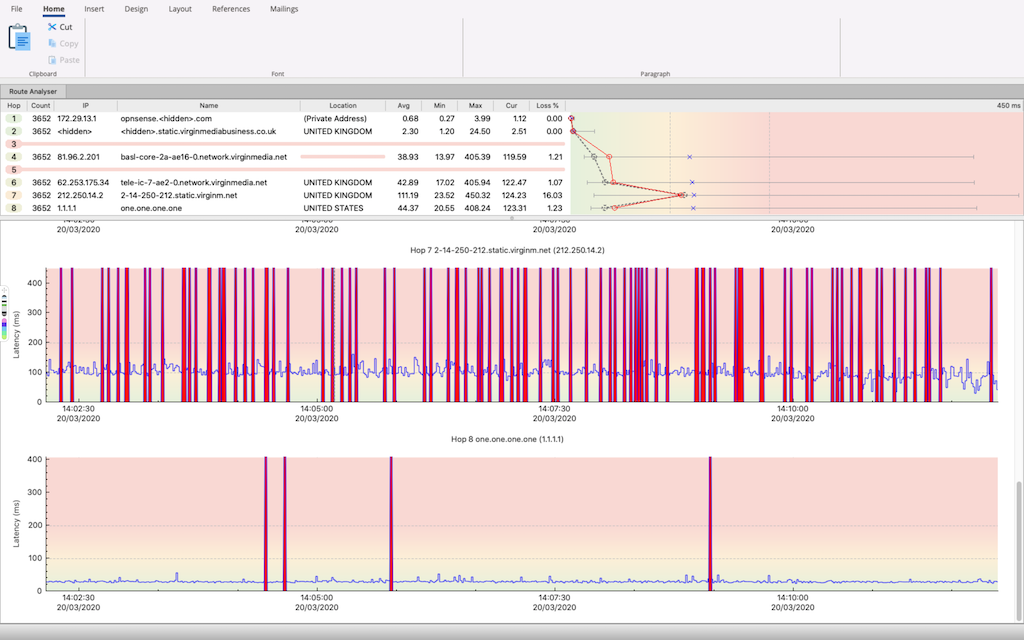
Pingnoo (pronounced /pɪŋ ɡəˈnuː/) is an open source combined traceroute and ping application for analysing network connections. It runs under Windows, Mac OS and Linux.
 ## Requirements
- Qt 5 libraries (Requirement for development)
- cmake for building the application
- Qt Creator (Optional development environment)
- Linux has special requirements, please read the Linux Notes section.
- Installers will be provided per platform and contain all required dependencies.
## Development
Pingnoo uses a modular design architecture based on components (aka plugins), the software can be extended easily by third parties by creating new components or modifying existing ones.
### General Information
The following configurations are used for development.
- ***Linux*** - 32 & 64-bit using GNU g++
- ***Windows*** - 32 & 64-bit using MSVC 2017 Community Edition
- ***Windows*** - 32 & 64-bit using mingw-g++
- ***Mac OS*** - 64-bit using clang from xcode command line tools
### Linux Notes
The application requires RAW socket privileges and therefore must be run as root or given raw socket access using the setcap command.
The cmake configuration for linux has the following post link command, this command is is optional and is controlled by the option `Pingnoo_SetRawCapabilities`.
`sudo -n /usr/sbin/setcap cap_net_raw,cap_net_admin=eip $${APPLICATION_BINARY_FOLDER}/$${TARGET}`
This will automatically apply the privileges to the executable after linking by running setcap via sudo, the `-n` flag is required to stop sudo prompting for a password if required, if a password is required then sudo fill fail.
To stop sudo requesting a password for the `/usr/sbin/setcap` command create the following entry in `/etc/sudoers`(replacing with the name of your user account):
` ALL = (root) NOPASSWD: /usr/sbin/setcap`
*Please be aware of any security issues by doing this.*
In addition, it's not possible to debug the application due to the requirement of RAW sockets, one way of solving this is to create a script in `/usr/bin/gdb-sudo` with the following content:
`#!/bin/sh`
`sudo -n /usr/bin/gdb $@`
Create an entry in `/etc/sudoers` to allow gdb to run as root without a password:
` ALL = (root) NOPASSWD: /usr/bin/gdb`
The final step is to configure Qt Creator to use this proxy script. Create a new debugger configuration in Qt Creator selecting `/usr/bin/gdb-sudo` as the gdb binary. This debugger should then be selected as the debugger in any Qt kit that you wish to use for debugging.
*Please be aware of any security issues by doing this.*
#### Valgrind
Debugging memory leaks can be done with valgrind, but as above the application requires raw socket privileges and valgrind cannot run the executable without being run as root. The following command can be executed from the application binary folder to run valgrind and produce an XML debug log which can then be loaded into Qt Creator for viewing. (For convenience a `valgrind.sh` script has been provided)
`sudo /usr/bin/valgrind --child-silent-after-fork=yes --xml=yes --smc-check=all-non-file --tool=memcheck --gen-suppressions=all --track-origins=yes --leak-check=summary --num-callers=25 --xml-file=./debug.xml ./Pingnoo_debug`
#### Unit Tests
Set the`Pingnoo_Build_Tests` option to `ON` to generate a binary which performs unit tests.
#### Ribbon Bar
The user interface uses a Ribbon style toolbar (as seen in applications such as Microsoft Office). To build the designer plugin set the cmake option `Pingnoo_Build_RibbonDesignerPlugin` to `ON`, this will create the plugin in the `bin` folder which will then need to be copied to the Qt `plugins` folder.
#### Mac OS
The generated application bundle needs to be turned into a deployable application bundle so that it runs without the need for the end user to install the Qt libraries. This is achieved by running the macdeployqt application inside the folder where the generated Pingnoo.app bundle resides.
```/Users/adriancarpenter/Qt/5.14.1/clang_64/bin/macdeployqt ./Pingnoo.app```
Furthermore, the gatekeeper requirements in Mac OS mean that the application needs to be signed to run without the need for user intervention in the security settings.
```codesign --deep --force --verbose --verify --sign "" ./Pingnoo.app```
# Credits
The following third party libraries/assets have been used in the development of Pingnoo.
- [Qt](https://www.qt.io/download) - cross platform framework, licensed under the [GPLv3.](https://www.gnu.org/licenses/gpl-3.0.en.html)
- [cmake](www.cmake.org) - cross platform project build system, licensed under [BSD license.](https://gitlab.kitware.com/cmake/cmake/raw/master/Copyright.txt)
- [Catch2](https://github.com/catchorg/Catch2) - unit testing framework, licensed under the [BSL-1.0 license](https://github.com/catchorg/Catch2/blob/master/LICENSE.txt).
- [GSL](https://github.com/Microsoft/GSL) - guidelines support library for C++, licensed under the [MIT license.](https://github.com/microsoft/GSL/blob/master/LICENSE)
- [Font Awesome](https://fontawesome.com) - Glyph based icon font, licensed under the [SIL OFL 1.1 License.](https://scripts.sil.org/OFL)
- [QCustomPlot](https://www.qcustomplot.com/) - charting library for Qt, licensed under the [GPLv3.](https://www.gnu.org/licenses/gpl-3.0.en.html)
# License
This project is open source and is released under the GPLv3 License
Distributed as-is; no warranty is given.
## Requirements
- Qt 5 libraries (Requirement for development)
- cmake for building the application
- Qt Creator (Optional development environment)
- Linux has special requirements, please read the Linux Notes section.
- Installers will be provided per platform and contain all required dependencies.
## Development
Pingnoo uses a modular design architecture based on components (aka plugins), the software can be extended easily by third parties by creating new components or modifying existing ones.
### General Information
The following configurations are used for development.
- ***Linux*** - 32 & 64-bit using GNU g++
- ***Windows*** - 32 & 64-bit using MSVC 2017 Community Edition
- ***Windows*** - 32 & 64-bit using mingw-g++
- ***Mac OS*** - 64-bit using clang from xcode command line tools
### Linux Notes
The application requires RAW socket privileges and therefore must be run as root or given raw socket access using the setcap command.
The cmake configuration for linux has the following post link command, this command is is optional and is controlled by the option `Pingnoo_SetRawCapabilities`.
`sudo -n /usr/sbin/setcap cap_net_raw,cap_net_admin=eip $${APPLICATION_BINARY_FOLDER}/$${TARGET}`
This will automatically apply the privileges to the executable after linking by running setcap via sudo, the `-n` flag is required to stop sudo prompting for a password if required, if a password is required then sudo fill fail.
To stop sudo requesting a password for the `/usr/sbin/setcap` command create the following entry in `/etc/sudoers`(replacing with the name of your user account):
` ALL = (root) NOPASSWD: /usr/sbin/setcap`
*Please be aware of any security issues by doing this.*
In addition, it's not possible to debug the application due to the requirement of RAW sockets, one way of solving this is to create a script in `/usr/bin/gdb-sudo` with the following content:
`#!/bin/sh`
`sudo -n /usr/bin/gdb $@`
Create an entry in `/etc/sudoers` to allow gdb to run as root without a password:
` ALL = (root) NOPASSWD: /usr/bin/gdb`
The final step is to configure Qt Creator to use this proxy script. Create a new debugger configuration in Qt Creator selecting `/usr/bin/gdb-sudo` as the gdb binary. This debugger should then be selected as the debugger in any Qt kit that you wish to use for debugging.
*Please be aware of any security issues by doing this.*
#### Valgrind
Debugging memory leaks can be done with valgrind, but as above the application requires raw socket privileges and valgrind cannot run the executable without being run as root. The following command can be executed from the application binary folder to run valgrind and produce an XML debug log which can then be loaded into Qt Creator for viewing. (For convenience a `valgrind.sh` script has been provided)
`sudo /usr/bin/valgrind --child-silent-after-fork=yes --xml=yes --smc-check=all-non-file --tool=memcheck --gen-suppressions=all --track-origins=yes --leak-check=summary --num-callers=25 --xml-file=./debug.xml ./Pingnoo_debug`
#### Unit Tests
Set the`Pingnoo_Build_Tests` option to `ON` to generate a binary which performs unit tests.
#### Ribbon Bar
The user interface uses a Ribbon style toolbar (as seen in applications such as Microsoft Office). To build the designer plugin set the cmake option `Pingnoo_Build_RibbonDesignerPlugin` to `ON`, this will create the plugin in the `bin` folder which will then need to be copied to the Qt `plugins` folder.
#### Mac OS
The generated application bundle needs to be turned into a deployable application bundle so that it runs without the need for the end user to install the Qt libraries. This is achieved by running the macdeployqt application inside the folder where the generated Pingnoo.app bundle resides.
```/Users/adriancarpenter/Qt/5.14.1/clang_64/bin/macdeployqt ./Pingnoo.app```
Furthermore, the gatekeeper requirements in Mac OS mean that the application needs to be signed to run without the need for user intervention in the security settings.
```codesign --deep --force --verbose --verify --sign "" ./Pingnoo.app```
# Credits
The following third party libraries/assets have been used in the development of Pingnoo.
- [Qt](https://www.qt.io/download) - cross platform framework, licensed under the [GPLv3.](https://www.gnu.org/licenses/gpl-3.0.en.html)
- [cmake](www.cmake.org) - cross platform project build system, licensed under [BSD license.](https://gitlab.kitware.com/cmake/cmake/raw/master/Copyright.txt)
- [Catch2](https://github.com/catchorg/Catch2) - unit testing framework, licensed under the [BSL-1.0 license](https://github.com/catchorg/Catch2/blob/master/LICENSE.txt).
- [GSL](https://github.com/Microsoft/GSL) - guidelines support library for C++, licensed under the [MIT license.](https://github.com/microsoft/GSL/blob/master/LICENSE)
- [Font Awesome](https://fontawesome.com) - Glyph based icon font, licensed under the [SIL OFL 1.1 License.](https://scripts.sil.org/OFL)
- [QCustomPlot](https://www.qcustomplot.com/) - charting library for Qt, licensed under the [GPLv3.](https://www.gnu.org/licenses/gpl-3.0.en.html)
# License
This project is open source and is released under the GPLv3 License
Distributed as-is; no warranty is given.