# diffuser
**Repository Path**: shanyixiang/diffuser
## Basic Information
- **Project Name**: diffuser
- **Description**: diffuserdiffuser
- **Primary Language**: Unknown
- **License**: MIT
- **Default Branch**: main
- **Homepage**: None
- **GVP Project**: No
## Statistics
- **Stars**: 0
- **Forks**: 0
- **Created**: 2023-01-17
- **Last Updated**: 2023-01-17
## Categories & Tags
**Categories**: Uncategorized
**Tags**: None
## README
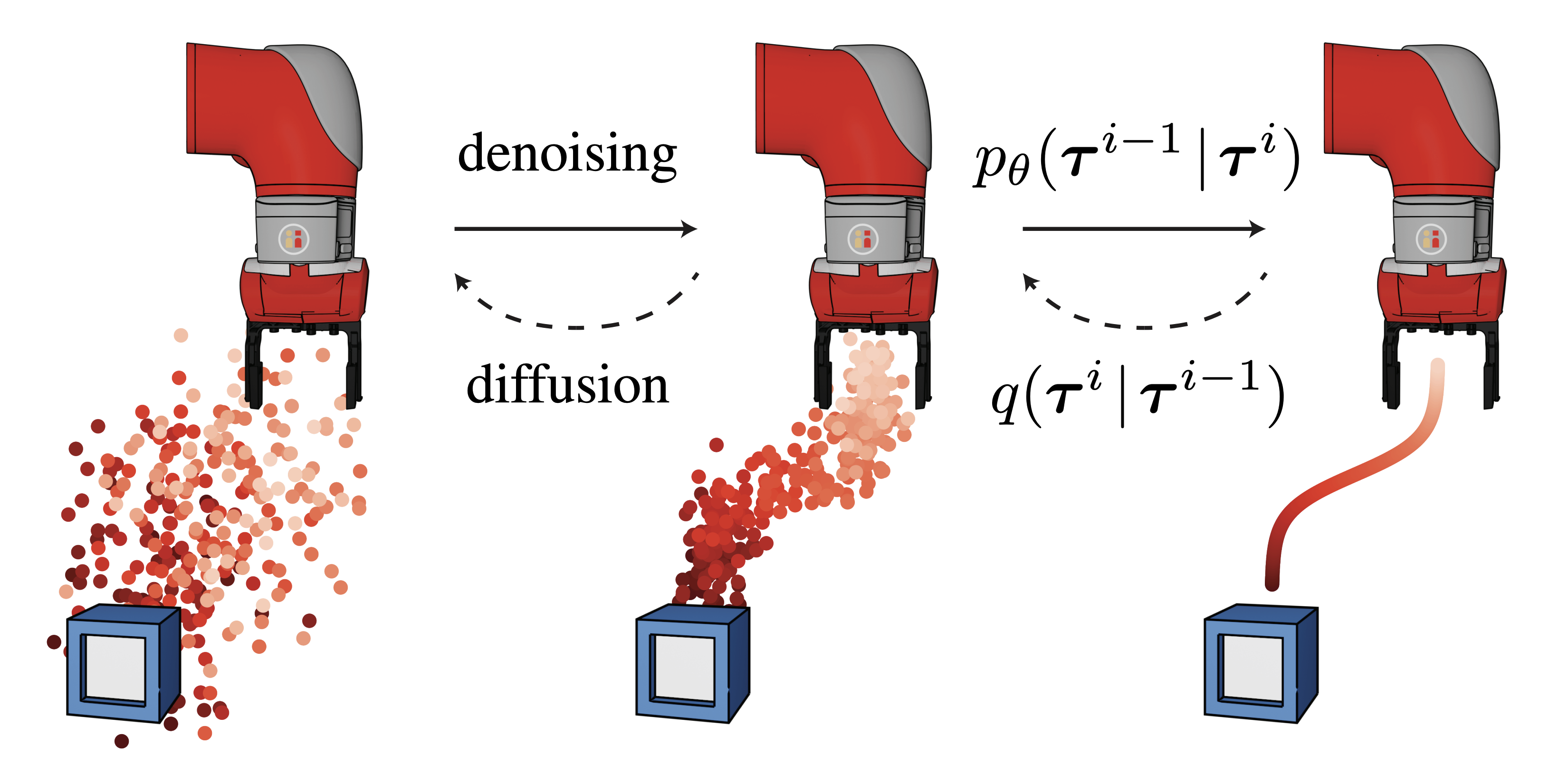
# Planning with Diffusion [](https://colab.research.google.com/drive/1YajKhu-CUIGBJeQPehjVPJcK_b38a8Nc?usp=sharing)
Training and visualizing of diffusion models from [Planning with Diffusion for Flexible Behavior Synthesis](https://diffusion-planning.github.io/).
The [main branch](https://github.com/jannerm/diffuser/tree/main) contains code for training diffusion models and planning via value-function guided sampling on the D4RL locomotion environments.
The [kuka branch](https://github.com/jannerm/diffuser/tree/kuka) contains block-stacking experiments.
The [maze2d branch](https://github.com/jannerm/diffuser/tree/maze2d) contains goal-reaching via inpainting in the Maze2D environments.
**Updates**
- 12/09/2022: Diffuser (the RL model) has been integrated into 🤗 Diffusers (the Hugging Face diffusion model library)! See [these docs](https://huggingface.co/docs/diffusers/using-diffusers/rl) for how to run Diffuser using their pipeline.
- 10/17/2022: A bug in the value function scaling has been fixed in [this commit](https://github.com/jannerm/diffuser/commit/3d7361c2d028473b601cc04f5eecd019e14eb4eb). Thanks to [Philemon Brakel](https://scholar.google.com/citations?user=Q6UMpRYAAAAJ&hl=en) for catching it!
## Quickstart
Load a pretrained diffusion model and sample from it in your browser with [scripts/diffuser-sample.ipynb](https://colab.research.google.com/drive/1YajKhu-CUIGBJeQPehjVPJcK_b38a8Nc?usp=sharing).
## Installation
```
conda env create -f environment.yml
conda activate diffuser
pip install -e .
```
## Using pretrained models
### Downloading weights
Download pretrained diffusion models and value functions with:
```
./scripts/download_pretrained.sh
```
This command downloads and extracts a [tarfile](https://drive.google.com/file/d/1wc1m4HLj7btaYDN8ogDIAV9QzgWEckGy/view?usp=share_link) containing [this directory](https://drive.google.com/drive/folders/1ie6z3toz9OjcarJuwjQwXXzDwh1XnS02?usp=sharing) to `logs/pretrained`. The models are organized according to the following structure:
```
└── logs/pretrained
├── ${environment_1}
│ ├── diffusion
│ │ └── ${experiment_name}
│ │ ├── state_${epoch}.pt
│ │ ├── sample-${epoch}-*.png
│ │ └── {dataset, diffusion, model, render, trainer}_config.pkl
│ ├── values
│ │ └── ${experiment_name}
│ │ ├── state_${epoch}.pt
│ │ └── {dataset, diffusion, model, render, trainer}_config.pkl
│ └── plans
│ └── defaults
│ ├── 0
│ ├── 1
│ ├── ...
│ └── 149
│
├── ${environment_2}
│ └── ...
```
The `state_${epoch}.pt` files contain the network weights and the `config.pkl` files contain the instantation arguments for the relevant classes.
The png files contain samples from different points during training of the diffusion model.
Within the `plans` subfolders, there are the results of 150 evaluation trials for each environment using the default hyperparameters.
To aggregate the results of the evaluations in the logs folder, run python scripts/read_results.py. (Expand to view the output of this command on the plans downloaded from Google Drive.)
```
hopper-medium-replay-v2 | defaults | logs/pretrained/hopper-medium-replay-v2/plans | 150 scores
93.6 +/- 0.37
hopper-medium-v2 | defaults | logs/pretrained/hopper-medium-v2/plans | 150 scores
74.3 +/- 1.36
hopper-medium-expert-v2 | defaults | logs/pretrained/hopper-medium-expert-v2/plans | 150 scores
103.3 +/- 1.30
walker2d-medium-replay-v2 | defaults | logs/pretrained/walker2d-medium-replay-v2/plans | 150 scores
70.6 +/- 1.60
walker2d-medium-v2 | defaults | logs/pretrained/walker2d-medium-v2/plans | 150 scores
79.6 +/- 0.55
walker2d-medium-expert-v2 | defaults | logs/pretrained/walker2d-medium-expert-v2/plans | 150 scores
106.9 +/- 0.24
halfcheetah-medium-replay-v2 | defaults | logs/pretrained/halfcheetah-medium-replay-v2/plans | 150 scores
37.7 +/- 0.45
halfcheetah-medium-v2 | defaults | logs/pretrained/halfcheetah-medium-v2/plans | 150 scores
42.8 +/- 0.32
halfcheetah-medium-expert-v2 | defaults | logs/pretrained/halfcheetah-medium-expert-v2/plans | 150 scores
88.9 +/- 0.25
```
To create the table of offline RL results from the paper, run python plotting/table.py. This will print a table that can be copied into a Latex document. (Expand to view table source.)
```
\definecolor{tblue}{HTML}{1F77B4}
\definecolor{tred}{HTML}{FF6961}
\definecolor{tgreen}{HTML}{429E9D}
\definecolor{thighlight}{HTML}{000000}
\newcolumntype{P}{>{\raggedleft\arraybackslash}X}
\begin{table*}[hb!]
\centering
\small
\begin{tabularx}{\textwidth}{llPPPPPPPPr}
\toprule
\multicolumn{1}{r}{\bf \color{black} Dataset} & \multicolumn{1}{r}{\bf \color{black} Environment} & \multicolumn{1}{r}{\bf \color{black} BC} & \multicolumn{1}{r}{\bf \color{black} CQL} & \multicolumn{1}{r}{\bf \color{black} IQL} & \multicolumn{1}{r}{\bf \color{black} DT} & \multicolumn{1}{r}{\bf \color{black} TT} & \multicolumn{1}{r}{\bf \color{black} MOPO} & \multicolumn{1}{r}{\bf \color{black} MOReL} & \multicolumn{1}{r}{\bf \color{black} MBOP} & \multicolumn{1}{r}{\bf \color{black} Diffuser} \\
\midrule
Medium-Expert & HalfCheetah & $55.2$ & $91.6$ & $86.7$ & $86.8$ & $95.0$ & $63.3$ & $53.3$ & $\textbf{\color{thighlight}105.9}$ & $88.9$ \scriptsize{\raisebox{1pt}{$\pm 0.3$}} \\
Medium-Expert & Hopper & $52.5$ & $\textbf{\color{thighlight}105.4}$ & $91.5$ & $\textbf{\color{thighlight}107.6}$ & $\textbf{\color{thighlight}110.0}$ & $23.7$ & $\textbf{\color{thighlight}108.7}$ & $55.1$ & $103.3$ \scriptsize{\raisebox{1pt}{$\pm 1.3$}} \\
Medium-Expert & Walker2d & $\textbf{\color{thighlight}107.5}$ & $\textbf{\color{thighlight}108.8}$ & $\textbf{\color{thighlight}109.6}$ & $\textbf{\color{thighlight}108.1}$ & $101.9$ & $44.6$ & $95.6$ & $70.2$ & $\textbf{\color{thighlight}106.9}$ \scriptsize{\raisebox{1pt}{$\pm 0.2$}} \\
\midrule
Medium & HalfCheetah & $42.6$ & $44.0$ & $\textbf{\color{thighlight}47.4}$ & $42.6$ & $\textbf{\color{thighlight}46.9}$ & $42.3$ & $42.1$ & $44.6$ & $42.8$ \scriptsize{\raisebox{1pt}{$\pm 0.3$}} \\
Medium & Hopper & $52.9$ & $58.5$ & $66.3$ & $67.6$ & $61.1$ & $28.0$ & $\textbf{\color{thighlight}95.4}$ & $48.8$ & $74.3$ \scriptsize{\raisebox{1pt}{$\pm 1.4$}} \\
Medium & Walker2d & $75.3$ & $72.5$ & $\textbf{\color{thighlight}78.3}$ & $74.0$ & $\textbf{\color{thighlight}79.0}$ & $17.8$ & $\textbf{\color{thighlight}77.8}$ & $41.0$ & $\textbf{\color{thighlight}79.6}$ \scriptsize{\raisebox{1pt}{$\pm 0.55$}} \\
\midrule
Medium-Replay & HalfCheetah & $36.6$ & $45.5$ & $44.2$ & $36.6$ & $41.9$ & $\textbf{\color{thighlight}53.1}$ & $40.2$ & $42.3$ & $37.7$ \scriptsize{\raisebox{1pt}{$\pm 0.5$}} \\
Medium-Replay & Hopper & $18.1$ & $\textbf{\color{thighlight}95.0}$ & $\textbf{\color{thighlight}94.7}$ & $82.7$ & $\textbf{\color{thighlight}91.5}$ & $67.5$ & $\textbf{\color{thighlight}93.6}$ & $12.4$ & $\textbf{\color{thighlight}93.6}$ \scriptsize{\raisebox{1pt}{$\pm 0.4$}} \\
Medium-Replay & Walker2d & $26.0$ & $77.2$ & $73.9$ & $66.6$ & $\textbf{\color{thighlight}82.6}$ & $39.0$ & $49.8$ & $9.7$ & $70.6$ \scriptsize{\raisebox{1pt}{$\pm 1.6$}} \\
\midrule
\multicolumn{2}{c}{\bf Average} & 51.9 & \textbf{\color{thighlight}77.6} & \textbf{\color{thighlight}77.0} & 74.7 & \textbf{\color{thighlight}78.9} & 42.1 & 72.9 & 47.8 & \textbf{\color{thighlight}77.5} \hspace{.6cm} \\
\bottomrule
\end{tabularx}
\vspace{-.0cm}
\caption{
}
\label{table:locomotion}
\end{table*}
```

### Planning
To plan with guided sampling, run:
```
python scripts/plan_guided.py --dataset halfcheetah-medium-expert-v2 --logbase logs/pretrained
```
The `--logbase` flag points the [experiment loaders](scripts/plan_guided.py#L22-L30) to the folder containing the pretrained models.
You can override planning hyperparameters with flags, such as `--batch_size 8`, but the default
hyperparameters are a good starting point.
## Training from scratch
1. Train a diffusion model with:
```
python scripts/train.py --dataset halfcheetah-medium-expert-v2
```
The default hyperparameters are listed in [locomotion:diffusion](config/locomotion.py#L22-L65).
You can override any of them with flags, eg, `--n_diffusion_steps 100`.
2. Train a value function with:
```
python scripts/train_values.py --dataset halfcheetah-medium-expert-v2
```
See [locomotion:values](config/locomotion.py#L67-L108) for the corresponding default hyperparameters.
3. Plan using your newly-trained models with the same command as in the pretrained planning section, simply replacing the logbase to point to your new models:
```
python scripts/plan_guided.py --dataset halfcheetah-medium-expert-v2 --logbase logs
```
See [locomotion:plans](config/locomotion.py#L110-L149) for the corresponding default hyperparameters.
**Deferred f-strings.** Note that some planning script arguments, such as `--n_diffusion_steps` or `--discount`,
do not actually change any logic during planning, but simply load a different model using a deferred f-string.
For example, the following flags:
```
---horizon 32 --n_diffusion_steps 20 --discount 0.997
--value_loadpath 'f:values/defaults_H{horizon}_T{n_diffusion_steps}_d{discount}'
```
will resolve to a value checkpoint path of `values/defaults_H32_T20_d0.997`. It is possible to
change the horizon of the diffusion model after training (see [here](https://colab.research.google.com/drive/1YajKhu-CUIGBJeQPehjVPJcK_b38a8Nc?usp=sharing) for an example),
but not for the value function.
## Docker
1. Build the image:
```
docker build -f Dockerfile . -t diffuser
```
2. Test the image:
```
docker run -it --rm --gpus all \
--mount type=bind,source=$PWD,target=/home/code \
--mount type=bind,source=$HOME/.d4rl,target=/root/.d4rl \
diffuser \
bash -c \
"export PYTHONPATH=$PYTHONPATH:/home/code && \
python /home/code/scripts/train.py --dataset halfcheetah-medium-expert-v2 --logbase logs"
```
## Singularity
1. Build the image:
```
singularity build --fakeroot diffuser.sif Singularity.def
```
2. Test the image:
```
singularity exec --nv --writable-tmpfs diffuser.sif \
bash -c \
"pip install -e . && \
python scripts/train.py --dataset halfcheetah-medium-expert-v2 --logbase logs"
```
## Running on Azure
#### Setup
1. Tag the Docker image (built in the [Docker section](#Docker)) and push it to Docker Hub:
```
export DOCKER_USERNAME=$(docker info | sed '/Username:/!d;s/.* //')
docker tag diffuser ${DOCKER_USERNAME}/diffuser:latest
docker image push ${DOCKER_USERNAME}/diffuser
```
3. Update [`azure/config.py`](azure/config.py), either by modifying the file directly or setting the relevant [environment variables](azure/config.py#L47-L52). To set the `AZURE_STORAGE_CONNECTION` variable, navigate to the `Access keys` section of your storage account. Click `Show keys` and copy the `Connection string`.
4. Download [`azcopy`](https://docs.microsoft.com/en-us/azure/storage/common/storage-use-azcopy-v10): `./azure/download.sh`
#### Usage
Launch training jobs with `python azure/launch.py`. The launch script takes no command-line arguments; instead, it launches a job for every combination of hyperparameters in [`params_to_sweep`](azure/launch_train.py#L36-L38).
#### Viewing results
To rsync the results from the Azure storage container, run `./azure/sync.sh`.
To mount the storage container:
1. Create a blobfuse config with `./azure/make_fuse_config.sh`
2. Run `./azure/mount.sh` to mount the storage container to `~/azure_mount`
To unmount the container, run `sudo umount -f ~/azure_mount; rm -r ~/azure_mount`
## Reference
```
@inproceedings{janner2022diffuser,
title = {Planning with Diffusion for Flexible Behavior Synthesis},
author = {Michael Janner and Yilun Du and Joshua B. Tenenbaum and Sergey Levine},
booktitle = {International Conference on Machine Learning},
year = {2022},
}
```
## Acknowledgements
The diffusion model implementation is based on Phil Wang's [denoising-diffusion-pytorch](https://github.com/lucidrains/denoising-diffusion-pytorch) repo.
The organization of this repo and remote launcher is based on the [trajectory-transformer](https://github.com/jannerm/trajectory-transformer) repo.