# gitmars
**Repository Path**: saqqdy/gitmars
## Basic Information
- **Project Name**: gitmars
- **Description**: 一个高度定制化的git工作流工具
- **Primary Language**: TypeScript
- **License**: GPL-3.0
- **Default Branch**: master
- **Homepage**: None
- **GVP Project**: No
## Statistics
- **Stars**: 39
- **Forks**: 3
- **Created**: 2020-02-18
- **Last Updated**: 2026-06-07
## Categories & Tags
**Categories**: Uncategorized
**Tags**: None
## README
## 
**强大的 Git 工作流 CLI 工具**
[![NPM version][npm-image]][npm-url]
[![build status][travis-image]][travis-url]
[![Test coverage][codecov-image]][codecov-url]
[![npm download][download-image]][download-url]
[![License][license-image]][license-url]
[![Sonar][sonar-image]][sonar-url]
### **[使用文档](http://www.saqqdy.com/gitmars/api/)** [更新日志](http://www.saqqdy.com/gitmars/changelog.html)
## 特性
- **直观的 API 设计** - 简单易懂的命令接口
- **增强的 Git 操作** - 将复杂的 git 命令封装为更易用的方法
- **Shell 工具集** - 内置常用开发任务的 shell 辅助方法
- **完善的测试** - 422+ 测试用例,高覆盖率,确保稳定可靠
## 快速开始
> **指南:** [快速上手](http://www.saqqdy.com/gitmars/guide/getting-start.html)
> **配置:** [参数说明](http://www.saqqdy.com/gitmars/guide/basic-config.html)
```shell
# 在项目中初始化 gitmars
gitm init
# 查看当前配置
gitm config list [option]
# 升级到最新版本
# 使用 -m/--mirror 切换淘宝镜像(国内更快)
# Mac 用户:
sudo gitm upgrade -m -c npm
# Windows 用户(PowerShell 或 CMD):
gitm upgrade latest -m -c npm.cmd
# 查看版本
gitm -v
# 查看帮助
gitm --help
gitm copy --help
```
## 安装
```shell
# 使用 npm
npm install -g gitmars
# 使用 yarn
yarn global add gitmars
```
## 工作流模式
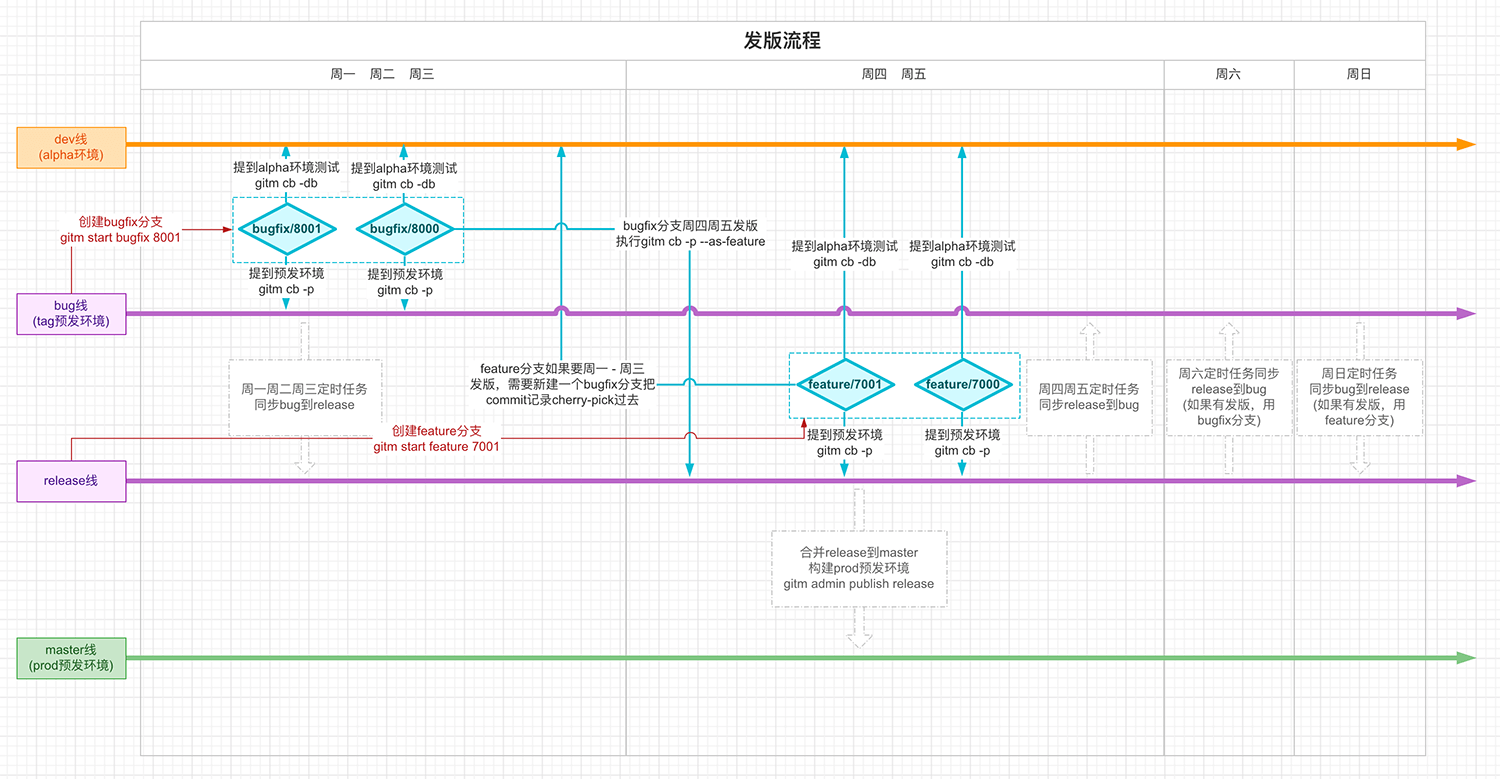
### 双主干分支模式
适用于开发和生产分支分离的项目。
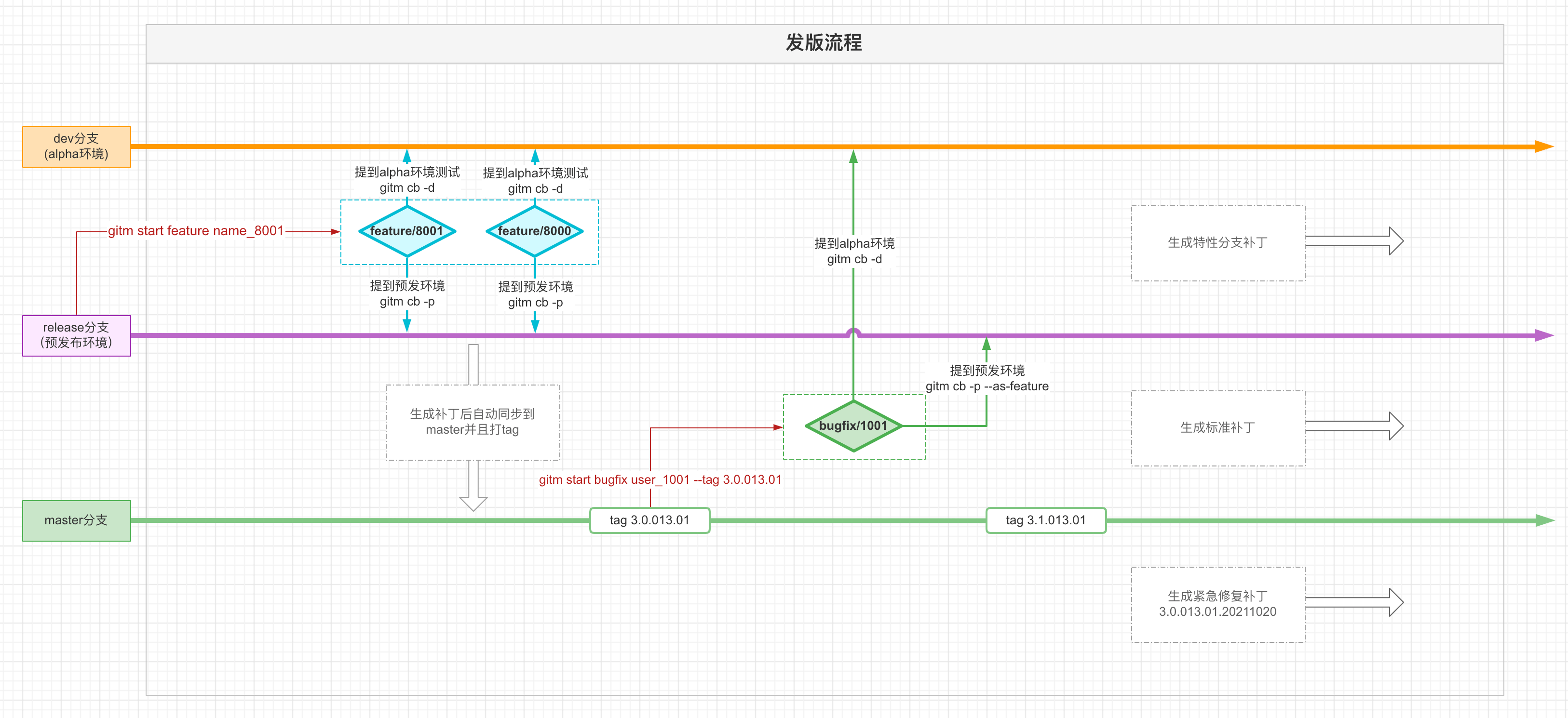
### 单主干分支模式
简化的工作流,适合更简单的发布流程。
## 命令参考
| 命令 | 说明 |
|------|------|
| [`gitm init`](http://www.saqqdy.com/gitmars/api/#gitm-init) | 初始化 gitmars 配置 |
| [`gitm config`](http://www.saqqdy.com/gitmars/api/#gitm-config) | 查看或修改配置项 |
| [`gitm combine`](http://www.saqqdy.com/gitmars/api/#gitm-combine) | 分支阶段提测合并 |
| [`gitm start`](http://www.saqqdy.com/gitmars/api/#gitm-start) | 创建 bugfix 分支或 release 分支 |
| [`gitm end`](http://www.saqqdy.com/gitmars/api/#gitm-end) | 完成功能开发 |
| [`gitm update`](http://www.saqqdy.com/gitmars/api/#gitm-update) | 同步 bugfix/feature 分支代码 |
| [`gitm branch`](http://www.saqqdy.com/gitmars/api/#gitm-branch) | 分支管理操作 |
| [`gitm save`](http://www.saqqdy.com/gitmars/api/#gitm-save) | 暂存当前分支更改 |
| [`gitm get`](http://www.saqqdy.com/gitmars/api/#gitm-get) | 恢复最近暂存的更改 |
| [`gitm suggest`](http://www.saqqdy.com/gitmars/api/#gitm-suggest) | 获取智能 git 操作建议 |
| [`gitm approve`](http://www.saqqdy.com/gitmars/api/#gitm-approve) | 处理远程合并请求 |
| [`gitm review`](http://www.saqqdy.com/gitmars/api/#gitm-review) | 进行远程代码审查 |
| [`gitm cleanbranch`](http://www.saqqdy.com/gitmars/api/#gitm-cleanbranch) | 清理已合并的功能分支 |
| [`gitm copy`](http://www.saqqdy.com/gitmars/api/#gitm-copy) | 简化的 cherry-pick 操作 |
| [`gitm continue`](http://www.saqqdy.com/gitmars/api/#gitm-continue) | 继续中断的操作 |
| [`gitm revert`](http://www.saqqdy.com/gitmars/api/#gitm-revert) | 撤销提交 |
| [`gitm undo`](http://www.saqqdy.com/gitmars/api/#gitm-undo) | 撤回提交或合并记录 |
| [`gitm redo`](http://www.saqqdy.com/gitmars/api/#gitm-redo) | 重做提交或合并记录 |
| [`gitm status`](http://www.saqqdy.com/gitmars/api/#gitm-status) | 显示当前分支状态 |
| [`gitm upgrade`](http://www.saqqdy.com/gitmars/api/#gitm-upgrade) | 升级 gitmars 版本 |
| [`gitm build`](http://www.saqqdy.com/gitmars/api/#gitm-build) | 触发 Jenkins 构建 |
| [`gitm unlink`](http://www.saqqdy.com/gitmars/api/#gitm-unlink) | 移除软链接 |
| [`gitm link`](http://www.saqqdy.com/gitmars/api/#gitm-link) | 创建软链接 |
| [`gitm clean`](http://www.saqqdy.com/gitmars/api/#gitm-clean) | 清除 gitmars 缓存 |
| [`gitm postmsg`](http://www.saqqdy.com/gitmars/api/#gitm-postmsg) | 发送通知消息 |
| [`gitm permission`](http://www.saqqdy.com/gitmars/api/#gitm-permission) | 管理提交权限 |
| [`gitm hook`](http://www.saqqdy.com/gitmars/api/#gitm-hook) | 配置 git 钩子 |
| [`gitm run`](http://www.saqqdy.com/gitmars/api/#gitm-run) | 执行 git 钩子 |
| [`gitm log`](http://www.saqqdy.com/gitmars/api/#gitm-log) | 查询提交日志 |
| [`gitm go`](http://www.saqqdy.com/gitmars/api/#gitm-go) | 交互式命令导航 |
| [`gitm alias`](http://www.saqqdy.com/gitmars/api/#gitm-alias) | 管理命令快捷方式 |
### 管理员命令
| 命令 | 说明 |
|------|------|
| [`gitm admin create`](http://www.saqqdy.com/gitmars/api/#gitm-admin-create) | 创建主干分支 |
| [`gitm admin publish`](http://www.saqqdy.com/gitmars/api/#gitm-admin-publish) | 发布分支 |
| [`gitm admin update`](http://www.saqqdy.com/gitmars/api/#gitm-admin-update) | 更新主干分支代码 |
| [`gitm admin clean`](http://www.saqqdy.com/gitmars/api/#gitm-admin-clean) | 清理分支 |
## 智能导航
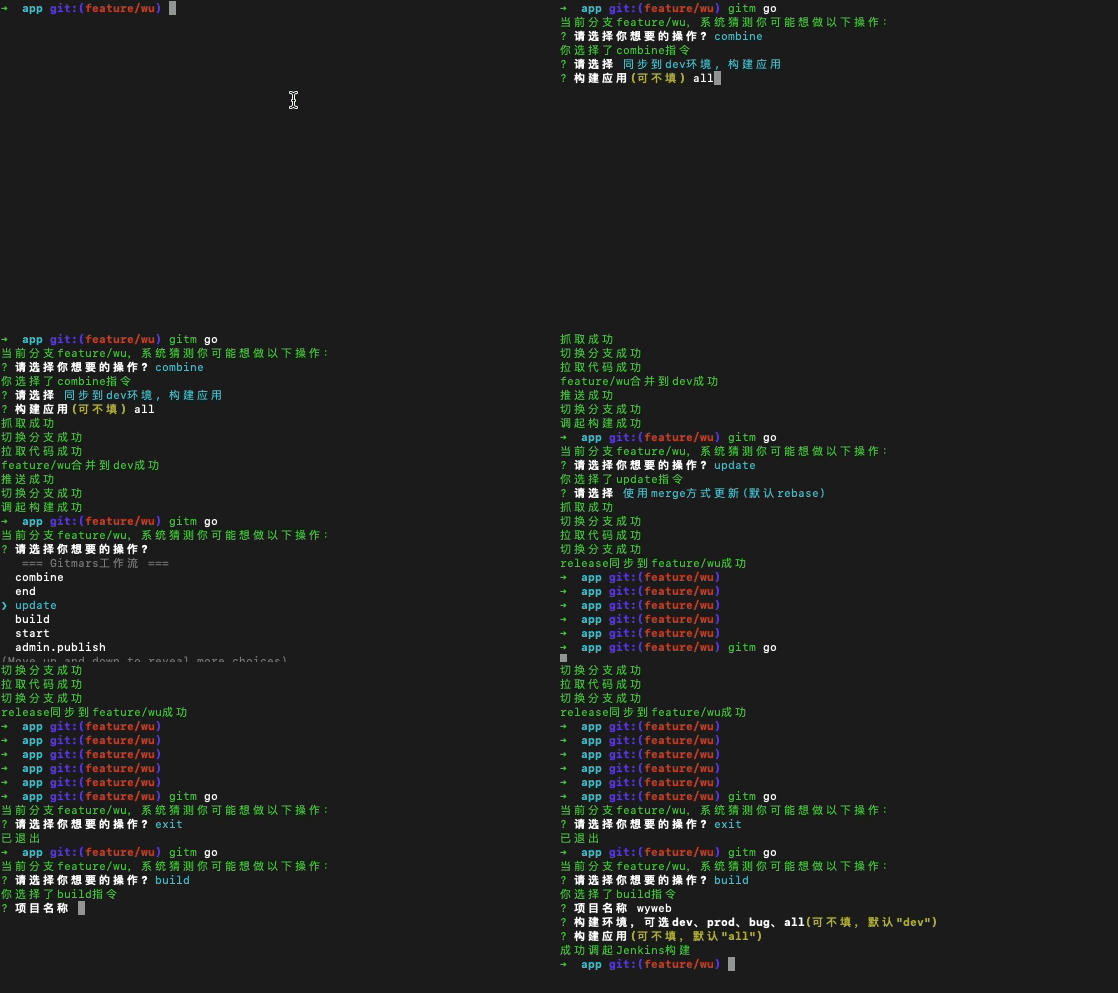
### `gitm go` - 一条命令搞定一切
记不住命令?只需输入 `gitm go`,让 gitmars 引导你。
**用法:**
```shell
gitm go [command]
```
**参数:**
| 参数 | 类型 | 必填 | 说明 |
|------|------|------|------|
| command | String | 否 | 要执行的命令名称 |
**可用命令:** `combine`、`end`、`update`、`build`、`start`、`undo`、`redo`、`suggest`、`approve`、`review`、`admin.publish`、`admin.update`、`admin.create`、`admin.clean`、`admin.approve`、`branch`、`copy`、`get`、`save`、`cleanbranch`、`clean`、`revert`、`link`、`unlink`、`postmsg`
**示例:**
```shell
gitm go build
```
**演示:**
## 许可证
[GPL](LICENSE)
[npm-image]: https://img.shields.io/npm/v/gitmars.svg?style=flat-square
[npm-url]: https://npmjs.com/package/gitmars
[travis-image]: https://travis-ci.com/saqqdy/gitmars.svg?branch=master
[travis-url]: https://travis-ci.com/saqqdy/gitmars
[codecov-image]: https://img.shields.io/codecov/c/github/saqqdy/gitmars.svg?style=flat-square
[codecov-url]: https://codecov.io/github/saqqdy/gitmars?branch=master
[download-image]: https://img.shields.io/npm/dm/gitmars.svg?style=flat-square
[download-url]: https://npmjs.com/package/gitmars
[license-image]: https://img.shields.io/badge/License-GPL-blue.svg
[license-url]: LICENSE
[sonar-image]: https://sonarcloud.io/api/project_badges/quality_gate?project=saqqdy_gitmars
[sonar-url]: https://sonarcloud.io/dashboard?id=saqqdy_gitmars