 Demo | 💬 WeChat (微信) | 📖 文档
中文 | English
模块化的交互数字人对话实现。
🤗 Demo | Demo | 💬 WeChat (微信) | 📖 文档
LiteAvatar |
LAM |
 ](https://github.com/HumanAIGC-Engineering/gradio-webrtc)||
| WebUI | HumanAIGC-Engineering/OpenAvatarChat-WebUI |[](https://github.com/HumanAIGC-Engineering/OpenAvatarChat-WebUI)||
| VAD | snakers4/silero-vad |[](https://github.com/snakers4/silero-vad)||
| Avatar | HumanAIGC/lite-avatar |[](https://github.com/HumanAIGC/lite-avatar)||
| TTS | FunAudioLLM/CosyVoice |[](https://github.com/FunAudioLLM/CosyVoice)||
|Avatar|aigc3d/LAM_Audio2Expression|[](https://github.com/aigc3d/LAM_Audio2Expression)|[🤗](https://huggingface.co/3DAIGC/LAM_audio2exp)|
||facebook/wav2vec2-base-960h||[🤗](https://huggingface.co/facebook/wav2vec2-base-960h) [](https://modelscope.cn/models/AI-ModelScope/wav2vec2-base-960h)|
|Avatar|TMElyralab/MuseTalk|[](https://github.com/TMElyralab/MuseTalk)||
|Avatar|Soul-AILab/SoulX-FlashHead|[](https://github.com/Soul-AILab/SoulX-FlashHead)|[🤗](https://huggingface.co/Soul-AILab/SoulX-FlashHead-1_3B)|
||||||
## 🚀 快速开始
```bash
# 克隆项目
git clone https://github.com/HumanAIGC-Engineering/OpenAvatarChat.git
cd OpenAvatarChat
git submodule update --init --recursive --depth 1
# 安装依赖(以 LiteAvatar + 百炼 API 为例)
uv run install.py --config config/chat_with_openai_compatible_bailian_cosyvoice.yaml
# 下载模型
uv run scripts/download_models.py --handler liteavatar
# 启动
uv run src/demo.py --config config/chat_with_openai_compatible_bailian_cosyvoice.yaml
```
> 📖 详细步骤请参阅[快速开始文档](https://humanaigc-engineering.github.io/OpenAvatarChat/getting-started/)
## 预置模式
| CONFIG名称 | ASR | LLM | TTS | AVATAR |
|----------------------------------------------------|-----|:---------:|:---------:|------------|
| chat_with_lam.yaml | SenseVoice | API | API | LAM |
| chat_with_qwen_omni.yaml | Qwen-Omni | Qwen-Omni | Qwen-Omni | lite-avatar |
| chat_with_openai_compatible_bailian_cosyvoice.yaml | SenseVoice | API | API | lite-avatar |
| chat_with_openai_compatible_bailian_cosyvoice_flashhead.yaml | SenseVoice | API | API | FlashHead |
| chat_with_openai_compatible_bailian_cosyvoice_flashhead_duplex.yaml | SenseVoice | API | API | FlashHead (双工) |
| chat_with_openai_compatible_bailian_cosyvoice_flashhead_duplex_agent.yaml | SenseVoice | **Agent** | API | FlashHead (双工+Agent) Beta |
> 📖 [查看全部预置模式](https://humanaigc-engineering.github.io/OpenAvatarChat/reference/preset-modes)
## 🧪 Beta 功能
### Chat Agent 模式(OpenClaw 集成)
> [!WARNING]
> 此功能目前处于 **Beta** 阶段,API 和配置格式可能随时变化。
Chat Agent 模式使用多轮工具调用 Agent 替代传统 LLM Handler,为数字人提供:
- **工具调用**:多轮调用工具(获取时间、系统信息等)
- **人格与长期记忆**:通过 OpenClaw 的 Agent Profile 赋予数字人持久人格
- **对话上下文压缩**:自动压缩过长的对话历史
- **后台任务协作**:通过 OpenClaw 在后台执行复杂任务
- **视觉感知**:结合 PerceptionAgent 处理摄像头输入
> 📖 [查看完整 Chat Agent 文档](https://humanaigc-engineering.github.io/OpenAvatarChat/beta/chat-agent)
## 社区
* 微信群
](https://github.com/HumanAIGC-Engineering/gradio-webrtc)||
| WebUI | HumanAIGC-Engineering/OpenAvatarChat-WebUI |[](https://github.com/HumanAIGC-Engineering/OpenAvatarChat-WebUI)||
| VAD | snakers4/silero-vad |[](https://github.com/snakers4/silero-vad)||
| Avatar | HumanAIGC/lite-avatar |[](https://github.com/HumanAIGC/lite-avatar)||
| TTS | FunAudioLLM/CosyVoice |[](https://github.com/FunAudioLLM/CosyVoice)||
|Avatar|aigc3d/LAM_Audio2Expression|[](https://github.com/aigc3d/LAM_Audio2Expression)|[🤗](https://huggingface.co/3DAIGC/LAM_audio2exp)|
||facebook/wav2vec2-base-960h||[🤗](https://huggingface.co/facebook/wav2vec2-base-960h) [](https://modelscope.cn/models/AI-ModelScope/wav2vec2-base-960h)|
|Avatar|TMElyralab/MuseTalk|[](https://github.com/TMElyralab/MuseTalk)||
|Avatar|Soul-AILab/SoulX-FlashHead|[](https://github.com/Soul-AILab/SoulX-FlashHead)|[🤗](https://huggingface.co/Soul-AILab/SoulX-FlashHead-1_3B)|
||||||
## 🚀 快速开始
```bash
# 克隆项目
git clone https://github.com/HumanAIGC-Engineering/OpenAvatarChat.git
cd OpenAvatarChat
git submodule update --init --recursive --depth 1
# 安装依赖(以 LiteAvatar + 百炼 API 为例)
uv run install.py --config config/chat_with_openai_compatible_bailian_cosyvoice.yaml
# 下载模型
uv run scripts/download_models.py --handler liteavatar
# 启动
uv run src/demo.py --config config/chat_with_openai_compatible_bailian_cosyvoice.yaml
```
> 📖 详细步骤请参阅[快速开始文档](https://humanaigc-engineering.github.io/OpenAvatarChat/getting-started/)
## 预置模式
| CONFIG名称 | ASR | LLM | TTS | AVATAR |
|----------------------------------------------------|-----|:---------:|:---------:|------------|
| chat_with_lam.yaml | SenseVoice | API | API | LAM |
| chat_with_qwen_omni.yaml | Qwen-Omni | Qwen-Omni | Qwen-Omni | lite-avatar |
| chat_with_openai_compatible_bailian_cosyvoice.yaml | SenseVoice | API | API | lite-avatar |
| chat_with_openai_compatible_bailian_cosyvoice_flashhead.yaml | SenseVoice | API | API | FlashHead |
| chat_with_openai_compatible_bailian_cosyvoice_flashhead_duplex.yaml | SenseVoice | API | API | FlashHead (双工) |
| chat_with_openai_compatible_bailian_cosyvoice_flashhead_duplex_agent.yaml | SenseVoice | **Agent** | API | FlashHead (双工+Agent) Beta |
> 📖 [查看全部预置模式](https://humanaigc-engineering.github.io/OpenAvatarChat/reference/preset-modes)
## 🧪 Beta 功能
### Chat Agent 模式(OpenClaw 集成)
> [!WARNING]
> 此功能目前处于 **Beta** 阶段,API 和配置格式可能随时变化。
Chat Agent 模式使用多轮工具调用 Agent 替代传统 LLM Handler,为数字人提供:
- **工具调用**:多轮调用工具(获取时间、系统信息等)
- **人格与长期记忆**:通过 OpenClaw 的 Agent Profile 赋予数字人持久人格
- **对话上下文压缩**:自动压缩过长的对话历史
- **后台任务协作**:通过 OpenClaw 在后台执行复杂任务
- **视觉感知**:结合 PerceptionAgent 处理摄像头输入
> 📖 [查看完整 Chat Agent 文档](https://humanaigc-engineering.github.io/OpenAvatarChat/beta/chat-agent)
## 社区
* 微信群
 * 官方视频教程:[Bilibili](https://www.bilibili.com/video/BV1sv8QzLEC2)
* 🚨 [常见问题](https://humanaigc-engineering.github.io/OpenAvatarChat/community/faq)
## 社区贡献-感谢
- 感谢社区热心同学"十字鱼"在B站上发布的一键安装包视频 [一键包](https://www.bilibili.com/video/BV1V1oLYmEu3/?vd_source=29463f5b63a3510553325ba70f325293)
- 感谢社区热心同学"W&H"提供的夸克一键包[windows版本:提取码a79V](https://pan.quark.cn/s/237177126010) 和 [linux 版本:提取码:E8Kq](https://pan.quark.cn/s/b7fcdc157586)
- 感谢社区热心同学"W&H"提供的源码zip[夸克网盘:提取码 9iNy](https://pan.quark.cn/s/9e6156cafacd) 和 [百度云盘:提取码:xrxr](https://pan.baidu.com/s/16-0OBtSD5cBz2gJDJORW7w)
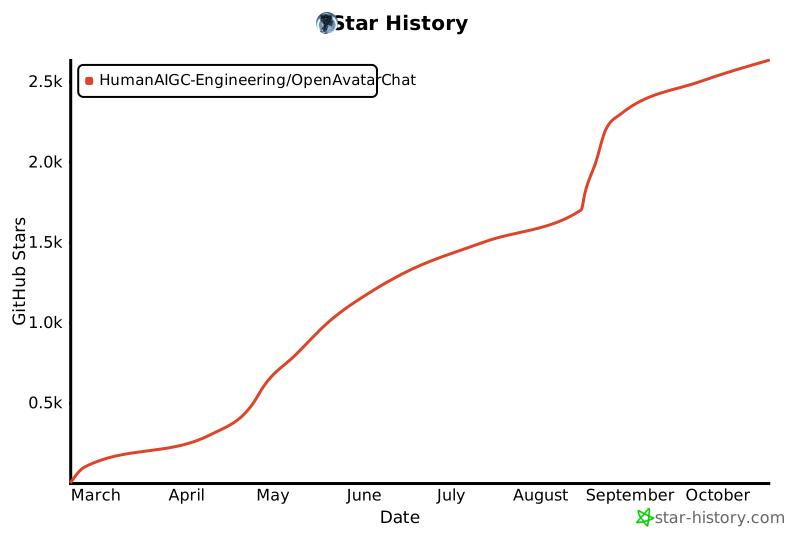
## Star历史
## 引用
如果您在您的研究/项目中感到 OpenAvatarChat 为您提供了帮助,期待您能给一个 Star⭐和引用✏️
```
@software{avatarchat2025,
author = {Gang Cheng, Tao Chen, Feng Wang, Binchao Huang, Hui Xu, Guanqiao He, Yi Lu, Shengyin Tan},
title = {OpenAvatarChat},
year = {2025},
publisher = {GitHub},
url = {https://github.com/HumanAIGC-Engineering/OpenAvatarChat}
}
```
* 官方视频教程:[Bilibili](https://www.bilibili.com/video/BV1sv8QzLEC2)
* 🚨 [常见问题](https://humanaigc-engineering.github.io/OpenAvatarChat/community/faq)
## 社区贡献-感谢
- 感谢社区热心同学"十字鱼"在B站上发布的一键安装包视频 [一键包](https://www.bilibili.com/video/BV1V1oLYmEu3/?vd_source=29463f5b63a3510553325ba70f325293)
- 感谢社区热心同学"W&H"提供的夸克一键包[windows版本:提取码a79V](https://pan.quark.cn/s/237177126010) 和 [linux 版本:提取码:E8Kq](https://pan.quark.cn/s/b7fcdc157586)
- 感谢社区热心同学"W&H"提供的源码zip[夸克网盘:提取码 9iNy](https://pan.quark.cn/s/9e6156cafacd) 和 [百度云盘:提取码:xrxr](https://pan.baidu.com/s/16-0OBtSD5cBz2gJDJORW7w)
## Star历史

## 引用
如果您在您的研究/项目中感到 OpenAvatarChat 为您提供了帮助,期待您能给一个 Star⭐和引用✏️
```
@software{avatarchat2025,
author = {Gang Cheng, Tao Chen, Feng Wang, Binchao Huang, Hui Xu, Guanqiao He, Yi Lu, Shengyin Tan},
title = {OpenAvatarChat},
year = {2025},
publisher = {GitHub},
url = {https://github.com/HumanAIGC-Engineering/OpenAvatarChat}
}
```