# mlflow
**Repository Path**: mirrors_serialx/mlflow
## Basic Information
- **Project Name**: mlflow
- **Description**: The open source developer platform to build AI/LLM applications and models with confidence. Enhance your AI applications with end-to-end tracking, observability, and evaluations, all in one integrated platform.
- **Primary Language**: Unknown
- **License**: Apache-2.0
- **Default Branch**: master
- **Homepage**: None
- **GVP Project**: No
## Statistics
- **Stars**: 0
- **Forks**: 0
- **Created**: 2025-10-21
- **Last Updated**: 2026-03-21
## Categories & Tags
**Categories**: Uncategorized
**Tags**: None
## README
Open-Source Platform for Productionizing AI
MLflow is an open-source developer platform to build AI/LLM applications and models with confidence. Enhance your AI applications with end-to-end **experiment tracking**, **observability**, and **evaluations**, all in one integrated platform.
## 🚀 Installation
To install the MLflow Python package, run the following command:
```
pip install mlflow
```
## 📦 Core Components
MLflow is **the only platform that provides a unified solution for all your AI/ML needs**, including LLMs, Agents, Deep Learning, and traditional machine learning.
### 💡 For LLM / GenAI Developers
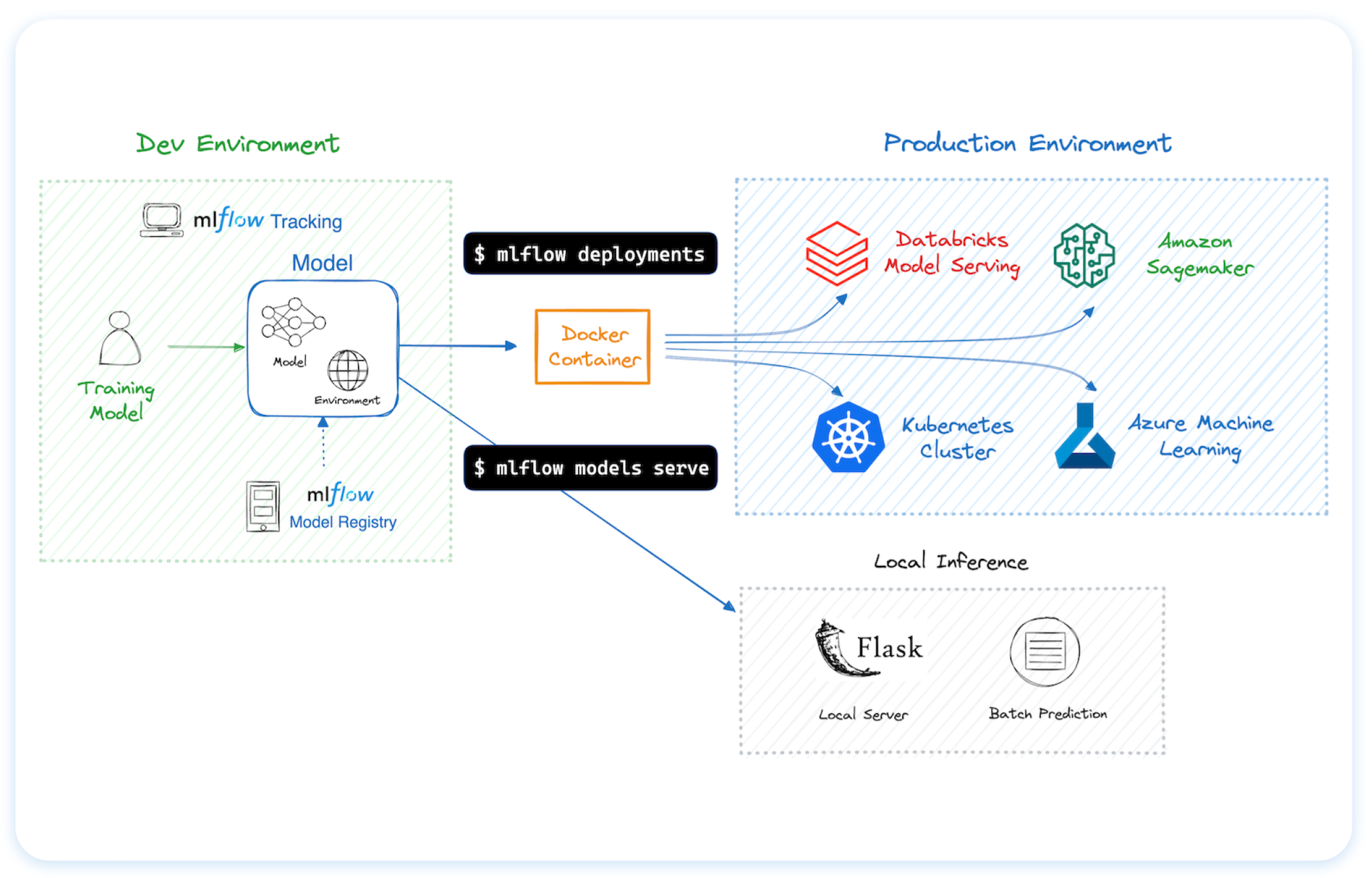
You can run MLflow in many different environments, including local machines, on-premise servers, and cloud infrastructure.
Trusted by thousands of organizations, MLflow is now offered as a managed service by most major cloud providers:
- [Amazon SageMaker](https://aws.amazon.com/sagemaker-ai/experiments/)
- [Azure ML](https://learn.microsoft.com/en-us/azure/machine-learning/concept-mlflow?view=azureml-api-2)
- [Databricks](https://www.databricks.com/product/managed-mlflow)
- [Nebius](https://nebius.com/services/managed-mlflow)
For hosting MLflow on your own infrastructure, please refer to [this guidance](https://mlflow.org/docs/latest/ml/tracking/#tracking-setup).
## 🗣️ Supported Programming Languages
- [Python](https://pypi.org/project/mlflow/)
- [TypeScript / JavaScript](https://www.npmjs.com/package/mlflow-tracing)
- [Java](https://mvnrepository.com/artifact/org.mlflow/mlflow-client)
- [R](https://cran.r-project.org/web/packages/mlflow/readme/README.html)
## 🔗 Integrations
MLflow is natively integrated with many popular machine learning frameworks and GenAI libraries.

## Usage Examples
### Tracing (Observability) ([Doc](https://mlflow.org/docs/latest/llms/tracing/index.html))
MLflow Tracing provides LLM observability for various GenAI libraries such as OpenAI, LangChain, LlamaIndex, DSPy, AutoGen, and more. To enable auto-tracing, call `mlflow.xyz.autolog()` before running your models. Refer to the documentation for customization and manual instrumentation.
```python
import mlflow
from openai import OpenAI
# Enable tracing for OpenAI
mlflow.openai.autolog()
# Query OpenAI LLM normally
response = OpenAI().chat.completions.create(
model="gpt-4o-mini",
messages=[{"role": "user", "content": "Hi!"}],
temperature=0.1,
)
```
Then navigate to the "Traces" tab in the MLflow UI to find the trace records for the OpenAI query.
### Evaluating LLMs, Prompts, and Agents ([Doc](https://mlflow.org/docs/latest/genai/eval-monitor/index.html))
The following example runs automatic evaluation for question-answering tasks with several built-in metrics.
```python
import os
import openai
import mlflow
from mlflow.genai.scorers import Correctness, Guidelines
client = openai.OpenAI(api_key=os.getenv("OPENAI_API_KEY"))
# 1. Define a simple QA dataset
dataset = [
{
"inputs": {"question": "Can MLflow manage prompts?"},
"expectations": {"expected_response": "Yes!"},
},
{
"inputs": {"question": "Can MLflow create a taco for my lunch?"},
"expectations": {
"expected_response": "No, unfortunately, MLflow is not a taco maker."
},
},
]
# 2. Define a prediction function to generate responses
def predict_fn(question: str) -> str:
response = client.chat.completions.create(
model="gpt-4o-mini", messages=[{"role": "user", "content": question}]
)
return response.choices[0].message.content
# 3. Run the evaluation
results = mlflow.genai.evaluate(
data=dataset,
predict_fn=predict_fn,
scorers=[
# Built-in LLM judge
Correctness(),
# Custom criteria using LLM judge
Guidelines(name="is_english", guidelines="The answer must be in English"),
],
)
```
Navigate to the "Evaluations" tab in the MLflow UI to find the evaluation results.
### Tracking Model Training ([Doc](https://mlflow.org/docs/latest/ml/tracking/))
The following example trains a simple regression model with scikit-learn, while enabling MLflow's [autologging](https://mlflow.org/docs/latest/tracking/autolog.html) feature for experiment tracking.
```python
import mlflow
from sklearn.model_selection import train_test_split
from sklearn.datasets import load_diabetes
from sklearn.ensemble import RandomForestRegressor
# Enable MLflow's automatic experiment tracking for scikit-learn
mlflow.sklearn.autolog()
# Load the training dataset
db = load_diabetes()
X_train, X_test, y_train, y_test = train_test_split(db.data, db.target)
rf = RandomForestRegressor(n_estimators=100, max_depth=6, max_features=3)
# MLflow triggers logging automatically upon model fitting
rf.fit(X_train, y_train)
```
Once the above code finishes, run the following command in a separate terminal and access the MLflow UI via the printed URL. An MLflow **Run** should be automatically created, which tracks the training dataset, hyperparameters, performance metrics, the trained model, dependencies, and even more.
```
mlflow server
```
## 💭 Support
- For help or questions about MLflow usage (e.g. "how do I do X?") visit the [documentation](https://mlflow.org/docs/latest).
- In the documentation, you can ask the question to our AI-powered chat bot. Click on the **"Ask AI"** button at the right bottom.
- Join the [virtual events](https://lu.ma/mlflow?k=c) like office hours and meetups.
- To report a bug, file a documentation issue, or submit a feature request, please [open a GitHub issue](https://github.com/mlflow/mlflow/issues/new/choose).
- For release announcements and other discussions, please subscribe to our mailing list (mlflow-users@googlegroups.com)
or join us on [Slack](https://mlflow.org/slack).
## 🤝 Contributing
We happily welcome contributions to MLflow!
- Submit [bug reports](https://github.com/mlflow/mlflow/issues/new?template=bug_report_template.yaml) and [feature requests](https://github.com/mlflow/mlflow/issues/new?template=feature_request_template.yaml)
- Contribute for [good-first-issues](https://github.com/mlflow/mlflow/issues?q=is%3Aissue+is%3Aopen+label%3A%22good+first+issue%22) and [help-wanted](https://github.com/mlflow/mlflow/issues?q=is%3Aissue+is%3Aopen+label%3A%22help+wanted%22)
- Writing about MLflow and sharing your experience
Please see our [contribution guide](CONTRIBUTING.md) to learn more about contributing to MLflow.
## ⭐️ Star History
## ✏️ Citation
If you use MLflow in your research, please cite it using the "Cite this repository" button at the top of the [GitHub repository page](https://github.com/mlflow/mlflow), which will provide you with citation formats including APA and BibTeX.
## 👥 Core Members
MLflow is currently maintained by the following core members with significant contributions from hundreds of exceptionally talented community members.
- [Ben Wilson](https://github.com/BenWilson2)
- [Corey Zumar](https://github.com/dbczumar)
- [Daniel Lok](https://github.com/daniellok-db)
- [Gabriel Fu](https://github.com/gabrielfu)
- [Harutaka Kawamura](https://github.com/harupy)
- [Joel Robin P](https://github.com/joelrobin18)
- [Serena Ruan](https://github.com/serena-ruan)
- [Tomu Hirata](https://github.com/TomeHirata)
- [Weichen Xu](https://github.com/WeichenXu123)
- [Yuki Watanabe](https://github.com/B-Step62)