# react-native-onesignal
**Repository Path**: mirrors_peritus/react-native-onesignal
## Basic Information
- **Project Name**: react-native-onesignal
- **Description**: React Native Library for OneSignal Push Notifications Service
- **Primary Language**: Unknown
- **License**: MIT
- **Default Branch**: master
- **Homepage**: None
- **GVP Project**: No
## Statistics
- **Stars**: 0
- **Forks**: 0
- **Created**: 2020-09-25
- **Last Updated**: 2026-05-24
## Categories & Tags
**Categories**: Uncategorized
**Tags**: None
## README
# React Native OneSignal
React Native Push Notifications support with OneSignal integration.
[](https://www.npmjs.com/package/react-native-onesignal)
[](https://www.npmjs.com/package/react-native-onesignal)
[](https://travis-ci.org/geektimecoil/react-native-onesignal)
[](https://circleci.com/gh/geektimecoil/react-native-onesignal/11)
- [React Native OneSignal](#react-native-onesignal)
- [Breaking Change](#breaking-change)
- [Note Regarding 0.39 <= React Native >= 0.40 Support](#note-regarding-039--react-native--040-support)
- [Running Example project](#running-example-project)
- [Installation](#installation)
- [Android Installation](#android-installation)
- [Adding the Code](#adding-the-code)
- [iOS Installation](#ios-installation)
- [Adding the Code](#adding-the-code)
- [Usage](#usage)
- [API](#api)
- [Handling Notifications](#handling-notifications)
- [Sending and Getting OneSignal Tags](#sending-and-getting-onesignal-tags)
- [Getting Player ID and Push Token](#getting-player-id-and-push-token)
- [Set Email for Better Targeting](#set-email-for-better-targeting)
- [Enable Vibration](#enable-vibration)
- [Enable Sound](#enable-sound)
- [Set In App Focus Behavior](#set-in-app-focus-behavior)
- [Change User Subscription Status](#change-user-subscription-status)
- [Check Push Notification and User Subscription Status](#check-push-notification-and-user-subscription-status)
- [Post Notification (Peer-to-Peer Notifications)](#post-notification-peer-to-peer-notifications)
- [Prompt Location](#prompt-location)
- [Clear Notifications (Android Only)](#clear-notifications-android-only)
- [Cancel Notifications (Android Only)](#cancel-notifications-android-only)
- [Check Push Notification Permissions (iOS Only)](#check-push-notification-permissions-ios-only)
- [Request Push Notification Permissions (iOS Only)](#request-push-notification-permissions-ios-only)
- [Register For Push Notifications (iOS Only)](#register-for-push-notifications-ios-only)
- [FAQ / Repeating Issues](#faq--repeating-issues)
- [Issue 1 - Multiple dex files define:](#issue-1---multiple-dex-files-define)
- [Issue 2 - Multiple dex files define (Again):](#issue-2---multiple-dex-files-define-again)
- [Issue 3 - symbol(s) not found for architecture x86_64 and/or OneSignal/OneSignal.h file not found](#issue-3---symbols-not-found-for-architecture-x86_64-andor-onesignalonesignalh-file-not-found)
- [Issue 4 - Make react-native-onesignal work with react-native-maps](#issue-4---make-react-native-onesignal-work-with-react-native-maps)
- [CREDITS](#credits)
- [TODO](#todo)
## Breaking Change
Make sure you read this documentation carefully, as the usage instructions had been changed since `react-native-onesignal v3.0.2`.
## Note Regarding 0.39 <= React Native >= 0.40 Support
TL;DR - Install the latest version, doesn't matter on what RN version you are.
Since version 3.0.2, this module supports backwards compatibiltiy with React Native 0.39 and below, without installing a custom version. Everyone should now update to the latest version available for this module.
## Running Example project
For your convenience, we created an example project, based on React Native 0.41.2.
You can run this project to test configurations, debug, and build upon it.
* `git clone https://github.com/geektimecoil/react-native-onesignal`
* `cd react-native-onesignal && cd examples && cd RNOneSignal`
* `yarn && cd ios && pod update && cd ..`
* Running the iOS example app: `react-native run-ios`
* Running the Android example app: `react-native run-android`
## Installation
1. Add library to project
- `yarn add react-native-onesignal`
- OR `npm install --save react-native-onesignal`
2. Link library to project
- `react-native link react-native-onesignal`
## Android Installation
* Follow OneSignal's instructions on generating a Google Server API Key: https://documentation.onesignal.com/docs/generate-a-google-server-api-key
### Adding the Code
In your `AndroidManifest.xml`
```xml
.....
.....
```
In `android/gradle/wrapper/gradle-wrapper.properties`
```javascript
...
distributionBase=GRADLE_USER_HOME
distributionPath=wrapper/dists
zipStoreBase=GRADLE_USER_HOME
zipStorePath=wrapper/dists
distributionUrl=https://services.gradle.org/distributions/gradle-2.14.1-all.zip
```
In `android/build.gradle`
```gradle
...
dependencies {
classpath 'com.android.tools.build:gradle:2.2.2' // Upgrade gradle
// NOTE: Do not place your application dependencies here; they belong
// in the individual module build.gradle files
}
```
In `android/app/build.gradle`
```gradle
...
android {
...
buildToolsVersion "23.0.2" // NOT REQUIRED BUT RECOMMENDED - This is good for in-process dex (faster)
...
defaultConfig {
...
manifestPlaceholders = [onesignal_app_id: "YOUR_ONESIGNAL_ID",
onesignal_google_project_number: "REMOTE"]
}
}
```
## iOS Installation
### iOS Push Certificate
* Open OneSignal account here: https://onesignal.com/
* Follow OneSignal's instructions on generating an iOS Push Certificate: https://documentation.onesignal.com/docs/generate-an-ios-push-certificate
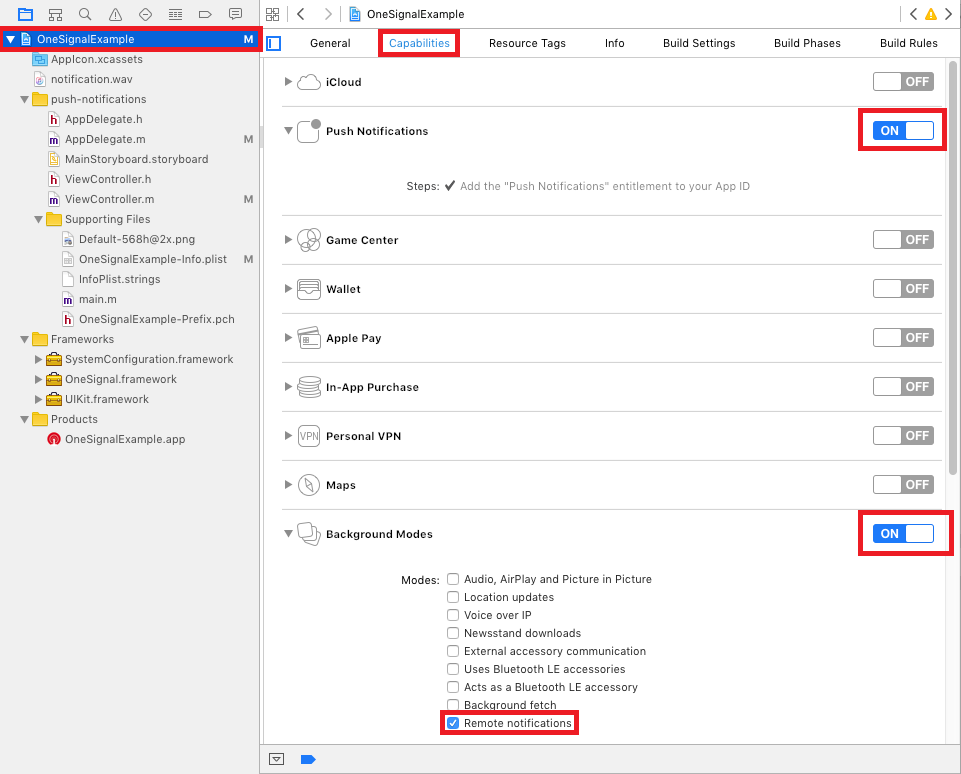
### Add Required Capabilities
1. Select the root project and Under Capabilities Enable "Push Notifications".
2. Next Enable "Background Modes" and check "Remote notifications".
### Adding Search Paths
1. Select your root project and go to `Build Settings`.
2. Search for `Header Search Paths`.
4. Add `$(SRCROOT)/../node_modules/react-native-onesignal/ios` and set it as `recursive`.

### Adding the Code
* in `AppDelegate.h`:
* Import `RCTOneSignal.h`:
```objc
#import
```
* Declare the `RCTOneSignal` property:
```objc
@property (strong, nonatomic) RCTOneSignal* oneSignal;
```
* in `AppDelegate.m`:
* Synthesize `oneSignal` after `@implementation AppDelegate`
```objc
@synthesize oneSignal = _oneSignal;
```
* On the `application didFinishLaunchingWithOptions` method, insert the following code (replace YOUR_ONESIGNAL_APP_ID with your OneSignal app ID):
```objc
self.oneSignal = [[RCTOneSignal alloc] initWithLaunchOptions:launchOptions
appId:@"YOUR_ONESIGNAL_APP_ID"];
```
```objc
// For requiring push notification permissions manually.
self.oneSignal = [[RCTOneSignal alloc] initWithLaunchOptions:launchOptions
appId:@"YOUR_ONESIGNAL_APP_ID"
settings:@{kOSSettingsKeyAutoPrompt: @false}];
```
* You're All Set!
## Usage
In your `index.android.js` or `index.ios.js`:
```javascript
import React, { Component } from 'react';
import OneSignal from 'react-native-onesignal'; // Import package from node modules
...
export default class App extends Component {
componentWillMount() {
OneSignal.addEventListener('received', this.onReceived);
OneSignal.addEventListener('opened', this.onOpened);
OneSignal.addEventListener('registered', this.onRegistered);
OneSignal.addEventListener('ids', this.onIds);
}
componentWillUnmount() {
OneSignal.removeEventListener('received', this.onReceived);
OneSignal.removeEventListener('opened', this.onOpened);
OneSignal.removeEventListener('registered', this.onRegistered);
OneSignal.removeEventListener('ids', this.onIds);
}
onReceived(notification) {
console.log("Notification received: ", notification);
}
onOpened(openResult) {
console.log('Message: ', openResult.notification.payload.body);
console.log('Data: ', openResult.notification.payload.additionalData);
console.log('isActive: ', openResult.notification.isAppInFocus);
console.log('openResult: ', openResult);
}
onRegistered(notifData) {
console.log("Device had been registered for push notifications!", notifData);
}
onIds(device) {
console.log('Device info: ', device);
}
...
}
```
## API
### Handling Notifications
When any notification is opened or received the `opened` and `received` are activated and calling their callback functions defined in the listeners, passing an OSNotificationOpenResult or an OSNotification object encapsulating the event data.
```javascript
componentWillMount() {
OneSignal.addEventListener('received', this.onReceived);
OneSignal.addEventListener('opened', this.onOpened);
}
componentWillUnmount() {
OneSignal.removeEventListener('received', this.onReceived);
OneSignal.removeEventListener('opened', this.onOpened);
}
onReceived(notification) {
console.log("Notification received: ", notification);
}
onOpened(openResult) {
console.log('Message: ', openResult.notification.payload.body);
console.log('Data: ', openResult.notification.payload.additionalData);
console.log('isActive: ', openResult.notification.isAppInFocus);
console.log('openResult: ', openResult);
}
```
Notification object received example:
```javascript
{
shown: true, // BOOLEAN: If the notification was displayed to the user or not
payload: {notificationID : "", contentAvailable : false, badge : 1, sound : "default", title : "Hello!", body : "World", launchURL : "", }, // OBJECT; the push data
displayType: 1, //The display method of a received notification
silentNotification: false // BOOLEAN : Wether the received notification was a silent one
}
```
### Sending and Getting OneSignal Tags
We exposed the tags API of OneSignal to allow you to target users with notification later.
```javascript
// Sending single tag
OneSignal.sendTag("key", "value");
// Sending multiple tags
OneSignal.sendTags({key: "value", key2: "value2"});
// Getting the tags from the server and use the received object
OneSignal.getTags((receivedTags) => {
console.log(receivedTags);
});
// Delete a tag
OneSignal.deleteTag("key");
```
### Set Email for Better Targeting
Sync hashed email if you have a login system or collect it. Will be used to reach the user at the most optimal time of day.
```javascript
OneSignal.syncHashedEmail("test@domain.com");
```
### Getting Player ID and Push Token
We exposed the idsAvailable API of OneSignal (both Android & iOS) as an event.
Listen for `ids` event and define a callback to handle the returned object.
```javascript
componentWillMount() {
OneSignal.addEventListener('ids', this.onIds);
}
componentWillUnmount() {
OneSignal.removeEventListener('ids', this.onIds);
}
onIds(device) {
console.log('Device info: ', device);
}
```
### Enable Vibration
We exposed the enableVibrate API of OneSignal (Android only).
*You can call this from your UI from a button press for example to give your user's options for your notifications. By default OneSignal always vibrates the device when a notification is displayed unless the device is in a total silent mode. Passing false means that the device will only vibrate lightly when the device is in it's vibrate only mode.*
```javascript
// Setting enableVibrate
OneSignal.enableVibrate(true);
```
### Enable Sound
We exposed the enableSound API of OneSignal (Android only).
*You can call this from your UI from a button press for example to give your user's options for your notifications. By default OneSignal plays the system's default notification sound when the device's notification system volume is turned on. Passing false means that the device will only vibrate unless the device is set to a total silent mode.*
```javascript
// Setting enableSound
OneSignal.enableSound(true);
```
### Set In App Focus Behavior
We exposed the inFocusDisplaying API of OneSignal.
#### Android:
- `0` = `None` - Will not display a notification, instead only `onNotificationReceived` will fire where you can display your own in app messages.
- `1` = `InAppAlert` - *(Default)* Will display an Android AlertDialog with the message contains.
- `2` = `Notification` - Notification will display in the Notification Shade. Same as when the app is not in focus.
```javascript
// Example, always display notification in shade.
OneSignal.inFocusDisplaying(2);
```
#### iOS:
On the init function in `AppDelegate.m`, add the settings parameter to specify custom settings. In this case, it would be the `kOSSettingsKeyInFocusDisplayOption` which can be set to 3 options:
1. `OSNotificationDisplayTypeNotification` - Display the native notification display.
2. `OSNotificationDisplayTypeInAppAlert` - Display an alert with the notification. Default value.
3. `OSNotificationDisplayTypeNone` - Silent. Do not display any notification when the app is in focus.
```objc
self.oneSignal = [[RCTOneSignal alloc] initWithLaunchOptions:launchOptions
appId:@"YOUR APP ID"
settings:@{kOSSettingsKeyInFocusDisplayOption : @(OSNotificationDisplayTypeNone), kOSSettingsKeyAutoPrompt : @YES}];
```
### Change User Subscription Status
We exposed the setSubscription API of OneSignal (both Android & iOS).
*You can call this method with false to opt users out of receiving all notifications through OneSignal. You can pass true later to opt users back into notifications*
```javascript
// Setting setSubscription
OneSignal.setSubscription(true);
```
### Check Push Notification and User Subscription Status
We exposed the getPermissionSubscriptionState API of OneSignal (both Android & iOS).
*Allows you to check whether notifications are enabled for the app, whether user is subscribed to notifications through OneSignal, and what the user's in-app subscription preference is. It also provides access to pushToken and userId*
```javascript
// Check push notification and OneSignal subscription statuses
OneSignal.getPermissionSubscriptionState((status) => {
console.log(status);
});
```
### Post Notification (Peer-to-Peer Notifications)
We exposed the postNotification API of OneSignal, currently supports one Player ID to send a notification to.
We call it internally P2P Notification, and therefore there is a special attribute to listen to while receiving the notification.
*Allows you to send notifications from user to user or schedule ones in the future to be delivered to the current device.*
The [OneSignal documentation](https://documentation.onesignal.com/docs/android-native-sdk#section--postnotification-) shows how to pass the [parameters](https://documentation.onesignal.com/reference#create-notification) as here:
```javascript
// Calling postNotification
let data = arr // some array as payload
let contents = {
'en': 'You got notification from user'
}
OneSignal.postNotification(contents, data, playerId);
// Listening to postNotification using OneSignal.Configure:
onNotificationOpened: function(message, data, isActive) {
if (data.p2p_notification) {
for (var num in data.p2p_notification) {
// console.log(data.p2p_notification[num]);
}
}
}
```
### Prompt Location
We exposed the promptLocation API of OneSignal.
*Prompts the user for location permissions. This allows for geotagging so you can send notifications to users based on location.
Note: Make sure you also have the required location permission in your AndroidManifest.xml. For iOS, make sure you set the NSLocationWhenInUseUsageDescription or the NSLocationAlwaysUsageDescription in your info.plist. (Location Always also requires the location background mode capability)*
```javascript
// Calling promptLocation
OneSignal.promptLocation();
```
### Clear Notifications (Android Only)
We exposed the clearOneSignalNotifications API of OneSignal (currently supported only on Android).
*Removes all OneSignal notifications from the Notification Shade.*
```javascript
// Calling clearOneSignalNotifications
OneSignal.clearOneSignalNotifications();
```
### Cancel Notifications (Android Only)
We exposed the cancelNotification API of OneSignal (currently supported only on Android).
*Cancels a single OneSignal notification based on its Android notification integer id. You can get the notification Id when invoking OneSignal.onNotificationOpened while receiving a notification.*
```javascript
// Calling cancelNotification
OneSignal.cancelNotification(id);
```
### Check Push Notification Permissions (iOS Only)
See what push permissions are currently enabled. callback will be invoked with a permissions object (currently supported only on iOS).
```javascript
// Requesting permissions
OneSignal.checkPermissions((permissions) => {
console.log(permissions);
});
```
### Request Push Notification Permissions (iOS Only)
We exposed the requestPermissions method (currently supported only on iOS).
```javascript
// Setting requestPermissions
permissions = {
alert: true,
badge: true,
sound: true
};
OneSignal.requestPermissions(permissions);
```
### Register For Push Notifications (iOS Only)
We exposed the registerForPushNotifications API of OneSignal (currently supported only on iOS).
*Call when you want to prompt the user to accept push notifications. Only call once and only if you passed @NO to `kOSSettingsKeyAutoPrompt` on init.
```javascript
// Calling registerForPushNotifications
OneSignal.registerForPushNotifications();
```
The following example is from our own App and needs to be customized in order to work.
Example:
```javascript
_syncOneSignal = () => {
var allTags = {};
var missingTags = {};
OneSignal.getTags((receivedTags) => {
// Find missing tags
for (var i = this.categories.length * 1; i >= 0; i--) {
var category = this.categories[i];
if (!(category.slug in receivedTags)) {
missingTags[category.slug] = category.is_push_default;
}
// Hash all tags for performance later on deletion
allTags[category.slug] = category.is_push_default;
};
// Send missing tags if there are any
if (Object.keys(missingTags).length > 0) {
OneSignal.sendTags(missingTags);
}
// Delete tags that doesn't show up in the categories
Object.keys(receivedTags).forEach(function(key,index) {
if (!(key in allTags)) {
OneSignal.deleteTag(key);
}
});
});
};
```
## FAQ / Repeating Issues
The following issues has been marked as repeating, therefore we decided to devote them a separate section.
### Issue 1 - Multiple dex files define:
```gradle
> com.android.build.api.transform.TransformException: com.android.ide.common.process.ProcessException: java.util.concurrent.ExecutionException: com.android.dex.DexException: Multiple dex files define Lcom/google/android/gms/internal/zzr;
```
Solution: Update all your Google Play Services dependencies to the latest version rather than to a specific version.
From the Google Play Services documentation:
*Be sure you update this version number each time Google Play services is updated https://developers.google.com/android/guides/setup#add_google_play_services_to_your_project*
In `android/app/build.gradle`
```gradle
...
dependencies {
...
compile "com.google.android.gms:play-services-base:+"
compile "com.google.android.gms:play-services-location:+"
compile "com.google.android.gms:play-services-ads:+"
}
```
### Issue 2 - Multiple dex files define (Again):
```gradle
:app:dexRelease
Unknown source file : UNEXPECTED TOP-LEVEL EXCEPTION:
Unknown source file : com.android.dex.DexException: Multiple dex files define Landroid/support/v7/appcompat/R$anim;
```
Solution: Upgrade your gradle to properly handle the dex tasks:
In `android/build.gradle`
```gradle
...
dependencies {
classpath 'com.android.tools.build:gradle:2.2.3'
// NOTE: Do not place your application dependencies here; they belong
// in the individual module build.gradle files
}
```
In `android/gradle/wrapper/gradle-wrapper.properties`
```javascript
distributionBase=GRADLE_USER_HOME
distributionPath=wrapper/dists
zipStoreBase=GRADLE_USER_HOME
zipStorePath=wrapper/dists
distributionUrl=https://services.gradle.org/distributions/gradle-2.14.1-all.zip
```
### Issue 3 - symbol(s) not found for architecture x86_64 and/or OneSignal/OneSignal.h file not found
Please double check the [iOS Installation](#ios-installation) section as missing a step or entering an incorrect path will create these errors.
### Issue 4 - Make `react-native-onesignal` work with `react-native-maps`
If you have both `react native maps` and `react-native-onesignal` make sure you compile `react-native-maps` in the following way (android/app/build.gradle).
```gradle
compile(project(':react-native-maps')){
exclude group: 'com.google.android.gms', module: 'play-services-base'
exclude group: 'com.google.android.gms', module: 'play-services-maps'
}
compile 'com.google.android.gms:play-services-base:+'
compile 'com.google.android.gms:play-services-maps:+'
```
### Manually updating iOS OneSignalNativeSDK
When you install `react-native-onesignal` it will automaticly include a specific version of the OneSignal iOS native SDK that is known to work with it. Only follow the instructions below if there is a native OneSignal SDK fix you need that isn't included already in the latest `react-native-onesignal` update.
1. Download the [latest OneSignal iOS native](https://github.com/OneSignal/OneSignal-iOS-SDK/releases) release.
2. In XCode, delete `OneSignalNativeSDK` under `Libraries/RCTOneSignal.xcodeproj`
3. Press "Move to trash"
4. Create a new `OneSignalNativeSDK` folder under `node_modules/react-native-onesignal/ios/`.
5. From the downloaded iOS native release, copy all .h and .m files from the `iOS_SDK` folder and put them in to `OneSignalNativeSDK`.
6. Drop and drag this new `OneSignalNativeSDK` folder under the `RCTOneSignal.xcodeproj` in Xccode.
7. Select "Create groups" and check RCTOneSignal and press Finish.
## CREDITS
Thanks for all the awesome fellows that contributed to this repository!
@danpe, @lunchieapp, @gaykov, @williamrijksen, @adrienbrault, @kennym, @dunghuynh, @holmesal, @joshuapinter, @jkasten2, @JKalash
## TODO
* [ ] Tell us?