# flutter-intellij
**Repository Path**: mirrors_flutter/flutter-intellij
## Basic Information
- **Project Name**: flutter-intellij
- **Description**: Flutter Plugin for IntelliJ
- **Primary Language**: Unknown
- **License**: BSD-3-Clause
- **Default Branch**: main
- **Homepage**: None
- **GVP Project**: No
## Statistics
- **Stars**: 0
- **Forks**: 1
- **Created**: 2020-08-08
- **Last Updated**: 2026-04-04
## Categories & Tags
**Categories**: Uncategorized
**Tags**: None
## README
#  Flutter Plugin for IntelliJ
[](https://plugins.jetbrains.com/plugin/9212-flutter)
[](https://github.com/flutter/flutter-intellij/actions?query=branch%3Amain+workflow%3Apresubmit)
An IntelliJ plugin for [Flutter](https://flutter.dev/) development. Flutter is a multi-platform
app SDK to help developers and designers build modern apps for iOS, Android and the web.
## Documentation
- [flutter.dev](https://flutter.dev)
- [Installing Flutter](https://docs.flutter.dev/get-started/install)
- [Getting Started with IntelliJ](https://docs.flutter.dev/tools/android-studio)
## Fast development
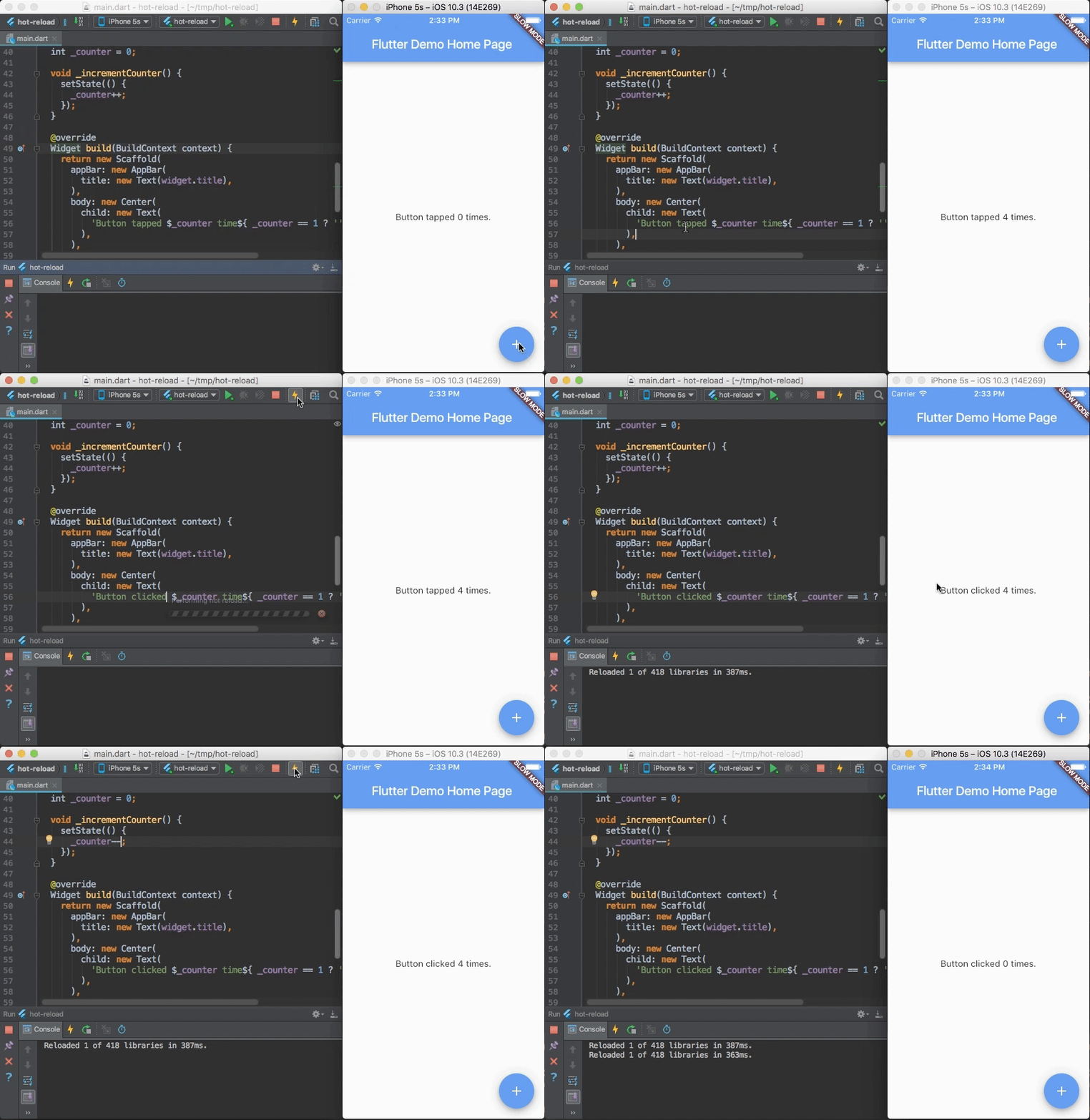
Flutter's hot reload helps you quickly and easily experiment, build UIs, add features,
and fix bugs faster. Experience sub-second reload times, without losing state, on emulators,
simulators, and hardware for iOS and Android.
Flutter Plugin for IntelliJ
[](https://plugins.jetbrains.com/plugin/9212-flutter)
[](https://github.com/flutter/flutter-intellij/actions?query=branch%3Amain+workflow%3Apresubmit)
An IntelliJ plugin for [Flutter](https://flutter.dev/) development. Flutter is a multi-platform
app SDK to help developers and designers build modern apps for iOS, Android and the web.
## Documentation
- [flutter.dev](https://flutter.dev)
- [Installing Flutter](https://docs.flutter.dev/get-started/install)
- [Getting Started with IntelliJ](https://docs.flutter.dev/tools/android-studio)
## Fast development
Flutter's hot reload helps you quickly and easily experiment, build UIs, add features,
and fix bugs faster. Experience sub-second reload times, without losing state, on emulators,
simulators, and hardware for iOS and Android.
 ## Quick start
A brief summary of the [getting started guide](https://docs.flutter.dev/tools/android-studio):
- install the [Flutter SDK](https://docs.flutter.dev/get-started/install)
- run `flutter doctor` from the command line to verify your installation
- ensure you have a supported IntelliJ development environment; either:
- the latest stable version of [IntelliJ](https://www.jetbrains.com/idea/download), Community or Ultimate Edition (EAP versions are not
always supported)
- the latest stable version of [Android Studio](https://developer.android.com/studio) (note: Android Studio Canary versions are
generally _not_ supported)
- open the plugin preferences
- `Preferences > Plugins` on macOS, `File > Settings > Plugins` on Linux, select "Browse repositories…"
- search for and install the 'Flutter' plugin
- choose the option to restart IntelliJ
- configure the Flutter SDK setting
- `Preferences` on macOS, `File>Settings` on Linux, select `Languages & Frameworks > Flutter`, and set
the path to the root of your flutter repo
## Filing issues
Please use our [issue tracker](https://github.com/flutter/flutter-intellij/issues)
for Flutter IntelliJ issues.
- for more general Flutter issues, you should prefer to use the Flutter
[issue tracker](https://github.com/flutter/flutter/issues)
- for more Dart IntelliJ related issues, please use the Dart Plugin
[issue tracker](https://github.com/flutter/dart-intellij-third-party/issues)
## Known issues
Please note the following known issues:
- [#601](https://github.com/flutter/flutter-intellij/issues/601): IntelliJ will
read the PATH variable just once on startup. Thus, if you change PATH later to
include the Flutter SDK path, this will not have an effect in IntelliJ until you
restart the IDE.
- If you require network access to go through proxy settings, you will need to set the
`https_proxy` variable in your environment as described in the
[pub docs](https://dart.dev/tools/pub/troubleshoot#pub-get-fails-from-behind-a-corporate-firewall).
(See also: [#2914](https://github.com/flutter/flutter-intellij/issues/2914).)
## Dev channel
If you like getting new features as soon as they've been added to the code then you
might want to try out the dev channel. It is updated daily with the latest contents
from the "main" branch. It has minimal testing. Set up instructions are in the wiki's
[dev channel page](./docs/Dev-Channel.md).
## Flutter SDK compatibility
These are the versions of Flutter SDK that current and previous Flutter plugins support:
| Flutter SDK version | Flutter plugin version |
|---------------------|------------------------|
| up to v3.7.12 | 83.0.4 and earlier |
| v3.10.0 to v3.10.2 | 85.3.2 and earlier |
| v3.10.3 to v3.10.6 | 86.0.2 and earlier |
| v3.13.0 to v3.13.9 | 88.1.0 and earlier |
| v3.16.0 and above | Currently supported |
Here is more information on the Flutter plugin's support for Flutter
SDKs: https://docs.flutter.dev/tools/sdk#sdk-support-for-flutter-developer-tools.
## Quick start
A brief summary of the [getting started guide](https://docs.flutter.dev/tools/android-studio):
- install the [Flutter SDK](https://docs.flutter.dev/get-started/install)
- run `flutter doctor` from the command line to verify your installation
- ensure you have a supported IntelliJ development environment; either:
- the latest stable version of [IntelliJ](https://www.jetbrains.com/idea/download), Community or Ultimate Edition (EAP versions are not
always supported)
- the latest stable version of [Android Studio](https://developer.android.com/studio) (note: Android Studio Canary versions are
generally _not_ supported)
- open the plugin preferences
- `Preferences > Plugins` on macOS, `File > Settings > Plugins` on Linux, select "Browse repositories…"
- search for and install the 'Flutter' plugin
- choose the option to restart IntelliJ
- configure the Flutter SDK setting
- `Preferences` on macOS, `File>Settings` on Linux, select `Languages & Frameworks > Flutter`, and set
the path to the root of your flutter repo
## Filing issues
Please use our [issue tracker](https://github.com/flutter/flutter-intellij/issues)
for Flutter IntelliJ issues.
- for more general Flutter issues, you should prefer to use the Flutter
[issue tracker](https://github.com/flutter/flutter/issues)
- for more Dart IntelliJ related issues, please use the Dart Plugin
[issue tracker](https://github.com/flutter/dart-intellij-third-party/issues)
## Known issues
Please note the following known issues:
- [#601](https://github.com/flutter/flutter-intellij/issues/601): IntelliJ will
read the PATH variable just once on startup. Thus, if you change PATH later to
include the Flutter SDK path, this will not have an effect in IntelliJ until you
restart the IDE.
- If you require network access to go through proxy settings, you will need to set the
`https_proxy` variable in your environment as described in the
[pub docs](https://dart.dev/tools/pub/troubleshoot#pub-get-fails-from-behind-a-corporate-firewall).
(See also: [#2914](https://github.com/flutter/flutter-intellij/issues/2914).)
## Dev channel
If you like getting new features as soon as they've been added to the code then you
might want to try out the dev channel. It is updated daily with the latest contents
from the "main" branch. It has minimal testing. Set up instructions are in the wiki's
[dev channel page](./docs/Dev-Channel.md).
## Flutter SDK compatibility
These are the versions of Flutter SDK that current and previous Flutter plugins support:
| Flutter SDK version | Flutter plugin version |
|---------------------|------------------------|
| up to v3.7.12 | 83.0.4 and earlier |
| v3.10.0 to v3.10.2 | 85.3.2 and earlier |
| v3.10.3 to v3.10.6 | 86.0.2 and earlier |
| v3.13.0 to v3.13.9 | 88.1.0 and earlier |
| v3.16.0 and above | Currently supported |
Here is more information on the Flutter plugin's support for Flutter
SDKs: https://docs.flutter.dev/tools/sdk#sdk-support-for-flutter-developer-tools.