# react-native-sortable-listview
**Repository Path**: mirrors_clauderic/react-native-sortable-listview
## Basic Information
- **Project Name**: react-native-sortable-listview
- **Description**: Drag drop capable wrapper of ListView for React Native
- **Primary Language**: Unknown
- **License**: MIT
- **Default Branch**: master
- **Homepage**: None
- **GVP Project**: No
## Statistics
- **Stars**: 0
- **Forks**: 0
- **Created**: 2020-09-24
- **Last Updated**: 2026-06-28
## Categories & Tags
**Categories**: Uncategorized
**Tags**: None
## README
# react-native-sortable-listview
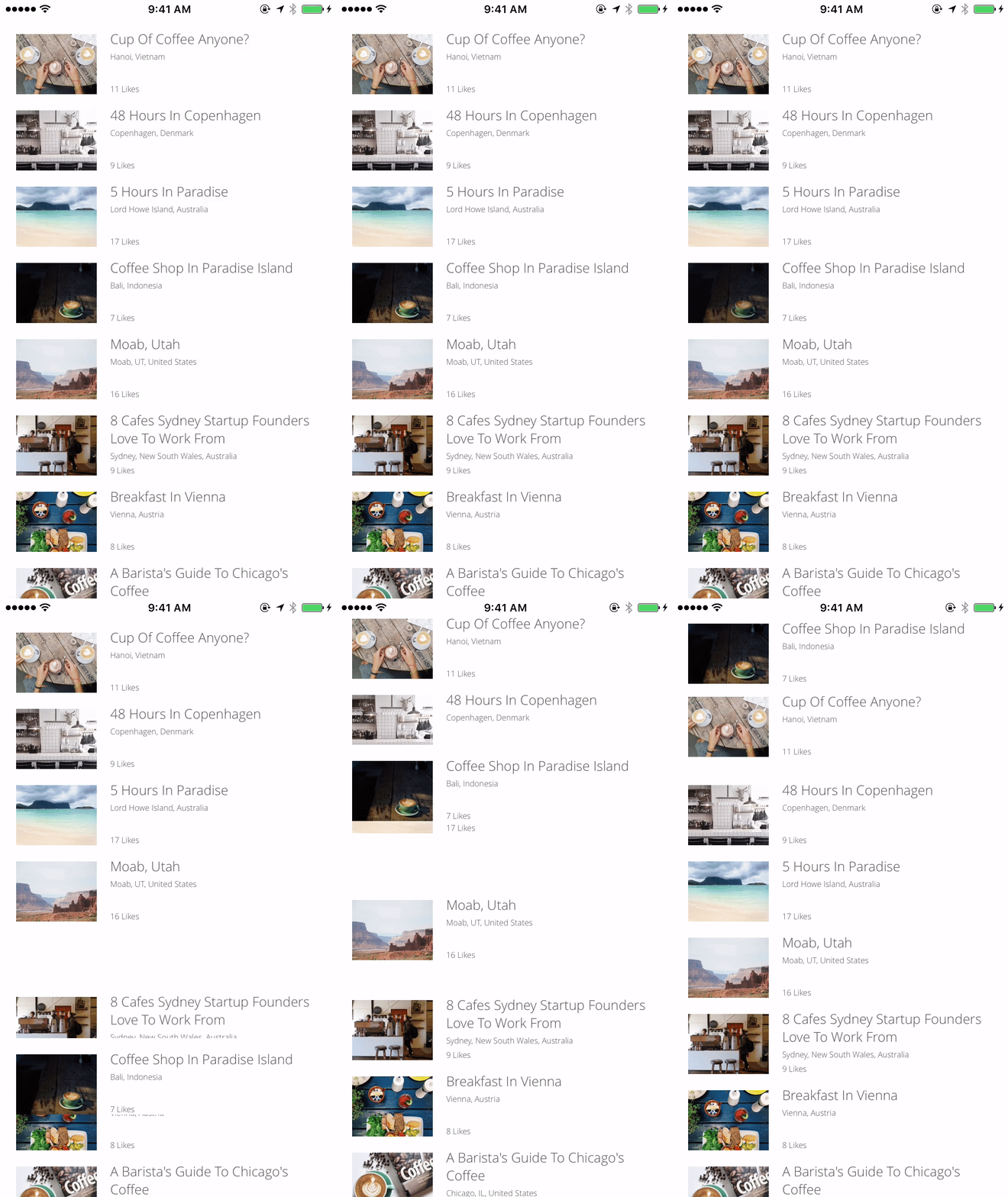
Drag drop capable wrapper of ListView for React Native. Allows for dragging and dropping of rows with automatic scrolling while dragging.
## Add it to your project
1. Run `npm install react-native-sortable-listview --save`
2. `var SortableListView = require('react-native-sortable-listview');`
## Demo
 ## Basic usage
```javascript
let SortableListView = require('react-native-sortable-listview');
let React = require('react-native');
let {
View,
Text,
TouchableHighlight
} = React;
let data = {
hello: {text: 'world'},
how: {text: 'are you'},
test: {text: 123},
this: {text: 'is'},
a: {text: 'a'},
real: {text: 'real'},
drag: {text: 'drag and drop'},
bb: {text: 'bb'},
cc: {text: 'cc'},
dd: {text: 'dd'},
ee: {text: 'ee'},
ff: {text: 'ff'},
gg: {text: 'gg'},
hh: {text: 'hh'},
ii: {text: 'ii'},
jj: {text: 'jj'},
kk: {text: 'kk'}
}
let order = Object.keys(data); //Array of keys
let RowComponent = React.createClass({
render: function() {
return
{this.props.data.text}
}
})
let MyComponent = React.createClass({
render: function() {
return {
order.splice(e.to, 0, order.splice(e.from, 1)[0]);
this.forceUpdate();
}}
renderRow={row => }
/>
}
});
module.exports = MyComponent;
```
## Example
See
[example.js](https://github.com/deanmcpherson/react-native-sortable-listview/tree/master/example.js).
## Props
SortableListView passes through all the standard ListView properties to ListView, except for dataSource. The renderRow method must render a component that forwards onLongPress and onPressOut methods to a Touchable* child component. Calling the onLongPress method will enable the drag and drop on the row and onPressOut will cancel it. You can also apply the default behaviour by spreading the sortHandlers prop (e.g. `..`)
- **`onRowMoved`** _(Function)_ - should return a function that is passed a single object when a row is dropped. The object contains three properties `from`, `to`, and `row`. `from` and `to` are the order indexes being requested to move. `row` is all the info available about the row being dropped.
- **`data`** _(Object)_ - Takes an object.
- **`rowHasChanged`** _(Function)_ - Takes an function that is called to compare row data. It is passed the new row data and a shallow copy of the previous row data. **This is necessary to define if row data is not immutible for row changes to correctly propagate, if your row data is immutable DO NOT DEFINE, see #28 for reasons why**.
- **`order`** _(Array)_ (optional) - Expects an array of keys to determine the current order of rows.
- **`sortRowStyle`** _(Object)_ (optional) - Expects a `style` object, which is to be applied on the rows when they're being dragged.
---
###Contributions welcome!
---
**MIT Licensed**
## Basic usage
```javascript
let SortableListView = require('react-native-sortable-listview');
let React = require('react-native');
let {
View,
Text,
TouchableHighlight
} = React;
let data = {
hello: {text: 'world'},
how: {text: 'are you'},
test: {text: 123},
this: {text: 'is'},
a: {text: 'a'},
real: {text: 'real'},
drag: {text: 'drag and drop'},
bb: {text: 'bb'},
cc: {text: 'cc'},
dd: {text: 'dd'},
ee: {text: 'ee'},
ff: {text: 'ff'},
gg: {text: 'gg'},
hh: {text: 'hh'},
ii: {text: 'ii'},
jj: {text: 'jj'},
kk: {text: 'kk'}
}
let order = Object.keys(data); //Array of keys
let RowComponent = React.createClass({
render: function() {
return
{this.props.data.text}
}
})
let MyComponent = React.createClass({
render: function() {
return {
order.splice(e.to, 0, order.splice(e.from, 1)[0]);
this.forceUpdate();
}}
renderRow={row => }
/>
}
});
module.exports = MyComponent;
```
## Example
See
[example.js](https://github.com/deanmcpherson/react-native-sortable-listview/tree/master/example.js).
## Props
SortableListView passes through all the standard ListView properties to ListView, except for dataSource. The renderRow method must render a component that forwards onLongPress and onPressOut methods to a Touchable* child component. Calling the onLongPress method will enable the drag and drop on the row and onPressOut will cancel it. You can also apply the default behaviour by spreading the sortHandlers prop (e.g. `..`)
- **`onRowMoved`** _(Function)_ - should return a function that is passed a single object when a row is dropped. The object contains three properties `from`, `to`, and `row`. `from` and `to` are the order indexes being requested to move. `row` is all the info available about the row being dropped.
- **`data`** _(Object)_ - Takes an object.
- **`rowHasChanged`** _(Function)_ - Takes an function that is called to compare row data. It is passed the new row data and a shallow copy of the previous row data. **This is necessary to define if row data is not immutible for row changes to correctly propagate, if your row data is immutable DO NOT DEFINE, see #28 for reasons why**.
- **`order`** _(Array)_ (optional) - Expects an array of keys to determine the current order of rows.
- **`sortRowStyle`** _(Object)_ (optional) - Expects a `style` object, which is to be applied on the rows when they're being dragged.
---
###Contributions welcome!
---
**MIT Licensed**