# tracespace
**Repository Path**: mirrors_basilfx/tracespace
## Basic Information
- **Project Name**: tracespace
- **Description**: ⚡️generate beautiful and accurate SVG renders of printed circuit boards
- **Primary Language**: Unknown
- **License**: MIT
- **Default Branch**: main
- **Homepage**: None
- **GVP Project**: No
## Statistics
- **Stars**: 0
- **Forks**: 0
- **Created**: 2022-10-24
- **Last Updated**: 2026-05-16
## Categories & Tags
**Categories**: Uncategorized
**Tags**: None
## README
# tracespace
[![coverage][coverage-badge]][coverage]
[![chat][chat-badge]][chat]
> PCB visualization tools for Node.js and the browser
tracespace is an open-source collection of tools to make looking at circuit boards on the internet easier.
[coverage]: https://codecov.io/gh/tracespace/tracespace
[chat]: https://gitter.im/tracespace/Lobby
[coverage-badge]: https://flat.badgen.net/codecov/c/github/tracespace/tracespace
[chat-badge]: https://flat.badgen.net/badge/chat/on%20gitter/cyan
## examples
Renders of the [Arduino Uno][arduino] produced by [pcb-stackup][] and [gerber-to-svg][]:
![arduino uno top][top]
![arduino uno bottom][bottom]
Arduino Uno design files used under the terms of the [Creative Commons Attribution Share-Alike license][arduino-osh].
Individual layers
top copper
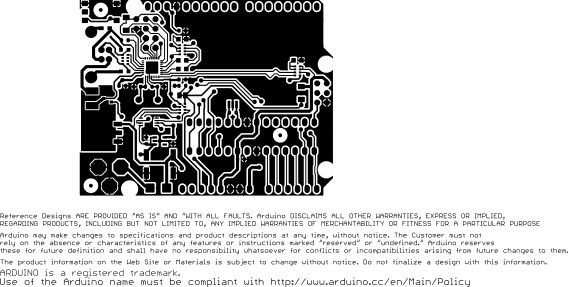
drill hits

outline

top silkscreen
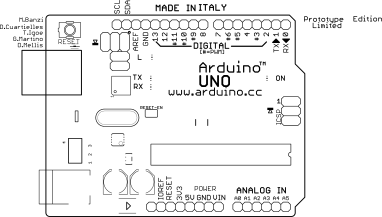
bottom copper
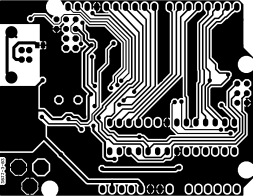
top soldermask

bottom soldermask

[arduino]: https://www.arduino.cc/
[arduino-osh]: https://www.arduino.cc/en/Main/FAQ
[top]: https://unpkg.com/pcb-stackup@latest/example/arduino-uno-top.svg
[bottom]: https://unpkg.com/pcb-stackup@latest/example/arduino-uno-bottom.svg
### tracespace in the wild
- [tracespace.io/view][tracespace-view] - A Gerber viewer powered by the tracespace libraries
- [kitspace.org][kitspace] - An electronics project sharing site with links to easily buy the required parts
- [OpenHardware.io][openhardware] - A social site around open source hardware. Enables authors to sell and manufacture their boards.
[tracespace-view]: https://tracespace.io/view
[kitspace]: https://kitspace.org
[openhardware]: https://www.openhardware.io
## apps
This repository has one web-app that is published to
### [@tracespace/view][view]
> Probably the best printed circuit board viewer on the internet
A Gerber viewer powered by the tracespace libraries. Available at .
[view]: ./apps/view
## packages
This repository also contains several packages that are published to npm. See them all below!
### [pcb-stackup][]
![latest][pcb-stackup-latest-badge]
![next][pcb-stackup-next-badge]
> Render PCBs as beautiful, precise SVGs from Gerber / NC drill files
[pcb-stackup]: ./packages/pcb-stackup
[pcb-stackup-latest-badge]: https://flat.badgen.net/npm/v/pcb-stackup
[pcb-stackup-next-badge]: https://flat.badgen.net/npm/v/pcb-stackup/next
### [@tracespace/cli][]
![latest][@tracespace/cli-latest-badge]
![next][@tracespace/cli-next-badge]
> Render PCBs as SVGs from the comfort of your own terminal
[@tracespace/cli]: ./packages/cli
[@tracespace/cli-latest-badge]: https://flat.badgen.net/npm/v/@tracespace/cli
[@tracespace/cli-next-badge]: https://flat.badgen.net/npm/v/@tracespace/cli/next
### [pcb-stackup-core][]
![latest][pcb-stackup-core-latest-badge]
![next][pcb-stackup-core-next-badge]
> Layer stacking core logic for pcb-stackup
[pcb-stackup-core]: ./packages/pcb-stackup-core
[pcb-stackup-core-latest-badge]: https://flat.badgen.net/npm/v/pcb-stackup-core
[pcb-stackup-core-next-badge]: https://flat.badgen.net/npm/v/pcb-stackup-core/next
### [gerber-to-svg][]
![latest][gerber-to-svg-latest-badge]
![next][gerber-to-svg-next-badge]
> Render individual Gerber / NC drill files as SVGs
[gerber-to-svg]: ./packages/gerber-to-svg
[gerber-to-svg-latest-badge]: https://flat.badgen.net/npm/v/gerber-to-svg
[gerber-to-svg-next-badge]: https://flat.badgen.net/npm/v/gerber-to-svg/next
### [gerber-plotter][]
![latest][gerber-plotter-latest-badge]
![next][gerber-plotter-next-badge]
> Streaming layer image plotter (consumer of `gerber-parser`)
[gerber-plotter]: ./packages/gerber-plotter
[gerber-plotter-latest-badge]: https://flat.badgen.net/npm/v/gerber-plotter
[gerber-plotter-next-badge]: https://flat.badgen.net/npm/v/gerber-plotter/next
### [gerber-parser][]
![latest][gerber-parser-latest-badge]
![next][gerber-parser-next-badge]
> Streaming Gerber/drill file parser
[gerber-parser]: ./packages/gerber-parser
[gerber-parser-latest-badge]: https://flat.badgen.net/npm/v/gerber-parser
[gerber-parser-next-badge]: https://flat.badgen.net/npm/v/gerber-parser/next
### [whats-that-gerber][]
![latest][whats-that-gerber-latest-badge]
![next][whats-that-gerber-next-badge]
> Identify Gerber and drill files by filename
[whats-that-gerber]: ./packages/whats-that-gerber
[whats-that-gerber-latest-badge]: https://flat.badgen.net/npm/v/whats-that-gerber
[whats-that-gerber-next-badge]: https://flat.badgen.net/npm/v/whats-that-gerber/next
### [@tracespace/xml-id][]
![latest][@tracespace/xml-id-latest-badge]
![next][@tracespace/xml-id-next-badge]
> XML ID generation and sanitation utilities for tracespace projects
[@tracespace/xml-id]: ./packages/xml-id
[@tracespace/xml-id-latest-badge]: https://flat.badgen.net/npm/v/@tracespace/xml-id
[@tracespace/xml-id-next-badge]: https://flat.badgen.net/npm/v/@tracespace/xml-id/next
### [@tracespace/fixtures][]
![latest][@tracespace/fixtures-latest-badge]
![next][@tracespace/fixtures-next-badge]
> Test fixtures for tracespace projects
[@tracespace/fixtures]: ./packages/fixtures
[@tracespace/fixtures-latest-badge]: https://flat.badgen.net/npm/v/@tracespace/fixtures
[@tracespace/fixtures-next-badge]: https://flat.badgen.net/npm/v/@tracespace/fixtures/next
## contributing
We could use your help maintaining and growing the tracespace ecosystem! Issues and pull requests are greatly appreciated.
### development setup
The tracespace tools live here in this [monorepo][]. We use [yarn][] and [lerna][] to manage this setup.
Node v8 (lts/carbon) or later is recommended.
```shell
# clone repository and install dependencies
git clone git@github.com:tracespace/tracespace.git
cd tracespace
yarn install
```
This repository adheres to the [Conventional Changelog][conventional-changelog] commit specification for automatic changelog generation. We recommend installing [commitizen][commitizen] to ensure your commit messages are properly formatted:
```shell
yarn global add commitizen
# later, when you're ready to commit
git add some/files/*
git cz
```
All development scripts below **should be run from the root of the repository**. Lerna handles delegating scripts downwards to the individual projects as necessary.
[monorepo]: https://github.com/babel/babel/blob/main/doc/design/monorepo.md
[yarn]: https://yarnpkg.com
[lerna]: https://lernajs.io/
[conventional-changelog]: https://github.com/conventional-changelog/conventional-changelog
[commitizen]: https://commitizen.github.io/cz-cli/
### tests
Automated tests consist of unit tests along with integration [snapshot tests][snapshot-testing] of SVG and data outputs.
```shell
# run unit and integration tests tests with coverage
yarn test
# set SNAPSHOT_UPDATE=1 to update integration test snapshots
SNAPSHOT_UPDATE=1 yarn test
# run unit tests in watch mode (no coverage)
yarn test:watch
# set INTEGRATION=1 to also include integration tests
INTEGRATION=1 yarn test:watch
```
[snapshot-testing]: https://facebook.github.io/jest/docs/en/snapshot-testing.html
### development servers
`pcb-stackup`, `pcb-stackup-core`, `gerber-to-svg`, and `@tracespace/view` have development servers. The first three serve a set of reference renders for manual visual inspection, and the `@tracespace/view` development server builds and serves the web-app locally.
```shell
# run all dev servers
yarn start
# run server for a specific project
yarn start --scope @tracespace/view
```
### production assets
There are two production asset types that you can build:
- Full web-app bundles
- `@tracespace/view`
- Standalone library bundles
- `gerber-parser`
- `gerber-plotter`
- `gerber-to-svg`
- `pcb-stackup-core`
- `pcb-stackup`
- `whats-that-gerber`
To build them:
```shell
# build production bundles
yarn build
# build:all
# builds all production bundles, example files, and documentation
yarn build:all
# build all bundles and serve them for testing/validation
yarn serve
# as with the dev server, these commands may be scoped by name
yarn build --scope gerber-parser
yarn serve --scope @tracespace/view
```
### linting and formatting
```shell
# format the code for styling
yarn format
# lint the code for potential errors
yarn lint
# typecheck any typescript code
yarn types
```
### publishing
Packages are published to npm by the CI server. To publish a release, you must have write access to the repository. There is a `bump` script in the `package.json` that will:
- Run all tests
- Write new version to `package.json` in updated packages
- Generate / update the changelogs
- Commit, tag, and push to git
First, checkout and pull down the latest commits on `main`:
```shell
git checkout main
get pull origin main
```
Then, bump the version:
```shell
# by default, bump to the next version as determined by conventional commits
yarn bump
# you may specify a bump level or exact version
# prerelease bumps will be prefixed with "next", e.g. 4.0.0 -> 4.0.1-next.0
# https://github.com/lerna/lerna/tree/master/commands/version#readme
yarn bump ${major|minor|patch|premajor|preminor|prepatch|prerelease}
yarn bump v42.0.0
# to do a "dry run", you can stop before commit and tag
yarn bump --no-git-tag-version
```
After you bump, push the commit and tag:
```shell
git push origin main --follow-tags
```
The release will be published to the `latest` npm tag for bare versions (e.g. `4.0.0`) and to `next` for pre-release versions (e.g. `4.0.0-next.0`).