# SwiftKit
**Repository Path**: mirrors_SvenTiigi/SwiftKit
## Basic Information
- **Project Name**: SwiftKit
- **Description**: Start your next Open-Source Swift Framework 📦
- **Primary Language**: Unknown
- **License**: MIT
- **Default Branch**: master
- **Homepage**: None
- **GVP Project**: No
## Statistics
- **Stars**: 0
- **Forks**: 0
- **Created**: 2022-01-06
- **Last Updated**: 2026-07-19
## Categories & Tags
**Categories**: Uncategorized
**Tags**: None
## README







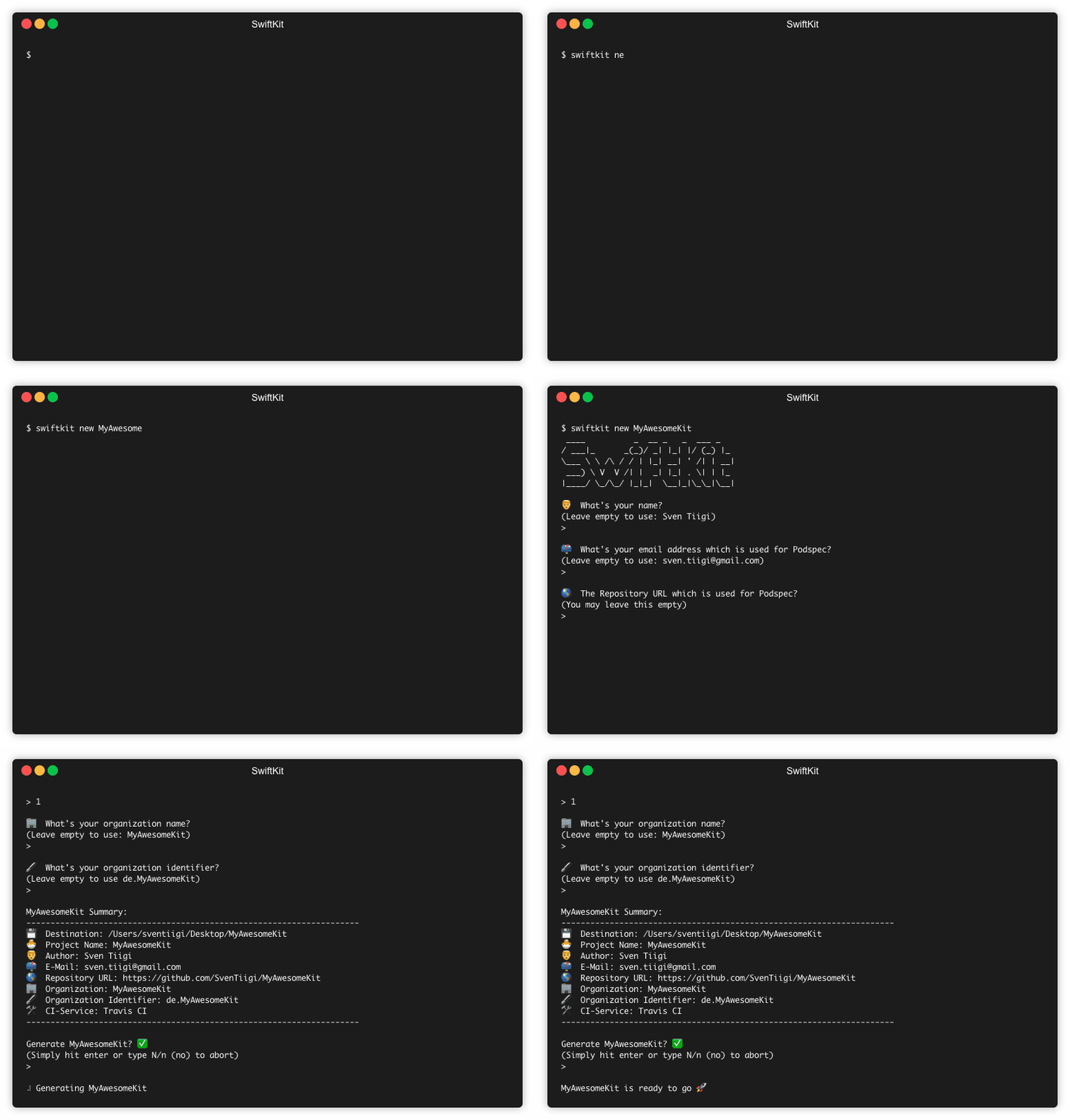
SwiftKit enables you to easily generate a cross platform Swift Framework from your command line.
It is the best way to start your next Open-Source Swift Framework 📦.
SwiftKit is inspired by SwiftPlate
## Features
- [x] Generated Kit supports `iOS`, `tvOS`, `watchOS` and `macOS`
- [x] `CocoaPods`, `Carthage` and `Swift Package Manager` compatibility
- [x] `README.md` template
- [x] Fastlane already integrated for `tests` and `release`
- [x] `Jazzy` to generate documentation
- [x] `SwiftLint` Build-Phase integrated
- [x] `CI-Service` configuration templates included (GitHub, Travis, GitLab, Azure Pipelines)
- [x] Automatically checks if the Kit name is already taken on `CocoaPods`
- [x] GitHub issue templates for `Bug reports` and `Feature requests`
## Installation
### Mint 🌱
[Mint](https://github.com/yonaskolb/Mint) is a package manager that installs and runs Swift command line tool packages.
```bash
$ mint install SvenTiigi/SwiftKit
```
### Homebrew 🍺
[Homebrew](https://brew.sh/) is a free and open-source software package management system that simplifies the installation of software on Apple's macOS operating system.
```bash
$ brew tap SvenTiigi/SwiftKit
$ brew install swiftkit
```
## Update
To update SwiftKit to the latest version simply run:
```bash
$ swiftkit update
```
> The `update` command will only work if SwiftKit is installed either via Mint 🌱 or Homebrew 🍺
## Usage 👨💻
To create a new Kit simply run:
```bash
$ swiftkit new MyAwesomeKit
```
> This will create a new folder in your current directory named by the name of your Kit
To create a Kit inside the current directory simply run:
```bash
$ swiftkit new
```
> This will infer the Kit name based on your directory name
If you wish to open the Xcode project after your Kit has been generated simply run:
```bash
$ swiftkit new MyAwesomeKit --open
```
> Head over to the [`Arguments`](https://github.com/SvenTiigi/SwiftKit#arguments) section to learn more about the available arguments
In default SwiftKit will create a Kit that supports `iOS`, `tvOS`, `watchOS`, `macOS`. If you want to support only certain Targets simply run:
```bash
$ swiftkit new MyAwesomeKit --target iOS --target tvOS
```
> This will create a Kit which only supports `iOS` and `tvOS`
## Kit-Structure 📦
The upcoming sections will explain the structure of your generated Kit in detail.
 ### Xcode Project Structure
In the generated Xcode project you will find four important directories.
| Directory | Description |
| --- | --- |
| [`Sources`](https://github.com/SvenTiigi/SwiftKit/tree/master/Template/Sources) | Where you place your Swift source files |
| [`Tests`](https://github.com/SvenTiigi/SwiftKit/tree/master/Template/Tests) | Place your Unit-Tests files |
| [`Example`](https://github.com/SvenTiigi/SwiftKit/tree/master/Template/Example) | The iOS application example for your Kit |
| [`Configs`](https://github.com/SvenTiigi/SwiftKit/tree/master/Template/Configs) | All config files like Plist, Package.swift, Podspec, etc. |
### Xcode Project Structure
In the generated Xcode project you will find four important directories.
| Directory | Description |
| --- | --- |
| [`Sources`](https://github.com/SvenTiigi/SwiftKit/tree/master/Template/Sources) | Where you place your Swift source files |
| [`Tests`](https://github.com/SvenTiigi/SwiftKit/tree/master/Template/Tests) | Place your Unit-Tests files |
| [`Example`](https://github.com/SvenTiigi/SwiftKit/tree/master/Template/Example) | The iOS application example for your Kit |
| [`Configs`](https://github.com/SvenTiigi/SwiftKit/tree/master/Template/Configs) | All config files like Plist, Package.swift, Podspec, etc. |
 ### Kit.swift
In the aforementioned `Sources` directory you will find one Swift file which is named by your Kit.
```swift
// Include Foundation
@_exported import Foundation
```
> This [file](https://github.com/SvenTiigi/SwiftKit/blob/master/Template/Sources/KITPROJECT.swift) is used to inherit the import of `Foundation` when importing your Kit.
### Kit.swift
In the aforementioned `Sources` directory you will find one Swift file which is named by your Kit.
```swift
// Include Foundation
@_exported import Foundation
```
> This [file](https://github.com/SvenTiigi/SwiftKit/blob/master/Template/Sources/KITPROJECT.swift) is used to inherit the import of `Foundation` when importing your Kit.
 ### Fastlane
Every generated Kit will come along with a predefined [`Fastfile`](https://github.com/SvenTiigi/SwiftKit/blob/master/Template/fastlane/Fastfile).
##### tests-Lane
The `tests` lane will run your Unit-Tests.
```bash
$ fastlane ios tests
```
##### compatibilityTests-Lane
The `compatibilityTests` lane will verify that your Kit is `Carthage`, `CocoaPods` and `Swift Package Manager` compatible.
```bash
$ fastlane ios compatibilityTests
```
#### release-lane
The `release` lane will allow you to automatically release a new version of your Kit.
```bash
$ fastlane ios release version:1.1.0
```
The lane verifies various aspects of your Kit.
| Step | Description |
| --- | --- |
| 1 | Ensure your are on a clean master branch |
| 2 | Run `compatibilityTests` lane |
| 3 | Run `tests` lane |
| 4 | Increment version |
| 5 | Add and push Git tag |
| 6 | Pushes the Podspec via `pod trunk push` |
> ☝️ Please ensure you have registered your machine with [`pod trunk register`](https://guides.cocoapods.org/making/getting-setup-with-trunk.html) in order to successfully push the Podspec to CocoaPods
### ReadMe
### Fastlane
Every generated Kit will come along with a predefined [`Fastfile`](https://github.com/SvenTiigi/SwiftKit/blob/master/Template/fastlane/Fastfile).
##### tests-Lane
The `tests` lane will run your Unit-Tests.
```bash
$ fastlane ios tests
```
##### compatibilityTests-Lane
The `compatibilityTests` lane will verify that your Kit is `Carthage`, `CocoaPods` and `Swift Package Manager` compatible.
```bash
$ fastlane ios compatibilityTests
```
#### release-lane
The `release` lane will allow you to automatically release a new version of your Kit.
```bash
$ fastlane ios release version:1.1.0
```
The lane verifies various aspects of your Kit.
| Step | Description |
| --- | --- |
| 1 | Ensure your are on a clean master branch |
| 2 | Run `compatibilityTests` lane |
| 3 | Run `tests` lane |
| 4 | Increment version |
| 5 | Add and push Git tag |
| 6 | Pushes the Podspec via `pod trunk push` |
> ☝️ Please ensure you have registered your machine with [`pod trunk register`](https://guides.cocoapods.org/making/getting-setup-with-trunk.html) in order to successfully push the Podspec to CocoaPods
### ReadMe
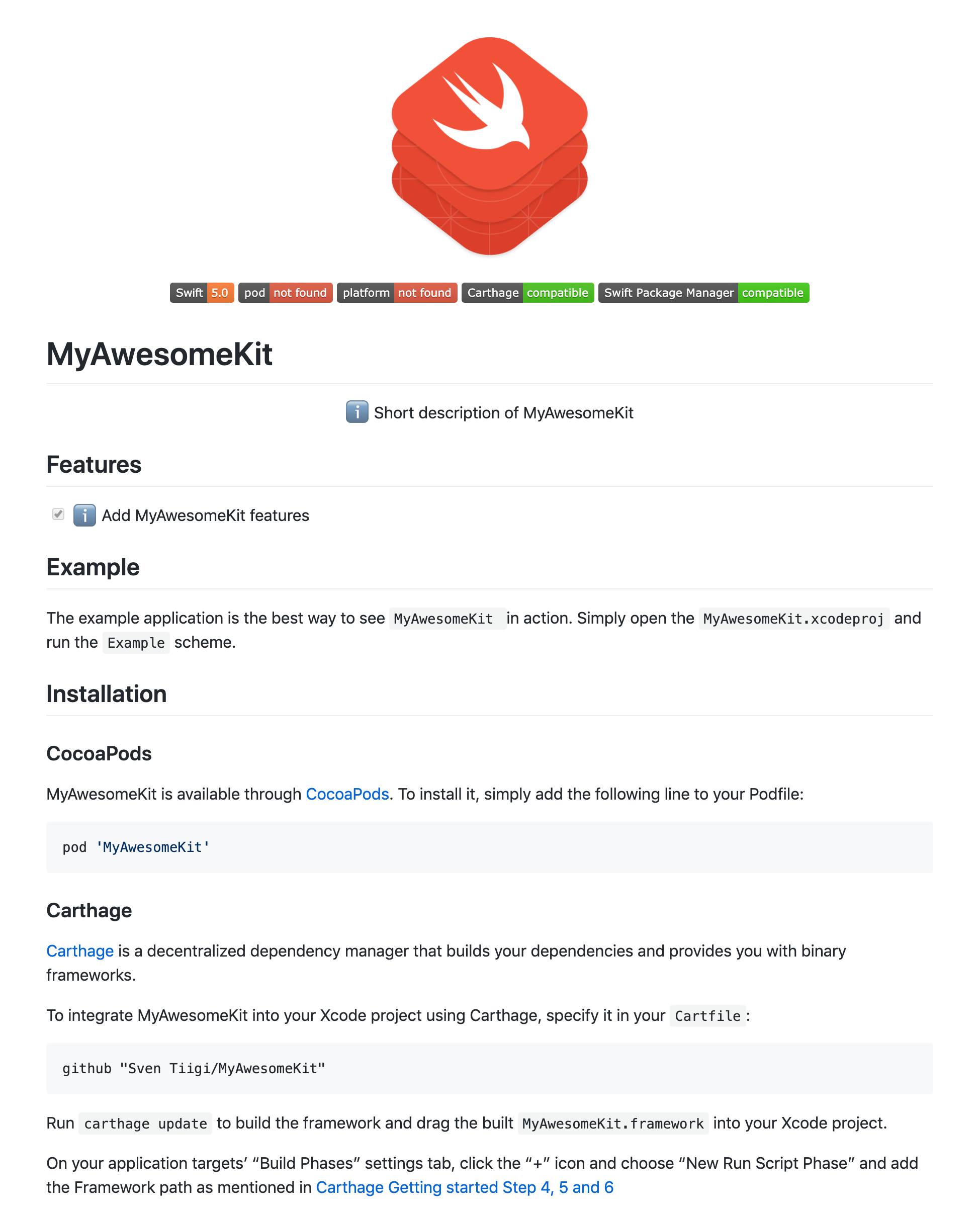 A [`README.md`](https://github.com/SvenTiigi/SwiftKit/blob/master/Template/README.md) template file will be automatically created inside your Kit.
The README comes along with typical sections like:
A [`README.md`](https://github.com/SvenTiigi/SwiftKit/blob/master/Template/README.md) template file will be automatically created inside your Kit.
The README comes along with typical sections like:
* Project description
* Example
* Installation
* Usage
* Contributing
* License
Please feel free to update the ReadMe to your needs 👍
## Environment-Configuration
You can place a JSON environment configuration file in your home directory `~/.swiftkit-env.json` to provide default values for:
| Key | Description |
| ----------- | ----------- |
| `authorName` | The author name |
| `authorEmail` | The author email address |
| `organizationName` | The organization name |
| `organizationIdentifier` | The organization identifier |
SwiftKit will use those values and skip the corresponding CLI questions when running `swiftkit new`.
```json
{
"authorName": "Sven Tiigi",
"authorEmail": "sven.tiigi@gmail.com",
"organizationName": "Sven Tiigi",
"organizationIdentifier": "de.tiigi"
}
```
> Path: `~/.swiftkit-env.json`
The environment config values will only be used if no argument for the corresponding value is present.
## Arguments
Beside using the CLI inputs SwiftKit supports arguments when launched. The following arguments are supported:
| Long parameter | Short parameter | Description
| ----------- | ----------- | -------------- |
| `--target` | `-t` | The Target that should be included in your Kit 📱 |
| `--destination` | `-d` | Where the generated Kit should be saved 💾 |
| `--kit-name` | `-k` | The name of your Kit 📦 |
| `--name` | `-n` | Your name 👨💻 |
| `--email` | `-e` | Your email address 📫 |
| `--url` | `-u` | The repository url 🌎 |
| `--ci-service` | `-c` | The CI-Service 🛠
`1 = Travis CI - macOS only`
`2 = Travis CI - macOS & Linux`
`3 = GitLab CI`
`4 = Azure Pipelines`
`5 = GitHub CI` |
| `--organization` | `-o` | The name of your organization 🏢 |
| `--organization-identifier` | `-i` | The organization identifier 🖋 |
| `--repository` | `-r` | The SwiftKit template repository url 🌎 |
| `--force` | `-f` | Generate the Kit without confirmation ✅ |
| `--open` | `-o` | Open the Xcode project after your Kit has been generated 📂 |
Example with all arguments been set.
```bash
swiftkit new \
--target iOS \
--target tvOS \
--target watchOS \
--target macOS \
--destination ~/Desktop/MyAwesomeKit \
--kit-name MyAwesomeKit \
--name SvenTiigi \
--email sven.tiigi@gmail.com \
--url https://github.com/SvenTiigi/MyAwesomeKit \
--ci-service 1 \
--organization SvenTiigi \
--organization-identifier com.tiigi \
--repository https://github.com/SvenTiigi/SwiftKit.git \
--force \
--open
```
## Featured on
* [Swift Weekly](http://digest.swiftweekly.com/issues/swift-weekly-issue-157-175911)
* [iOS Goodies](https://ios-goodies.com/post/184763118641/week-281)
* [Mybridge - Swift Open Source for the Past Month (v.May 2019)](https://medium.mybridge.co/swift-open-source-for-the-past-month-v-may-2019-c0f6a0d61e34)
## Contributing
Contributions are very welcome 🙌 🤓
## Credits
SwiftKit is inspired by [`SwiftPlate`](https://github.com/JohnSundell/SwiftPlate) from [JohnSundell](https://twitter.com/johnsundell)
## License
```
SwiftKit
Copyright (c) 2021 Sven Tiigi
Permission is hereby granted, free of charge, to any person obtaining a copy
of this software and associated documentation files (the "Software"), to deal
in the Software without restriction, including without limitation the rights
to use, copy, modify, merge, publish, distribute, sublicense, and/or sell
copies of the Software, and to permit persons to whom the Software is
furnished to do so, subject to the following conditions:
The above copyright notice and this permission notice shall be included in
all copies or substantial portions of the Software.
THE SOFTWARE IS PROVIDED "AS IS", WITHOUT WARRANTY OF ANY KIND, EXPRESS OR
IMPLIED, INCLUDING BUT NOT LIMITED TO THE WARRANTIES OF MERCHANTABILITY,
FITNESS FOR A PARTICULAR PURPOSE AND NONINFRINGEMENT. IN NO EVENT SHALL THE
AUTHORS OR COPYRIGHT HOLDERS BE LIABLE FOR ANY CLAIM, DAMAGES OR OTHER
LIABILITY, WHETHER IN AN ACTION OF CONTRACT, TORT OR OTHERWISE, ARISING FROM,
OUT OF OR IN CONNECTION WITH THE SOFTWARE OR THE USE OR OTHER DEALINGS IN
THE SOFTWARE.
```