# Ultra-Fusion
**Repository Path**: machine_-project/Ultra-Fusion
## Basic Information
- **Project Name**: Ultra-Fusion
- **Description**: No description available
- **Primary Language**: Unknown
- **License**: MIT
- **Default Branch**: main
- **Homepage**: None
- **GVP Project**: No
## Statistics
- **Stars**: 0
- **Forks**: 1
- **Created**: 2026-07-18
- **Last Updated**: 2026-07-18
## Categories & Tags
**Categories**: Uncategorized
**Tags**: None
## README
# Ultra-Fusion: A Resilient Tightly-Coupled Multi-Sensor Fusion SLAM Framework under Sensor Degradation and Spatiotemporal Perturbation for Intelligent Transportation Systems
[](https://sjtuyinjie.github.io/ultrafusion-web/)
[](https://huggingface.co/TianYihong/Ultra-Fusion)
[](https://arxiv.org/abs/2606.21223)
[](https://github.com/sjtuyinjie/M3DGR)
[](https://www.youtube.com/watch?v=ekzD9ovd1SQ)
[](#5-license--acknowledgements)
[](#ros1-vs-ros2--which-to-choose)
[](docs/ros2_humble_m3dgr.md)
[](#31-fusion-modes)
[](#42-cross-platform-results)
**Core contributors:** [Yihong Tian](https://github.com/maotian123), [Junjie Zhang](https://github.com/Zjj587), [Liuyang Li](https://github.com/Lurvelly), and [Jie Yin](https://sjtuyinjie.github.io/)*
---
Ultra-Fusion is a tightly-coupled multi-sensor SLAM framework for intelligent transportation systems (ITS). It targets real-world deployment where **sensor degradation** (poor illumination, LiDAR degeneracy, wheel slippage, GNSS outage) and **spatiotemporal miscalibration** are common.
Within one configurable optimization framework, Ultra-Fusion supports **WIO, VIO, LIO, and LVIO**, with optional wheel/GNSS fusion and online calibration.
**Available releases:**
- **v0.1.0 (ROS1 Noetic)** — pre-built binaries to reproduce the paper benchmarks ([§2.1–2.2](#21-m3dgr-ros1)).
- **v0.1.1 Ultra-Fusion-Omni (UFO) on ROS1 Noetic** — omnidirectional multi-camera LVIO for 360° vision + LiDAR; D360 as example ([§2.4](#24-ultra-fusion-omni-ufo), [walkthrough](docs/visual_life_d360.md)).
- **v0.1.2 (ROS1 Noetic)** — improves runtime reliability and performance and adds flag-gated map PCD export ([release notes](docs/releases/v0.1.2.md)).
- **v0.2.0 (ROS2 Humble)** — same `uf_node` + YAML workflow on Ubuntu 22.04 ([§2.3](#23-ros2-humble-runtime)).
- **v0.2.1 (ROS2 Humble)** — fixes the ROS2 Humble runtime for M3DGR VIO/VIWO and validates LVWIO in the public ROS2 Docker runtime.
- **v0.2.2 (ROS2 Humble)** — brings the latest estimator improvements and the same opt-in map PCD workflow to ROS2 ([release notes](docs/releases/v0.2.2.md)).
Latest Debian assets:
| Runtime | Asset | SHA256 |
| --- | --- | --- |
| ROS1 Noetic | `ultrafusion_0.1.2_amd64.deb` | `625252c2fade99b3c3f7ca016e0bda7c4a604be4dc1a27c4af2d7798026dbce9` |
| ROS2 Humble | `ultrafusion-ros2_0.2.2_amd64.deb` | `243f88fa5e3d87fcd96a2b02c8561fca4d5e56419ab72ec0a3a731b0ea34cccc` |
More demos and releases are on the way — stay tuned.
## Contents
- [Overview](#overview)
- [Our Goal](#our-goal)
- [Method Overview](#method-overview)
- [Why Ultra-Fusion](#why-ultra-fusion)
- [Benchmarks and Findings](#benchmarks-and-findings)
- [1. Prerequisites & Installation](#1-prerequisites--installation)
- [ROS1 vs ROS2 — which to choose?](#ros1-vs-ros2--which-to-choose)
- [Docker installation (recommended)](#docker-installation-recommended-)
- [Native installation](#native-installation)
- [Installed files](#installed-files)
- [2. Run on Benchmarks & Your Device](#2-run-on-benchmarks--your-device)
- [2.1 M3DGR (ROS1)](#21-m3dgr-ros1)
- [2.2 Other datasets (ROS1)](#22-other-datasets-ros1)
- [2.3 ROS2 Humble runtime](#23-ros2-humble-runtime)
- [2.4 Ultra-Fusion-Omni (UFO)](#24-ultra-fusion-omni-ufo)
- [3. Adapt to Your Device & Platform](#3-custom-profiles)
- [3.1 Fusion modes](#31-fusion-modes)
- [3.2 Camera intrinsics](#32-camera-intrinsics)
- [3.3 GNSS fusion](#33-gnss-fusion)
- [3.4 Extrinsics](#34-extrinsics)
- [3.5 Calibration & delays](#35-calibration--delays)
- [3.6 Map PCD export](#36-map-pcd-export)
- [4. Qualitative Results](#4-qualitative-results)
- [5. License & Acknowledgements](#5-license--acknowledgements)
- [6. Star History](#6-star-history)
---
## Overview
### Our Goal
We aim to provide a **foundational SLAM system** for the community: one configurable framework that **unifies sensor setups and platforms** (wheeled, legged, aerial), and stays **ultra-resilient** under sensor degradation, timing delays, and extrinsic calibration errors — instead of a pipeline limited to one robot or one sensor stack.
### Method Overview
Ultra-Fusion timestamp-orders asynchronous sensor streams and converts them into optional factors inside one sliding-window optimizer, sharing state representation, marginalization, and calibration logic.

Unified pipeline: initialization, reliability scheduling, online calibration, and multi-modal fusion in one framework.
---
### Why Ultra-Fusion
Compared with pipelines tied to a fixed sensor set, Ultra-Fusion focuses on:
1. **Configurability** — one framework for WIO / VIO / LIO / LVIO (+ wheel / GNSS).
2. **Reliability** — robust localization under corner-case sensor degradation.
3. **Deployability** — long-duration and high-speed ITS operation.
4. **Transferability** — validated on wheeled, legged, and aerial platforms.
5. **Dual middleware** — ROS1 (Noetic) and ROS2 (Humble) runtimes share the same YAML-driven `uf_node` workflow.
---
### Benchmarks and Findings
Ultra-Fusion is evaluated on five public benchmarks:
- [**M3DGR**](https://github.com/sjtuyinjie/M3DGR) — wheeled, real + sim, sensor-degradation stress tests
- [**M2DGR-Plus**](https://github.com/SJTU-ViSYS/M2DGR-plus) — wheeled, multi-scenario ground SLAM
- [**KAIST Complex Urban**](https://sites.google.com/view/complex-urban-dataset) — autonomous driving, large-scale urban
- [**GrandTour**](https://github.com/leggedrobotics/grand_tour_dataset) — legged robots in the wild
- [**MARS-LVIG**](https://mars.hku.hk/dataset.html) — aerial LVIG fusion
Reported gains include competitive accuracy and improved localization availability under sensor degradation, calibration perturbation, and long-duration / high-speed operation.
**See the [project website](https://sjtuyinjie.github.io/ultrafusion-web/) for videos, benchmark tables, and interactive demos!**
> [!NOTE]
> This repository currently releases **executable binaries and demos**. Full source code will be released after paper acceptance. For related implementations, see [Ground-Fusion](https://github.com/SJTU-ViSYS/Ground-Fusion) and [Ground-Fusion++](https://github.com/sjtuyinjie/Ground-Fusion2).
---
## 1. Prerequisites & Installation
### ROS1 vs ROS2 — which to choose?
| | **ROS1 Noetic** | **ROS2 Humble** |
| --- | --- | --- |
| OS | Ubuntu 20.04 | Ubuntu 22.04 |
| Package | v0.1.2 (includes paper + **UFO** profiles) | v0.2.2 |
| Install | [Docker](#docker-installation-recommended-) or [Native](#native-installation) | Same paths — pick the ROS2 image or deps script |
| Data | ROS1 bags (`rosbag play`) | ROS2 bags (`ros2 bag play`) |
| Profiles | All five benchmarks + UFO (`visual_life`) | Any YAML profile — point topics at your ROS2 drivers ([M3DGR example](#example-m3dgr-on-ros2)) |
| Docs | [§2.1–2.2](#21-m3dgr-ros1) · [§2.4 UFO](#24-ultra-fusion-omni-ufo) | [§2.3](#23-ros2-humble-runtime) · [ros2 guide](docs/ros2_humble_m3dgr.md) |
> [!TIP]
> **First time?** Start with **ROS1 v0.1.2** for the full benchmark suite and UFO profiles. Choose **ROS2 v0.2.2** when your drivers or recordings are already on Humble.
The paper release is **v0.1.0** and **v0.1.1** introduced Ultra-Fusion-Omni.
The latest ROS1 package is **v0.1.2**; it retains those profiles and adds
runtime reliability, performance, and map-export improvements.
---
### Docker installation (recommended) ⭐
Docker images ship **only the ROS/runtime stack** (middleware, RViz, Ceres, yaml-cpp, system libraries). Install the Ultra-Fusion `.deb` inside the container after starting it.
**Step 1 — Clone this repository** (mounted as `/workspace` in the container)
```bash
git clone https://github.com/sjtuyinjie/Ultra-Fusion.git
cd Ultra-Fusion
```
#### ROS1 Noetic (Ubuntu 20.04)
**Step 2 — Pull the image**
```bash
# Alibaba Cloud ACR (recommended in China):
docker pull registry.cn-hangzhou.aliyuncs.com/bit_robot_image/ultrafusion:0.1.0
# Docker Hub:
docker pull maotiandocker/ultrafusion:0.1.0
# Or build locally:
docker build -t ultrafusion:0.1.0 .
```
**Step 3 — Start a container** (RViz GUI enabled)
Add `-v /media:/media:ro` if your rosbags live under `/media` on the host.
```bash
xhost +local:docker
docker run --rm -it --net=host --ipc=host \
-e DISPLAY="${DISPLAY}" \
-e QT_X11_NO_MITSHM=1 \
-v /tmp/.X11-unix:/tmp/.X11-unix:rw \
-v /media:/media:ro \
-v "$(pwd)":/workspace \
registry.cn-hangzhou.aliyuncs.com/bit_robot_image/ultrafusion:0.1.0
```
**Step 4 — Install Ultra-Fusion**
```bash
cd /workspace
./scripts/install_ultrafusion_deb.sh # add --mirror if GitHub is slow
source /opt/ros/noetic/setup.bash
```
**Step 5 — Verify**
```bash
which uf_node
rviz -d /opt/ultrafusion/rviz/lio.rviz
```
Proceed to [§2 Running Ultra-Fusion](#2-run-on-benchmarks--your-device).
#### ROS2 Humble (Ubuntu 22.04)
Same CMake-based `uf_node` runtime as ROS1; no `colcon build` is needed with the prebuilt `.deb`.
The published runtime image remains `0.2.1`; the installer now installs the
`0.2.2` Debian package inside it. No `0.2.2` Docker image is claimed yet.
| Step | Command |
| --- | --- |
| 1. Pull image | `docker pull maotiandocker/ultrafusion-ros2:0.2.1` (ACR: `registry.cn-hangzhou.aliyuncs.com/bit_robot_image/ultrafusion-ros2:0.2.1`) |
| 2. Start container | See block below |
| 3. Install `.deb` | `./scripts/install_ultrafusion_ros2_deb.sh` |
| 4. Source ROS2 | `source /opt/ros/humble/setup.bash` |
| 5. Run | [§2.3](#23-ros2-humble-runtime) |
```bash
xhost +local:docker
docker run --rm -it --net=host --ipc=host \
-e DISPLAY="${DISPLAY}" \
-e QT_X11_NO_MITSHM=1 \
-v /tmp/.X11-unix:/tmp/.X11-unix:rw \
-v /media:/media:ro \
-v "$(pwd)":/workspace \
maotiandocker/ultrafusion-ros2:0.2.1
cd /workspace
./scripts/install_ultrafusion_ros2_deb.sh
source /opt/ros/humble/setup.bash
```
Image digests and troubleshooting: [docs/ros2_humble_m3dgr.md](docs/ros2_humble_m3dgr.md).
---
### Native installation
For hosts that run Ultra-Fusion directly without Docker.
#### ROS1 Noetic (Ubuntu 20.04)
**Step 1 — Clone and install dependencies**
```bash
git clone https://github.com/sjtuyinjie/Ultra-Fusion.git
cd Ultra-Fusion
./scripts/install_native_deps.sh
```
Installs ROS Noetic, PCL/OpenCV/Eigen, and builds Ceres 2.1.0 and yaml-cpp 0.8.0.
**Step 2 — Install Ultra-Fusion**
```bash
./scripts/install_ultrafusion_deb.sh # add --mirror if GitHub is slow
```
**Step 3 — Source ROS** (required in every new shell)
```bash
source /opt/ros/noetic/setup.bash
```
**Step 4 — Verify**
```bash
which uf_node
rviz -d /opt/ultrafusion/rviz/lio.rviz
```
Proceed to [§2 Running Ultra-Fusion](#2-run-on-benchmarks--your-device).
#### ROS2 Humble (Ubuntu 22.04)
Dependencies mirror [Dockerfile.ros2](Dockerfile.ros2).
**Step 1 — Clone and install dependencies**
```bash
git clone https://github.com/sjtuyinjie/Ultra-Fusion.git
cd Ultra-Fusion
./scripts/install_native_ros2_deps.sh
```
Installs ROS2 Humble, PCL/OpenCV/Eigen, `rosbags`, and builds Ceres 2.1.0 and yaml-cpp 0.8.0.
**Step 2 — Install Ultra-Fusion ROS2 package**
```bash
./scripts/install_ultrafusion_ros2_deb.sh # add --mirror if GitHub is slow
```
**Step 3 — Source ROS2** (required in every new shell)
```bash
source /opt/ros/humble/setup.bash
```
**Step 4 — Verify**
```bash
which uf_node
rviz2 -d /opt/ultrafusion/rviz/lio_ros2.rviz
```
Proceed to [§2.3 ROS2 runtime](#23-ros2-humble-runtime).
---
### Installed files
**ROS1 package** (`ultrafusion_*.deb`):
| Path | Description |
| --- | --- |
| `/opt/ultrafusion/bin/uf_node` | Main executable |
| `/usr/bin/uf_node`, `/usr/bin/uf-node` | CLI shortcuts |
| `/opt/ultrafusion/config/m3dgr` | M3DGR profiles |
| `/opt/ultrafusion/config/m2p` | M2DGR-Plus profile |
| `/opt/ultrafusion/config/lvig` | MARS-LVIG profile |
| `/opt/ultrafusion/config/kaist` | KAIST profile |
| `/opt/ultrafusion/config/groundtour` | GrandTour profile |
| `/opt/ultrafusion/config/visual_life` | **UFO** reference profile—omni multi-camera LVIO (D360), retained in v0.1.2 |
| `/opt/ultrafusion/rviz/lio.rviz` | Default RViz layout |
**ROS2 package** (`ultrafusion-ros2_*.deb`):
| Path | Description |
| --- | --- |
| `/opt/ultrafusion/bin/uf_node` | Main executable (ROS2 runtime) |
| `/opt/ultrafusion/bin/uf_ros2_adapter` | ROS2 topic adapter |
| `/usr/bin/uf_node`, `/usr/bin/uf-ros2-adapter` | CLI wrappers |
| `/opt/ultrafusion/config/m3dgr/uf_m3dgr_ros2_*.yaml` | ROS2 YAML profiles |
| `/opt/ultrafusion/rviz/lio_ros2.rviz` | RViz2 layout |
---
## 2. Run on Benchmarks & Your Device
Each `uf_node ` maps to a YAML under `/opt/ultrafusion/config/`. You can also pass a path directly: `uf_node /path/to/config.yaml`.
| Runtime | Source ROS | Play data | Launch | RViz |
| --- | --- | --- | --- | --- |
| **ROS1** | `source /opt/ros/noetic/setup.bash` | `rosbag play … --clock` | `uf_node ` | `rviz -d /opt/ultrafusion/rviz/lio.rviz` |
| **ROS2** | `source /opt/ros/humble/setup.bash` | `ros2 bag play … --clock` | `uf_node /path/to/config.yaml` | `rviz2 -d /opt/ultrafusion/rviz/lio_ros2.rviz` |
**ROS1 three-terminal workflow:**
| Terminal | Command |
| --- | --- |
| 1 | `roscore` |
| 2 | `rosbag play /path/to/your.bag --clock` |
| 3 | `uf_node ` |
[§2.1–2.2](#21-m3dgr-ros1) walk through ROS1 benchmarks; [§2.3](#23-ros2-humble-runtime) covers the ROS2 runtime; [§2.4](#24-ultra-fusion-omni-ufo) introduces **Ultra-Fusion-Omni (UFO)** for omnidirectional multi-camera rigs.
### 2.1 M3DGR (ROS1)
Wheeled benchmark with real and simulated sensor-degradation sequences. Download rosbags from the [M3DGR sequence table](https://github.com/sjtuyinjie/M3DGR#5-dataset-sequences), then launch:
```bash
# Terminal 1
roscore
# Terminal 2
rosbag play /media/path/to/your.bag --clock
# Terminal 3
uf_node m3dgr # default (= m3dgr_standard)
# uf_node m3dgr_standard # standard LVWIO profile
# uf_node m3dgr_image_enhance # stronger visual coupling
```
**Released profiles:**
| Command | Config | Recommended sequences |
| --- | --- | --- |
| `uf_node m3dgr` | `.../m3dgr/uf_m3dgr_standard.yaml` | Default M3DGR profile (alias of `m3dgr_standard`) |
| `uf_node m3dgr_standard` | `.../m3dgr/uf_m3dgr_standard.yaml` | Dynamic01, Varying-illu01, Dark01, Occlusion01 |
| `uf_node m3dgr_image_enhance` | `.../m3dgr/uf_m3dgr_image_enhance.yaml` | Corridor01, GNSS-denial01, Longtime01, Longtime02 |
> Legacy aliases `uf_node m3dgr_01` and `uf_node m3dgr_02` remain supported.
**Expected output (M3DGR)** — live LiDAR map + trajectory in RViz:

Corridor01 · uf_node m3dgr_image_enhance
Stable localization in an indoor corridor under vision challenge and LiDAR degeneration.
|

GNSS-denial01 · uf_node m3dgr_image_enhance
Continuous state estimation when GNSS measurements are unavailable.
|

Longtime02 · uf_node m3dgr_image_enhance
Long-duration operation with consistent map and path alignment.
|
### 2.2 Other datasets (ROS1)
Additional shortcuts for cross-platform reproducibility. Download rosbags first, then run the matching command. Sequences not listed may need parameter retuning.
| Dataset | Platform | Download | demo sequences |
| --- | --- | --- | --- |
| [M2DGR-Plus](https://github.com/SJTU-ViSYS/M2DGR-plus) | Wheeled ground | [Sequence table](https://github.com/SJTU-ViSYS/M2DGR-plus#3dataset-sequences) | Bridge_01, Bridge_02 |
| [MARS-LVIG](https://mars.hku.hk/dataset.html) | Aerial UAV | [Google Drive rosbags](https://drive.google.com/drive/folders/1aG21le4QZl9LhSLE1O0vuVDQ8YgAwdas) | HKairport01–03, AMtown/AMvalley, HKisland |
| [KAIST Complex Urban](https://sites.google.com/view/complex-urban-dataset) | Urban driving | [LiDAR + Stereo download](https://sites.google.com/view/complex-urban-dataset/download-lidar-stereo) | urban25, urban35 (request access on the page) |
| [GrandTour](https://github.com/leggedrobotics/grand_tour_dataset) | Legged robot | [rosbag download](https://github.com/leggedrobotics/grand_tour_dataset#ros1-instructions) | SPX-2, SNOW-2, EIG-1 |
| Command | Config | Recommended sequences |
| --- | --- | --- |
| `uf_node m2p` | `.../m2p/uf_m2p.yaml` | M2DGR-Plus bridge1-style LVWIO |
| `uf_node lvig` | `.../lvig/uf_lvig.yaml` | MARS-LVIG HKairport01 LVIO |
| `uf_node kaist` | `.../kaist/uf_kaist.yaml` | KAIST urban25, urban35 |
| `uf_node groundtour` | `.../groundtour/uf_groundtour.yaml` | GrandTour SPX-2, SNOW-2, EIG-1 |
**Expected output (other datasets)** — compare your RViz playback with:

GrandTour Arc2 · uf_node groundtour
Legged-platform mapping and trajectory recovery through a large arc-shaped route.
|

KAIST urban25/35 · uf_node kaist
Large-scale LiDAR mapping with high-speed vehicle trajectory visualization.
|

MARS-LVIG HKairport01 · uf_node lvig
Aerial LVIO reconstruction with dense point cloud and flight trajectory.
|
### 2.3 ROS2 Humble runtime
The **ROS2 Humble runtime** uses the same `uf_node` + YAML workflow as ROS1:
`ros2 bag play` (or live topics) and RViz2 for visualization. v0.2.2 includes
LIO, LWIO, LVWIO, VIO, and VIWO profiles plus opt-in map PCD export. Any ROS2
dataset works once topics match a profile—copy a released YAML, edit
`common.*` fields, and launch.
Requires [ROS2 install](#ros2-humble--docker) (Docker or [Native](#ros2-humble--native-install)).
**Two-terminal workflow:**
| Terminal | Command |
| --- | --- |
| 1 | `source /opt/ros/humble/setup.bash` → `uf_node /path/to/config.yaml --ros-args -p use_sim_time:=true` |
| 2 | `ros2 bag play /path/to/your_ros2_bag --clock` |
Optional RViz2: `rviz2 -d /opt/ultrafusion/rviz/lio_ros2.rviz` (fixed frame: `world`).
**Adapt your own ROS2 data:**
```bash
cp /opt/ultrafusion/config/m3dgr/uf_m3dgr_ros2_lvwio.yaml /tmp/my_ros2.yaml
# edit common.imu_topic, lid_topic, image topics, extrinsics, fusion switches
uf_node /tmp/my_ros2.yaml
```
Released ROS2 profiles live under `/opt/ultrafusion/config/m3dgr/uf_m3dgr_ros2_*.yaml`. To adapt a profile to your topics: [§3](#3-custom-profiles).
#### Example: M3DGR on ROS2
M3DGR ships as ROS1 bags. Use the converter script to produce a ROS2 bag with standard common topics, then replay with any ROS2 profile that matches:
```bash
python3 -m pip install --user rosbags
python3 scripts/convert_m3dgr_ros1_to_ros2_common.py \
--src /media/path/to/M3DGR/Grass01.bag \
--dst /tmp/grass01_20s_ros2 \
--duration 20 \
--overwrite
```
```bash
source /opt/ros/humble/setup.bash
uf_node /opt/ultrafusion/config/m3dgr/uf_m3dgr_ros2_lvwio.yaml \
--ros-args -p use_sim_time:=true
```
```bash
source /opt/ros/humble/setup.bash
ros2 bag play /tmp/grass01_20s_ros2 --clock
```
Verify:
```bash
rviz2 -d /opt/ultrafusion/rviz/lio_ros2.rviz
ros2 topic echo /curr_cloud --once --field width
ros2 topic echo /result_lidar_path --once --field header.frame_id
```
Full-bag conversion, expected topics, and release checklist: [docs/ros2_humble_m3dgr.md](docs/ros2_humble_m3dgr.md).
### 2.4 Ultra-Fusion-Omni (UFO)
**Ultra-Fusion-Omni (UFO)** is the omnidirectional release line of Ultra-Fusion (**v0.1.1**, ROS1 Noetic). It extends the paper stack with multi-camera LVIO for platforms whose **vision and LiDAR are both 360°** — full surround coverage instead of a single forward-looking camera.
The public reference is Computer Vision Life **D360**: three fisheye cameras + Livox Mid-360 + IMU. Use the same workflow to adapt your own omni (or multi-camera) rig: copy a profile, map topics / calibration / extrinsics, then launch `uf_node`. Full walkthrough: [docs/visual_life_d360.md](docs/visual_life_d360.md). Field-by-field adaptation: [§3](#3-custom-profiles).

UFO on D360 — omnidirectional multi-camera LVIO with surround LiDAR.
| Step | Action |
| --- | --- |
| Download | [D360 bag (Baidu Netdisk)](https://pan.baidu.com/s/1hrrsmn3BJP4seY4z82qeZw?pwd=thce), extraction code: `thce` |
| Install | **v0.1.2** `.deb` from GitHub Releases (includes the UFO profiles introduced in v0.1.1) |
| Configure | `cp -a /opt/ultrafusion/config/visual_life /tmp/my_rig` — edit topics, `camera*.yaml`, `multi_camera.modules[]` |
| Run | `uf_node visual_life` or `uf_node /path/to/config.yaml` |
| Verify | RViz fixed frame `world`; `/result_path`, `/curr_cloud`, `/feature_reproject_cloud`, `/colored_lidar_cloud` |
Multi-camera: set `use_multi_camera: true` and one `multi_camera.modules[]` entry per stream.
## 3. Adapt to Your Device & Platform
This section is the **how-to for bringing Ultra-Fusion onto your own hardware** — wheeled, legged, or aerial; single-camera, RGB-D, or omni multi-camera. Released shortcuts only alias YAML under `/opt/ultrafusion/config/`; adapting means copying the closest profile and rewriting it for your sensors, topics, calibration, and platform.
**Recommended adaptation flow:**
1. **Pick a starting profile** — same platform / sensor suite as yours (e.g. `m3dgr` for wheeled RGB-D + LiDAR; `visual_life` / [UFO](#24-ultra-fusion-omni-ufo) for 360° multi-camera + LiDAR; `groundtour` for legged; `lvig` for aerial).
2. **Copy the whole profile directory** — keep camera-intrinsic files next to the main YAML (relative paths). Do not invent a minimal YAML; the runtime expects the full field set at startup.
3. **Map ROS topics** — point `common.*` at your drivers ([§3.1](#31-fusion-modes)).
4. **Choose fusion mode** — enable the sensors you actually have ([§3.1](#31-fusion-modes)).
5. **Fill intrinsics & extrinsics** — cameras ([§3.2](#32-camera-intrinsics)), body–sensor transforms ([§3.4](#34-extrinsics)); optional GNSS ([§3.3](#33-gnss-fusion)).
6. **Set timing / online calibration** — only if you need them ([§3.5](#35-calibration--delays)).
7. **Launch and verify** — RViz trajectory / map topics; restart `uf_node` after every YAML edit.
Omnidirectional multi-camera example (D360): [§2.4 UFO](#24-ultra-fusion-omni-ufo), [docs/visual_life_d360.md](docs/visual_life_d360.md).
```bash
WORK=/tmp/uf_config
mkdir -p "$WORK"
cp -a /opt/ultrafusion/config/m3dgr "$WORK"/ # or visual_life, groundtour, …
CFG="$WORK/m3dgr/uf_m3dgr_standard.yaml"
${EDITOR:-nano} "$CFG"
roscore &
sleep 3
uf_node "$CFG" &
rosbag play /media/path/to/your.bag --clock
```
> `uf_node` reads YAML only at startup — restart it after any config change.
### 3.1 Fusion modes
Match the estimator to **your** sensor suite. Keep `imu: 1` for the modes below. Visual sensing is selected by `use_image`.
`use_gf_standalone_vio` is not the UF visual switch: in the current runtime it
only selects the Ground-Fusion standalone backend for pure VIO
(`use_lidar: 0`, `use_image: 1`, `wheel: 0`). Ultra-Fusion also has its own
native VIO/VIWO/LVIO/LVWIO path; keep `use_gf_standalone_vio: false` for those
UF modes.
| Target mode | `use_lidar` | `use_image` | `wheel` | `use_gf_standalone_vio` | Runtime path |
| --- | --- | --- | --- | --- | --- |
| UF `lvwio` | `1` | `1` | `1` | `false` | Native UF LiDAR + visual + wheel |
| UF `lvio` | `1` | `1` | `0` | `false` | Native UF LiDAR + visual |
| UF `vio` | `0` | `1` | `0` | `false` | Native UF standalone VIO (`UFVIO`) |
| GF standalone `vio` | `0` | `1` | `0` | `true` | Ground-Fusion standalone VIO baseline |
| UF `viwo` | `0` | `1` | `1` | `false` | Native UF standalone visual + wheel |
| UF `wio` | `0` | `0` | `1` | ignored | Native UF standalone wheel + IMU |
| UF `lio` | `1` | `0` | `0` | ignored | LiDAR + IMU |
| UF `lwio` | `1` | `0` | `1` | ignored | LiDAR + wheel + IMU |
Set `depth: 1` only for RGB-D visual profiles that really provide the configured
depth image; use `depth: 0` for monocular RGB visual profiles. `use_lidar_reproject`
only matters for LiDAR+visual profiles, so keep the copied profile's value
unless you are intentionally evaluating that coupling. `use_planar_wheel_factor`
selects the planar wheel factor model; keep the released profile's value unless
you are intentionally comparing it with the legacy wheel-pose factor.
Sensor topics for **your** drivers go in `common`:
```yaml
common:
imu_topic: /camera/imu
lid_topic: /livox/mid360/lidar
wheel_topic: /odom
image0_topic: /camera/color/image_raw/compressed
image1_topic: /camera/aligned_depth_to_color/image_raw
```
### 3.2 Camera intrinsics
Point the profile at **your** camera calibration files. Intrinsics are not stored in the main UF YAML — the main YAML references camodocal/OpenCV calibration YAMLs:
```yaml
cam0_calib: "color.yaml"
cam1_calib: "color.yaml"
```
`cam0_calib` is the primary visual camera file. The runtime loads it as
`/`, so keep the calibration file next to
the copied main YAML or preserve the released config directory layout as in the
copy example above. In the current runtime this field is treated as a path
relative to the main config directory; an absolute path will still be prefixed
by that directory.
The released visual profiles use `PINHOLE` or `KANNALA_BRANDT` camera models:
```yaml
%YAML:1.0
---
model_type: PINHOLE
camera_name: camera
image_width: 640
image_height: 480
distortion_parameters:
k1: 0.0
k2: 0.0
p1: 0.0
p2: 0.0
k3: 0.0
projection_parameters:
fx: 607.79772949218
fy: 607.83526613281
cx: 328.79772949218
cy: 245.53321838378
```
For `KANNALA_BRANDT`, use `projection_parameters` fields
`mu`, `mv`, `u0`, `v0`, `k2`, `k3`, `k4`, and `k5`, following the released
fisheye-style calibration files. `cam1_calib` is only used when the runtime is
configured for the two-camera path; for the current single-camera/RGB-D public
profiles, keep it consistent with the released template. RGB-D depth input is
controlled by `depth: 1` and `common.image1_topic`, not by giving the depth image
its own camera-intrinsic YAML.
Multi-camera rigs use `multi_camera.modules[].cam_calib` instead of `cam0_calib` — see [docs/visual_life_d360.md](docs/visual_life_d360.md).
### 3.3 GNSS fusion
Enable GNSS only if **your** platform / bag provides the measurements. GNSS is independent of the LiDAR/visual/wheel mode switches. UF estimator paths
can add raw GNSS pseudorange/Doppler factors and position-only
`sensor_msgs/NavSatFix` factors when the bag provides the required topics. The
GF standalone VIO backend receives raw GNSS only; position-only GNSS fixes are
not consumed by that backend.
| Use case | Main fields | Notes |
| --- | --- | --- |
| Disable GNSS | `gnss_enable: 0` | No GNSS subscribers are started |
| Raw GNSS | `gnss_enable: 1`, `gnss_raw_enable: true`, `gnss_position_enable: false` | Requires range measurements plus ephemeris/iono topics |
| Position-only GNSS | `gnss_enable: 1`, `gnss_raw_enable: false`, `gnss_position_enable: true` | Uses `sensor_msgs/NavSatFix` in UF estimator paths |
| Raw + position GNSS | `gnss_enable: 1`, `gnss_raw_enable: true`, `gnss_position_enable: true` | Use only when both measurement types are available |
Typical GNSS topic and lever-arm fields:
```yaml
gnss_meas_topic: /ublox_driver/range_meas
gnss_position_topic: /ublox_driver/receiver_lla
gnss_ephem_topic: /ublox_driver/ephem
gnss_glo_ephem_topic: /ublox_driver/glo_ephem
gnss_iono_params_topic: /ublox_driver/iono_params
gnss_use_antenna_extrinsic: false
gnss_antenna_in_body: [0.0, 0.0, 0.0]
```
If `gnss_use_antenna_extrinsic` is true, `gnss_antenna_in_body` is the antenna
position in the estimator body/IMU frame. Do not enable raw GNSS without the
matching ephemeris topics; use position-only GNSS in a UF estimator profile or
leave GNSS off.
### 3.4 Extrinsics
Fill **your** body–sensor mounts under `mapping`. Ultra-Fusion uses `T_A_B` to mean
"transform a point from frame `B` into frame `A`":
```text
p_A = R_A_B * p_B + t_A_B
```
Rotation arrays are row-major 3x3 matrices, and translations are in meters.
| YAML fields | Transform | Meaning |
| --- | --- | --- |
| `extrinsic_T`, `extrinsic_R` | `T_I_L` | LiDAR frame `L` to IMU/body frame `I` |
| `extrinsic_TIC`, `extrinsic_RIC` | `T_I_C` | Camera frame `C` to IMU/body frame `I` |
| `extrinsic_TCL`, `extrinsic_RCL` | `T_C_L` | LiDAR frame `L` to camera frame `C` |
| `extrinsic_TOL`, `extrinsic_ROL` | `T_O_L` | LiDAR frame `L` to wheel/odometer frame `O` |
| `extrinsic_TIO`, `extrinsic_RIO` | `T_I_O` | Wheel/odometer frame `O` to IMU/body frame `I` |
Runtime priority:
| Runtime transform | How UF obtains it |
| --- | --- |
| `T_I_L` | Always reads `mapping.extrinsic_T/R` |
| `T_I_C` | Uses `mapping.extrinsic_TIC/RIC` if present; otherwise computes `T_I_L * inverse(T_C_L)` from `extrinsic_TCL/RCL` |
| `T_C_L` | If `T_I_C` is present, UF also derives internal `T_C_L = inverse(T_I_C) * T_I_L` |
| `T_I_O` | Uses explicit `mapping.extrinsic_TIO/RIO` if present; otherwise computes `T_I_L * inverse(T_O_L)` from `extrinsic_TOL/ROL` |
There is no public YAML flag named `estimate_wheel_extrinsic`. To change the
wheel extrinsic, provide `extrinsic_TIO/RIO` directly or provide a correct
`extrinsic_TOL/ROL` so UF can derive `T_I_O`.
### 3.5 Calibration & delays
Start with **fixed** calibration on a new device; turn on online estimation only after topics and extrinsics look sane. For fixed calibration, keep both visual online-calibration flags at zero:
```yaml
estimate_extrinsic: 0
estimate_td: 0
td: 0.0
```
In the current runtime, `estimate_extrinsic` and `estimate_td` are treated as a
joint online camera-IMU calibration request: any nonzero value starts the
`T_I_C + td` calibration state machine after the visual feature and motion
excitation gates pass. The state machine first commits `T_I_C`, then enters the
visual delay (`td`) stage. Therefore `estimate_td: 1` alone should not be read
as an isolated delay-only mode. This state machine is driven in the UF
LiDAR/visual processing path; pure UF standalone VIO/VIWO and GF standalone VIO
keep their `T_I_C` and `td` parameter blocks fixed in the solver.
| Field | Scope | Code behavior |
| --- | --- | --- |
| `estimate_extrinsic` | Camera-IMU | `0` does not request online visual calibration by itself; nonzero requests the joint `T_I_C + td` state machine |
| `estimate_td` | Visual timing | `0` does not request online visual calibration by itself; nonzero also requests the same `T_I_C + td` state machine |
| `td` | Visual timing | Visual state time uses `image_timestamp + td` |
| `common.img_time_offset` | ROS image stamp | Added to the ROS image timestamp before visual buffering; this is separate from `td` |
| `wheel_initial_td` | Wheel timing | Wheel state time uses `wheel_timestamp + wheel_initial_td` |
| `TimeSync.initial_lidar_to_imu_dt_sec` | LiDAR-IMU timing | Initial LiDAR-to-IMU time offset |
| `TimeSync.enable_lidar_imu_online_dt` | LiDAR-IMU timing | Enables online LiDAR-IMU time-offset estimation |
The current public configs use `wheel_initial_td` for wheel timing. Legacy
fields such as `estimate_td_wheel` and `td_wheel` are not the public switch for
wheel-delay calibration.
LiDAR-IMU online extrinsic calibration is configured separately:
```yaml
lidar_imu_calib:
enable: false
enable_lock_result: true
freeze_after_locked_result: true
apply_locked_result_to_slam: false
```
This LiDAR-IMU calibrator estimates the rotation part of `T_I_L`. Locked
rotation results affect SLAM only when `apply_locked_result_to_slam: true`; the
LiDAR-IMU translation used by SLAM remains the YAML translation unless you edit
the config.
When checking a new profile, inspect the startup log lines for `Opti_TIC`,
`Opti_TIO`, `td`, wheel `td`, GNSS status, and LiDAR-IMU time sync. A smooth but
biased trajectory is often a frame or time-offset error, not just solver tuning.
### 3.6 Map PCD export
ROS1 v0.1.2 and ROS2 v0.2.2 can save LiDAR world-cloud keyframes and merge
them into one `map.pcd`. The feature is opt-in; every released profile ships
with `enable: false` so a normal run creates no map directory or service.
```yaml
map_pcd:
enable: false
output_directory: "/tmp/Ultrafusion"
translation_threshold_m: 2.0
rotation_threshold_deg: 30.0
service_name: "/ultrafusion/generate_map_pcd"
```
Set `enable: true` in a copied profile. The first keyframe is saved
immediately; later keyframes are saved when translation reaches 2 m **or**
rotation reaches 30 degrees with the defaults. Change both thresholds and the
output directory in YAML if needed.
Call the Trigger service before shutting down the node:
```bash
# ROS1
rosservice call /ultrafusion/generate_map_pcd
# ROS2
ros2 service call /ultrafusion/generate_map_pcd std_srvs/srv/Trigger '{}'
```
Individual PCDs are written to
`/keyframes/keyframe_*.pcd`; the service creates
`/map.pcd`.
---
## 4. Qualitative Results
### 4.1 Robustness Under Degradation

Representative stress cases: challenging perception conditions with consistent trajectory and map quality.
### 4.2 Cross-Platform Results

Trajectory estimation examples on ground, legged, and UAV datasets.
> For full-scene playback demos, see **Expected output** in [§2.1](#21-m3dgr-ros1) and [§2.2](#22-other-datasets-ros1).
---
## 5. License & Acknowledgements
This project is licensed under the MIT License. If you find this project useful, please cite:
```bibtex
@article{tian2026ultra,
title={Ultra-Fusion: A Resilient Tightly-Coupled Multi-Sensor Fusion SLAM Framework under Sensor Degradation and Spatiotemporal Perturbation for Intelligent Transportation Systems},
author={Tian, Yihong and Zhang, Junjie and Li, Liuyang and Zhang, Deteng and Zuo, Yunfei and Yin, Jie},
journal={arXiv preprint arXiv:2606.21223},
year={2026}
}
```
Please also consider citing our previous works related to this project:
```bibtex
@article{zhang2025towards,
author={Zhang, Deteng and Zhang, Junjie and Sun, Yan and Li, Tao and Yin, Hao and Xie, Hongzhao and Yin, Jie},
booktitle={2025 IEEE/RSJ International Conference on Intelligent Robots and Systems (IROS)},
title={Towards Robust Sensor-Fusion Ground SLAM: A Comprehensive Benchmark and A Resilient Framework},
year={2025},
volume={},
number={},
pages={8894-8901},
doi={10.1109/IROS60139.2025.11247507}}
@inproceedings{yin2024ground,
title={Ground-fusion: A low-cost ground slam system robust to corner cases},
author={Yin, Jie and Li, Ang and Xi, Wei and Yu, Wenxian and Zou, Danping},
booktitle={2024 IEEE International Conference on Robotics and Automation (ICRA)},
pages={8603--8609},
year={2024},
organization={IEEE}
}
@article{yin2021m2dgr,
title={M2dgr: A multi-sensor and multi-scenario slam dataset for ground robots},
author={Yin, Jie and Li, Ang and Li, Tao and Yu, Wenxian and Zou, Danping},
journal={IEEE Robotics and Automation Letters},
volume={7},
number={2},
pages={2266--2273},
year={2021},
publisher={IEEE}
}
```
This work is self-funded. Thanks to Tianbao Zhang for providing computation resources. For maintenance, collaboration, or business inquiries, contact maotian616@gmail.com and robot_yinjie@outlook.com.
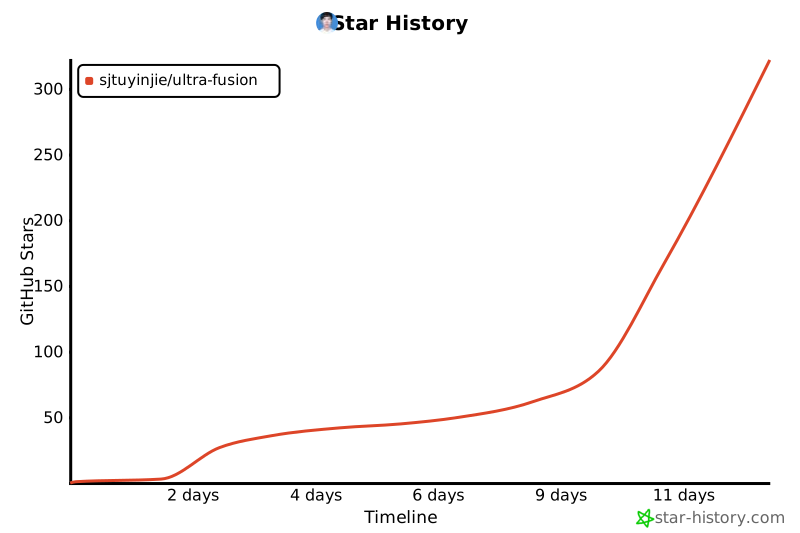
## 6. Star History
[](https://star-history.com/#Ashutosh00710/github-readme-activity-graph&Timeline)