# expandable_bottom_sheet
**Repository Path**: luy7788/expandable_bottom_sheet
## Basic Information
- **Project Name**: expandable_bottom_sheet
- **Description**: 仿高德地图,底部拖出控件
- **Primary Language**: Unknown
- **License**: MIT
- **Default Branch**: dev
- **Homepage**: None
- **GVP Project**: No
## Statistics
- **Stars**: 0
- **Forks**: 0
- **Created**: 2024-01-15
- **Last Updated**: 2024-01-15
## Categories & Tags
**Categories**: Uncategorized
**Tags**: None
## README
# ExpandableBottomSheet
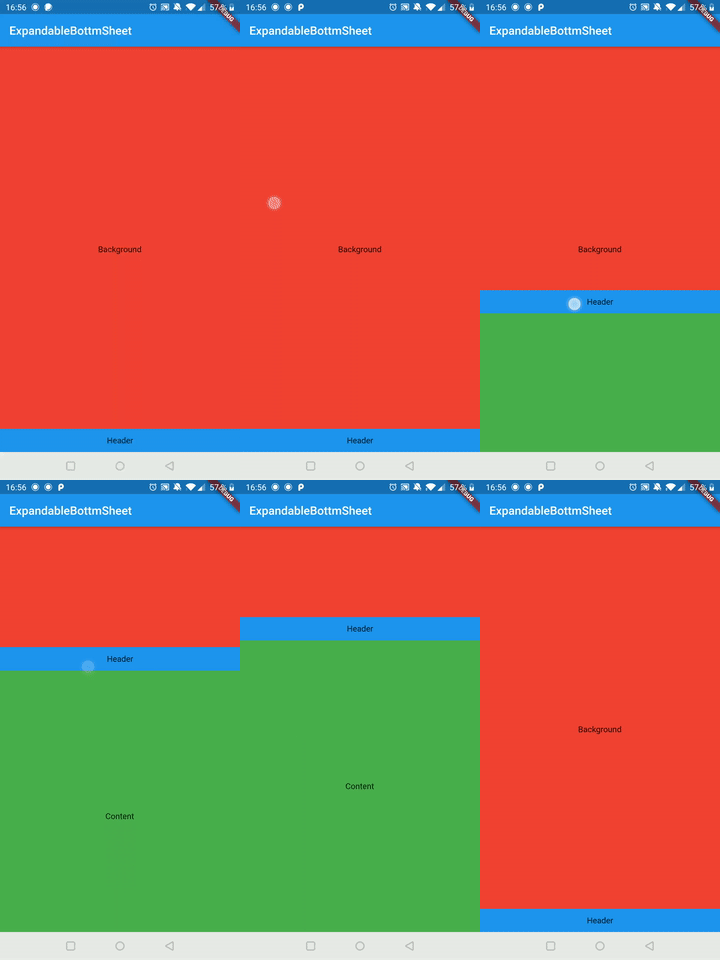
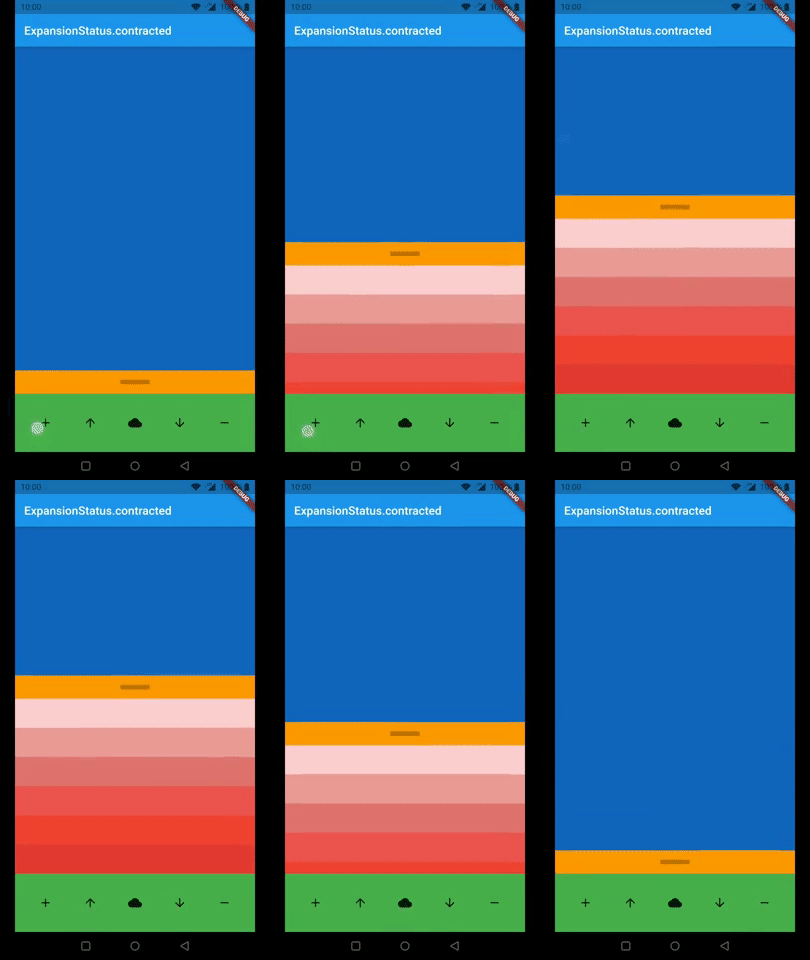
*This is a BottomSheet with a draggable height like the Google Maps App on Android.*
If you have suggestions or find bugs please write an issue at [github](https://github.com/torbenkeller/expandable_bottom_sheet/issues).
PR's are welcome.
 |
 |
## Arguments
Argument | Description
--- | ---
expandableContent | This is the widget which you can hide and show by dragging. It has to be a widget with a constant height.
background | This is the widget behind the `expandableContent` which holds usually the content of your page.
persistentHeader | This is a Widget which is on top of the `expandableContent` and will never be hidden. It is made for a widget which indicates the user he can expand the content by dragging.
persistentFooter | This is a widget which is always shown at the bottom. The `expandableContent`is if it is expanded on top of it so you don't need margin to see all of your content. You can use it for example for navigation or a menu.
persistentContentHeight | This is the height of the content which will never been contracted. It only relates to `expandableContent`. `persistentHeader` and `persistentFooter` will not be affected by this.
animationDurationExtend | This is the duration for the animation if you stop dragging with high speed.
animationDurationContract | is the duration for the animation to bottom if you stop dragging with high speed. If it is `null` `animationDurationExtend` will be used.
animationCurveExpand | This is the curve of the animation for expanding the `expandableContent` if the drag ended with high speed.
animationCurveContract | This is the curve of the animation for contracting the `expandableContent` if the drag ended with high speed.
onIsExtendedCallback | This will be executed if the extend reaches its maximum.
onIsContractedCallback | This will be executed if the extend reaches its minimum.
enableToggle | This will enable tap to toggle option on header.
# Examples
This are two examples how to use the ExpandableBottomSheet
## Import Library
```dart
import 'package:expandable_bottom_sheet/expandable_bottom_sheet.dart';
```
## Easy Example
```dart
ExpandableBottomSheet(
background: Container(
color: Colors.red,
child: Center(
child: Text('Background'),
),
),
persistentHeader: Container(
height: 40,
color: Colors.blue,
child: Center(
child: Text('Header'),
),
),
expandableContent: Container(
height: 500,
color: Colors.green,
child: Center(
child: Text('Content'),
),
),
);
```
## Call expand, contract or status programmatically
```dart
...
GlobalKey key = new GlobalKey();
...
@override
Widget build(BuildContext context) {
return ExpandableBottomSheet(
key: key
...
);
}
void expand() => key.currentState.expand();
void contract() key.currentState.contract();
ExpansionStatus status() => key.currentState.expansionStatus;
```
## Expert Example
```dart
class ExampleExpert extends StatefulWidget {
@override
_ExampleExpertState createState() => _ExampleExpertState();
}
class _ExampleExpertState extends State {
GlobalKey key = new GlobalKey();
int _contentAmount = 0;
ExpansionStatus _expansionStatus = ExpansionStatus.contracted;
@override
Widget build(BuildContext context) {
return MaterialApp(
home: Scaffold(
appBar: AppBar(
title: Text(_expansionStatus.toString()),
),
body: ExpandableBottomSheet(
//use the key to get access to expand(), contract() and expansionStatus
key: key,
//optional
//callbacks (use it for example for an animation in your header)
onIsContractedCallback: () => print('contracted'),
onIsExtendedCallback: () => print('extended'),
//optional; default: Duration(milliseconds: 250)
//The durations of the animations.
animationDurationExtend: Duration(milliseconds: 500),
animationDurationContract: Duration(milliseconds: 250),
//optional; default: Curves.ease
//The curves of the animations.
animationCurveExpand: Curves.bounceOut,
animationCurveContract: Curves.ease,
//optional
//The content extend will be at least this height. If the content
//height is smaller than the persistentContentHeight it will be
//animated on a height change.
//You can use it for example if you have no header.
persistentContentHeight: 220,
//required
//This is the widget which will be overlapped by the bottom sheet.
background: Container(
color: Colors.blue[800],
),
//optional
//This widget is sticking above the content and will never be contracted.
persistentHeader: Container(
color: Colors.orange,
constraints: BoxConstraints.expand(height: 40),
child: Center(
child: Container(
height: 8.0,
width: 50.0,
color: Color.fromARGB((0.25 * 255).round(), 0, 0, 0),
),
),
),
//required
//This is the content of the bottom sheet which will be extendable by dragging.
expandableContent: Container(
constraints: BoxConstraints(maxHeight: 400),
child: SingleChildScrollView(
child: Column(
mainAxisSize: MainAxisSize.min,
children: [
for (int i = 0; i < _contentAmount; i++)
Container(
height: 50,
color: Colors.red[((i % 8) + 1) * 100],
),
],
),
),
),
//optional
//This is a widget aligned to the bottom of the screen and stays there.
//You can use this for example for navigation.
persistentFooter: Container(
color: Colors.green,
height: 100,
child: Row(
mainAxisSize: MainAxisSize.max,
mainAxisAlignment: MainAxisAlignment.spaceEvenly,
children: [
IconButton(
icon: Icon(Icons.add),
onPressed: () => setState(() {
_contentAmount++;
}),
),
IconButton(
icon: Icon(Icons.arrow_upward),
onPressed: () => setState(() {
key.currentState!.expand();
}),
),
IconButton(
icon: Icon(Icons.cloud),
onPressed: () => setState(() {
_expansionStatus = key.currentState!.expansionStatus;
}),
),
IconButton(
icon: Icon(Icons.arrow_downward),
onPressed: () => setState(() {
key.currentState!.contract();
}),
),
IconButton(
icon: Icon(Icons.remove),
onPressed: () => setState(() {
if (_contentAmount > 0) _contentAmount--;
}),
),
],
),
),
),
),
);
}
}
```