# ChubaoFS
**Repository Path**: lotsptr/chubaofs
## Basic Information
- **Project Name**: ChubaoFS
- **Description**: ChubaoFS(储宝文件系统)是为大规模容器平台设计的分布式文件系统
- **Primary Language**: Go
- **License**: Apache-2.0
- **Default Branch**: master
- **Homepage**: https://www.oschina.net/p/chubaofs
- **GVP Project**: No
## Statistics
- **Stars**: 0
- **Forks**: 7
- **Created**: 2020-11-02
- **Last Updated**: 2020-12-19
## Categories & Tags
**Categories**: Uncategorized
**Tags**: None
## README
# ChubaoFS
[](https://www.cncf.io/sandbox-projects)
[](https://travis-ci.org/chubaofs/chubaofs)
[](https://github.com/chubaofs/chubaofs/blob/master/LICENSE)
[](https://golang.org/)
[](https://goreportcard.com/report/github.com/chubaofs/chubaofs)
[](https://chubaofs.readthedocs.io/en/latest/?badge=latest)
[](https://app.fossa.io/projects/git%2Bgithub.com%2Fchubaofs%2Fcfs?ref=badge_shield)
[](https://bestpractices.coreinfrastructure.org/projects/2761)
| Community Meeting|
|------------------|
| The ChubaoFS Project holds bi-weekly community online meeting. To join or watch previous meeting notes and recordings, please see [meeting schedule](https://github.com/chubaofs/community/wiki/Meeting-Schedule) and [meeting minutes](https://github.com/chubaofs/community/wiki/Meeting-Agenda-and-Notes). |
**Note**: The `master` branch may be in an *unstable or even broken state* during development.
Please use [releases](https://github.com/chubaofs/chubaofs/releases) instead of the `master` branch in order to get a stable set of binaries.
Community Meeting|
|------------------|
| The ChubaoFS Project holds bi-weekly community online meeting. To join or watch previous meeting notes and recordings, please see [meeting schedule](https://github.com/chubaofs/community/wiki/Meeting-Schedule) and [meeting minutes](https://github.com/chubaofs/community/wiki/Meeting-Agenda-and-Notes). |
**Note**: The `master` branch may be in an *unstable or even broken state* during development.
Please use [releases](https://github.com/chubaofs/chubaofs/releases) instead of the `master` branch in order to get a stable set of binaries.

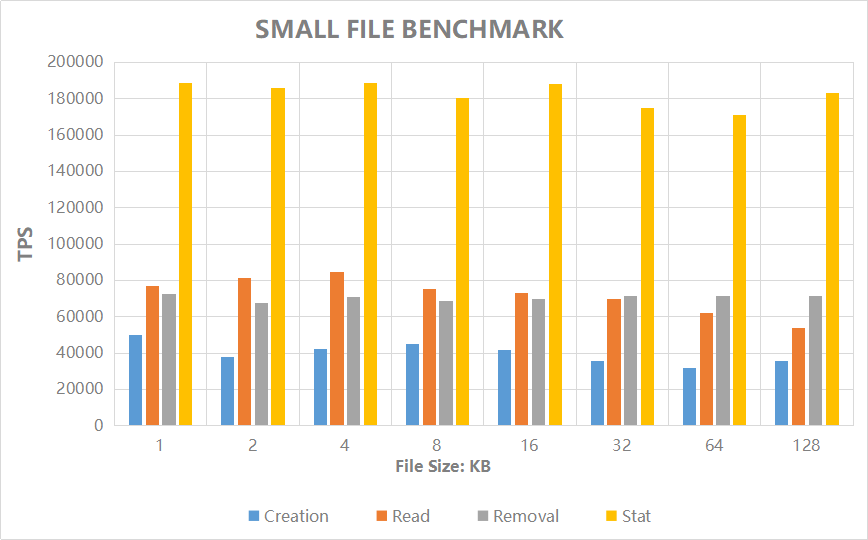 |File Size (KB) | 1 | 2 | 4 | 8 | 16 | 32 | 64 | 128 |
|:-|:-|:-|:-|:-|:-|:-|:-|:-|
|Creation (TPS) |70383 |70383 |73738 |74617 |69479 |67435 |47540 |27147 |
|Read (TPS) |108600 |118193 |118346 |122975 |116374 |110795 |90462 |62082 |
|Removal (TPS) |87648 |84651 |83532 |79279 |85498 |86523 |80946 |84441 |
|Stat (TPS) |231961 |263270 |264207 |252309 |240244 |244906 |273576 |242930|
Refer to [chubaofs.readthedocs.io](https://chubaofs.readthedocs.io/en/latest/evaluation.html) for performance and scalability of `IO` and `Metadata`.
## Build ChubaoFS
### Build for x86
```
$ git clone http://github.com/chubaofs/chubaofs.git
$ cd chubaofs
$ make
```
### Build for arm64
For example,the current chubaofs directory is /root/arm64/chubaofs,build.sh will auto download follow source codes to vendor/dep directory :
bzip2-1.0.6 lz4-1.9.2 zlib-1.2.11 zstd-1.4.5
gcc version as v4 or v5:
```
cd /root/arm64/chubaofs
export CPUTYPE=arm64_gcc4 && bash ./build.sh
```
gcc version as v9 :
```
export CPUTYPE=arm64_gcc9 && bash ./build.sh
```
#### Also support cross compiler with docker:
gcc version as v4, support Ububtu 14.04 and up version,CentOS7.6 and up version. Check libstdc++.so.6 version must more than `GLIBCXX_3.4.19',if fail please update libstdc++.
```
cd /root/arm64/chubaofs
docker build --rm --tag arm64_gcc4_golang1_13_ubuntu_14_04_chubaofs ./build/compile/arm64/gcc4
make dist-clean
docker run -v /root/arm64/chubaofs:/root/chubaofs arm64_gcc4_golang1_13_ubuntu_14_04_chubaofs /root/buildcfs.sh
```
Remove image:
```
docker image remove -f arm64_gcc4_golang1_13_ubuntu_14_04_chubaofs
```
## Yum Tools to Run a ChubaoFS Cluster for CentOS 7+
The list of RPM packages dependencies can be installed with:
```
$ yum install http://storage.jd.com/chubaofsrpm/latest/cfs-install-latest-el7.x86_64.rpm
$ cd /cfs/install
$ tree -L 2
.
├── install_cfs.yml
├── install.sh
├── iplist
├── src
└── template
├── client.json.j2
├── create_vol.sh.j2
├── datanode.json.j2
├── grafana
├── master.json.j2
└── metanode.json.j2
```
Set parameters of the ChubaoFS cluster in `iplist`.
1. `[master]`, `[datanode]`, `[metanode]`, `[monitor]`, `[client]` modules define IP addresses of each role.
2. `#datanode config` module defines parameters of DataNodes. `datanode_disks` defines `path` and `reserved space` separated by ":". The `path` is where the data store in, so make sure it exists and has at least 30GB of space; `reserved space` is the minimum free space(Bytes) reserved for the path.
3. `[cfs:vars]` module defines parameters for SSH connection. So make sure the port, username and password for SSH connection is unified before start.
4. `#metanode config` module defines parameters of MetaNodes. `metanode_totalMem` defines the maximum memory(Bytes) can be use by MetaNode process.
```yaml
[master]
10.196.0.1
10.196.0.2
10.196.0.3
[datanode]
...
[cfs:vars]
ansible_ssh_port=22
ansible_ssh_user=root
ansible_ssh_pass="password"
...
#datanode config
...
datanode_disks = '"/data0:10737418240","/data1:10737418240"'
...
#metanode config
...
metanode_totalMem = "28589934592"
...
```
For more configurations please refer to [documentation](https://chubaofs.readthedocs.io/en/latest/user-guide/master.html).
Start the resources of ChubaoFS cluster with script `install.sh`. (make sure the Master is started first)
```
$ bash install.sh -h
Usage: install.sh -r | --role [datanode | metanode | master | objectnode | console | monitor | client | all | createvol ] [2.1.0 or latest]
$ bash install.sh -r master
$ bash install.sh -r metanode
$ bash install.sh -r datanode
$ bash install.sh -r monitor
$ bash install.sh -r client
$ bash install.sh -r console
```
Check mount point at `/cfs/mountpoint` on `client` node defined in `iplist`.
Open [http://[the IP of console system]](https:/github.com/chubaofs/chubaofs) through a browser for web console system(the IP of console system is defined in `iplist`). In console default user is `root`, password is `ChubaoFSRoot`. In monitor default user is `admin`,password is `123456`.
## Run a ChubaoFS Cluster within Docker
A helper tool called `run_docker.sh` (under the `docker` directory) has been provided to run ChubaoFS with [docker-compose](https://docs.docker.com/compose/).
```
$ docker/run_docker.sh -r -d /data/disk
```
Note that **/data/disk** can be any directory but please make sure it has at least 10G available space.
To check the mount status, use the `mount` command in the client docker shell:
```
$ mount | grep chubaofs
```
To view grafana monitor metrics, open http://127.0.0.1:3000 in browser and login with `admin/123456`.
To run server and client separately, use the following commands:
```
$ docker/run_docker.sh -b
$ docker/run_docker.sh -s -d /data/disk
$ docker/run_docker.sh -c
$ docker/run_docker.sh -m
```
For more usage:
```
$ docker/run_docker.sh -h
```
## Helm chart to Run a ChubaoFS Cluster in Kubernetes
The [chubaofs-helm](https://github.com/chubaofs/chubaofs-helm) repository can help you deploy ChubaoFS cluster quickly in containers orchestrated by kubernetes.
Kubernetes 1.12+ and Helm 3 are required. chubaofs-helm has already integrated ChubaoFS CSI plugin
### Download chubaofs-helm
```
$ git clone https://github.com/chubaofs/chubaofs-helm
$ cd chubaofs-helm
```
### Copy kubeconfig file
ChubaoFS CSI driver will use client-go to connect the Kubernetes API Server. First you need to copy the kubeconfig file to `chubaofs-helm/chubaofs/config/` directory, and rename to kubeconfig
```
$ cp ~/.kube/config chubaofs/config/kubeconfig
```
### Create configuration yaml file
Create a `chubaofs.yaml` file, and put it in a user-defined path. Suppose this is where we put it.
```
$ cat ~/chubaofs.yaml
```
``` yaml
path:
data: /chubaofs/data
log: /chubaofs/log
datanode:
disks:
- /data0:21474836480
- /data1:21474836480
metanode:
total_mem: "26843545600"
provisioner:
kubelet_path: /var/lib/kubelet
```
> Note that `chubaofs-helm/chubaofs/values.yaml` shows all the config parameters of ChubaoFS.
> The parameters `path.data` and `path.log` are used to store server data and logs, respectively.
### Add labels to Kubernetes node
You should tag each Kubernetes node with the appropriate labels accorindly for server node and CSI node of ChubaoFS.
```
kubectl label node chuabaofs-master=enabled
kubectl label node chuabaofs-metanode=enabled
kubectl label node chuabaofs-datanode=enabled
kubectl label node chubaofs-csi-node=enabled
```
### Deploy ChubaoFS cluster
```
$ helm install chubaofs ./chubaofs -f ~/chubaofs.yaml
```
## Reference
Haifeng Liu, et al., CFS: A Distributed File System for Large Scale Container Platforms. SIGMOD‘19, June 30-July 5, 2019, Amsterdam, Netherlands.
For more information, please refer to https://dl.acm.org/citation.cfm?doid=3299869.3314046 and https://arxiv.org/abs/1911.03001
## Contributing
Recommend the standard GitHub flow based on forking and pull requests.
|File Size (KB) | 1 | 2 | 4 | 8 | 16 | 32 | 64 | 128 |
|:-|:-|:-|:-|:-|:-|:-|:-|:-|
|Creation (TPS) |70383 |70383 |73738 |74617 |69479 |67435 |47540 |27147 |
|Read (TPS) |108600 |118193 |118346 |122975 |116374 |110795 |90462 |62082 |
|Removal (TPS) |87648 |84651 |83532 |79279 |85498 |86523 |80946 |84441 |
|Stat (TPS) |231961 |263270 |264207 |252309 |240244 |244906 |273576 |242930|
Refer to [chubaofs.readthedocs.io](https://chubaofs.readthedocs.io/en/latest/evaluation.html) for performance and scalability of `IO` and `Metadata`.
## Build ChubaoFS
### Build for x86
```
$ git clone http://github.com/chubaofs/chubaofs.git
$ cd chubaofs
$ make
```
### Build for arm64
For example,the current chubaofs directory is /root/arm64/chubaofs,build.sh will auto download follow source codes to vendor/dep directory :
bzip2-1.0.6 lz4-1.9.2 zlib-1.2.11 zstd-1.4.5
gcc version as v4 or v5:
```
cd /root/arm64/chubaofs
export CPUTYPE=arm64_gcc4 && bash ./build.sh
```
gcc version as v9 :
```
export CPUTYPE=arm64_gcc9 && bash ./build.sh
```
#### Also support cross compiler with docker:
gcc version as v4, support Ububtu 14.04 and up version,CentOS7.6 and up version. Check libstdc++.so.6 version must more than `GLIBCXX_3.4.19',if fail please update libstdc++.
```
cd /root/arm64/chubaofs
docker build --rm --tag arm64_gcc4_golang1_13_ubuntu_14_04_chubaofs ./build/compile/arm64/gcc4
make dist-clean
docker run -v /root/arm64/chubaofs:/root/chubaofs arm64_gcc4_golang1_13_ubuntu_14_04_chubaofs /root/buildcfs.sh
```
Remove image:
```
docker image remove -f arm64_gcc4_golang1_13_ubuntu_14_04_chubaofs
```
## Yum Tools to Run a ChubaoFS Cluster for CentOS 7+
The list of RPM packages dependencies can be installed with:
```
$ yum install http://storage.jd.com/chubaofsrpm/latest/cfs-install-latest-el7.x86_64.rpm
$ cd /cfs/install
$ tree -L 2
.
├── install_cfs.yml
├── install.sh
├── iplist
├── src
└── template
├── client.json.j2
├── create_vol.sh.j2
├── datanode.json.j2
├── grafana
├── master.json.j2
└── metanode.json.j2
```
Set parameters of the ChubaoFS cluster in `iplist`.
1. `[master]`, `[datanode]`, `[metanode]`, `[monitor]`, `[client]` modules define IP addresses of each role.
2. `#datanode config` module defines parameters of DataNodes. `datanode_disks` defines `path` and `reserved space` separated by ":". The `path` is where the data store in, so make sure it exists and has at least 30GB of space; `reserved space` is the minimum free space(Bytes) reserved for the path.
3. `[cfs:vars]` module defines parameters for SSH connection. So make sure the port, username and password for SSH connection is unified before start.
4. `#metanode config` module defines parameters of MetaNodes. `metanode_totalMem` defines the maximum memory(Bytes) can be use by MetaNode process.
```yaml
[master]
10.196.0.1
10.196.0.2
10.196.0.3
[datanode]
...
[cfs:vars]
ansible_ssh_port=22
ansible_ssh_user=root
ansible_ssh_pass="password"
...
#datanode config
...
datanode_disks = '"/data0:10737418240","/data1:10737418240"'
...
#metanode config
...
metanode_totalMem = "28589934592"
...
```
For more configurations please refer to [documentation](https://chubaofs.readthedocs.io/en/latest/user-guide/master.html).
Start the resources of ChubaoFS cluster with script `install.sh`. (make sure the Master is started first)
```
$ bash install.sh -h
Usage: install.sh -r | --role [datanode | metanode | master | objectnode | console | monitor | client | all | createvol ] [2.1.0 or latest]
$ bash install.sh -r master
$ bash install.sh -r metanode
$ bash install.sh -r datanode
$ bash install.sh -r monitor
$ bash install.sh -r client
$ bash install.sh -r console
```
Check mount point at `/cfs/mountpoint` on `client` node defined in `iplist`.
Open [http://[the IP of console system]](https:/github.com/chubaofs/chubaofs) through a browser for web console system(the IP of console system is defined in `iplist`). In console default user is `root`, password is `ChubaoFSRoot`. In monitor default user is `admin`,password is `123456`.
## Run a ChubaoFS Cluster within Docker
A helper tool called `run_docker.sh` (under the `docker` directory) has been provided to run ChubaoFS with [docker-compose](https://docs.docker.com/compose/).
```
$ docker/run_docker.sh -r -d /data/disk
```
Note that **/data/disk** can be any directory but please make sure it has at least 10G available space.
To check the mount status, use the `mount` command in the client docker shell:
```
$ mount | grep chubaofs
```
To view grafana monitor metrics, open http://127.0.0.1:3000 in browser and login with `admin/123456`.
To run server and client separately, use the following commands:
```
$ docker/run_docker.sh -b
$ docker/run_docker.sh -s -d /data/disk
$ docker/run_docker.sh -c
$ docker/run_docker.sh -m
```
For more usage:
```
$ docker/run_docker.sh -h
```
## Helm chart to Run a ChubaoFS Cluster in Kubernetes
The [chubaofs-helm](https://github.com/chubaofs/chubaofs-helm) repository can help you deploy ChubaoFS cluster quickly in containers orchestrated by kubernetes.
Kubernetes 1.12+ and Helm 3 are required. chubaofs-helm has already integrated ChubaoFS CSI plugin
### Download chubaofs-helm
```
$ git clone https://github.com/chubaofs/chubaofs-helm
$ cd chubaofs-helm
```
### Copy kubeconfig file
ChubaoFS CSI driver will use client-go to connect the Kubernetes API Server. First you need to copy the kubeconfig file to `chubaofs-helm/chubaofs/config/` directory, and rename to kubeconfig
```
$ cp ~/.kube/config chubaofs/config/kubeconfig
```
### Create configuration yaml file
Create a `chubaofs.yaml` file, and put it in a user-defined path. Suppose this is where we put it.
```
$ cat ~/chubaofs.yaml
```
``` yaml
path:
data: /chubaofs/data
log: /chubaofs/log
datanode:
disks:
- /data0:21474836480
- /data1:21474836480
metanode:
total_mem: "26843545600"
provisioner:
kubelet_path: /var/lib/kubelet
```
> Note that `chubaofs-helm/chubaofs/values.yaml` shows all the config parameters of ChubaoFS.
> The parameters `path.data` and `path.log` are used to store server data and logs, respectively.
### Add labels to Kubernetes node
You should tag each Kubernetes node with the appropriate labels accorindly for server node and CSI node of ChubaoFS.
```
kubectl label node chuabaofs-master=enabled
kubectl label node chuabaofs-metanode=enabled
kubectl label node chuabaofs-datanode=enabled
kubectl label node chubaofs-csi-node=enabled
```
### Deploy ChubaoFS cluster
```
$ helm install chubaofs ./chubaofs -f ~/chubaofs.yaml
```
## Reference
Haifeng Liu, et al., CFS: A Distributed File System for Large Scale Container Platforms. SIGMOD‘19, June 30-July 5, 2019, Amsterdam, Netherlands.
For more information, please refer to https://dl.acm.org/citation.cfm?doid=3299869.3314046 and https://arxiv.org/abs/1911.03001
## Contributing
Recommend the standard GitHub flow based on forking and pull requests.
See [CONTRIBUTING.md](CONTRIBUTING.md#workflow) for detail.
## Reporting a security vulnerability
See [security disclosure process](security/README.md) for detail.
## Community
- Twitter: [@ChubaoFS](https://twitter.com/ChubaoFS)
- Mailing list: chubaofs-users@groups.io
- Slack: [chubaofs.slack.com](https://chubaofs.slack.com/)
- WeChat: detail see [here](https://github.com/chubaofs/chubaofs/issues/604).
## Partners and Users
For a list of users and success stories see [ADOPTERS.md](ADOPTERS.md).
## License
ChubaoFS is licensed under the [Apache License, Version 2.0](http://www.apache.org/licenses/LICENSE-2.0).
For detail see [LICENSE](LICENSE) and [NOTICE](NOTICE).
[](https://app.fossa.io/projects/git%2Bgithub.com%2Fchubaofs%2Fcfs?ref=badge_large)