 **See your agent think.** Real-time observability for [OpenClaw](https://github.com/openclaw/openclaw) AI agents.
One command. Zero config. Auto-detects everything.
```bash
pip install clawmetry && clawmetry
```
Opens at **http://localhost:8900** and you're done.
## What You Get
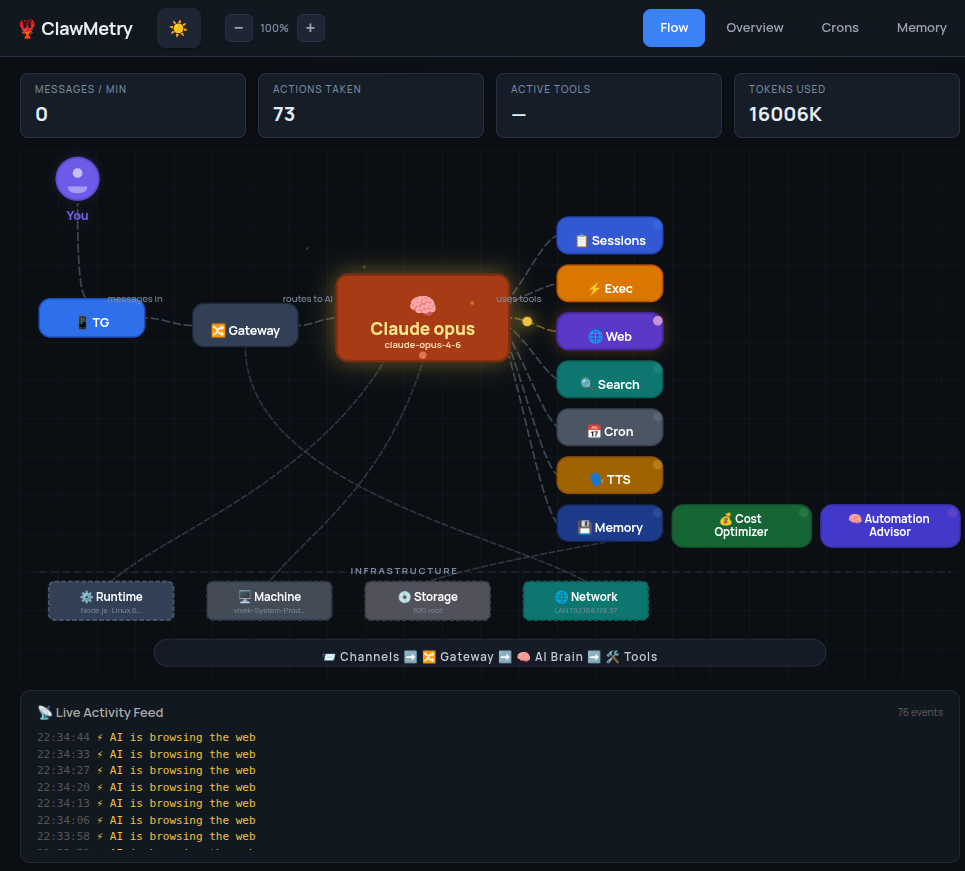
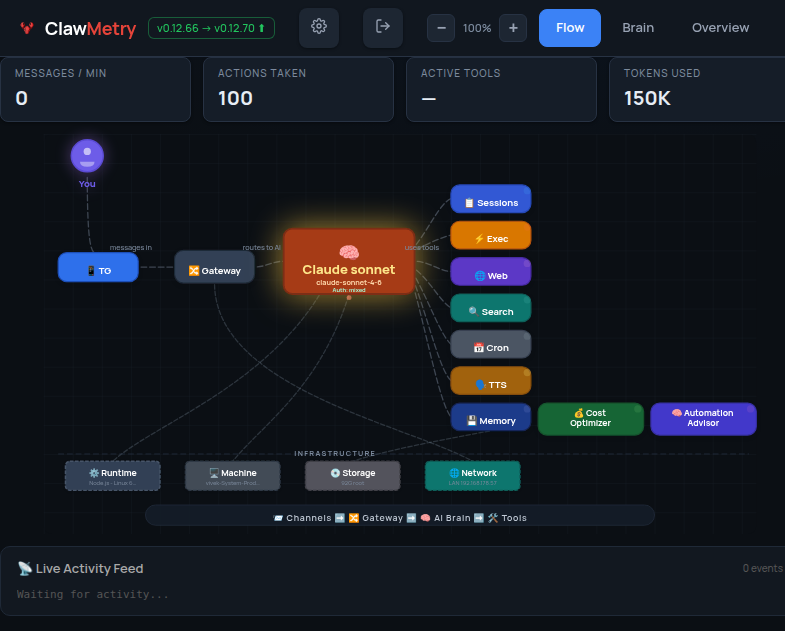
- **Flow** — Live animated diagram showing messages flowing through channels, brain, tools, and back
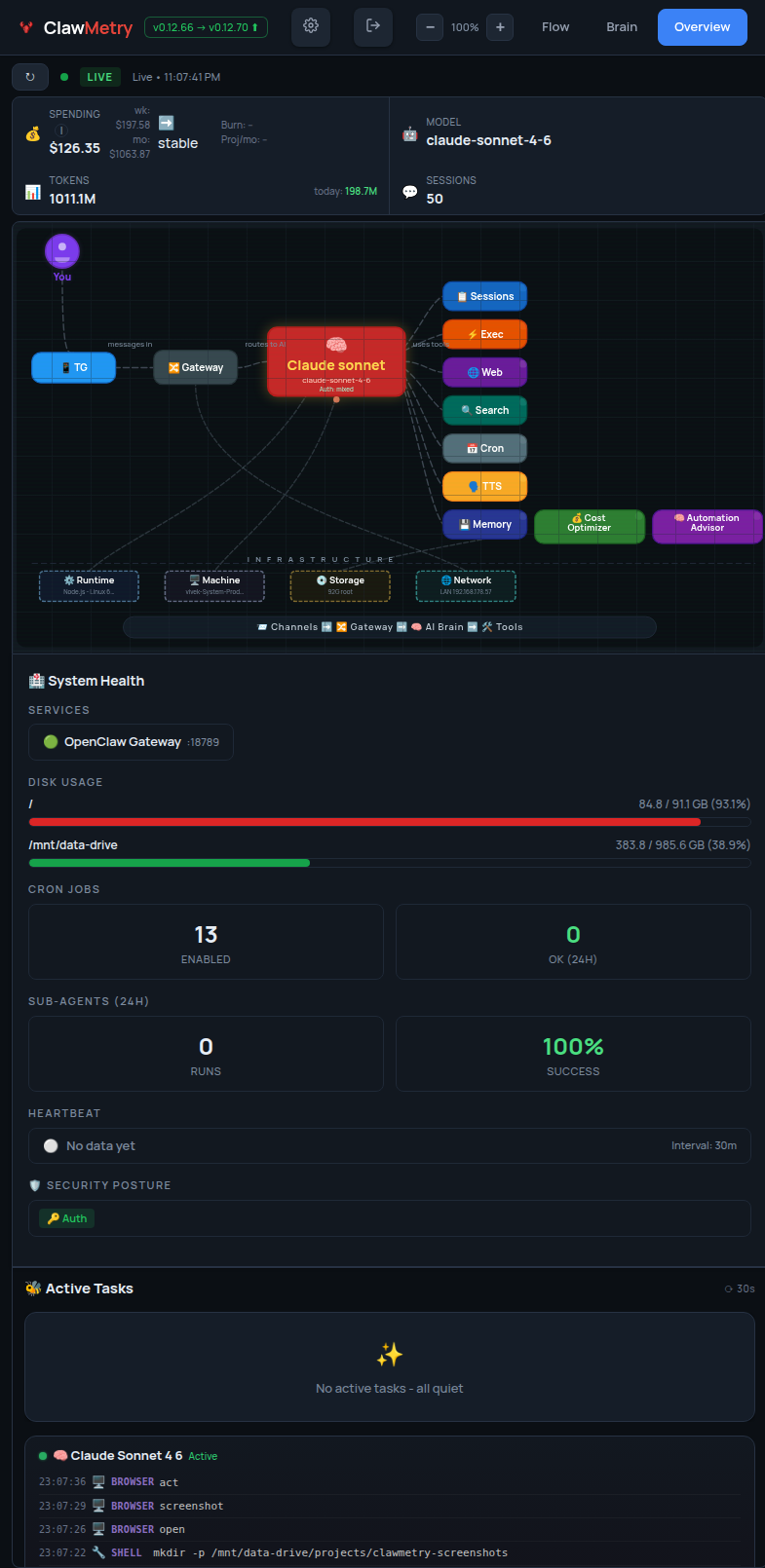
- **Overview** — Health checks, activity heatmap, session counts, model info
- **Usage** — Token and cost tracking with daily/weekly/monthly breakdowns
- **Sessions** — Active agent sessions with model, tokens, last activity
- **Crons** — Scheduled jobs with status, next run, duration
- **Logs** — Color-coded real-time log streaming
- **Memory** — Browse SOUL.md, MEMORY.md, AGENTS.md, daily notes
- **Transcripts** — Chat-bubble UI for reading session histories
## Screenshots
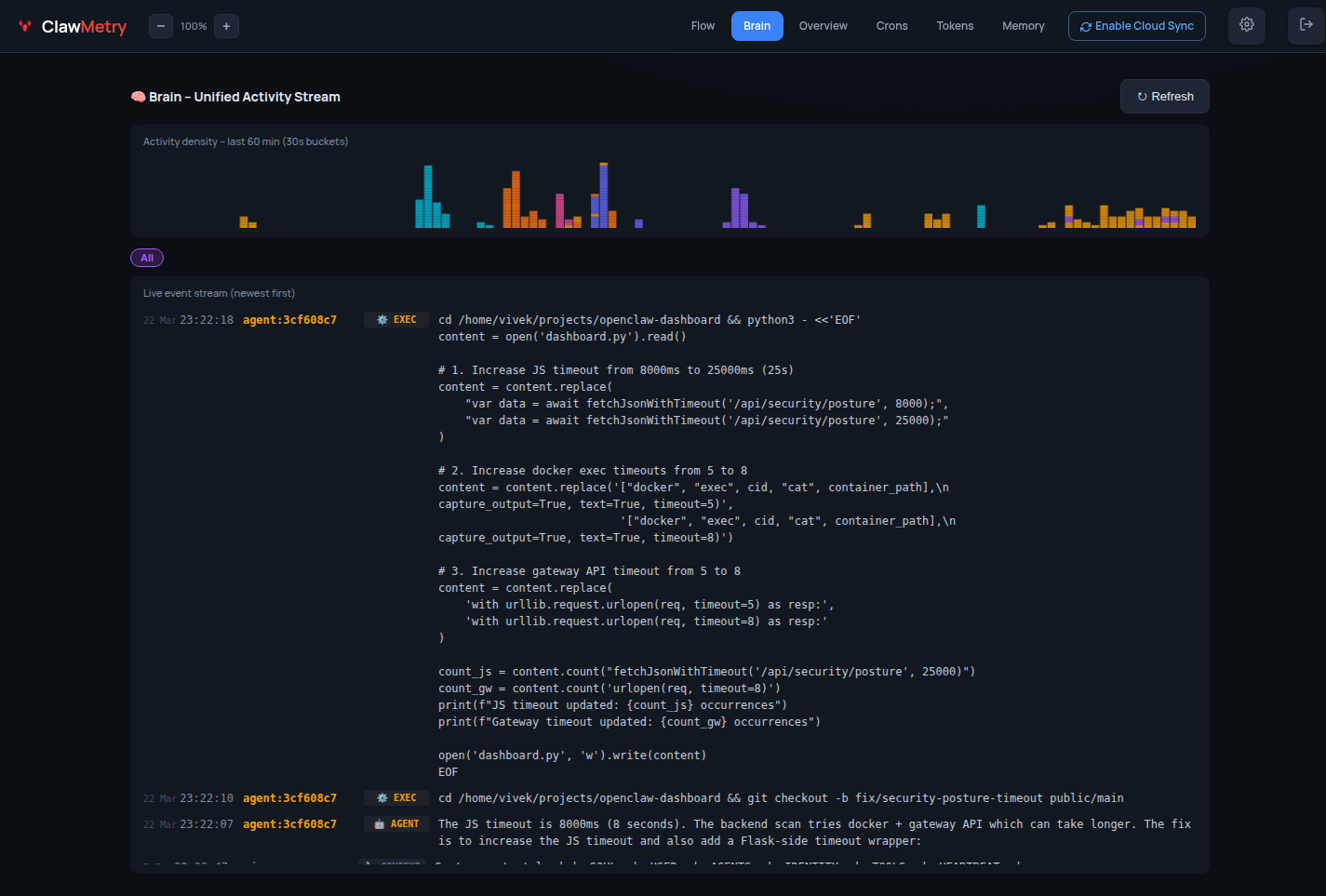
### 🧠 Brain — Live agent event stream
### 📊 Overview — Token usage & session summary
### ⚡ Flow — Real-time tool call feed
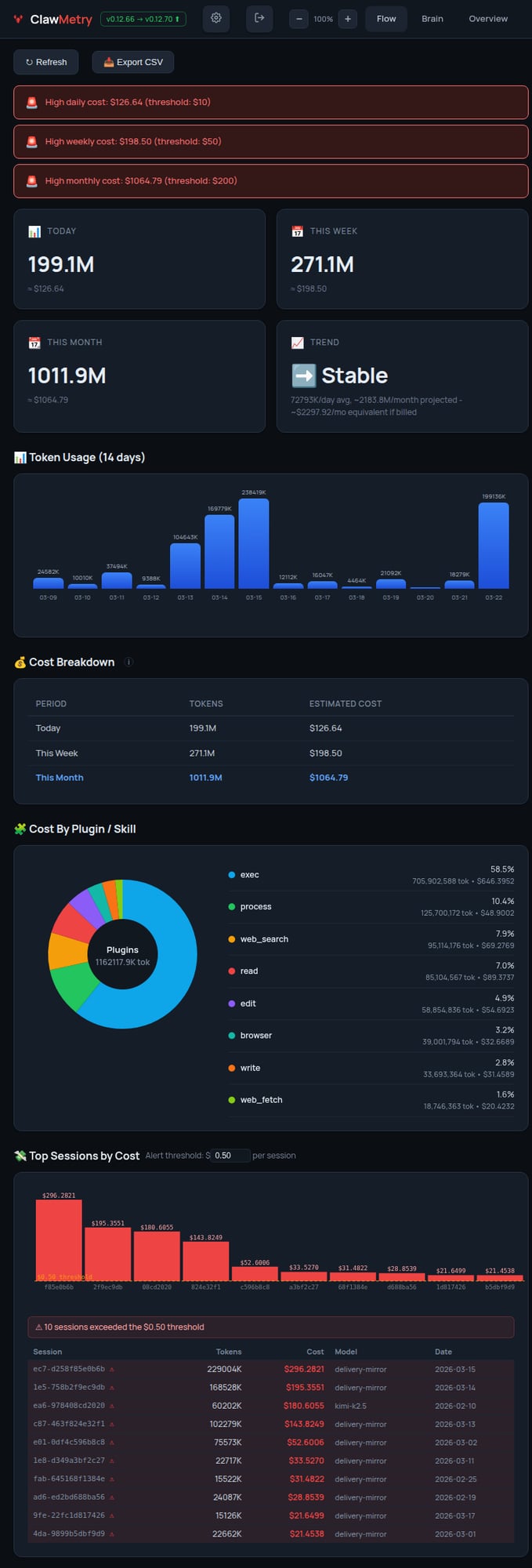
### 💰 Tokens — Cost breakdown by model & session
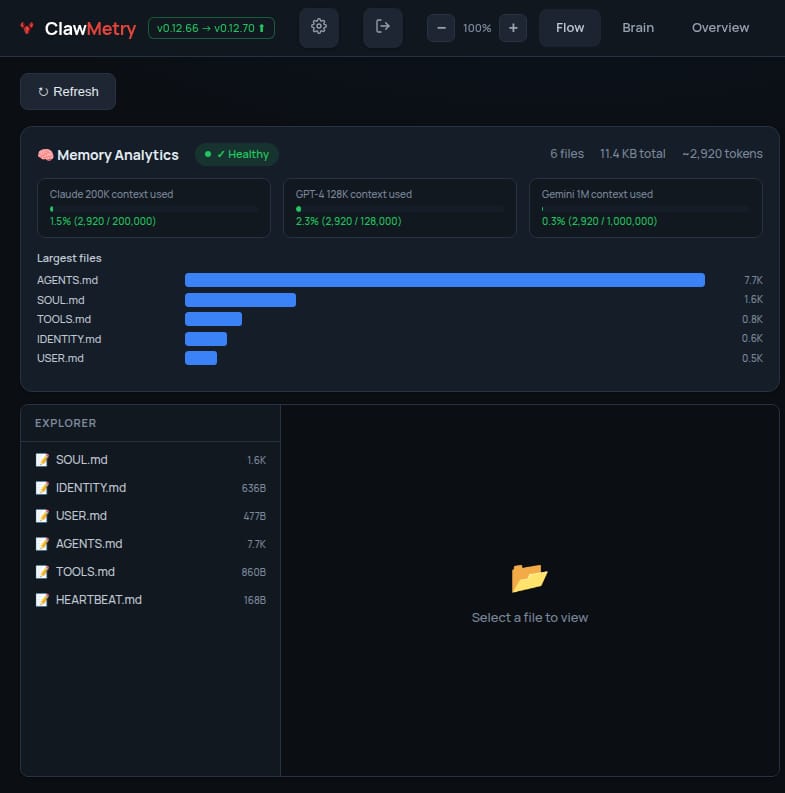
### 🧬 Memory — Workspace file browser
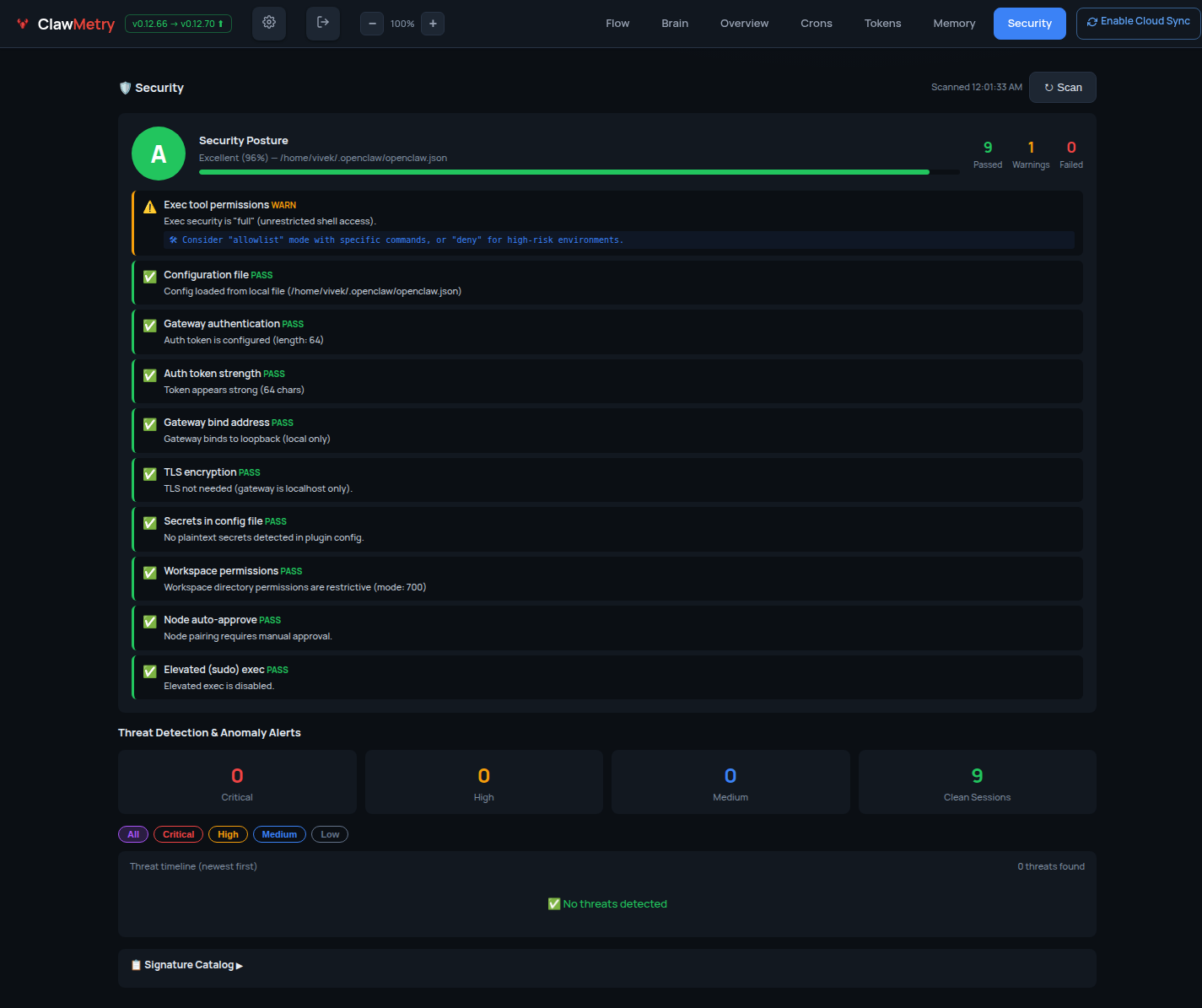
### 🔐 Security — Posture & audit log
## Install
**One-liner (recommended):**
```bash
curl -sSL https://raw.githubusercontent.com/vivekchand/clawmetry/main/install.sh | bash
```
**pip:**
```bash
pip install clawmetry
clawmetry
```
**From source:**
```bash
git clone https://github.com/vivekchand/clawmetry.git
cd clawmetry && pip install flask && python3 dashboard.py
```
## Configuration
Most people don't need any config. ClawMetry auto-detects your workspace, logs, sessions, and crons.
If you do need to customize:
```bash
clawmetry --port 9000 # Custom port (default: 8900)
clawmetry --host 127.0.0.1 # Bind to localhost only
clawmetry --workspace ~/mybot # Custom workspace path
clawmetry --name "Alice" # Your name in Flow visualization
```
All options: `clawmetry --help`
## Supported Channels
ClawMetry shows live activity for every OpenClaw channel you have configured. Only channels that are actually set up in your `openclaw.json` appear in the Flow diagram — unconfigured ones are automatically hidden.
Click any channel node in the Flow to see a live chat bubble view with incoming/outgoing message counts.
| Channel | Status | Live Popup | Notes |
|---------|--------|------------|-------|
| 📱 **Telegram** | ✅ Full | ✅ | Messages, stats, 10s refresh |
| 💬 **iMessage** | ✅ Full | ✅ | Reads `~/Library/Messages/chat.db` directly |
| 💚 **WhatsApp** | ✅ Full | ✅ | Via WhatsApp Web (Baileys) |
| 🔵 **Signal** | ✅ Full | ✅ | Via signal-cli |
| 🟣 **Discord** | ✅ Full | ✅ | Guild + channel detection |
| 🟪 **Slack** | ✅ Full | ✅ | Workspace + channel detection |
| 🌐 **Webchat** | ✅ Full | ✅ | Built-in web UI sessions |
| 📡 **IRC** | ✅ Full | ✅ | Terminal-style bubble UI |
| 🍏 **BlueBubbles** | ✅ Full | ✅ | iMessage via BlueBubbles REST API |
| 🔵 **Google Chat** | ✅ Full | ✅ | Via Chat API webhooks |
| 🟣 **MS Teams** | ✅ Full | ✅ | Via Teams bot plugin |
| 🔷 **Mattermost** | ✅ Full | ✅ | Self-hosted team chat |
| 🟩 **Matrix** | ✅ Full | ✅ | Decentralized, E2EE support |
| 🟢 **LINE** | ✅ Full | ✅ | LINE Messaging API |
| ⚡ **Nostr** | ✅ Full | ✅ | Decentralized NIP-04 DMs |
| 🟣 **Twitch** | ✅ Full | ✅ | Chat via IRC connection |
| 🔷 **Feishu/Lark** | ✅ Full | ✅ | WebSocket event subscription |
| 🔵 **Zalo** | ✅ Full | ✅ | Zalo Bot API |
> **Auto-detection:** ClawMetry reads your `~/.openclaw/openclaw.json` and only renders the channels you've actually configured. No manual setup required.
## Docker Deployment
Want to run ClawMetry in a container? No problem! 🐳
**Quick start with Docker:**
```bash
# Build the image
docker build -t clawmetry .
# Run with default settings
docker run -p 8900:8900 clawmetry
# Or with your OpenClaw workspace mounted
docker run -p 8900:8900 \
-v ~/.openclaw:/root/.openclaw \
-v /tmp/moltbot:/tmp/moltbot \
clawmetry
```
**Docker Compose example:**
```yaml
version: '3.8'
services:
clawmetry:
build: .
ports:
- "8900:8900"
volumes:
- ~/.openclaw:/root/.openclaw:ro
- /tmp/moltbot:/tmp/moltbot:ro
restart: unless-stopped
```
> **Note:** When running in Docker, make sure to mount your OpenClaw workspace and log directories so ClawMetry can auto-detect your setup.
## Requirements
- Python 3.8+
- Flask (installed automatically via pip)
- OpenClaw running on the same machine (or mounted volumes for Docker)
- Linux or macOS
## NemoClaw / OpenShell Support
ClawMetry automatically detects [NemoClaw](https://github.com/NVIDIA/NemoClaw) — NVIDIA's enterprise security wrapper for OpenClaw that runs agents inside sandboxed OpenShell containers.
No extra configuration is needed in most cases. The sync daemon auto-discovers session files whether they live in `~/.openclaw/` on the host or inside an OpenShell container.
### How it works
ClawMetry detects NemoClaw in two ways:
1. **Binary detection** — checks for the `nemoclaw` CLI and runs `nemoclaw status` to get sandbox info
2. **Container detection** — scans running Docker containers for `openshell`, `nemoclaw`, or `ghcr.io/nvidia/` images, then reads sessions via volume mounts or `docker cp`
Session files synced from NemoClaw containers are tagged with `runtime=nemoclaw` and `container_id` metadata in the cloud dashboard, so you can tell them apart from standard OpenClaw sessions at a glance.
### Recommended setup: sync daemon on the HOST
For the best experience, run ClawMetry's sync daemon on the **host machine** (not inside the sandbox). This avoids NemoClaw network policy restrictions.
```bash
# On the host (outside the sandbox)
pip install clawmetry
clawmetry connect
clawmetry sync
```
The sync daemon will automatically find sessions inside any running OpenShell containers.
### Optional: explicit sandbox name
If auto-detection doesn't work, point ClawMetry at the right sandbox:
```bash
export NEMOCLAW_SANDBOX=my-sandbox-name
clawmetry sync
```
### Running inside the sandbox (advanced)
If you must run the sync daemon **inside** the OpenShell sandbox, add this egress rule to your NemoClaw network policy so it can reach the ClawMetry ingest API:
```yaml
# nemoclaw-policy.yaml
network:
egress:
- host: ingest.clawmetry.com
port: 443
protocol: https
```
Apply with:
```bash
nemoclaw policy apply --file nemoclaw-policy.yaml
```
### Ports and endpoints
| Endpoint | Port | Protocol | Required |
|---|---|---|---|
| `ingest.clawmetry.com` | 443 | HTTPS | Yes (sync daemon → cloud) |
| `localhost:8900` | 8900 | HTTP | Yes (local dashboard UI) |
| Docker socket (`/var/run/docker.sock`) | — | Unix socket | For container session discovery |
The sync daemon only makes outbound HTTPS calls to `ingest.clawmetry.com`. No inbound ports are required.
---
## Cloud Deployment
See the **[Cloud Testing Guide](https://github.com/vivekchand/clawmetry/blob/main/docs/CLOUD_TESTING.md)** for SSH tunnels, reverse proxy, and Docker.
## Testing
This project is tested with BrowserStack.
[](https://browserstack.com)
## Star History
**See your agent think.** Real-time observability for [OpenClaw](https://github.com/openclaw/openclaw) AI agents.
One command. Zero config. Auto-detects everything.
```bash
pip install clawmetry && clawmetry
```
Opens at **http://localhost:8900** and you're done.

## What You Get
- **Flow** — Live animated diagram showing messages flowing through channels, brain, tools, and back
- **Overview** — Health checks, activity heatmap, session counts, model info
- **Usage** — Token and cost tracking with daily/weekly/monthly breakdowns
- **Sessions** — Active agent sessions with model, tokens, last activity
- **Crons** — Scheduled jobs with status, next run, duration
- **Logs** — Color-coded real-time log streaming
- **Memory** — Browse SOUL.md, MEMORY.md, AGENTS.md, daily notes
- **Transcripts** — Chat-bubble UI for reading session histories
## Screenshots
### 🧠 Brain — Live agent event stream

### 📊 Overview — Token usage & session summary

### ⚡ Flow — Real-time tool call feed

### 💰 Tokens — Cost breakdown by model & session

### 🧬 Memory — Workspace file browser

### 🔐 Security — Posture & audit log

## Install
**One-liner (recommended):**
```bash
curl -sSL https://raw.githubusercontent.com/vivekchand/clawmetry/main/install.sh | bash
```
**pip:**
```bash
pip install clawmetry
clawmetry
```
**From source:**
```bash
git clone https://github.com/vivekchand/clawmetry.git
cd clawmetry && pip install flask && python3 dashboard.py
```
## Configuration
Most people don't need any config. ClawMetry auto-detects your workspace, logs, sessions, and crons.
If you do need to customize:
```bash
clawmetry --port 9000 # Custom port (default: 8900)
clawmetry --host 127.0.0.1 # Bind to localhost only
clawmetry --workspace ~/mybot # Custom workspace path
clawmetry --name "Alice" # Your name in Flow visualization
```
All options: `clawmetry --help`
## Supported Channels
ClawMetry shows live activity for every OpenClaw channel you have configured. Only channels that are actually set up in your `openclaw.json` appear in the Flow diagram — unconfigured ones are automatically hidden.
Click any channel node in the Flow to see a live chat bubble view with incoming/outgoing message counts.
| Channel | Status | Live Popup | Notes |
|---------|--------|------------|-------|
| 📱 **Telegram** | ✅ Full | ✅ | Messages, stats, 10s refresh |
| 💬 **iMessage** | ✅ Full | ✅ | Reads `~/Library/Messages/chat.db` directly |
| 💚 **WhatsApp** | ✅ Full | ✅ | Via WhatsApp Web (Baileys) |
| 🔵 **Signal** | ✅ Full | ✅ | Via signal-cli |
| 🟣 **Discord** | ✅ Full | ✅ | Guild + channel detection |
| 🟪 **Slack** | ✅ Full | ✅ | Workspace + channel detection |
| 🌐 **Webchat** | ✅ Full | ✅ | Built-in web UI sessions |
| 📡 **IRC** | ✅ Full | ✅ | Terminal-style bubble UI |
| 🍏 **BlueBubbles** | ✅ Full | ✅ | iMessage via BlueBubbles REST API |
| 🔵 **Google Chat** | ✅ Full | ✅ | Via Chat API webhooks |
| 🟣 **MS Teams** | ✅ Full | ✅ | Via Teams bot plugin |
| 🔷 **Mattermost** | ✅ Full | ✅ | Self-hosted team chat |
| 🟩 **Matrix** | ✅ Full | ✅ | Decentralized, E2EE support |
| 🟢 **LINE** | ✅ Full | ✅ | LINE Messaging API |
| ⚡ **Nostr** | ✅ Full | ✅ | Decentralized NIP-04 DMs |
| 🟣 **Twitch** | ✅ Full | ✅ | Chat via IRC connection |
| 🔷 **Feishu/Lark** | ✅ Full | ✅ | WebSocket event subscription |
| 🔵 **Zalo** | ✅ Full | ✅ | Zalo Bot API |
> **Auto-detection:** ClawMetry reads your `~/.openclaw/openclaw.json` and only renders the channels you've actually configured. No manual setup required.
## Docker Deployment
Want to run ClawMetry in a container? No problem! 🐳
**Quick start with Docker:**
```bash
# Build the image
docker build -t clawmetry .
# Run with default settings
docker run -p 8900:8900 clawmetry
# Or with your OpenClaw workspace mounted
docker run -p 8900:8900 \
-v ~/.openclaw:/root/.openclaw \
-v /tmp/moltbot:/tmp/moltbot \
clawmetry
```
**Docker Compose example:**
```yaml
version: '3.8'
services:
clawmetry:
build: .
ports:
- "8900:8900"
volumes:
- ~/.openclaw:/root/.openclaw:ro
- /tmp/moltbot:/tmp/moltbot:ro
restart: unless-stopped
```
> **Note:** When running in Docker, make sure to mount your OpenClaw workspace and log directories so ClawMetry can auto-detect your setup.
## Requirements
- Python 3.8+
- Flask (installed automatically via pip)
- OpenClaw running on the same machine (or mounted volumes for Docker)
- Linux or macOS
## NemoClaw / OpenShell Support
ClawMetry automatically detects [NemoClaw](https://github.com/NVIDIA/NemoClaw) — NVIDIA's enterprise security wrapper for OpenClaw that runs agents inside sandboxed OpenShell containers.
No extra configuration is needed in most cases. The sync daemon auto-discovers session files whether they live in `~/.openclaw/` on the host or inside an OpenShell container.
### How it works
ClawMetry detects NemoClaw in two ways:
1. **Binary detection** — checks for the `nemoclaw` CLI and runs `nemoclaw status` to get sandbox info
2. **Container detection** — scans running Docker containers for `openshell`, `nemoclaw`, or `ghcr.io/nvidia/` images, then reads sessions via volume mounts or `docker cp`
Session files synced from NemoClaw containers are tagged with `runtime=nemoclaw` and `container_id` metadata in the cloud dashboard, so you can tell them apart from standard OpenClaw sessions at a glance.
### Recommended setup: sync daemon on the HOST
For the best experience, run ClawMetry's sync daemon on the **host machine** (not inside the sandbox). This avoids NemoClaw network policy restrictions.
```bash
# On the host (outside the sandbox)
pip install clawmetry
clawmetry connect
clawmetry sync
```
The sync daemon will automatically find sessions inside any running OpenShell containers.
### Optional: explicit sandbox name
If auto-detection doesn't work, point ClawMetry at the right sandbox:
```bash
export NEMOCLAW_SANDBOX=my-sandbox-name
clawmetry sync
```
### Running inside the sandbox (advanced)
If you must run the sync daemon **inside** the OpenShell sandbox, add this egress rule to your NemoClaw network policy so it can reach the ClawMetry ingest API:
```yaml
# nemoclaw-policy.yaml
network:
egress:
- host: ingest.clawmetry.com
port: 443
protocol: https
```
Apply with:
```bash
nemoclaw policy apply --file nemoclaw-policy.yaml
```
### Ports and endpoints
| Endpoint | Port | Protocol | Required |
|---|---|---|---|
| `ingest.clawmetry.com` | 443 | HTTPS | Yes (sync daemon → cloud) |
| `localhost:8900` | 8900 | HTTP | Yes (local dashboard UI) |
| Docker socket (`/var/run/docker.sock`) | — | Unix socket | For container session discovery |
The sync daemon only makes outbound HTTPS calls to `ingest.clawmetry.com`. No inbound ports are required.
---
## Cloud Deployment
See the **[Cloud Testing Guide](https://github.com/vivekchand/clawmetry/blob/main/docs/CLOUD_TESTING.md)** for SSH tunnels, reverse proxy, and Docker.
## Testing
This project is tested with BrowserStack.
[](https://browserstack.com)
## Star History
🦞 See your agent think
Built by @vivekchand · clawmetry.com · Part of the OpenClaw ecosystem