小程序组件库
 ## 安装
### 步骤一 通过 npm 安装
> 使用 npm 构建前,请先阅读微信官方的 [npm 支持](https://developers.weixin.qq.com/miniprogram/dev/devtools/npm.html)
```bash
# 通过 npm 安装
npm i mina-component -S --production
# 通过 yarn 安装
yarn add mina-component --production
# 安装 0.x 版本
npm i mina-component -S --production
```
### 步骤二 构建 npm 包
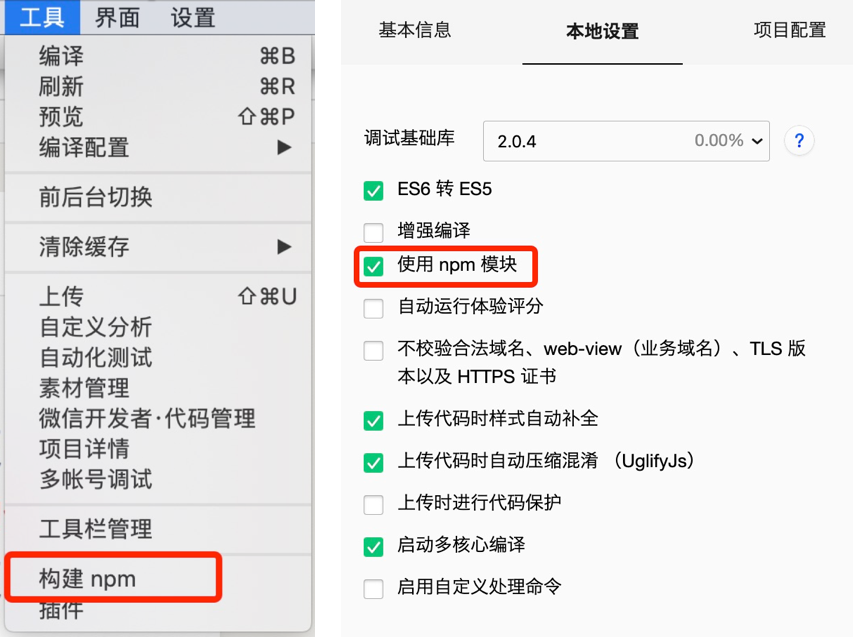
打开微信开发者工具,点击 **工具 -> 构建 npm**,并勾选 **使用 npm 模块** 选项,构建完成后,即可引入组件。
## 安装
### 步骤一 通过 npm 安装
> 使用 npm 构建前,请先阅读微信官方的 [npm 支持](https://developers.weixin.qq.com/miniprogram/dev/devtools/npm.html)
```bash
# 通过 npm 安装
npm i mina-component -S --production
# 通过 yarn 安装
yarn add mina-component --production
# 安装 0.x 版本
npm i mina-component -S --production
```
### 步骤二 构建 npm 包
打开微信开发者工具,点击 **工具 -> 构建 npm**,并勾选 **使用 npm 模块** 选项,构建完成后,即可引入组件。
 ### 步骤五 typescript 支持
如果你使用 typescript 开发小程序,还需要做如下操作,以获得顺畅的开发体验。
#### 安装 miniprogram-api-typings
```bash
# 通过 npm 安装
npm i -D miniprogram-api-typings
# 通过 yarn 安装
yarn add -D miniprogram-api-typings
```
#### 在 tsconfig.json 中增加如下配置,以防止 tsc 编译报错。
请将`path/to/node_modules/mina-component`修改为项目的 `node_modules` 中 mina-component 所在的目录。
```json
{
...
"compilerOptions": {
...
"baseUrl": ".",
"types": ["miniprogram-api-typings"],
"paths": {
"mina-component/*": ["path/to/node_modules/mina-component/dist/*"]
},
"lib": ["ES6"]
}
}
```
## 使用
### 引入组件
以 ImagePreview 组件为例,只需要在`app.json`或`index.json`中配置 ImagePreview 对应的路径即可。
所有组件文档中的引入路径均以 npm 安装为例,如果你是通过下载源代码的方式使用 mina-component,请将路径修改为项目中 mina-component 所在的目录。
```json
// 通过 npm 安装
// app.json
"usingComponents": {
"mina-image-preview": "mina-component/image-preview/index"
}
```
```json
// 通过下载源码使用 es6版本
// app.json
"usingComponents": {
"mina-image-preview": "path/to/mina-component/dist/image-preview/index"
}
```
```json
// 通过下载源码使用 es5版本
// app.json
"usingComponents": {
"mina-image-preview": "path/to/mina-component/lib/image-preview/index"
}
```
### 使用组件
引入组件后,可以在 wxml 中直接使用组件
```xml
### 步骤五 typescript 支持
如果你使用 typescript 开发小程序,还需要做如下操作,以获得顺畅的开发体验。
#### 安装 miniprogram-api-typings
```bash
# 通过 npm 安装
npm i -D miniprogram-api-typings
# 通过 yarn 安装
yarn add -D miniprogram-api-typings
```
#### 在 tsconfig.json 中增加如下配置,以防止 tsc 编译报错。
请将`path/to/node_modules/mina-component`修改为项目的 `node_modules` 中 mina-component 所在的目录。
```json
{
...
"compilerOptions": {
...
"baseUrl": ".",
"types": ["miniprogram-api-typings"],
"paths": {
"mina-component/*": ["path/to/node_modules/mina-component/dist/*"]
},
"lib": ["ES6"]
}
}
```
## 使用
### 引入组件
以 ImagePreview 组件为例,只需要在`app.json`或`index.json`中配置 ImagePreview 对应的路径即可。
所有组件文档中的引入路径均以 npm 安装为例,如果你是通过下载源代码的方式使用 mina-component,请将路径修改为项目中 mina-component 所在的目录。
```json
// 通过 npm 安装
// app.json
"usingComponents": {
"mina-image-preview": "mina-component/image-preview/index"
}
```
```json
// 通过下载源码使用 es6版本
// app.json
"usingComponents": {
"mina-image-preview": "path/to/mina-component/dist/image-preview/index"
}
```
```json
// 通过下载源码使用 es5版本
// app.json
"usingComponents": {
"mina-image-preview": "path/to/mina-component/lib/image-preview/index"
}
```
### 使用组件
引入组件后,可以在 wxml 中直接使用组件
```xml