# Ros_Qt5_Gui_App
**Repository Path**: knowmefly/Ros_Qt5_Gui_App
## Basic Information
- **Project Name**: Ros_Qt5_Gui_App
- **Description**: ROS human computer interface based on Qt5(基于Qt5的ROS人机交互界面)
- **Primary Language**: C++
- **License**: GPL-2.0
- **Default Branch**: master
- **Homepage**: None
- **GVP Project**: No
## Statistics
- **Stars**: 0
- **Forks**: 31
- **Created**: 2026-01-29
- **Last Updated**: 2026-01-29
## Categories & Tags
**Categories**: Uncategorized
**Tags**: None
## README
# ROS Qt5 GUI App
*一个跨平台轻量级的 ROS1/ROS2 移动机器人人机交互软件*
[简体中文](./README.md) | [English](./README_en.md)
[](https://github.com/chengyangkj/Ros_Qt5_Gui_App/commits/master)
[](https://github.com/chengyangkj/Ros_Qt5_Gui_App/stargazers)
[](https://github.com/chengyangkj/Ros_Qt5_Gui_App/network/members)
[](https://github.com/chengyangkj/Ros_Qt5_Gui_App/issues)
[](http://qm.qq.com/cgi-bin/qm/qr?_wv=1027&k=mvzoO6tJQtu0ZQYa_itHW7JrT0i4OCdK&authKey=exOT53pUpRG85mwuSMstWKbLlnrme%2FEuJE0Rt%2Fw6ONNvfHqftoWMay03mk1Qi7yv&noverify=0&group_code=797497206)






## 📖 简介
本项目基于 Qt5 开发,使用 CMake 构建,可以实现一套代码同时在 ROS1/ROS2 系统中使用。软件在编译时会自动识别环境变量中的 ROS1/ROS2 环境并进行构建,实现 ROS 通信与界面隔离。
所有功能均为自行绘制实现,因此可以轻松运行在性能较低的边缘设备上。项目已接入 CI,保证多 ROS 版本/系统版本的可用性。
### ✨ 功能特性
- ROS1 通信支持 - 基础功能已实现,持续优化中
- ROS2 通信支持 - 稳定及长期支持维护
- ROSBridge 通信支持 - 支持 WebSocket 连接,支持断线重连
- 全局/局部地图显示 - 支持 OccupancyGrid 地图
- 机器人实时位置显示 - 基于 TF 变换
- 机器人速度仪表盘 - 实时显示线速度和角速度
- 机器人手动控制 - 支持速度控制
- 机器人重定位 - 支持 2D Pose Estimate
- 机器人单点/多点导航 - 支持导航目标点设置
- 机器人全局/局部规划轨迹显示 - 实时显示规划路径
- 拓扑点位编辑功能 - 可视化编辑拓扑点
- 电池电量显示 - 订阅 BatteryState 话题
- 地图障碍物编辑功能 - 支持地图编辑
- 拓扑路径编辑功能 - 可视化编辑拓扑路径
- 地图加载/保存 - 支持地图文件管理
- 相机图像显示 - 支持多路图像显示
- 机器人车身轮廓显示 - 订阅 footprint 话题
- 激光雷达显示 - 支持 LaserScan 可视化
### 🖼️ 界面预览


## 🚀 快速开始
### 环境要求
- **操作系统**: Ubuntu 18.04+ / Windows 10+
- **ROS 环境**: ROS1 (Melodic/Noetic) 或 ROS2 (Foxy/Galactic/Humble)
- **Qt5**: Qt5.12+ (Qt5 Core, Widgets, SVG)
- **CMake**: 3.16+
- **编译器**: GCC 7+ / MSVC 2019+
## 🚀 编译与使用
> **💡 提示:** 点击下方标签切换查看不同平台的编译与使用说明
🐧 Linux 平台
### 安装依赖
```bash
sudo apt-get update
sudo apt-get install -y \
qtbase5-dev \
qtbase5-private-dev \
libqt5svg5-dev \
qtbase5-dev-tools \
libeigen3-dev \
libgtest-dev \
libsdl2-dev \
libsdl2-image-dev
```
### CMake 升级
Ubuntu 20.04及以下的系统自带的CMake版本过低,需要升级到 3.16+ 版本。Ubuntu 22.04 及以上可跳过此步骤。
```bash
wget https://cmake.org/files/v3.16/cmake-3.16.4-Linux-x86_64.sh -O cmake-install.sh
chmod +x cmake-install.sh
sudo ./cmake-install.sh --prefix=/usr/local --skip-license
```
### 编译构建
```bash
# 克隆仓库
git clone https://github.com/chengyangkj/Ros_Qt5_Gui_App.git
cd Ros_Qt5_Gui_App
```
#### 方法一、手动 CMake 编译
```bash
# 创建构建目录
mkdir build && cd build
# 配置和编译
cmake ..
make -j$(nproc)
```
#### 方法二、使用 build.sh 脚本
```bash
./build.sh
```
##### 使用 Gitee 镜像加速编译
将拉取的三方库位置替换为 Gitee 镜像,加速编译:
```bash
./build_cn.sh
```
或者手动指定镜像:
```bash
mkdir build && cd build
cmake .. \
-DCMAKE_BUILD_TYPE=Release \
-Ddockwidget_GIT_REPOSITORY=https://gitee.com/kqz2007/qt-advanced-docking-system_github.git \
-Dnlohmann_json_GIT_REPOSITORY=https://gitee.com/athtan/json.git \
-Dyaml-cpp_GIT_REPOSITORY=https://gitee.com/dragonet_220/yaml-cpp.git \
-Dwebsocketpp_GIT_REPOSITORY=https://gitee.com/open-source-software_1/websocketpp.git
make -j$(nproc)
```
### 运行
#### 方法 1: 使用启动脚本(推荐)
构建完成后,启动脚本会自动复制到 `build` 目录:
```bash
cd build
./start.sh
```
启动脚本会自动设置库文件路径并启动程序。
#### 方法 2: 手动运行
```bash
cd build
export LD_LIBRARY_PATH=$LD_LIBRARY_PATH:./lib
./ros_qt5_gui_app
```
#### 方法 3: 安装后运行 {#方法-3-安装后运行}
```bash
cd build
make install
cd ../install/bin
./start.sh
```
🪟 Windows 平台
### 安装依赖
### 安装依赖
Windows 平台推荐使用 vcpkg 管理依赖。项目已包含 `vcpkg.json` manifest 文件,可自动安装所有依赖。
**使用 vcpkg 安装依赖:**
1. 安装 vcpkg(如果尚未安装):
```powershell
git clone https://github.com/microsoft/vcpkg.git
cd vcpkg
.\bootstrap-vcpkg.bat
```
2. 设置环境变量(可选,推荐):
```powershell
$env:VCPKG_ROOT = "C:\path\to\vcpkg"
[Environment]::SetEnvironmentVariable("VCPKG_ROOT", "C:\path\to\vcpkg", "User")
```
3. 安装项目依赖:
```powershell
cd Ros_Qt5_Gui_App
vcpkg install --triplet x64-windows
```
**注意:** 首次安装 Qt5 等大型依赖包需要较长时间(30-60分钟),因为需要从源码编译。后续构建会使用缓存,速度会快很多。
### 编译构建
```powershell
# 克隆仓库
git clone https://github.com/chengyangkj/Ros_Qt5_Gui_App.git
cd Ros_Qt5_Gui_App
```
#### 方法一、手动 CMake 编译
```powershell
# 创建构建目录
mkdir build
cd build
# 配置 CMake(指定 vcpkg toolchain)
cmake .. `
-DCMAKE_TOOLCHAIN_FILE="$env:VCPKG_ROOT\scripts\buildsystems\vcpkg.cmake" `
-DCMAKE_BUILD_TYPE=Release `
-DBUILD_WITH_TEST=OFF
# 编译
cmake --build . --config Release --parallel
# 安装
cmake --install . --config Release
```
#### 方法二、使用 Gitee 镜像加速编译
将拉取的三方库位置替换为 Gitee 镜像,加速编译:
```powershell
# 创建构建目录
mkdir build
cd build
# 配置 CMake,使用 Gitee 镜像加速
cmake .. `
-DCMAKE_TOOLCHAIN_FILE="$env:VCPKG_ROOT\scripts\buildsystems\vcpkg.cmake" `
-DCMAKE_BUILD_TYPE=Release `
-DBUILD_WITH_TEST=OFF `
-Ddockwidget_GIT_REPOSITORY=https://gitee.com/kqz2007/qt-advanced-docking-system_github.git `
-Dnlohmann_json_GIT_REPOSITORY=https://gitee.com/athtan/json.git `
-Dyaml-cpp_GIT_REPOSITORY=https://gitee.com/dragonet_220/yaml-cpp.git `
-Dwebsocketpp_GIT_REPOSITORY=https://gitee.com/open-source-software_1/websocketpp.git
# 编译
cmake --build . --config Release --parallel
# 安装
cmake --install . --config Release
```
### 运行
#### 方法 1: 使用启动脚本(推荐)
构建完成后,启动脚本会自动复制到 `build` 目录:
```powershell
cd build
.\start.bat
```
启动脚本会自动设置库文件路径并启动程序。
#### 方法 2: 手动运行
```powershell
cd build
.\ros_qt5_gui_app.exe
```
#### 方法 3: 安装后运行 {#方法-3-安装后运行-windows}
```powershell
cd build
cmake --install . --config Release
cd ..\install\bin
.\start.bat
```
## 📥 Release 二进制发行版使用
下载[release](https://github.com/chengyangkj/Ros_Qt5_Gui_App/releases)界面中对应系统版本的二进制压缩包:
- **Linux**: 下载 `.tar.gz` 压缩包,解压后参考 [Linux 方法 3: 安装后运行](#方法-3-安装后运行) 运行程序
- **Windows**: 下载 `.zip` 压缩包,解压后参考 [Windows 方法 3: 安装后运行](#方法-3-安装后运行-windows) 运行程序
### 配置说明
首次运行前,请确保:
1. **ROS 环境已配置**: 确保已 source ROS 的 setup.bash/setup.bat
2. **话题配置**: 检查配置界面中的话题名称是否与你的 ROS 系统匹配
3. **通道选择**: 在配置界面中选择正确的通信通道(ROS1/ROS2/ROSBridge)
详细配置说明请参考 [功能使用指南](./doc/usage.md)
## 📚 文档
- [使用指南](./doc/usage.md) - 功能使用教程
- [开发指南](./doc/development.md) - 开发环境搭建和代码结构
- [常见问题](./doc/faq.md) - FAQ 和故障排除
## 🏗️ 项目结构
```
Ros_Qt5_Gui_App/
├── src/ # 源代码目录
│ ├── core/ # 核心模块(主程序入口)
│ ├── mainwindow/ # 主窗口和界面
│ ├── common/ # 公共库
│ ├── basic/ # 基础数据结构
│ ├── channel/ # 通信通道(ROS1/ROS2/ROSBridge)
│ └── plugin/ # 插件系统
├── install/ # 安装脚本
│ ├── linux/bin/ # Linux 启动脚本
│ └── windows/bin/ # Windows 启动脚本
├── doc/ # 文档目录
├── cmake/ # CMake 模块
└── CMakeLists.txt # 主 CMake 配置文件
```
## 🤝 贡献
欢迎提交 [Issues](https://github.com/chengyangkj/Ros_Qt5_Gui_App/issues) 和 [Pull Requests](https://github.com/chengyangkj/Ros_Qt5_Gui_App/pulls)!
如果有什么想法或者建议,欢迎提交 [🌟心愿/需求单](https://github.com/chengyangkj/Ros_Qt5_Gui_App/issues/29),说不定哪天就实现了呢!
### 贡献指南
1. Fork 本仓库
2. 创建特性分支 (`git checkout -b feature/AmazingFeature`)
3. 提交更改 (`git commit -m 'Add some AmazingFeature'`)
4. 推送到分支 (`git push origin feature/AmazingFeature`)
5. 开启 Pull Request
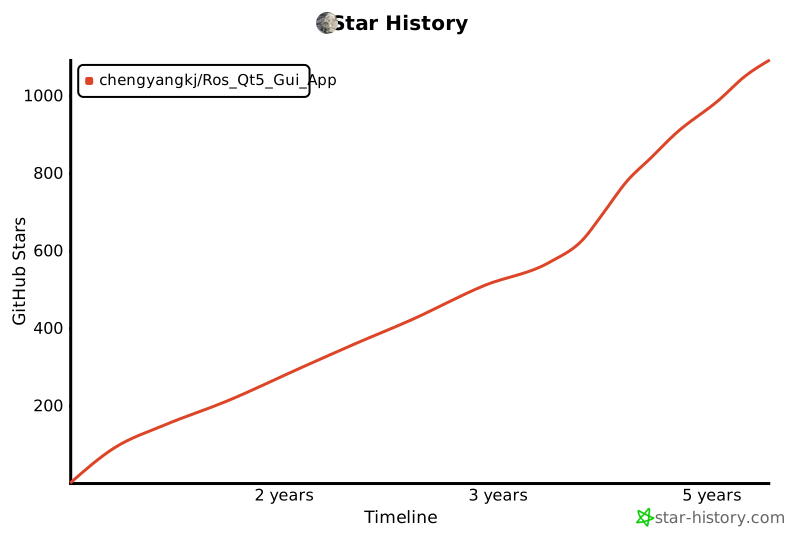
## 📊 Star 历史
## 📱 相关项目
### 基于 Flutter 的 ROS1/ROS2 跨平台移动机器人人机交互软件

详情请访问 [ROS_Flutter_Gui_App](https://github.com/chengyangkj/ROS_Flutter_Gui_App)
### 基于 React 的 ROS1/ROS2 web gui 应用程序
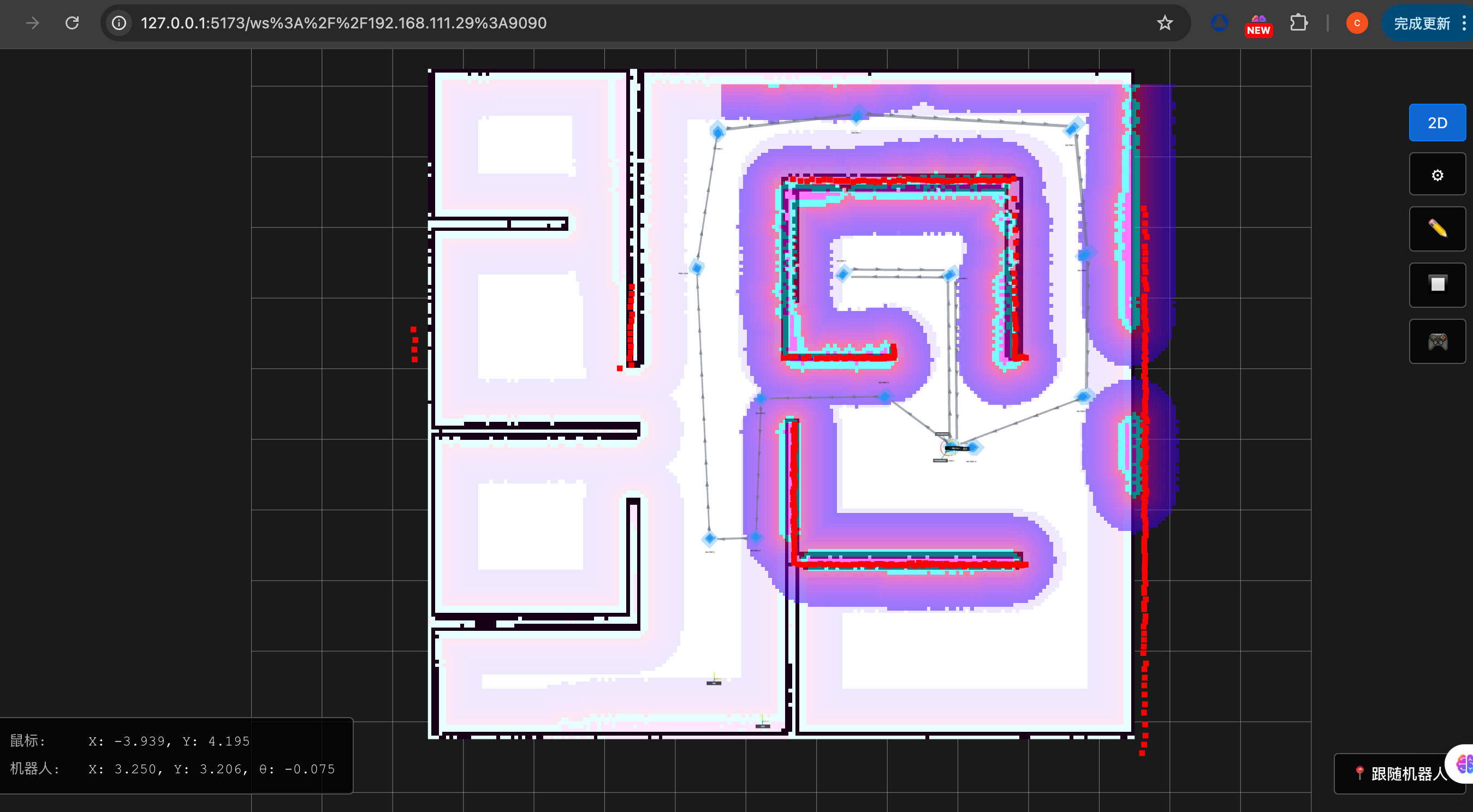
支持地图编辑
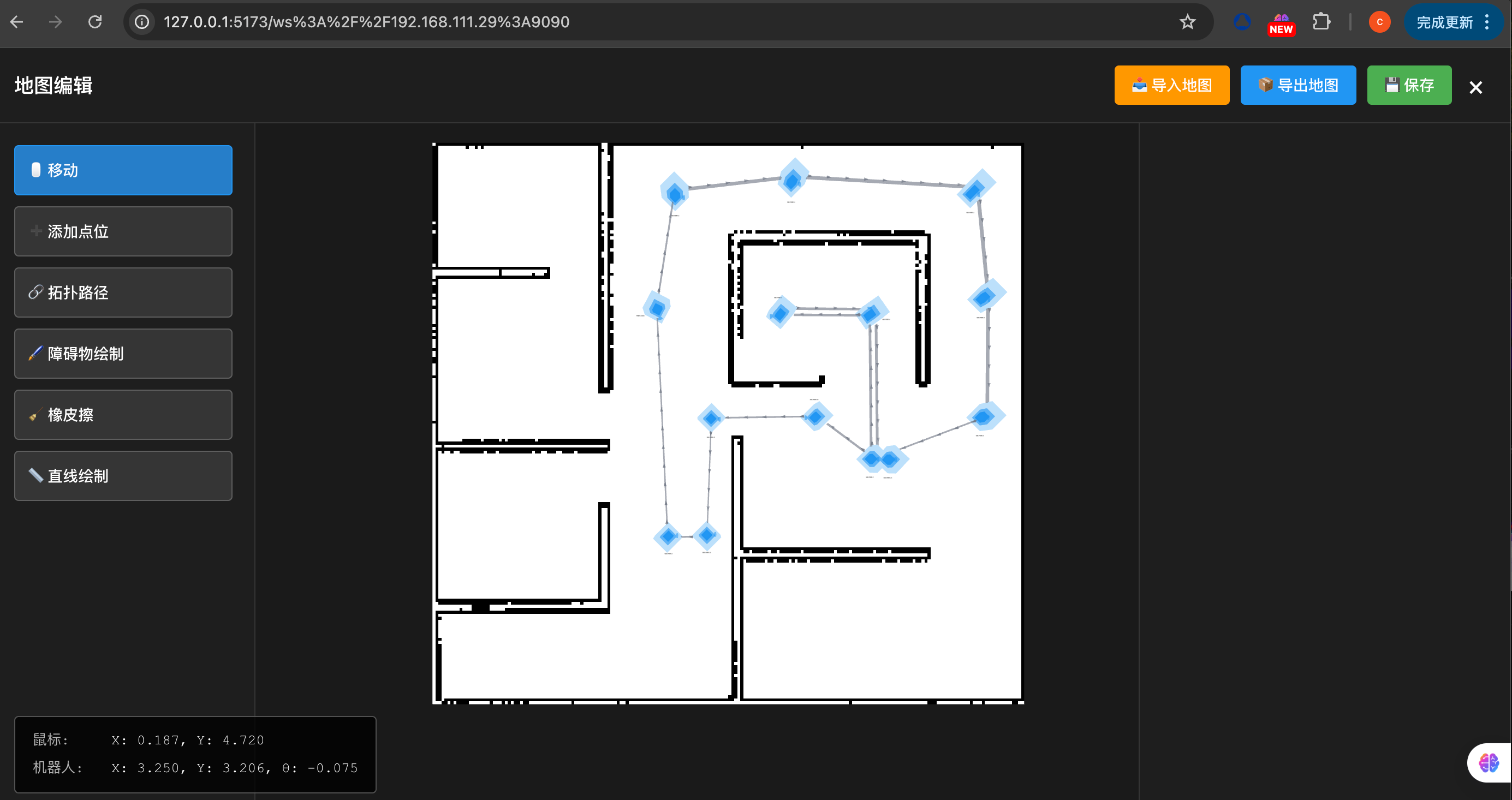
详情请访问 [ROS_Web_Gui_App](https://github.com/chengyangkj/ros_web_gui_app)
## 🔗 相关链接
| 分支 | 支持平台 | 功能说明 |
|------|---------|---------|
| [master](https://github.com/chengyangkj/Ros_Qt5_Gui_App/tree/master) | Win10 Ubuntu | ROS + QWidget + QGraphicsView 自定义可视化界面显示 |
| [qml_hmi](https://github.com/chengyangkj/Ros_Qt5_Gui_App/tree/qml_hmi) | Win10 Ubuntu | ROS + QML + C++ 混合编程,QML 自绘制地图、激光雷达等可视化 demo |
| [simple](https://github.com/chengyangkj/Ros_Qt5_Gui_App/tree/simple) | Win10 Ubuntu | ROS + QWidget + Librviz 可视化显示,CSDN 博客《ROS 人机交互软件开发》课程实现版本 |
| [rviz_tree](https://github.com/chengyangkj/Ros_Qt5_Gui_App/tree/rviz_tree) | Win10 Ubuntu | ROS + QWidget + Librviz 原生图层 API 管理图层,无需手动创建图层 |
| [ros_qt_demo](https://github.com/chengyangkj/ros_qt_demo) | Win10 Ubuntu | 使用 catkin_create_qt_pkg 创建的原始包,CMakeLists.txt 配置到 Qt5,可直接编译运行 |
| [ros2_qt_demo](https://github.com/chengyangkj/ros2_qt_demo) | ROS2 | 运行在 ROS2 平台的 Qt demo 包,CMakeLists.txt 配置到 Qt5,可使用 colcon build 编译使用 |
| [ROS2_Qt5_Gui_App](https://github.com/chengyangkj/ROS2_Qt5_Gui_App) | ROS2 | 与本仓库相同/不再维护 |
| [Flutter App](https://github.com/chengyangkj/ROS_Flutter_Gui_App) | 多平台 (Flutter) | 已实现 |
## 💬 交流群
- **QQ 群**: 797497206
- **Issues**: [GitHub Issues](https://github.com/chengyangkj/Ros_Qt5_Gui_App/issues)
## 📄 开源协议
本项目采用 [MIT](LICENSE) 开源协议。
## 🙏 致谢
感谢所有贡献者和使用者的支持!