# demoplugin
**Repository Path**: imagepy/demoplugin
## Basic Information
- **Project Name**: demoplugin
- **Description**: This is a demo project to show How to write ImagePy plugin. Including the usage of all kinds of plugin, with document wrote in detail. Developers can take this project as example.
- **Primary Language**: Python
- **License**: BSD-3-Clause
- **Default Branch**: master
- **Homepage**: None
- **GVP Project**: No
## Statistics
- **Stars**: 0
- **Forks**: 0
- **Created**: 2021-03-22
- **Last Updated**: 2021-03-22
## Categories & Tags
**Categories**: Uncategorized
**Tags**: None
## README
# Demo Plugin
**Path:** https://github.com/Image-Py/demoplugin
**Version:** 0.1
**Author:** YXDragon
**Email:** yxdragon@imagepy.org
**Keyword:** demo, tutorial
**Description:** a friendly development tutorial.
**[English Document](README.md) | [中文文档](READMECN.md)**
*This is a demo project to show How to write ImagePy plugin. Including the usage of all kinds of plugin, with document wrote in detail. Developers can take this project as example.*
## Install
ImagePy Menu:`Plugins > Manager > Plugins Manager` input `demo`, and select the `Demo Plugin`, then click `Install/Update`. When complete the installing, the user interface would be changed. New plugins' menu, tool, and widget would be loaded in place.
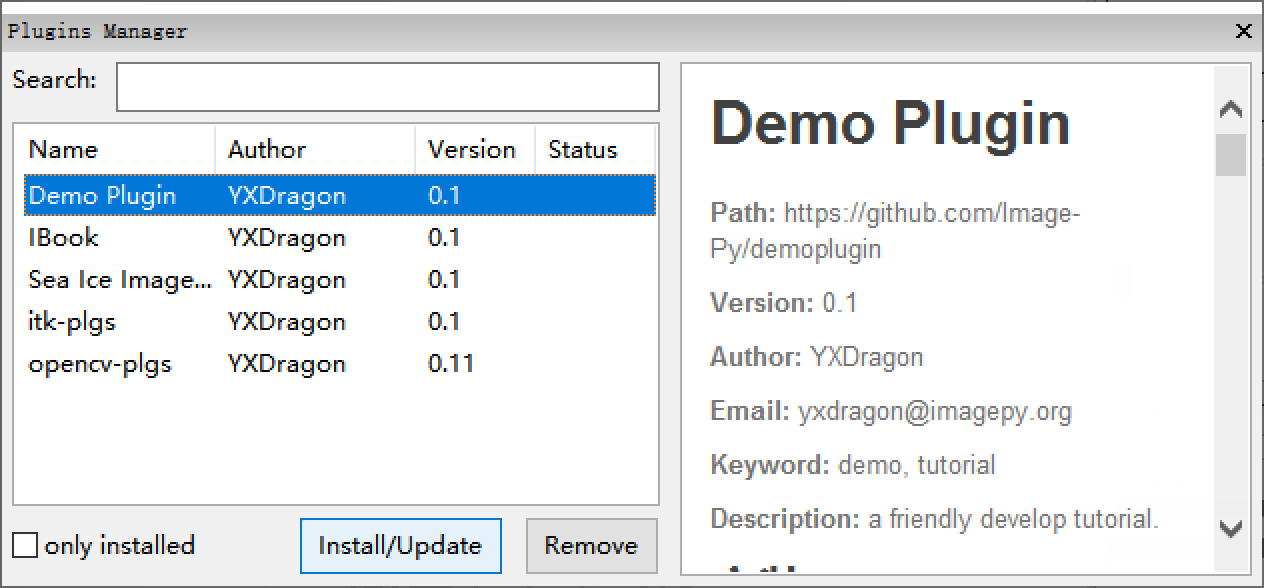
Install DemoPlugin
## [Basic](doc/start.md)
**[Start here](doc/start.md)**
1. [What is plugin](doc/start.md#What-is-plugin)
2. [Hello World(my first plugin)](doc/start.md#Hello-World)
3. [Who Are You(interactive)](doc/start.md#Who-Are-You)
4. [Questionnaire(parameter dialog in detail)](doc/start.md#Questionnaire)
5. [Multi plugin in one file](doc/start.md#Implement-multi-plugins-in-one-file)
## Plugin development
**[Markdown: document](doc/markdown.md)**
1. [Markdown Demo](doc/markdown.md#MarkDown-Demo)
**[Macros: serialise existing function](doc/macros.md#Macros)**
1. [Gaussian blur - Invert](doc/macros.md#Gaussian-Blur-Then-Invert)
2. [Coins Segmentation Macros](doc/macros.md#Coins-Segmentation)
**[Workflow: interactive macros](doc/workflow.md)**
1. [Coins Segment Workflow](doc/workflow.md#Coins-Segmentation-Workflow)
**[Report: generate report](doc/report.md)**
1. [Personal Information](doc/report.md#Personal-Information)
2. [Coins Report: report for coins segment](doc/report.md#Coins-Segmentation)
3. [Rule of Report design](doc/report.md#Report-template-design-principles)
**[Filter: image filter in 2d](doc/filter.md)**
1. [Invert Demo: without parameter](doc/filter.md#Invert)
2. [Gaussian Demo: with parameter](doc/filter.md#Gaussian)
3. [Filter operating mechanism](doc/filter.md#Filter-operating-mechanism)
**[Simple: treat sequence and other attributes](doc/simple.md)**
1. [Gaussian 3D Demo: filter in 3d](doc/simple.md#Gaussian3D)
2. [Red Lut Demo: operate color lookup table](doc/simple.md#SetLUT)
3. [ROI Inflate Demo: operate ROI](doc/simple.md#Inflate-ROI)
4. [Unit Demo: set unit and scale](doc/simple.md#Set-Scale-And-Unit)
5. [Draw Mark Demo: Set Mark](doc/simple.md#Mark)
6. [Simple operating mechanism](doc/simple.md#Simple-operating-mechanism)
**[Table: treat dataframe](doc/table.md)**
1. [Generate Table Demo: generate table](doc/table.md#Generate-score-list)
2. [Sort By Key Demo: sort](doc/table.md#Sort-by-field)
3. [Table Plot Demo: plot](doc/table.md#Bar-Chart)
4. [Table operation mechanism](doc/table.md#Table-operation-mechanism)
**[Free: depend on nothing](doc/free.md)**
1. [New Image Demo: creat image](doc/free.md#Create-image)
2. [About Demo: the about dialog](doc/free.md#About-dialog-box)
3. [Close Demo: quit program](doc/free.md#Quit)
4. [Free operating mechanism](doc/free.md#Free-operating-mechanism)
**[Tool: mouse interaction](doc/tool.md)**
1. [Painter Demo: draw with mouse](doc/tool.md#Brush-Tool)
2. [Tool operating mechanism](doc/tool.md#Tool-operating-mechanism)
**[Widget: customed panel](doc/widget.md)**
1. [Widget Demo](doc/widget.md#Widget-Demo)
2. [Widget opterating mechanism](doc/widget.md#Widget-opterating-mechanism)
## [Plugin Release](doc/publish.md)
**[Function Organization](doc/publish.md#Function-organization)**
1. [Functional partitioning](doc/publish.md#Function-organization)
2. [Set Order](doc/publish.md#Set-Order)
**[Plugin project creation](doc/publish.md#Plugin-project-creation)**
1. [Create a plugin project repository](doc/publish.md#Plugin-project-creation)
2. [Write requirements](doc/publish.md#Plugin-project-creation)
3. [Write readme](doc/publish.md#Plugin-project-creation)
4. [Install Plugin](doc/publish.md#Plugin-project-creation)
**[Release to ImagePy](doc/publish.md#Release-to-ImagePy)**
1. [Send Pull Request to ImagePy](doc/publish.md#Release-to-ImagePy)
2. [About the top-level menu](doc/publish.md#Release-to-ImagePy)
## [Write Document](doc/document.md)
**[Write The Opteration Manual](doc/document.md#Write-The-Opteration-Manual)**
**[View The Operation Manual](doc/document.md#View-Operation-Manual)**
## [Attention](doc/attention.md#注意事项)
**[User Friendliness](doc/attention.md#User-Friendliness)**
**[Developer Friendliness](doc/attention.md#Developer-Friendliness)**
**[Communicate Timely](doc/attention.md#Communicate-Timely)**
**This document introduces how to write ImagePy plugin. More questions not exhaustive here,please post in [forum.Image.sc](https://forum.image.sc/)**