# ColorUI-GA-Docs
**Repository Path**: hutaoseven/ColorUI-GA-Docs
## Basic Information
- **Project Name**: ColorUI-GA-Docs
- **Description**: No description available
- **Primary Language**: JavaScript
- **License**: Not specified
- **Default Branch**: master
- **Homepage**: None
- **GVP Project**: No
## Statistics
- **Stars**: 0
- **Forks**: 0
- **Created**: 2025-03-15
- **Last Updated**: 2025-05-19
## Categories & Tags
**Categories**: Uncategorized
**Tags**: None
## README
# 🌈ColorUI GA 简介
[](https://github.com/XiaokangLei/ColorUI-GA) [](https://github.com/XiaokangLei/ColorUI-GA) [ ](https://s1.ax1x.com/2022/11/30/zwKWsx.jpg)
[ColorUI GA](https://github.com/XiaokangLei/ColorUI-GA) 是基于ColorUI 2.0开发的轻量、可靠、开源的小程序**原生**css组件库,理论上适用于其他支持css库的所有平台。
在原组件库的基础上会增加部分样式和模板,长期更新,如果您有好的想法或对本项目有任何建议、需求以及发现文中内容有误,请提交 [Github Issues](https://github.com/XiaokangLei/ColorUI-GA/issues)。
对于想要一起开发,补充CSS样式库的朋友,欢迎提交 PR。
## 完整UI模板
- 商城UI模板《北岛小店》:[链接](https://one.x-artspace.cn/ColorUI-GA-Docs/h5/northlandshop/demo.html)
## 快速开始(原生小程序)
- 1、下载 [源码](https://github.com/XiaokangLei/ColorUI-GA) 并解压,复制`/colorui`文件夹到项目根目录
- 2、`app.wxss`引入关键css:`main.wxss`,`icon.wxss`
```js
/* 根目录 app.wxss 文件 */
@import "colorui/main.wxss";
@import "colorui/icon.wxss";
/* 若需要使用微动画,请引入 animation.wxss */
@import "colorui/animation.wxss";
/* 若使用暗色模式,请引入 dark.wxss,注意,当前版本暗色模式随系统切换,目前不支持手动切换 */
@import "colorui/dark.wxss";
```
- 3、如果使用新版的组件样式`app.json`里面的`"style": "v2"`,部分样式将失效,请确保删除全局`app.json`里面的`"style": "v2"`。如确实需要使用新版样式,可在局部`page`中的`.json`文件中添加`"style": "v2"`。
## Demo 快速体验
- 基础表单组件库使用示例,v2.0.9 版本 Demo[下载链接](https://github.com/XiaokangLei/ColorUI-GA/releases/download/v2.0.9/demo.zip)
- 详细使用说明:[【链接】](https://zhuanlan.zhihu.com/p/597197882)
### 自定义顶部导航栏(可选)
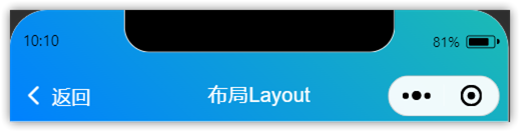
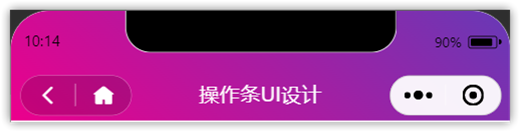
根据项目需要,决定是否自定义导航栏,示例导航栏代码在`/colorui/components/cu-custom`中,可自行修改相关参数进行配置。
- 1、`app.js`获得系统信息
```js
onLaunch: function() {
wx.getSystemInfo({
success: e => {
this.globalData.StatusBar = e.statusBarHeight;
let custom = wx.getMenuButtonBoundingClientRect();
this.globalData.Custom = custom;
this.globalData.CustomBar = custom.bottom + custom.top - e.statusBarHeight;
}
})
},
```
- 2、`app.json`配置取消系统默认导航栏,并全局引入组件
```js
"window": {
"navigationStyle": "custom"
},
"usingComponents": {
"cu-custom":"/colorui/components/cu-custom/cu-custom"
}
```
- 3、`xxx.wxml`页面调用
```html
返回
导航栏
```
- 4、参数
| 参数 | 作用 | 类型 | 默认值 |
| -------- | :-------------: | :-----: | :----: |
| bgColor | 背景颜色类名 | String | '' |
| isBack | 是否开启返回 | Boolean | false |
| isCustom | 是否开启左侧胶囊 | Boolean | false |
| bgImage | 背景图片路径 | String | '' |
| isLucency| 背景透明 | Boolean | false |
| slot块 | 作用 |
| -------- | :----------------------------------: |
| backText | 返回时的文字 |
| content | 中间区域 |
| right | 右侧区域(胶囊占位可使用范围很窄!) |
- 5、示例
## UniApp部署(仅供参考)
- 1、下载 [源码](https://github.com/XiaokangLei/ColorUI-GA) 并解压,复制`/colorui`文件夹到项目根目录
- 2、`app.vue`引入关键css:`main.wxss`,`icon.wxss`
- 3、【**注意**】部分样式需要仿照原生小程序page中的wxss样式及js代码一起使用才能看到完整效果,请注意查看源码,由于精力有限,暂不提供uniapp版本demo
```js
```
](https://s1.ax1x.com/2022/11/30/zwKWsx.jpg)
[ColorUI GA](https://github.com/XiaokangLei/ColorUI-GA) 是基于ColorUI 2.0开发的轻量、可靠、开源的小程序**原生**css组件库,理论上适用于其他支持css库的所有平台。
在原组件库的基础上会增加部分样式和模板,长期更新,如果您有好的想法或对本项目有任何建议、需求以及发现文中内容有误,请提交 [Github Issues](https://github.com/XiaokangLei/ColorUI-GA/issues)。
对于想要一起开发,补充CSS样式库的朋友,欢迎提交 PR。
## 完整UI模板
- 商城UI模板《北岛小店》:[链接](https://one.x-artspace.cn/ColorUI-GA-Docs/h5/northlandshop/demo.html)
## 快速开始(原生小程序)
- 1、下载 [源码](https://github.com/XiaokangLei/ColorUI-GA) 并解压,复制`/colorui`文件夹到项目根目录
- 2、`app.wxss`引入关键css:`main.wxss`,`icon.wxss`
```js
/* 根目录 app.wxss 文件 */
@import "colorui/main.wxss";
@import "colorui/icon.wxss";
/* 若需要使用微动画,请引入 animation.wxss */
@import "colorui/animation.wxss";
/* 若使用暗色模式,请引入 dark.wxss,注意,当前版本暗色模式随系统切换,目前不支持手动切换 */
@import "colorui/dark.wxss";
```
- 3、如果使用新版的组件样式`app.json`里面的`"style": "v2"`,部分样式将失效,请确保删除全局`app.json`里面的`"style": "v2"`。如确实需要使用新版样式,可在局部`page`中的`.json`文件中添加`"style": "v2"`。
## Demo 快速体验
- 基础表单组件库使用示例,v2.0.9 版本 Demo[下载链接](https://github.com/XiaokangLei/ColorUI-GA/releases/download/v2.0.9/demo.zip)
- 详细使用说明:[【链接】](https://zhuanlan.zhihu.com/p/597197882)
### 自定义顶部导航栏(可选)
根据项目需要,决定是否自定义导航栏,示例导航栏代码在`/colorui/components/cu-custom`中,可自行修改相关参数进行配置。
- 1、`app.js`获得系统信息
```js
onLaunch: function() {
wx.getSystemInfo({
success: e => {
this.globalData.StatusBar = e.statusBarHeight;
let custom = wx.getMenuButtonBoundingClientRect();
this.globalData.Custom = custom;
this.globalData.CustomBar = custom.bottom + custom.top - e.statusBarHeight;
}
})
},
```
- 2、`app.json`配置取消系统默认导航栏,并全局引入组件
```js
"window": {
"navigationStyle": "custom"
},
"usingComponents": {
"cu-custom":"/colorui/components/cu-custom/cu-custom"
}
```
- 3、`xxx.wxml`页面调用
```html
返回
导航栏
```
- 4、参数
| 参数 | 作用 | 类型 | 默认值 |
| -------- | :-------------: | :-----: | :----: |
| bgColor | 背景颜色类名 | String | '' |
| isBack | 是否开启返回 | Boolean | false |
| isCustom | 是否开启左侧胶囊 | Boolean | false |
| bgImage | 背景图片路径 | String | '' |
| isLucency| 背景透明 | Boolean | false |
| slot块 | 作用 |
| -------- | :----------------------------------: |
| backText | 返回时的文字 |
| content | 中间区域 |
| right | 右侧区域(胶囊占位可使用范围很窄!) |
- 5、示例
## UniApp部署(仅供参考)
- 1、下载 [源码](https://github.com/XiaokangLei/ColorUI-GA) 并解压,复制`/colorui`文件夹到项目根目录
- 2、`app.vue`引入关键css:`main.wxss`,`icon.wxss`
- 3、【**注意**】部分样式需要仿照原生小程序page中的wxss样式及js代码一起使用才能看到完整效果,请注意查看源码,由于精力有限,暂不提供uniapp版本demo
```js
```