


MiniMax AI 开放平台官方命令行工具
专为 AI Agent 打造。在任意 Agent 或终端中生成文字、图像、视频、语音和音乐。
 ## 安装
```bash
# AI Agent 使用(OpenClaw、Cursor、Claude Code 等):添加 Skill 到你的 Agent
npx skills add MiniMax-AI/cli -y -g
# 或全局安装 CLI 在终端中使用
npm install -g mmx-cli
```
> 需要 [Node.js](https://nodejs.org) 18+
> **需要 MiniMax Token 套餐** — [国际版](https://platform.minimax.io/subscribe/token-plan) · [国内版](https://platform.minimaxi.com/subscribe/token-plan)
## 快速开始
```bash
# 认证
mmx auth login --api-key sk-xxxxx
# 开始创作
mmx text chat --message "你好,MiniMax!"
mmx image "一只穿宇航服的猫"
mmx speech synthesize --text "你好!" --out hello.mp3
mmx video generate --prompt "海浪拍打礁石"
mmx music generate --prompt "欢快的流行乐" --lyrics "[主歌] 啦啦啦,阳光照"
mmx search "MiniMax AI 最新动态"
mmx vision photo.jpg
mmx quota
```
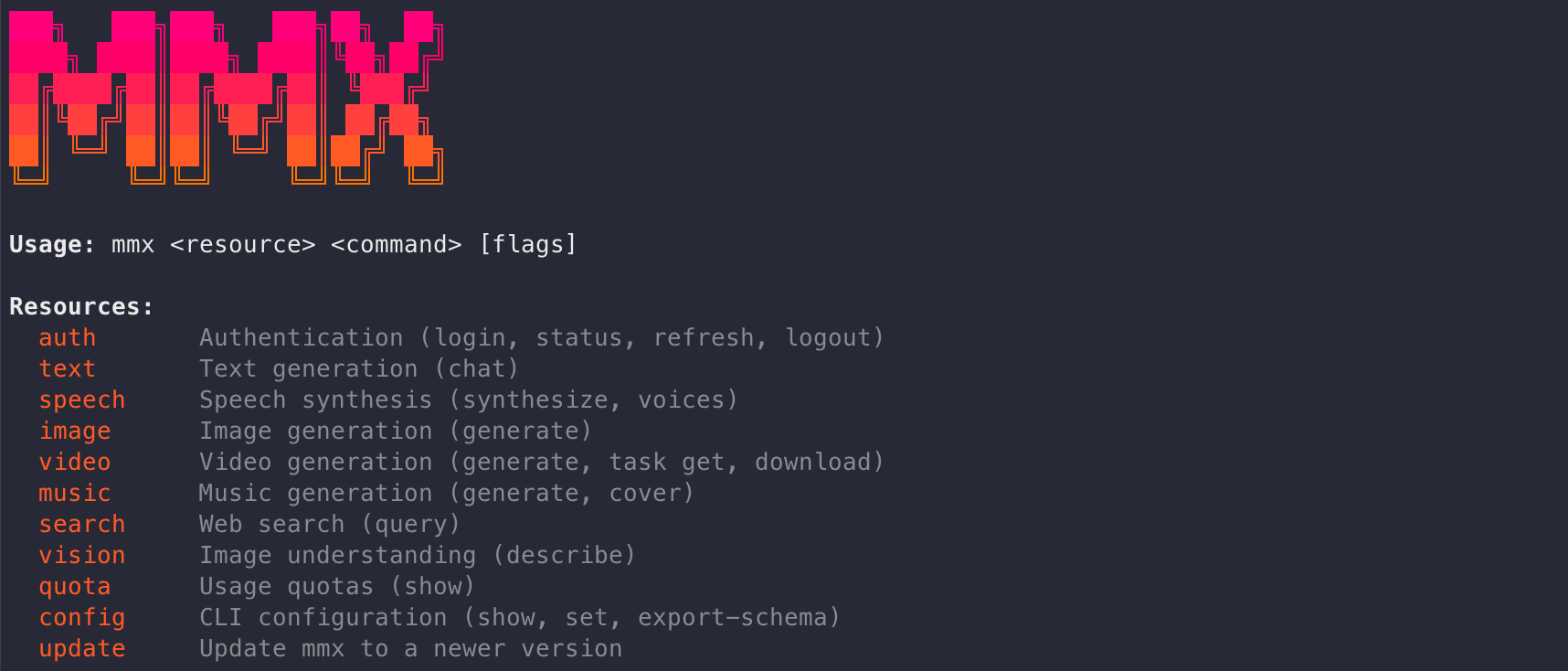
## 命令参考
### `mmx text`
```bash
mmx text chat --message "写一首诗"
mmx text chat --model MiniMax-M2.7-highspeed --message "你好" --stream
mmx text chat --system "你是编程助手" --message "用 Go 写 Fizzbuzz"
mmx text chat --message "user:你好" --message "assistant:嗨!" --message "你叫什么名字?"
cat messages.json | mmx text chat --messages-file - --output json
```
### `mmx image`
```bash
mmx image "一只穿宇航服的猫"
mmx image generate --prompt "科技感 Logo" --n 3 --aspect-ratio 16:9
mmx image generate --prompt "山水画" --out-dir ./output/
```
### `mmx video`
```bash
mmx video generate --prompt "海浪拍打礁石" --download sunset.mp4
mmx video generate --prompt "机器人作画" --async
mmx video task get --task-id 123456
mmx video download --file-id 176844028768320 --out video.mp4
```
### `mmx speech`
```bash
mmx speech synthesize --text "你好!" --out hello.mp3
mmx speech synthesize --text "流式输出" --stream | mpv -
mmx speech synthesize --text "Hi" --voice English_magnetic_voiced_man --speed 1.2
echo "头条新闻" | mmx speech synthesize --text-file - --out news.mp3
mmx speech voices
```
### `mmx music`
```bash
# 带歌词生成
mmx music generate --prompt "欢快的流行乐" --lyrics "[主歌] 啦啦啦,阳光照" --out song.mp3
# 自动生成歌词
mmx music generate --prompt "忧郁的独立民谣,雨夜" --lyrics-optimizer --out song.mp3
# 纯音乐(无人声)
mmx music generate --prompt "史诗管弦乐" --instrumental --out bgm.mp3
# Cover — 基于参考音频生成翻唱版本
mmx music cover --prompt "爵士钢琴,慵懒女声" --audio-file original.mp3 --out cover.mp3
mmx music cover --prompt "民谣吉他" --audio https://example.com/song.mp3 --out cover.mp3
```
### `mmx vision`
```bash
mmx vision photo.jpg
mmx vision describe --image https://example.com/img.jpg --prompt "这是什么品种的狗?"
mmx vision describe --file-id file-123
```
### `mmx search`
```bash
mmx search "MiniMax AI"
mmx search query --q "最新动态" --output json
```
### `mmx auth`
```bash
mmx auth login --api-key sk-xxxxx
mmx auth login # OAuth 浏览器授权
mmx auth status
mmx auth refresh
mmx auth logout
```
请使用 `mmx auth status` 作为认证状态的权威检查方式。`~/.mmx/credentials.json`
只在 OAuth 登录时存在;API Key 登录会写入 `~/.mmx/config.json`(也可每次通过
`--api-key` 直接传入)。
### `mmx config` · `mmx quota`
```bash
mmx quota
mmx config show
mmx config set --key region --value cn
mmx config set --key default-text-model --value MiniMax-M2.7-highspeed
mmx config export-schema | jq .
```
### `mmx update`
```bash
mmx update
mmx update latest
```
## 贡献者
## 安装
```bash
# AI Agent 使用(OpenClaw、Cursor、Claude Code 等):添加 Skill 到你的 Agent
npx skills add MiniMax-AI/cli -y -g
# 或全局安装 CLI 在终端中使用
npm install -g mmx-cli
```
> 需要 [Node.js](https://nodejs.org) 18+
> **需要 MiniMax Token 套餐** — [国际版](https://platform.minimax.io/subscribe/token-plan) · [国内版](https://platform.minimaxi.com/subscribe/token-plan)
## 快速开始
```bash
# 认证
mmx auth login --api-key sk-xxxxx
# 开始创作
mmx text chat --message "你好,MiniMax!"
mmx image "一只穿宇航服的猫"
mmx speech synthesize --text "你好!" --out hello.mp3
mmx video generate --prompt "海浪拍打礁石"
mmx music generate --prompt "欢快的流行乐" --lyrics "[主歌] 啦啦啦,阳光照"
mmx search "MiniMax AI 最新动态"
mmx vision photo.jpg
mmx quota
```
## 命令参考
### `mmx text`
```bash
mmx text chat --message "写一首诗"
mmx text chat --model MiniMax-M2.7-highspeed --message "你好" --stream
mmx text chat --system "你是编程助手" --message "用 Go 写 Fizzbuzz"
mmx text chat --message "user:你好" --message "assistant:嗨!" --message "你叫什么名字?"
cat messages.json | mmx text chat --messages-file - --output json
```
### `mmx image`
```bash
mmx image "一只穿宇航服的猫"
mmx image generate --prompt "科技感 Logo" --n 3 --aspect-ratio 16:9
mmx image generate --prompt "山水画" --out-dir ./output/
```
### `mmx video`
```bash
mmx video generate --prompt "海浪拍打礁石" --download sunset.mp4
mmx video generate --prompt "机器人作画" --async
mmx video task get --task-id 123456
mmx video download --file-id 176844028768320 --out video.mp4
```
### `mmx speech`
```bash
mmx speech synthesize --text "你好!" --out hello.mp3
mmx speech synthesize --text "流式输出" --stream | mpv -
mmx speech synthesize --text "Hi" --voice English_magnetic_voiced_man --speed 1.2
echo "头条新闻" | mmx speech synthesize --text-file - --out news.mp3
mmx speech voices
```
### `mmx music`
```bash
# 带歌词生成
mmx music generate --prompt "欢快的流行乐" --lyrics "[主歌] 啦啦啦,阳光照" --out song.mp3
# 自动生成歌词
mmx music generate --prompt "忧郁的独立民谣,雨夜" --lyrics-optimizer --out song.mp3
# 纯音乐(无人声)
mmx music generate --prompt "史诗管弦乐" --instrumental --out bgm.mp3
# Cover — 基于参考音频生成翻唱版本
mmx music cover --prompt "爵士钢琴,慵懒女声" --audio-file original.mp3 --out cover.mp3
mmx music cover --prompt "民谣吉他" --audio https://example.com/song.mp3 --out cover.mp3
```
### `mmx vision`
```bash
mmx vision photo.jpg
mmx vision describe --image https://example.com/img.jpg --prompt "这是什么品种的狗?"
mmx vision describe --file-id file-123
```
### `mmx search`
```bash
mmx search "MiniMax AI"
mmx search query --q "最新动态" --output json
```
### `mmx auth`
```bash
mmx auth login --api-key sk-xxxxx
mmx auth login # OAuth 浏览器授权
mmx auth status
mmx auth refresh
mmx auth logout
```
请使用 `mmx auth status` 作为认证状态的权威检查方式。`~/.mmx/credentials.json`
只在 OAuth 登录时存在;API Key 登录会写入 `~/.mmx/config.json`(也可每次通过
`--api-key` 直接传入)。
### `mmx config` · `mmx quota`
```bash
mmx quota
mmx config show
mmx config set --key region --value cn
mmx config set --key default-text-model --value MiniMax-M2.7-highspeed
mmx config export-schema | jq .
```
### `mmx update`
```bash
mmx update
mmx update latest
```
## 贡献者