# ColorPickerView
**Repository Path**: heracer/ColorPickerView
## Basic Information
- **Project Name**: ColorPickerView
- **Description**: No description available
- **Primary Language**: Unknown
- **License**: Apache-2.0
- **Default Branch**: master
- **Homepage**: None
- **GVP Project**: No
## Statistics
- **Stars**: 0
- **Forks**: 0
- **Created**: 2024-08-07
- **Last Updated**: 2024-08-07
## Categories & Tags
**Categories**: Uncategorized
**Tags**: None
## README
ColorPickerView
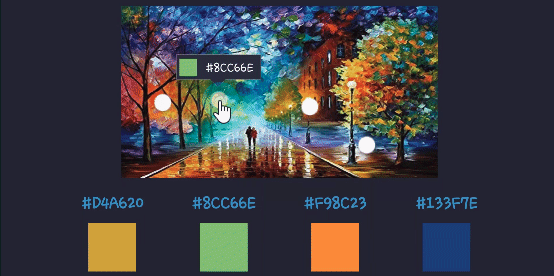
🎨 ColorPickerView implements getting HSV colors, ARGB values, Hex color codes from any image drawables or your gallery pictures by tapping on the desired color. It also supports alpha & brightness slider bar, dialog, and saving & restoring selected data.








## Including in your project
[](https://search.maven.org/search?q=g:%22com.github.skydoves%22%20AND%20a:%22colorpickerview%22)
### Gradle
Add below codes to your **root** `build.gradle` file (not your module build.gradle file).
```gradle
allprojects {
repositories {
mavenCentral()
}
}
```
And add a dependency code to your **module**'s `build.gradle` file.
```gradle
dependencies {
implementation "com.github.skydoves:colorpickerview:2.2.4"
}
```
## SNAPSHOT
[](https://oss.sonatype.org/content/repositories/snapshots/com/github/skydoves/colorpickerview/)
Snapshots of the current development version of ColorPickerView are available, which track [the latest versions](https://oss.sonatype.org/content/repositories/snapshots/com/github/skydoves/colorpickerview/).
```Gradle
repositories {
maven {
url 'https://oss.sonatype.org/content/repositories/snapshots/'
}
}
```
 ## Table of Contents
#### [1. ColorPickerView](https://github.com/skydoves/ColorPickerView#usage)
- [ColorPickerView in layout](https://github.com/skydoves/ColorPickerView#colorpickerview-in-xml-layout)
- [ColorListener](https://github.com/skydoves/ColorPickerView#colorlistener)
- [Palette](https://github.com/skydoves/ColorPickerView#palette)
- [ActionMode](https://github.com/skydoves/ColorPickerView#actionmode)
- [Debounce](https://github.com/skydoves/ColorPickerView#debounce)
- [Create using builder](https://github.com/skydoves/ColorPickerView#create-using-builder)
- [Restore and save state](https://github.com/skydoves/ColorPickerView#restore-and-save)
- [Palette from Gallery](https://github.com/skydoves/ColorPickerView#palette-from-gallery)
## Table of Contents
#### [1. ColorPickerView](https://github.com/skydoves/ColorPickerView#usage)
- [ColorPickerView in layout](https://github.com/skydoves/ColorPickerView#colorpickerview-in-xml-layout)
- [ColorListener](https://github.com/skydoves/ColorPickerView#colorlistener)
- [Palette](https://github.com/skydoves/ColorPickerView#palette)
- [ActionMode](https://github.com/skydoves/ColorPickerView#actionmode)
- [Debounce](https://github.com/skydoves/ColorPickerView#debounce)
- [Create using builder](https://github.com/skydoves/ColorPickerView#create-using-builder)
- [Restore and save state](https://github.com/skydoves/ColorPickerView#restore-and-save)
- [Palette from Gallery](https://github.com/skydoves/ColorPickerView#palette-from-gallery)
__[2. AlphaSlideBar](https://github.com/skydoves/ColorPickerView#alphaslidebar)__
__[3. BrightnessSlideBar](https://github.com/skydoves/ColorPickerView#brightnessslidebar)__
__[4. ColorPickerDialog](https://github.com/skydoves/ColorPickerView#colorpickerdialog)__
__[5. FlagView](https://github.com/skydoves/ColorPickerView#flagview)__
__[6. AlphaTileView](https://github.com/skydoves/ColorPickerView#alphatileview)__
__[7. ColorPickerView Methods](https://github.com/skydoves/ColorPickerView#colorpickerview-methods)__
__[8. Other Libraries](https://github.com/skydoves/ColorPickerView#other-libraries)__
## Usage
Add following XML namespace inside your XML layout file.
```gradle
xmlns:app="http://schemas.android.com/apk/res-auto"
```
### ColorPickerView in XML layout
We can use `ColorPickerView` without any customized attributes.
This `ColorPickerView` will be initialized with the default HSV color palette and default selector.
```gradle
```
### Attribute descriptions
We can customize the palette image and selector or various options using the below attributes.
```gradle
app:palette="@drawable/palette" // sets a custom palette image.
app:selector="@drawable/wheel" // sets a custom selector image.
app:selector_size="32dp" // sets a width & height size of the selector.
app:alpha_selector="0.8" // sets an alpha of thr selector.
app:alpha_flag="0.8" // sets an alpha of the flag.
app:actionMode="last" // sets action mode 'always' or 'last'.
// set an initial position of the selector using a specific color. This attribute will work with only a default HSV palette.
app:initialColor="@color/colorPrimary"
app:preferenceName="MyColorPicker" // sets a preference name.
app:debounceDuration="200" // sets a debounce duration of the invoking color listener.
```
### ColorListener
`ColorListener` is invoked when tapped by a user or selected a position by a function.
```java
colorPickerView.setColorListener(new ColorListener() {
@Override
public void onColorSelected(int color, boolean fromUser) {
LinearLayout linearLayout = findViewById(R.id.linearLayout);
linearLayout.setBackgroundColor(color);
}
});
```
### ColorEnvelope
`ColorEnvelope` is a wrapper class of color models for providing more variety of color models.
We can get HSV color value, Hex string code, ARGB value from the `ColorEnvelope`.
```java
colorEnvelope.getColor() // returns a integer color.
colorEnvelope.getHexCode() // returns a hex code string.
colorEnvelope.getArgb() // returns a argb integer array.
```
### ColorEnvelope Listener
`ColorEnvelopeListener` extends `ColorListener` and it provides `ColorEnvelope` as a parameter.
```java
colorPickerView.setColorListener(new ColorEnvelopeListener() {
@Override
public void onColorSelected(ColorEnvelope envelope, boolean fromUser) {
linearLayout.setBackgroundColor(envelope.getColor());
textView.setText("#" + envelope.getHexCode());
}
});
```
### Palette
If we do not set any customized palette, the default palette drawable is the `ColorHsvPalette`.
We can move and select a point on the palette using a specific color using the below methods.
```java
colorPickerView.selectByHsvColor(color);
colorPickerView.selectByHsvColorRes(R.color.colorPrimary);
```
We can change the default palette as a desired image drawable using the below method.
But if we change the palette using another drawable, we can not use the `selectByHsvColor` method.
```java
colorPickerView.setPaletteDrawable(drawable);
```
If we want to change back to the default palette, we can change it using the below method.
```java
colorPickerView.setHsvPaletteDrawable();
```
### ActionMode
`ActionMode` is an option restrict to invoke the `ColorListener` by user actions.
```java
colorPickerView.setActionMode(ActionMode.LAST); // ColorListener will be invoked when the finger is released.
```
### Debounce
Only emits color values to the listener if a particular timespan has passed without it emitting using `debounceDuration` attribute.
We can set the `debounceDuration` on our xml layout file.
```xml
app:debounceDuration="150"
```
Or we can set it programmatically.
```java
colorPickerView.setDebounceDuration(150);
```
### Create using builder
This is how to create `ColorPickerView`'s instance using `ColorPickerView.Builder` class.
```java
ColorPickerView colorPickerView = new ColorPickerView.Builder(context)
.setColorListener(colorListener)
.setPreferenceName("MyColorPicker");
.setActionMode(ActionMode.LAST)
.setAlphaSlideBar(alphaSlideBar)
.setBrightnessSlideBar(brightnessSlideBar)
.setFlagView(new CustomFlag(context, R.layout.layout_flag))
.setPaletteDrawable(ContextCompat.getDrawable(context, R.drawable.palette))
.setSelectorDrawable(ContextCompat.getDrawable(context, R.drawable.selector))
.build();
```
### Initial color
We can set an initial color and set positions of selector and slideBars based on the initial color.
This function will work only with a default HSV palette.
If we set preference name using the `setPreferenceName` method, this function will work only once.
```gradle
app:initialColor="@color/colorPrimary"
```
Or we can use this method programmatically.
```java
.setInitialColor(color);
.setInitialColorRes(R.color.colorPrimary);
```
### Restore and save
This is how to restore the state of `ColorPickerView`.
`setPreferenceName()` method restores all of the saved states (selector, color) automatically.
```java
colorPickerView.setPreferenceName("MyColorPicker");
```
This is how to save the states of `ColorPickerView`.
`setLifecycleOwner()` method saves all of the states automatically when the lifecycleOwner is destroy.
```java
colorPickerView.setLifecycleOwner(this);
```
Or we can save the states manually using the below method.
```java
ColorPickerPreferenceManager.getInstance(this).saveColorPickerData(colorPickerView);
```
### Manipulate and clear
We can manipulate and clear the saved states using `ColorPickerPreferenceManager`.
```java
ColorPickerPreferenceManager manager = ColorPickerPreferenceManager.getInstance(this);
manager.setColor("MyColorPicker", Color.RED); // manipulates the saved color data.
manager.setSelectorPosition("MyColorPicker", new Point(120, 120)); // manipulates the saved selector's position data.
manager.clearSavedAllData(); // clears all of the states.
manager.clearSavedColor("MyColorPicker"); // clears only saved color data.
manager.restoreColorPickerData(colorPickerView); // restores the saved states manually.
```
### Palette from Gallery
Here is how to get a bitmap drawable from the gallery image and set it to the palette.
 Declare below permission on your `AndroidManifest.xml` file.
```gradle
```
The below codes will start the Gallery and we can choose the desired image.
```java
Intent photoPickerIntent = new Intent(Intent.ACTION_PICK);
photoPickerIntent.setType("image/*");
startActivityForResult(photoPickerIntent, REQUEST_CODE_GALLERY);
```
In the `onActivityResult`, we can get a bitmap drawable from the gallery and set it as the palette. And We can change the palette image of the `ColorPickerView` using the `setPaletteDrawable` method.
```java
try {
final Uri imageUri = data.getData();
final InputStream imageStream = getContentResolver().openInputStream(imageUri);
final Bitmap selectedImage = BitmapFactory.decodeStream(imageStream);
Drawable drawable = new BitmapDrawable(getResources(), selectedImage);
colorPickerView.setPaletteDrawable(drawable);
} catch (FileNotFoundException e) {
e.printStackTrace();
}
```
## AlphaSlideBar
AlphaSlideBar changes the transparency of the selected color.
Declare below permission on your `AndroidManifest.xml` file.
```gradle
```
The below codes will start the Gallery and we can choose the desired image.
```java
Intent photoPickerIntent = new Intent(Intent.ACTION_PICK);
photoPickerIntent.setType("image/*");
startActivityForResult(photoPickerIntent, REQUEST_CODE_GALLERY);
```
In the `onActivityResult`, we can get a bitmap drawable from the gallery and set it as the palette. And We can change the palette image of the `ColorPickerView` using the `setPaletteDrawable` method.
```java
try {
final Uri imageUri = data.getData();
final InputStream imageStream = getContentResolver().openInputStream(imageUri);
final Bitmap selectedImage = BitmapFactory.decodeStream(imageStream);
Drawable drawable = new BitmapDrawable(getResources(), selectedImage);
colorPickerView.setPaletteDrawable(drawable);
} catch (FileNotFoundException e) {
e.printStackTrace();
}
```
## AlphaSlideBar
AlphaSlideBar changes the transparency of the selected color.
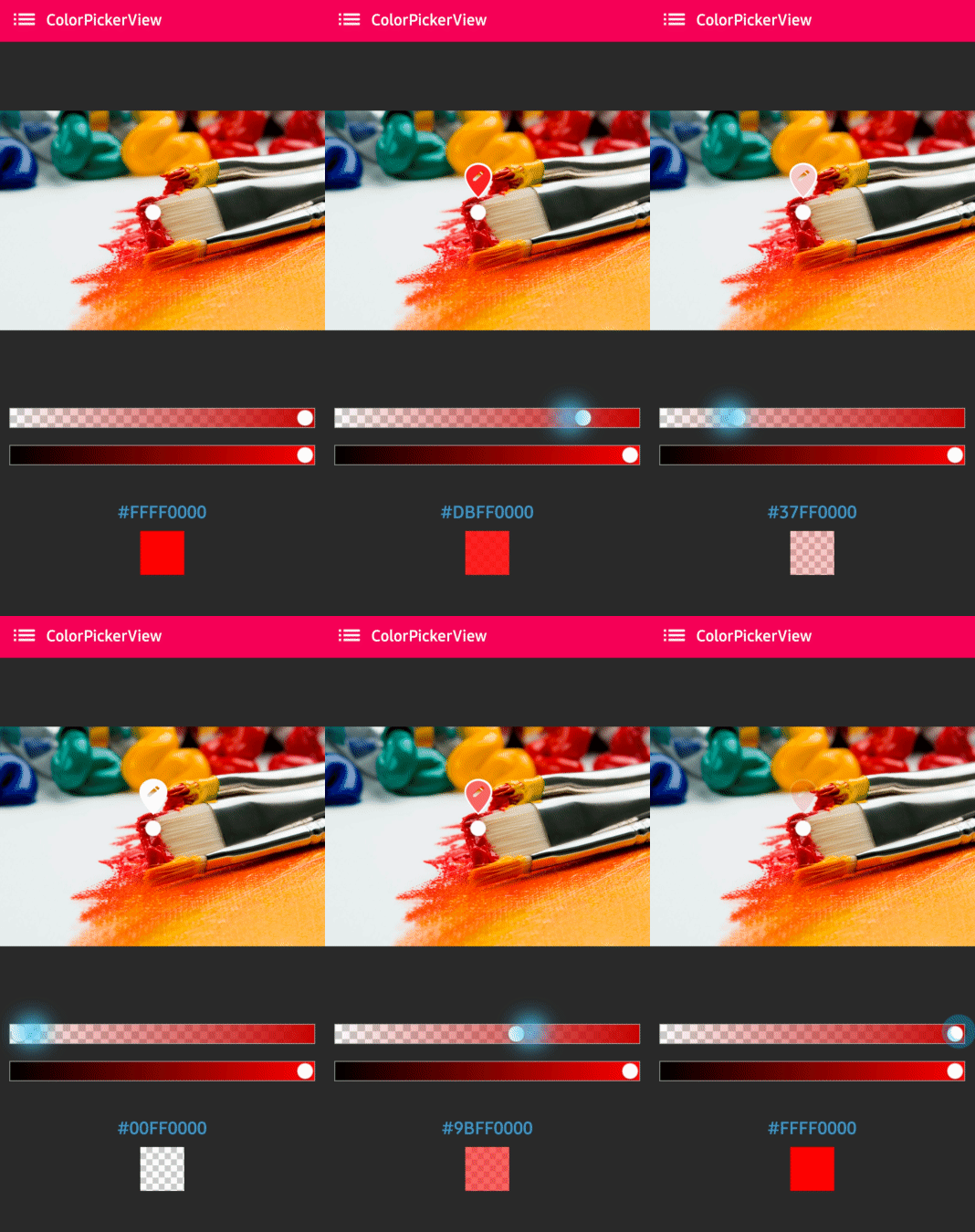 `AlphaSlideBar` in XML layout
```gradle
// sets a size of the border.
```
We can attach and connect the `AlphaSlideBar` to our `ColorPickerView` using `attachAlphaSlider` method.
```java
AlphaSlideBar alphaSlideBar = findViewById(R.id.alphaSlideBar);
colorPickerView.attachAlphaSlider(alphaSlideBar);
```
We can make it vertically using the below attributes.
```gradle
android:layout_width="280dp" // width must set a specific width size.
android:layout_height="wrap_content"
android:rotation="90"
```
## BrightnessSlideBar
BrightnessSlideBar changes the brightness of the selected color.
`AlphaSlideBar` in XML layout
```gradle
// sets a size of the border.
```
We can attach and connect the `AlphaSlideBar` to our `ColorPickerView` using `attachAlphaSlider` method.
```java
AlphaSlideBar alphaSlideBar = findViewById(R.id.alphaSlideBar);
colorPickerView.attachAlphaSlider(alphaSlideBar);
```
We can make it vertically using the below attributes.
```gradle
android:layout_width="280dp" // width must set a specific width size.
android:layout_height="wrap_content"
android:rotation="90"
```
## BrightnessSlideBar
BrightnessSlideBar changes the brightness of the selected color.
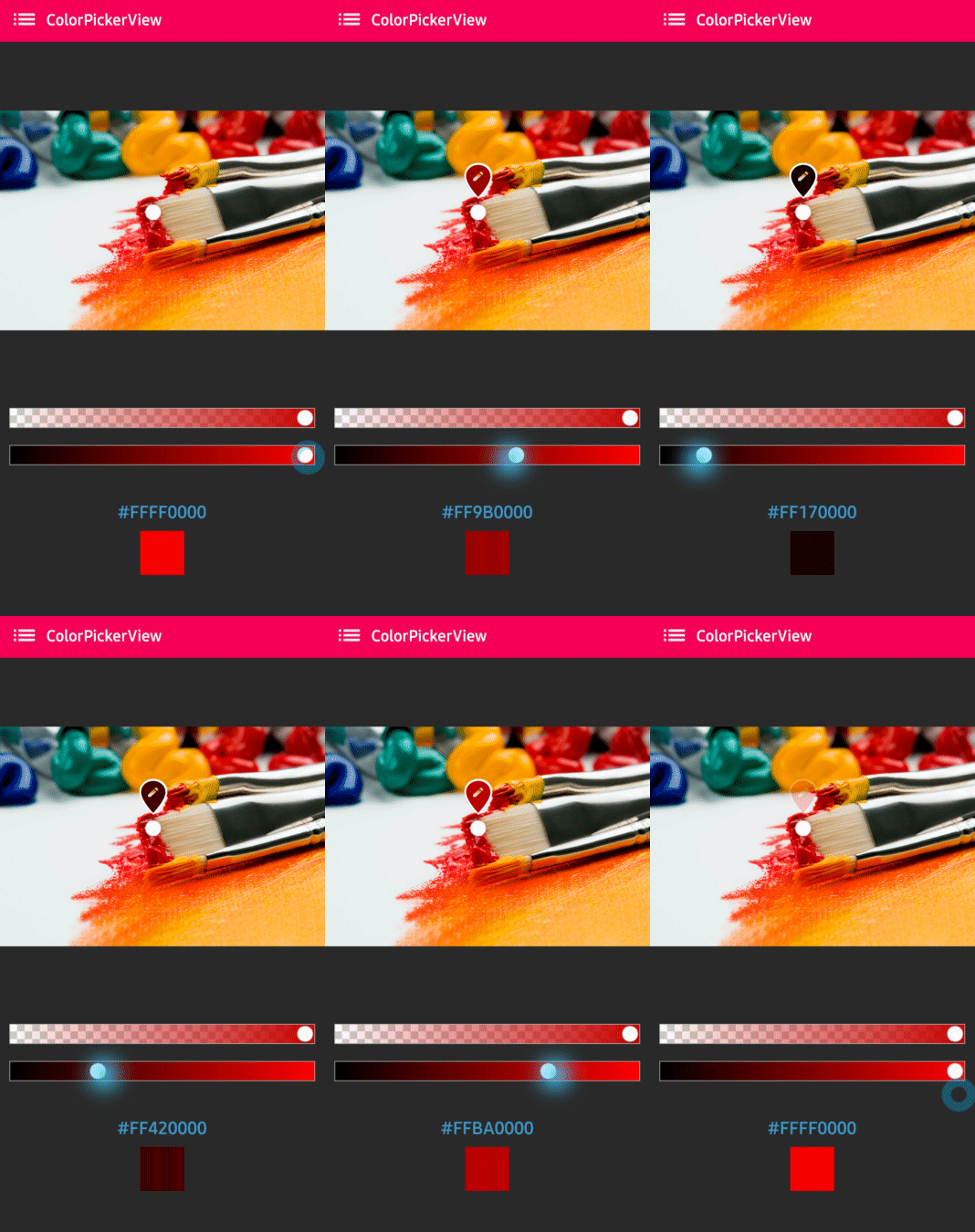 `BrightnessSlideBar` in XML layout
```gradle
// sets a size of the border.
```
We can attach and connect the `BrightnessSlideBar` to our `ColorPickerView` using `attachBrightnessSlider` method.
```java
BrightnessSlideBar brightnessSlideBar = findViewById(R.id.brightnessSlide);
colorPickerView.attachBrightnessSlider(brightnessSlideBar);
```
We can make it vertically using the below attributes.
```gradle
android:layout_width="280dp" // width must set a specific width size.
android:layout_height="wrap_content"
android:rotation="90"
```
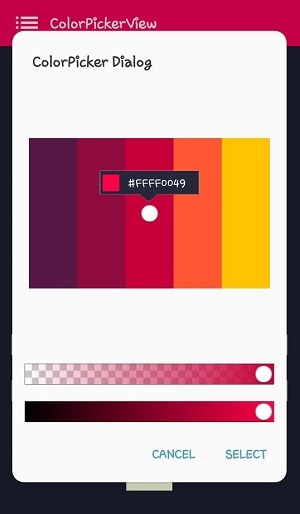
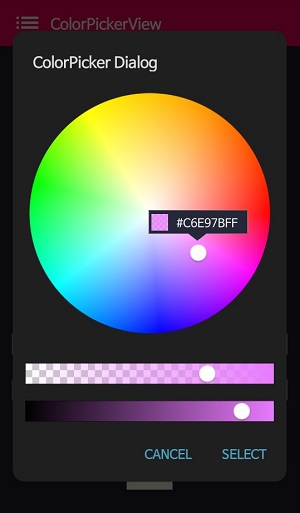
## ColorPickerDialog
`BrightnessSlideBar` in XML layout
```gradle
// sets a size of the border.
```
We can attach and connect the `BrightnessSlideBar` to our `ColorPickerView` using `attachBrightnessSlider` method.
```java
BrightnessSlideBar brightnessSlideBar = findViewById(R.id.brightnessSlide);
colorPickerView.attachBrightnessSlider(brightnessSlideBar);
```
We can make it vertically using the below attributes.
```gradle
android:layout_width="280dp" // width must set a specific width size.
android:layout_height="wrap_content"
android:rotation="90"
```
## ColorPickerDialog


`ColorPickerDialog` can be used just like an AlertDialog and it provides colors by tapping from any drawable.
```java
new ColorPickerDialog.Builder(this)
.setTitle("ColorPicker Dialog")
.setPreferenceName("MyColorPickerDialog")
.setPositiveButton(getString(R.string.confirm),
new ColorEnvelopeListener() {
@Override
public void onColorSelected(ColorEnvelope envelope, boolean fromUser) {
setLayoutColor(envelope);
}
})
.setNegativeButton(getString(R.string.cancel),
new DialogInterface.OnClickListener() {
@Override
public void onClick(DialogInterface dialogInterface, int i) {
dialogInterface.dismiss();
}
})
.attachAlphaSlideBar(true) // the default value is true.
.attachBrightnessSlideBar(true) // the default value is true.
.setBottomSpace(12) // set a bottom space between the last slidebar and buttons.
.show();
```
we can get an instance of `ColorPickerView` from the `ColorPickerView.Builder` and we can customize it.
```java
ColorPickerView colorPickerView = builder.getColorPickerView();
colorPickerView.setFlagView(new CustomFlag(this, R.layout.layout_flag)); // sets a custom flagView
builder.show(); // shows the dialog
```
## FlagView
We can implement showing a `FlagView` above and below on the selector.
This library provides `BubbleFlagView` by default as we can see the [previews](https://github.com/skydoves/ColorPickerView#colorpickerview).
Here is the example code for implementing it.
```java
BubbleFlag bubbleFlag = new BubbleFlag(this);
bubbleFlag.setFlagMode(FlagMode.FADE);
colorPickerView.setFlagView(bubbleFlag);
```
We can also fully customize the `FlagView` like below.
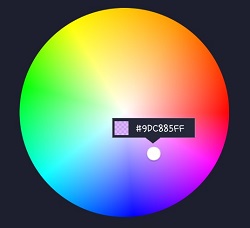
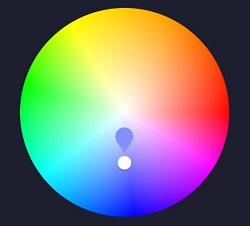
First, We need a customized layout like below.
```gradle
```
Second, we need to create a class that extends `FlagView`. Here is an example code.
```java
public class CustomFlag extends FlagView {
private TextView textView;
private AlphaTileView alphaTileView;
public CustomFlag(Context context, int layout) {
super(context, layout);
textView = findViewById(R.id.flag_color_code);
alphaTileView = findViewById(R.id.flag_color_layout);
}
@Override
public void onRefresh(ColorEnvelope colorEnvelope) {
textView.setText("#" + colorEnvelope.getHexCode());
alphaTileView.setPaintColor(colorEnvelope.getColor());
}
}
```
And last, set the `FlagView` to the `ColorPickerView` using the `setFlagView` method.
```java
colorPickerView.setFlagView(new CustomFlag(this, R.layout.layout_flag));
```
### FlagMode
`FlagMode` is an option to decides the visibility action of the `FlagView`.
```java
colorPickerView.setFlagMode(FlagMode.ALWAYS); // showing always by tapping and dragging.
colorPickerView.setFlagMode(FlagMode.LAST); // showing only when finger released.
```
## AlphaTileView

`AlphaTileView` visualizes ARGB colors over the view.
If we need to represent ARGB colors on the general view, it will not be showing accurately. Because a color will be mixed with the parent view's background color. so if we need to represent ARGB colors accurately, we can use the `AlphaTileView`.
```gradle
// the color of odd tiles
```
### ColorPickerView Methods
Methods | Return | Description
--- | --- | ---
getColor() | int | gets the last selected color.
getColorEnvelope() | ColorEnvelope | gets the `ColorEnvelope` of the last selected color.
setPaletteDrawable(Drawable drawable) | void | changes palette drawable manually.
setSelectorDrawable(Drawable drawable) | void | changes selector drawable manually.
setSelectorPoint(int x, int y) | void | selects the specific coordinate of the palette manually.
selectByHsvColor(@ColorInt int color) | void | changes selector's selected point by a specific color.
selectByHsvColorRes(@ColorRes int resource) | void | changes selector's selected point by a specific color using a color resource.
setHsvPaletteDrawable() | void | changes the palette drawable as the default drawable (ColorHsvPalette).
selectCenter() | void | selects the center of the palette manually.
setInitialColor(@ColorInt int color) | void | changes selector's selected point by a specific color initially.
setInitialColorRes(@ColorRes int resource) | void | changes selector's selected point by a specific color initially using a color resource.
setActionMode(ActionMode) | void | sets the color listener's trigger action mode.
setFlagView(FlagView flagView) | void | sets `FlagView` on `ColorPickerView`.
attachAlphaSlider | void | linking an `AlphaSlideBar` on the `ColorPickerView`.
attachBrightnessSlider | void | linking an `BrightnessSlideBar` on the `ColorPickerView`.
## Other Libraries
Here are other ColorPicker related libraries!
### ColorPickerPreference
[A library](https://github.com/skydoves/ColorPickerPreference) that let you implement ColorPickerView, ColorPickerDialog, ColorPickerPreference.
### Multi-ColorPickerView
You can get colors using multi selectors.
At [here](https://github.com/skydoves/Multi-ColorPicker) you can get a more specialized library on multi-coloring.
## Find this library useful? :heart:
Support it by joining [stargazers](https://github.com/skydoves/ColorPickerView/stargazers) for this repository. :star:
And __[follow](https://github.com/skydoves)__ me for my next creations! 🤩
# License
```xml
Copyright 2017 skydoves (Jaewoong Eum)
Licensed under the Apache License, Version 2.0 (the "License");
you may not use this file except in compliance with the License.
You may obtain a copy of the License at
http://www.apache.org/licenses/LICENSE-2.0
Unless required by applicable law or agreed to in writing, software
distributed under the License is distributed on an "AS IS" BASIS,
WITHOUT WARRANTIES OR CONDITIONS OF ANY KIND, either express or implied.
See the License for the specific language governing permissions and
limitations under the License.
```