# pigsty
**Repository Path**: gs043134/pigsty
## Basic Information
- **Project Name**: pigsty
- **Description**: Pigsty 是开箱即用的开源 PostgreSQL 发行版
- **Primary Language**: Python
- **License**: AGPL-3.0
- **Default Branch**: master
- **Homepage**: https://www.oschina.net/p/pigsty
- **GVP Project**: No
## Statistics
- **Stars**: 0
- **Forks**: 17
- **Created**: 2024-08-14
- **Last Updated**: 2024-08-14
## Categories & Tags
**Categories**: Uncategorized
**Tags**: None
## README
# Pigsty
> "**P**ostgreSQL **I**n **G**reat **STY**le": **P**ostgres, **I**nfras, **G**raphics, **S**ervice, **T**oolbox, it's all **Y**ours.
>
> —— Battery-Included, Local-First **PostgreSQL** Distribution as an Open-Source **RDS** Alternative
>
> [Website](https://pigsty.io/) | [Demo](https://demo.pigsty.cc) | [Blog](https://pigsty.io/blog) | [Discuss](https://github.com/Vonng/pigsty/discussions) | [Discord](https://discord.gg/j5pG8qfKxU) | [Roadmap](https://github.com/users/Vonng/projects/2/views/3) | [站点](https://pigsty.cc/zh/) | [博客](https://pigsty.cc/zh/blog)
>
> [Get Started](https://pigsty.io/docs/setup/install/) with the latest [v2.7.0](https://github.com/Vonng/pigsty/releases/tag/v2.7.0) release: `curl -fsSL https://get.pigsty.cc/i | bash`
----------------
## Features
> Pigsty is your postgres, infra, grafana service toolbox, check [**Feature**](https://pigsty.io/docs/about/feature/) | [**特性**](https://pigsty.io/zh/docs/about/feature/) and [**Demo**](https://demo.pigsty.cc) for details.
[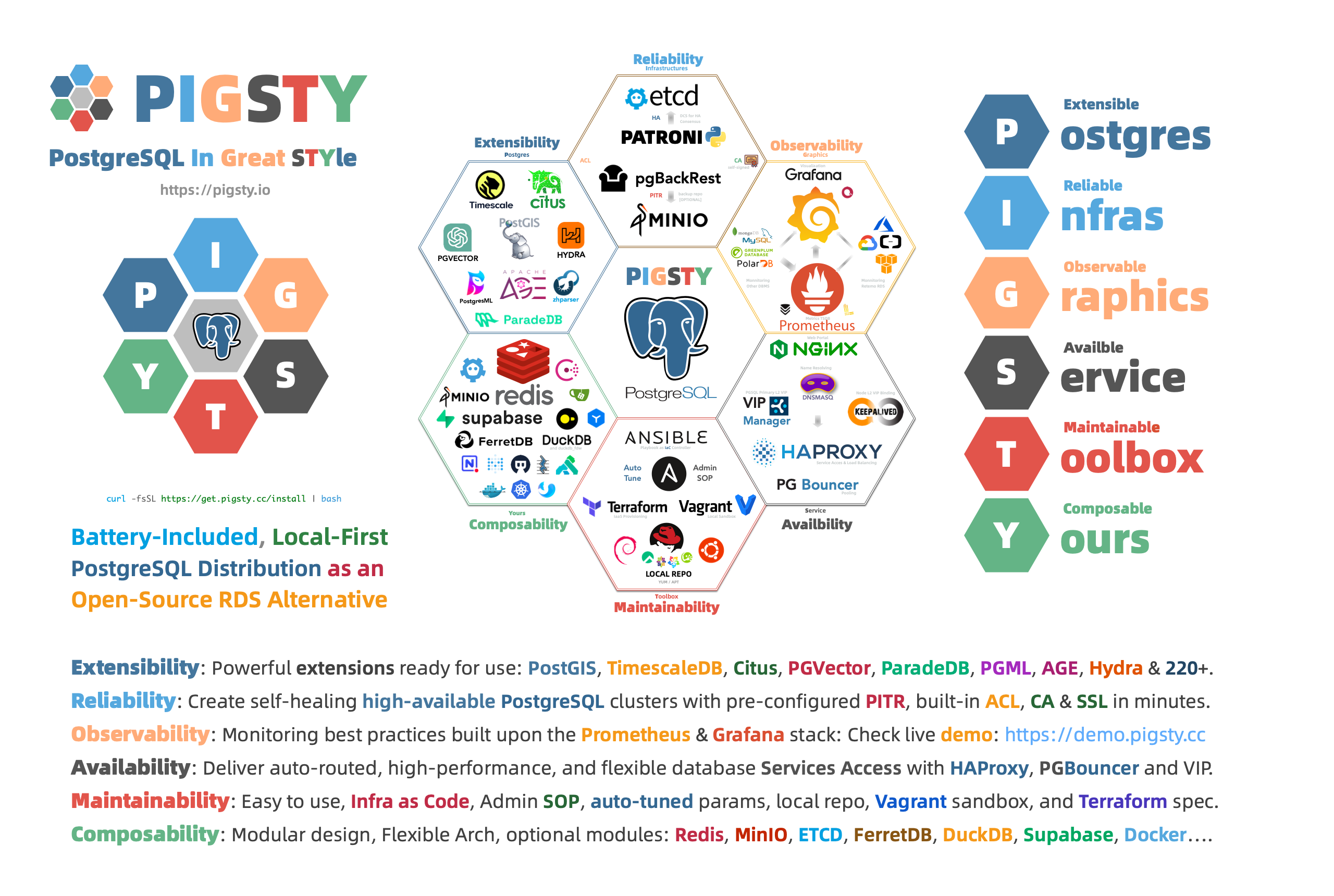](https://pigsty.io/)
There are **255** unique [extensions](https://pigsty.io/docs/reference/extension) available in Pigsty, **34** of which are maintained by Pigsty itself.
----------------
## Get Started
> Setup everything with one command! Check [**Get Started**](https://pigsty.io/docs/setup/install/) | [**快速上手**](https://pigsty.io/zh/docs/setup/install/) for details.
[**Prepare**](https://pigsty.io/docs/setup/prepare/) a fresh Linux x86_64 node that runs [**compatible**](https://pigsty.io/docs/reference/compatibility/) OS distros,
Run this [**`install`**](https://github.com/Vonng/pigsty/blob/master/bin/install) script as the admin user with nopass `ssh` & `sudo` privilege:
```bash
bash -c "$(curl -fsSL https://get.pigsty.cc/install)"
cd ~/pigsty; ./bootstrap; ./configure; ./install.yml;
```
Then you will have a pigsty singleton node ready, with Web Services on port `80/443` and Postgres on port `5432`.
Install Script Output
If you don't like the idea of running the [`install`](https://github.com/Vonng/pigsty/blob/master/bin/install) script from the Internet.
Consider download pigsty source tarball & offline package and perform an [offline install](https://pigsty.io/docs/setup/offline/) without the Internet access.
```bash
$ bash -c "$(curl -fsSL https://get.pigsty.cc/install)"
[v2.7.0] ===========================================
$ curl -fsSL https://pigsty.cc/install | bash
[Site] https://pigsty.io
[Demo] https://demo.pigsty.cc
[Repo] https://github.com/Vonng/pigsty
[Docs] https://pigsty.io/docs/setup/install
[Download] ===========================================
[ OK ] version = v2.7.0 (from default)
curl -fSL https://get.pigsty.cc/v2.7.0/pigsty-v2.7.0.tgz -o /tmp/pigsty-v2.7.0.tgz
########################################################################### 100.0%
[ OK ] md5sums = some_random_md5_hash_value_here_ /tmp/pigsty-v2.7.0.tgz
[Install] ===========================================
[ OK ] install = /home/vagrant/pigsty, from /tmp/pigsty-v2.7.0.tgz
[Resource] ===========================================
[HINT] rocky 8 have [OPTIONAL] offline package available: https://pigsty.io/docs/setup/offline
curl -fSL https://github.com/Vonng/pigsty/releases/download/v2.7.0/pigsty-pkg-v2.7.0.el8.x86_64.tgz -o /tmp/pkg.tgz
curl -fSL https://get.pigsty.cc/v2.7.0/pigsty-pkg-v2.7.0.el8.x86_64.tgz -o /tmp/pkg.tgz # or use alternative CDN
[TodoList] ===========================================
cd /home/vagrant/pigsty
./bootstrap # [OPTIONAL] install ansible & use offline package
./configure # [OPTIONAL] preflight-check and config generation
./install.yml # install pigsty modules according to your config.
[Complete] ===========================================
```
> HINT: To install a specific version, passing the version string as the first parameter:
>
> ```bash
> bash -c "$(curl -fsSL https://get.pigsty.cc/i)" -- v2.6.0
> curl -fsSL https://get.pigsty.cc/i | bash -s v2.6.0
> ```
Download with Git
You can also download pigsty source with `git`, don't forget to check out a specific version tag, the `master` branch is for development.
```bash
git clone https://github.com/Vonng/pigsty;
cd pigsty; git checkout v2.7.0
```
Download Directly
You can also download pigsty source tarball & [offline packages](https://pigsty.io/docs/setup/offline/) directly from GitHub release page.
| Package | GitHub Release | CDN Mirror |
|------------------------------|:----------------------------------------------------------------------------------------------------------------------------------------|:------------------------------------------------------------------------------------------------------------|
| Pigsty Source Tarball | [pigsty-v2.7.0.tgz](https://github.com/Vonng/pigsty/releases/download/v2.7.0/pigsty-v2.7.0.tgz) | [pigsty-v2.7.0.tgz](https://get.pigsty.cc/v2.7.0/pigsty-v2.7.0.tgz) |
| EL8 Offline Package | [pigsty-pkg-2.7.0.el8.x86_64.tgz](https://github.com/Vonng/pigsty/releases/download/v2.7.0/pigsty-pkg-v2.7.0.el8.x86_64.tgz) | [pigsty-pkg-2.7.0.el8.x86_64.tgz](https://get.pigsty.cc/v2.7.0/pigsty-pkg-v2.7.0.el8.x86_64.tgz) |
| Debian 12 Offline Package | [pigsty-pkg-v2.7.0.debian12.x86_64.tgz](https://github.com/Vonng/pigsty/releases/download/v2.7.0/pigsty-pkg-v2.7.0.debian12.x86_64.tgz) | [pigsty-pkg-v2.7.0.debian12.x86_64.tgz](https://get.pigsty.cc/v2.7.0/pigsty-pkg-v2.7.0.debian12.x86_64.tgz) |
| Ubuntu 22.04 Offline Package | [pigsty-pkg-v2.7.0.ubuntu22.x86_64.tgz](https://github.com/Vonng/pigsty/releases/download/v2.7.0/pigsty-pkg-v2.7.0.ubuntu22.x86_64.tgz) | [pigsty-pkg-v2.7.0.ubuntu22.x86_64.tgz](https://get.pigsty.cc/v2.7.0/pigsty-pkg-v2.7.0.ubuntu22.x86_64.tgz) |
```bash
# download tarball directly from GitHub with curl
curl -L https://github.com/Vonng/pigsty/releases/download/v2.7.0/pigsty-v2.7.0.tgz -o ~/pigsty.tgz # Pigsty Source Tarball
curl -L https://github.com/Vonng/pigsty/releases/download/v2.7.0/pigsty-pkg-v2.7.0.el8.x86_64.tgz -o /tmp/pkg.tgz # Offline Package for Rocky 8.9 (Green Obsidian)
curl -L https://github.com/Vonng/pigsty/releases/download/v2.7.0/pigsty-pkg-v2.7.0.debian12.x86_64.tgz -o /tmp/pkg.tgz # Offline Package for Debian 12 (bookworm, 12.4)
curl -L https://github.com/Vonng/pigsty/releases/download/v2.7.0/pigsty-pkg-v2.7.0.ubuntu22.x86_64.tgz -o /tmp/pkg.tgz # Offline Package for Ubuntu 22.04 (jammy, 22.04.3)
# or use the alternative CDN in china
curl -L https://get.pigsty.cc/v2.7.0/pigsty-v2.7.0.tgz -o ~/pigsty.tgz # Pigsty Source Tarball
curl -L https://get.pigsty.cc/v2.7.0/pigsty-pkg-v2.7.0.el8.x86_64.tgz -o /tmp/pkg.tgz # Offline Package for Rocky 8.9 (Green Obsidian)
curl -L https://get.pigsty.cc/v2.7.0/pigsty-pkg-v2.7.0.debian12.x86_64.tgz -o /tmp/pkg.tgz # Offline Package for Debian 12 (bookworm, 12.4)
curl -L https://get.pigsty.cc/v2.7.0/pigsty-pkg-v2.7.0.ubuntu22.x86_64.tgz -o /tmp/pkg.tgz # Offline Package for Ubuntu 22.04 (jammy, 22.04.3)
```
Beware that pre-packed offline packages are OS Minor version specific, if you are using a different minor version (e.g: 8.6, 22.04.2), consider not using the offline package and perform the default online installation.
Example: Install with Offline Package (EL8)
[](https://asciinema.org/a/659637)
Example: Complex Postgres Customize
```yaml
pg-meta:
hosts: { 10.10.10.10: { pg_seq: 1, pg_role: primary , pg_offline_query: true } }
vars:
pg_cluster: pg-meta
pg_databases: # define business databases on this cluster, array of database definition
- name: meta # REQUIRED, `name` is the only mandatory field of a database definition
baseline: cmdb.sql # optional, database sql baseline path, (relative path among ansible search path, e.g files/)
pgbouncer: true # optional, add this database to pgbouncer database list? true by default
schemas: [pigsty] # optional, additional schemas to be created, array of schema names
extensions: # optional, additional extensions to be installed: array of `{name[,schema]}`
- { name: postgis , schema: public }
- { name: timescaledb }
comment: pigsty meta database # optional, comment string for this database
owner: postgres # optional, database owner, postgres by default
template: template1 # optional, which template to use, template1 by default
encoding: UTF8 # optional, database encoding, UTF8 by default. (MUST same as template database)
locale: C # optional, database locale, C by default. (MUST same as template database)
lc_collate: C # optional, database collate, C by default. (MUST same as template database)
lc_ctype: C # optional, database ctype, C by default. (MUST same as template database)
tablespace: pg_default # optional, default tablespace, 'pg_default' by default.
allowconn: true # optional, allow connection, true by default. false will disable connect at all
revokeconn: false # optional, revoke public connection privilege. false by default. (leave connect with grant option to owner)
register_datasource: true # optional, register this database to grafana datasources? true by default
connlimit: -1 # optional, database connection limit, default -1 disable limit
pool_auth_user: dbuser_meta # optional, all connection to this pgbouncer database will be authenticated by this user
pool_mode: transaction # optional, pgbouncer pool mode at database level, default transaction
pool_size: 64 # optional, pgbouncer pool size at database level, default 64
pool_size_reserve: 32 # optional, pgbouncer pool size reserve at database level, default 32
pool_size_min: 0 # optional, pgbouncer pool size min at database level, default 0
pool_max_db_conn: 100 # optional, max database connections at database level, default 100
- { name: grafana ,owner: dbuser_grafana ,revokeconn: true ,comment: grafana primary database }
- { name: bytebase ,owner: dbuser_bytebase ,revokeconn: true ,comment: bytebase primary database }
- { name: kong ,owner: dbuser_kong ,revokeconn: true ,comment: kong the api gateway database }
- { name: gitea ,owner: dbuser_gitea ,revokeconn: true ,comment: gitea meta database }
- { name: wiki ,owner: dbuser_wiki ,revokeconn: true ,comment: wiki meta database }
pg_users: # define business users/roles on this cluster, array of user definition
- name: dbuser_meta # REQUIRED, `name` is the only mandatory field of a user definition
password: DBUser.Meta # optional, password, can be a scram-sha-256 hash string or plain text
login: true # optional, can log in, true by default (new biz ROLE should be false)
superuser: false # optional, is superuser? false by default
createdb: false # optional, can create database? false by default
createrole: false # optional, can create role? false by default
inherit: true # optional, can this role use inherited privileges? true by default
replication: false # optional, can this role do replication? false by default
bypassrls: false # optional, can this role bypass row level security? false by default
pgbouncer: true # optional, add this user to pgbouncer user-list? false by default (production user should be true explicitly)
connlimit: -1 # optional, user connection limit, default -1 disable limit
expire_in: 3650 # optional, now + n days when this role is expired (OVERWRITE expire_at)
expire_at: '2030-12-31' # optional, YYYY-MM-DD 'timestamp' when this role is expired (OVERWRITTEN by expire_in)
comment: pigsty admin user # optional, comment string for this user/role
roles: [dbrole_admin] # optional, belonged roles. default roles are: dbrole_{admin,readonly,readwrite,offline}
parameters: {} # optional, role level parameters with `ALTER ROLE SET`
pool_mode: transaction # optional, pgbouncer pool mode at user level, transaction by default
pool_connlimit: -1 # optional, max database connections at user level, default -1 disable limit
- {name: dbuser_view ,password: DBUser.Viewer ,pgbouncer: true ,roles: [dbrole_readonly], comment: read-only viewer for meta database}
- {name: dbuser_grafana ,password: DBUser.Grafana ,pgbouncer: true ,roles: [dbrole_admin] ,comment: admin user for grafana database }
- {name: dbuser_bytebase ,password: DBUser.Bytebase ,pgbouncer: true ,roles: [dbrole_admin] ,comment: admin user for bytebase database }
- {name: dbuser_kong ,password: DBUser.Kong ,pgbouncer: true ,roles: [dbrole_admin] ,comment: admin user for kong api gateway }
- {name: dbuser_gitea ,password: DBUser.Gitea ,pgbouncer: true ,roles: [dbrole_admin] ,comment: admin user for gitea service }
- {name: dbuser_wiki ,password: DBUser.Wiki ,pgbouncer: true ,roles: [dbrole_admin] ,comment: admin user for wiki.js service }
pg_services: # extra services in addition to pg_default_services, array of service definition
# standby service will route {ip|name}:5435 to sync replica's pgbouncer (5435->6432 standby)
- name: standby # required, service name, the actual svc name will be prefixed with `pg_cluster`, e.g: pg-meta-standby
port: 5435 # required, service exposed port (work as kubernetes service node port mode)
ip: "*" # optional, service bind ip address, `*` for all ip by default
selector: "[]" # required, service member selector, use JMESPath to filter inventory
dest: default # optional, destination port, default|postgres|pgbouncer|, 'default' by default
check: /sync # optional, health check url path, / by default
backup: "[? pg_role == `primary`]" # backup server selector
maxconn: 3000 # optional, max allowed front-end connection
balance: roundrobin # optional, haproxy load balance algorithm (roundrobin by default, other: leastconn)
options: 'inter 3s fastinter 1s downinter 5s rise 3 fall 3 on-marked-down shutdown-sessions slowstart 30s maxconn 3000 maxqueue 128 weight 100'
pg_hba_rules:
- {user: dbuser_view , db: all ,addr: infra ,auth: pwd ,title: 'allow grafana dashboard access cmdb from infra nodes'}
pg_vip_enabled: true
pg_vip_address: 10.10.10.2/24
pg_vip_interface: eth1
node_crontab: # make a full backup 1 am everyday
- '00 01 * * * postgres /pg/bin/pg-backup full'
```
Example: Security Enhanced PG Cluster with Delayed Replica
```yaml
pg-meta: # 3 instance postgres cluster `pg-meta`
hosts:
10.10.10.10: { pg_seq: 1, pg_role: primary }
10.10.10.11: { pg_seq: 2, pg_role: replica }
10.10.10.12: { pg_seq: 3, pg_role: replica , pg_offline_query: true }
vars:
pg_cluster: pg-meta
pg_conf: crit.yml
pg_users:
- { name: dbuser_meta , password: DBUser.Meta , pgbouncer: true , roles: [ dbrole_admin ] , comment: pigsty admin user }
- { name: dbuser_view , password: DBUser.Viewer , pgbouncer: true , roles: [ dbrole_readonly ] , comment: read-only viewer for meta database }
pg_databases:
- {name: meta ,baseline: cmdb.sql ,comment: pigsty meta database ,schemas: [pigsty] ,extensions: [{name: postgis, schema: public}, {name: timescaledb}]}
pg_default_service_dest: postgres
pg_services:
- { name: standby ,src_ip: "*" ,port: 5435 , dest: default ,selector: "[]" , backup: "[? pg_role == `primary`]" }
pg_vip_enabled: true
pg_vip_address: 10.10.10.2/24
pg_vip_interface: eth1
pg_listen: '${ip},${vip},${lo}'
patroni_ssl_enabled: true
pgbouncer_sslmode: require
pgbackrest_method: minio
pg_libs: 'timescaledb, $libdir/passwordcheck, pg_stat_statements, auto_explain' # add passwordcheck extension to enforce strong password
pg_default_roles: # default roles and users in postgres cluster
- { name: dbrole_readonly ,login: false ,comment: role for global read-only access }
- { name: dbrole_offline ,login: false ,comment: role for restricted read-only access }
- { name: dbrole_readwrite ,login: false ,roles: [dbrole_readonly] ,comment: role for global read-write access }
- { name: dbrole_admin ,login: false ,roles: [pg_monitor, dbrole_readwrite] ,comment: role for object creation }
- { name: postgres ,superuser: true ,expire_in: 7300 ,comment: system superuser }
- { name: replicator ,replication: true ,expire_in: 7300 ,roles: [pg_monitor, dbrole_readonly] ,comment: system replicator }
- { name: dbuser_dba ,superuser: true ,expire_in: 7300 ,roles: [dbrole_admin] ,pgbouncer: true ,pool_mode: session, pool_connlimit: 16 , comment: pgsql admin user }
- { name: dbuser_monitor ,roles: [pg_monitor] ,expire_in: 7300 ,pgbouncer: true ,parameters: {log_min_duration_statement: 1000 } ,pool_mode: session ,pool_connlimit: 8 ,comment: pgsql monitor user }
pg_default_hba_rules: # postgres host-based auth rules by default
- {user: '${dbsu}' ,db: all ,addr: local ,auth: ident ,title: 'dbsu access via local os user ident' }
- {user: '${dbsu}' ,db: replication ,addr: local ,auth: ident ,title: 'dbsu replication from local os ident' }
- {user: '${repl}' ,db: replication ,addr: localhost ,auth: ssl ,title: 'replicator replication from localhost'}
- {user: '${repl}' ,db: replication ,addr: intra ,auth: ssl ,title: 'replicator replication from intranet' }
- {user: '${repl}' ,db: postgres ,addr: intra ,auth: ssl ,title: 'replicator postgres db from intranet' }
- {user: '${monitor}' ,db: all ,addr: localhost ,auth: pwd ,title: 'monitor from localhost with password' }
- {user: '${monitor}' ,db: all ,addr: infra ,auth: ssl ,title: 'monitor from infra host with password'}
- {user: '${admin}' ,db: all ,addr: infra ,auth: ssl ,title: 'admin @ infra nodes with pwd & ssl' }
- {user: '${admin}' ,db: all ,addr: world ,auth: cert ,title: 'admin @ everywhere with ssl & cert' }
- {user: '+dbrole_readonly',db: all ,addr: localhost ,auth: ssl ,title: 'pgbouncer read/write via local socket'}
- {user: '+dbrole_readonly',db: all ,addr: intra ,auth: ssl ,title: 'read/write biz user via password' }
- {user: '+dbrole_offline' ,db: all ,addr: intra ,auth: ssl ,title: 'allow etl offline tasks from intranet'}
pgb_default_hba_rules: # pgbouncer host-based authentication rules
- {user: '${dbsu}' ,db: pgbouncer ,addr: local ,auth: peer ,title: 'dbsu local admin access with os ident'}
- {user: 'all' ,db: all ,addr: localhost ,auth: pwd ,title: 'allow all user local access with pwd' }
- {user: '${monitor}' ,db: pgbouncer ,addr: intra ,auth: ssl ,title: 'monitor access via intranet with pwd' }
- {user: '${monitor}' ,db: all ,addr: world ,auth: deny ,title: 'reject all other monitor access addr' }
- {user: '${admin}' ,db: all ,addr: intra ,auth: ssl ,title: 'admin access via intranet with pwd' }
- {user: '${admin}' ,db: all ,addr: world ,auth: deny ,title: 'reject all other admin access addr' }
- {user: 'all' ,db: all ,addr: intra ,auth: ssl ,title: 'allow all user intra access with pwd' }
# OPTIONAL delayed cluster for pg-meta
pg-meta-delay: # delayed instance for pg-meta (1 hour ago)
hosts: { 10.10.10.13: { pg_seq: 1, pg_role: primary, pg_upstream: 10.10.10.10, pg_delay: 1h } }
vars: { pg_cluster: pg-meta-delay }
```
Example: Citus Distributed Cluster: 5 Nodes
```yaml
all:
children:
pg-citus0: # citus coordinator, pg_group = 0
hosts: { 10.10.10.10: { pg_seq: 1, pg_role: primary } }
vars: { pg_cluster: pg-citus0 , pg_group: 0 }
pg-citus1: # citus data node 1
hosts: { 10.10.10.11: { pg_seq: 1, pg_role: primary } }
vars: { pg_cluster: pg-citus1 , pg_group: 1 }
pg-citus2: # citus data node 2
hosts: { 10.10.10.12: { pg_seq: 1, pg_role: primary } }
vars: { pg_cluster: pg-citus2 , pg_group: 2 }
pg-citus3: # citus data node 3, with an extra replica
hosts:
10.10.10.13: { pg_seq: 1, pg_role: primary }
10.10.10.14: { pg_seq: 2, pg_role: replica }
vars: { pg_cluster: pg-citus3 , pg_group: 3 }
vars: # global parameters for all citus clusters
pg_mode: citus # pgsql cluster mode: citus
pg_shard: pg-citus # citus shard name: pg-citus
patroni_citus_db: meta # citus distributed database name
pg_dbsu_password: DBUser.Postgres # all dbsu password access for citus cluster
pg_libs: 'citus, timescaledb, pg_stat_statements, auto_explain' # citus will be added by patroni automatically
pg_extensions:
- postgis34_${ pg_version }* timescaledb-2-postgresql-${ pg_version }* pgvector_${ pg_version }* citus_${ pg_version }*
pg_users: [ { name: dbuser_meta ,password: DBUser.Meta ,pgbouncer: true ,roles: [ dbrole_admin ] } ]
pg_databases: [ { name: meta ,extensions: [ { name: citus }, { name: postgis }, { name: timescaledb } ] } ]
pg_hba_rules:
- { user: 'all' ,db: all ,addr: 127.0.0.1/32 ,auth: ssl ,title: 'all user ssl access from localhost' }
- { user: 'all' ,db: all ,addr: intra ,auth: ssl ,title: 'all user ssl access from intranet' }
```
Example: Redis Cluster/Sentinel/Standalone
```yaml
redis-ms: # redis classic primary & replica
hosts: { 10.10.10.10: { redis_node: 1 , redis_instances: { 6379: { }, 6380: { replica_of: '10.10.10.10 6379' } } } }
vars: { redis_cluster: redis-ms ,redis_password: 'redis.ms' ,redis_max_memory: 64MB }
redis-meta: # redis sentinel x 3
hosts: { 10.10.10.11: { redis_node: 1 , redis_instances: { 26379: { } ,26380: { } ,26381: { } } } }
vars:
redis_cluster: redis-meta
redis_password: 'redis.meta'
redis_mode: sentinel
redis_max_memory: 16MB
redis_sentinel_monitor: # primary list for redis sentinel, use cls as name, primary ip:port
- { name: redis-ms, host: 10.10.10.10, port: 6379 ,password: redis.ms, quorum: 2 }
redis-test: # redis native cluster: 3m x 3s
hosts:
10.10.10.12: { redis_node: 1 ,redis_instances: { 6379: { } ,6380: { } ,6381: { } } }
10.10.10.13: { redis_node: 2 ,redis_instances: { 6379: { } ,6380: { } ,6381: { } } }
vars: { redis_cluster: redis-test ,redis_password: 'redis.test' ,redis_mode: cluster, redis_max_memory: 32MB }
```
Example: ETCD 3 Node Cluster
```yaml
etcd: # dcs service for postgres/patroni ha consensus
hosts: # 1 node for testing, 3 or 5 for production
10.10.10.10: { etcd_seq: 1 } # etcd_seq required
10.10.10.11: { etcd_seq: 2 } # assign from 1 ~ n
10.10.10.12: { etcd_seq: 3 } # odd number please
vars: # cluster level parameter override roles/etcd
etcd_cluster: etcd # mark etcd cluster name etcd
etcd_safeguard: false # safeguard against purging
etcd_clean: true # purge etcd during init process
```
Example: Minio 3 Node Deployment
```yaml
minio:
hosts:
10.10.10.10: { minio_seq: 1 }
10.10.10.11: { minio_seq: 2 }
10.10.10.12: { minio_seq: 3 }
vars:
minio_cluster: minio
minio_data: '/data{1...2}' # use two disk per node
minio_node: '${minio_cluster}-${minio_seq}.pigsty' # minio node name pattern
haproxy_services:
- name: minio # [REQUIRED] service name, unique
port: 9002 # [REQUIRED] service port, unique
options:
- option httpchk
- option http-keep-alive
- http-check send meth OPTIONS uri /minio/health/live
- http-check expect status 200
servers:
- { name: minio-1 ,ip: 10.10.10.10 , port: 9000 , options: 'check-ssl ca-file /etc/pki/ca.crt check port 9000' }
- { name: minio-2 ,ip: 10.10.10.11 , port: 9000 , options: 'check-ssl ca-file /etc/pki/ca.crt check port 9000' }
- { name: minio-3 ,ip: 10.10.10.12 , port: 9000 , options: 'check-ssl ca-file /etc/pki/ca.crt check port 9000' }
```
Example: Install Pigsty 4-Node Sandbox
[](https://asciinema.org/a/566220)