# claude-code-best-practice
**Repository Path**: group_agent/claude-code-best-practice
## Basic Information
- **Project Name**: claude-code-best-practice
- **Description**: from vibe coding to agentic engineering - practice makes claude perfect
- **Primary Language**: Unknown
- **License**: MIT
- **Default Branch**: main
- **Homepage**: None
- **GVP Project**: No
## Statistics
- **Stars**: 0
- **Forks**: 0
- **Created**: 2026-04-22
- **Last Updated**: 2026-04-24
## Categories & Tags
**Categories**: Uncategorized
**Tags**: None
## README
# claude-code-best-practice
从 "Vibe Coding" 到 "Agentic Engineering" —— 练习让 Claude 臻于完美
-white?style=flat&labelColor=555)  

[](best-practice/) [](implementation/) [](orchestration-workflow/orchestration-workflow.md) [](https://code.claude.com/docs) [](#-tips-and-tricks) [](#-subscribe) 
 = Agents ·
  = Commands ·
  = Skills


Boris Cherny on X (tweet 1 · tweet 2 · tweet 3)
## 🧠 核心概念
| 功能 | 位置 | 描述 |
|---------|----------|-------------|
| [**子代理 (Subagents)**](https://code.claude.com/docs/en/sub-agents) | `.claude/agents/.md` | [](best-practice/claude-subagents.md) [](implementation/claude-subagents-implementation.md) 在全新隔离上下文中运行的自主角色 —— 可自定义工具、权限、模型、记忆和持久身份 |
| [**命令 (Commands)**](https://code.claude.com/docs/en/slash-commands) | `.claude/commands/.md` | [](best-practice/claude-commands.md) [](implementation/claude-commands-implementation.md) 注入现有上下文的知识 —— 简单的用户调用型提示模板,用于工作流编排 |
| [**技能 (Skills)**](https://code.claude.com/docs/en/skills) | `.claude/skills//SKILL.md` | [](best-practice/claude-skills.md) [](implementation/claude-skills-implementation.md) 注入现有上下文的知识 —— 可配置、可预加载、可自动发现,支持上下文分叉和渐进式披露 · [官方技能](https://github.com/anthropics/skills/tree/main/skills) |
| [**工作流 (Workflows)**](https://code.claude.com/docs/en/common-workflows) | [`.claude/commands/weather-orchestrator.md`](.claude/commands/weather-orchestrator.md) | [](orchestration-workflow/orchestration-workflow.md) |
| [**钩子 (Hooks)**](https://code.claude.com/docs/en/hooks) | `.claude/hooks/` | [](https://github.com/shanraisshan/claude-code-hooks) [](https://github.com/shanraisshan/claude-code-hooks) 用户定义的处理程序(脚本、HTTP、提示、代理),在特定事件发生时于代理循环外部运行 · [指南](https://code.claude.com/docs/en/hooks-guide) |
| [**MCP 服务器**](https://code.claude.com/docs/en/mcp) | `.claude/settings.json`, `.mcp.json` | [](best-practice/claude-mcp.md) [](.mcp.json) Model Context Protocol 连接,集成外部工具、数据库和 API |
| [**插件 (Plugins)**](https://code.claude.com/docs/en/plugins) | 可分发包 | 技能、子代理、钩子、MCP 服务器和 LSP 服务器的捆绑包 · [市场](https://code.claude.com/docs/en/discover-plugins) · [创建市场](https://code.claude.com/docs/en/plugin-marketplaces) |
| [**设置 (Settings)**](https://code.claude.com/docs/en/settings) | `.claude/settings.json` | [](best-practice/claude-settings.md) [](.claude/settings.json) 分层配置系统 · [权限](https://code.claude.com/docs/en/permissions) · [模型配置](https://code.claude.com/docs/en/model-config) · [输出样式](https://code.claude.com/docs/en/output-styles) · [沙盒](https://code.claude.com/docs/en/sandboxing) · [快捷键](https://code.claude.com/docs/en/keybindings) · [快速模式](https://code.claude.com/docs/en/fast-mode) |
| [**状态栏 (Status Line)**](https://code.claude.com/docs/en/statusline) | `.claude/settings.json` | [](https://github.com/shanraisshan/claude-code-status-line) [](.claude/settings.json) 可自定义状态栏,显示上下文用量、模型、成本和会话信息 |
| [**记忆 (Memory)**](https://code.claude.com/docs/en/memory) | `CLAUDE.md`, `.claude/rules/`, `~/.claude/rules/`, `~/.claude/projects//memory/` | [](best-practice/claude-memory.md) [](CLAUDE.md) 通过 CLAUDE.md 文件和 `@path` 导入实现持久化上下文 · [自动记忆](https://code.claude.com/docs/en/memory) · [规则](https://code.claude.com/docs/en/memory#organize-rules-with-clauderules) |
| [**检查点 (Checkpointing)**](https://code.claude.com/docs/en/checkpointing) | 自动(基于 git) | 自动追踪文件编辑,支持回退(`Esc Esc` 或 `/rewind`)和定向摘要 |
| [**CLI 启动参数**](https://code.claude.com/docs/en/cli-reference) | `claude [flags]` | [](best-practice/claude-cli-startup-flags.md) 启动 Claude Code 的命令行标志、子命令和环境变量 · [交互模式](https://code.claude.com/docs/en/interactive-mode) · [环境变量](https://code.claude.com/docs/en/env-vars) |
| **AI 术语** | | [](https://github.com/shanraisshan/claude-code-codex-cursor-gemini/blob/main/reports/ai-terms.md) Agentic Engineering · Context Engineering · Vibe Coding |
| [**最佳实践**](https://code.claude.com/docs/en/best-practices) | | 官方最佳实践 · [提示工程](https://github.com/anthropics/prompt-eng-interactive-tutorial) · [扩展 Claude Code](https://code.claude.com/docs/en/features-overview) |
### 🔥 热门功能
| 功能 | 位置 | 描述 |
|---------|----------|-------------|
| [**Routines**](https://code.claude.com/docs/en/routines)  | `claude.ai/code/routines`, `/schedule` | 基于 Anthropic 基础设施的云端自动化 —— 定时、API 触发或 GitHub 事件驱动的任务,即使计算机关机也能运行 · [桌面任务](https://code.claude.com/docs/en/desktop-scheduled-tasks) |
| [**Ultrareview**](https://code.claude.com/docs/en/ultrareview)  | `/ultrareview` | 云端多代理代码审查 —— 每个发现都在远程沙箱中独立重现和验证(5–10 分钟,~5–20美元/次);Pro/Max 用户每月 3 次免费 · [任务追踪](https://code.claude.com/docs/en/ultrareview#track-a-running-review) |
| [**Devcontainers**](https://code.claude.com/docs/en/devcontainer) | `.devcontainer/` | 预配置的开发容器,具有安全隔离和防火墙规则,确保一致的 Claude Code 环境 |
| [**Channels**](https://code.claude.com/docs/en/channels)  | `--channels`, 插件模式 | 将 Telegram、Discord 或 webhooks 的事件推送到运行中的会话 —— 你离开时 Claude 也能响应 · [参考](https://code.claude.com/docs/en/channels-reference) |
| [**Ultraplan**](https://code.claude.com/docs/en/ultraplan)  | `/ultraplan` | 在云端起草计划,支持浏览器内审查、内联评论和灵活执行 —— 可远程或传回终端 |
| [**无闪烁模式**](https://code.claude.com/docs/en/fullscreen)  | `/tui fullscreen`, `CLAUDE_CODE_NO_FLICKER=1` | [](https://x.com/bcherny/status/2039421575422980329) 无闪烁的替代屏幕渲染,支持鼠标、稳定记忆和应用内滚动 —— `/tui fullscreen` 是官方切换方式 (v2.1.110+);环境变量是旧版路径 |
| [**Auto Mode**](https://code.claude.com/docs/en/permission-modes#eliminate-prompts-with-auto-mode)  | `--permission-mode auto`, `Shift+Tab` | [](https://x.com/claudeai/status/2036503582166393240) 后台安全分类器替代手动权限提示 —— Claude 决定什么安全,同时阻止提示注入和风险升级 · `--enable-auto-mode` 标志已移除 (v2.1.111);Max 用户默认使用 Opus 4.7 · [博客](https://claude.com/blog/auto-mode) |
| [**Power-ups**](best-practice/claude-power-ups.md) | `/powerup` | [](best-practice/claude-power-ups.md) 交互式课程,通过动画演示教授 Claude Code 功能 (v2.1.90) |
| [**Computer Use**](https://code.claude.com/docs/en/computer-use)  | `computer-use` MCP 服务器 | 让 Claude 控制你的屏幕 —— 在 macOS 上打开应用、点击、输入和截图 · [桌面](https://code.claude.com/docs/en/desktop#let-claude-use-your-computer) |
| [**Agent SDK**](https://code.claude.com/docs/en/agent-sdk/overview) | `npm` / `pip` 包 | 使用 Claude Code 作为库构建生产级 AI 代理 —— Python 和 TypeScript SDK,内置工具、钩子、子代理和 MCP · [快速开始](https://code.claude.com/docs/en/agent-sdk/quickstart) · [示例](https://github.com/anthropics/claude-agent-sdk-demos) |
| [**Ralph Wiggum Loop**](https://github.com/anthropics/claude-code/tree/main/plugins/ralph-wiggum) | 插件 | [](https://github.com/ghuntley/how-to-ralph-wiggum) [](https://github.com/shanraisshan/novel-llm-26) 用于长时间运行任务的自主开发循环 —— 持续迭代直到完成 |
| [**Chrome**](https://code.claude.com/docs/en/chrome)  | `--chrome`, 扩展程序 | [](reports/claude-in-chrome-v-chrome-devtools-mcp.md) 通过 Chrome 中的 Claude 实现浏览器自动化 —— 测试 Web 应用、调试控制台、自动化表单、从页面提取数据 |
| [**Claude Code Web**](https://code.claude.com/docs/en/claude-code-on-the-web)  | `claude.ai/code` | 在云基础设施上运行任务 —— 长时间运行的任务、PR 自动修复、并行会话,无需本地设置 · [Routines](https://code.claude.com/docs/en/routines) |
| [**Slack**](https://code.claude.com/docs/en/slack) | Slack 中的 `@Claude` | 在团队聊天中 @Claude 并分配编码任务 —— 自动路由到 Claude Code Web 会话进行错误修复、代码审查和并行任务执行 |
| [**Code Review**](https://code.claude.com/docs/en/code-review)  | GitHub App (托管) | [](https://x.com/claudeai/status/2031088171262554195) 多代理 PR 分析,捕获错误、安全漏洞和回归 · [博客](https://claude.com/blog/code-review) |
| [**GitHub Actions**](https://code.claude.com/docs/en/github-actions) | `.github/workflows/` | 在 CI/CD 流水线中自动执行 PR 审查、问题分类和代码生成 · [GitLab CI/CD](https://code.claude.com/docs/en/gitlab-ci-cd) |
| [**Remote Control**](https://code.claude.com/docs/en/remote-control) | `/remote-control`, `/rc` | [](https://x.com/noahzweben/status/2032533699116355819) 从任何设备继续本地会话 —— 手机、平板或浏览器 · [无头模式](https://code.claude.com/docs/en/headless) |
| [**Agent Teams**](https://code.claude.com/docs/en/agent-teams)  | 内置(环境变量) | [](https://x.com/bcherny/status/2019472394696683904) [](implementation/claude-agent-teams-implementation.md) 多个代理在同一个代码库上并行工作,共享任务协调 |
| [**定时任务**](https://code.claude.com/docs/en/scheduled-tasks) | `/loop`, `/schedule`, cron 工具 | [](https://x.com/bcherny/status/2030193932404150413) [](implementation/claude-scheduled-tasks-implementation.md) `/loop` 在本地按重复计划运行提示(最长 7 天)—— 支持自节奏,Claude 通过 Monitor 工具选择自己的间隔 · [`/schedule`](https://code.claude.com/docs/en/routines) 在 Anthropic 基础设施上运行云端提示 —— 即使计算机关机也能工作 · [公告](https://x.com/noahzweben/status/2036129220959805859) |
| [**任务 (Tasks)**](https://code.claude.com/docs/en/ultrareview#track-a-running-review) | `/tasks`, `~/.claude/tasks/` | [](reports/claude-global-vs-project-settings.md) 持久化多会话任务追踪 —— 查看运行中和已完成的后台工作(ultrareview、代理、定时任务)并检查依赖关系;取代已弃用的 TodoWrite 工具 |
| [**语音听写**](https://code.claude.com/docs/en/voice-dictation)  | `/voice` | [](https://x.com/trq212/status/2028628570692890800) 按键说话式语音输入,支持 20 种语言,可重新绑定激活键 |
| [**Simplify & Batch**](https://code.claude.com/docs/en/skills#bundled-skills) | `/simplify`, `/batch` | [](https://x.com/bcherny/status/2027534984534544489) 用于代码质量和批量操作的内置技能 —— simplify 重构以提高复用性和效率,batch 跨文件运行命令 |
| [**Git Worktrees**](https://code.claude.com/docs/en/common-workflows#run-parallel-claude-code-sessions-with-git-worktrees) | 内置, `EnterWorktree`/`ExitWorktree`, `isolation: "worktree"` | [](https://x.com/bcherny/status/2025007393290272904) 用于并行开发的隔离 git 分支 —— 每个代理获得自己的工作副本;子代理可通过 `isolation: "worktree"` frontmatter 在临时 worktree 中运行 (v2.1.106+) |
##  详见 [编排工作流](orchestration-workflow/orchestration-workflow.md),了解 **命令 (Command)** → **代理 (Agent)** → **技能 (Skill)** 模式的实现细节。


```bash
claude
/weather-orchestrator
```
## ⚙️ 开发工作流
所有主要工作流都遵循相同的架构模式:**研究 → 计划 → 执行 → 审查 → 发布**
| Name | ★ | Uniqueness | Plan | | | |
|------|---|------------|------|---|---|---|
| [Everything Claude Code](https://github.com/affaan-m/everything-claude-code) | 160k |    | [planner](https://github.com/affaan-m/everything-claude-code/blob/main/agents/planner.md) | 48 | 143 | 230 |
| [Superpowers](https://github.com/obra/superpowers) | 159k |    | [writing-plans](https://github.com/obra/superpowers/tree/main/skills/writing-plans) | 5 | 3 | 14 |
| [Spec Kit](https://github.com/github/spec-kit) | 89k |    | [speckit.plan](https://github.com/github/spec-kit/blob/main/templates/commands/plan.md) | 0 | 9+ | 0 |
| [gstack](https://github.com/garrytan/gstack) | 76k |    | [autoplan](https://github.com/garrytan/gstack/tree/main/autoplan) | 0 | 0 | 37 |
| [Get Shit Done](https://github.com/gsd-build/get-shit-done) | 55k |    | [gsd-planner](https://github.com/gsd-build/get-shit-done/blob/main/agents/gsd-planner.md) | 33 | 122 | 0 |
| [BMAD-METHOD](https://github.com/bmad-code-org/BMAD-METHOD) | 45k |    | [bmad-create-prd](https://github.com/bmad-code-org/BMAD-METHOD/tree/main/src/bmm-skills/2-plan-workflows/bmad-create-prd) | 0 | 0 | 39 |
| [OpenSpec](https://github.com/Fission-AI/OpenSpec) | 41k |    | [opsx:propose](https://github.com/Fission-AI/OpenSpec/blob/main/src/commands/workflow/new-change.ts) | 0 | 11 | 0 |
| [oh-my-claudecode](https://github.com/Yeachan-Heo/oh-my-claudecode) | 30k |    | [ralplan](https://github.com/Yeachan-Heo/oh-my-claudecode/tree/main/skills/ralplan) | 19 | 0 | 37 |
| [Compound Engineering](https://github.com/EveryInc/compound-engineering-plugin) | 15k |    | [ce-plan](https://github.com/EveryInc/compound-engineering-plugin/tree/main/plugins/compound-engineering/skills/ce-plan) | 50 | 4 | 44 |
| [HumanLayer](https://github.com/humanlayer/humanlayer) | 10k |    | [create_plan](https://github.com/humanlayer/humanlayer/blob/main/.claude/commands/create_plan.md) | 6 | 27 | 0 |
### Others
- [Cross-Model (Claude Code + Codex) Workflow](development-workflows/cross-model-workflow/cross-model-workflow.md) [](development-workflows/cross-model-workflow/cross-model-workflow.md)
- [RPI](development-workflows/rpi/rpi-workflow.md) [](development-workflows/rpi/rpi-workflow.md)
- [Ralph Wiggum Loop](https://www.youtube.com/watch?v=eAtvoGlpeRU) [](https://github.com/shanraisshan/novel-llm-26)
- [Andrej Karpathy (Founding Member, OpenAI) Workflow](https://x.com/karpathy/status/2015883857489522876)
- [Peter Steinberger (Creator of OpenClaw) Workflow](https://youtu.be/8lF7HmQ_RgY?t=2582)
- Boris Cherny (Creator of Claude Code) Workflow — [13 Tips](tips/claude-boris-13-tips-03-jan-26.md) · [10 Tips](tips/claude-boris-10-tips-01-feb-26.md) · [12 Tips](tips/claude-boris-12-tips-12-feb-26.md) · [2 Tips](tips/claude-boris-2-tips-25-mar-26.md) · [15 Tips](tips/claude-boris-15-tips-30-mar-26.md) · [6 Tips](tips/claude-boris-6-tips-16-apr-26.md) [](https://x.com/bcherny)
- Thariq (Anthropic) Workflow — [Skills](tips/claude-thariq-tips-17-mar-26.md) · [Session Management](tips/claude-thariq-tips-16-apr-26.md) [](https://x.com/trq212)
## 💡 技巧和窍门 (82)
🚫👶 = 不要过度干预
[提示](#tips-prompting) · [规划](#tips-planning) · [上下文](#tips-context) · [会话](#tips-session) · [CLAUDE.md + .claude/rules](#tips-claudemd) · [代理](#tips-agents) · [命令](#tips-commands) · [技能](#tips-skills) · [钩子](#tips-hooks) · [工作流](#tips-workflows) · [高级](#tips-workflows-advanced) · [Git / PR](#tips-git-pr) · [调试](#tips-debugging) · [实用工具](#tips-utilities) · [日常](#tips-daily)

■ **提示技巧 (3)**
| 技巧 | 来源 |
|-----|--------|
| 挑战 Claude —— "仔细审查这些改动,在我通过你的测试之前不要创建 PR。"或者"向我证明这个能工作",让 Claude 比较 main 和你的分支的区别 🚫👶 | [](https://x.com/bcherny/status/2017742752566632544) |
| 在一个平庸的修复之后 —— "基于你现在知道的一切,废弃这个并实现优雅的解决方案" 🚫👶 | [](https://x.com/bcherny/status/2017742752566632544) |
| Claude 大多数 bug 自己就能修复 —— 粘贴 bug,说"修复",不要微观管理怎么做 🚫👶 | [](https://x.com/bcherny/status/2017742750473720121) |
■ **规划/规格 (6)**
| 技巧 | 来源 |
|-----|--------|
| 总是从[计划模式](https://code.claude.com/docs/en/common-workflows)开始 | [](https://x.com/bcherny/status/2007179845336527000) |
| 从一个最小的规格或提示开始,让 Claude 使用 [AskUserQuestion](https://code.claude.com/docs/en/cli-reference) 工具采访你,然后开一个新会话来执行规格 | [](https://x.com/trq212/status/2005315275026260309) |
| 总是制作分阶段门控计划,每个阶段有多个测试(单元、自动化、集成) | [](videos/claude-dex-mlops-community-24-mar-26.md) [](https://youtu.be/YwZR6tc7qYg?t=1032) |
| 启动第二个 Claude 作为高级工程师审查你的计划,或使用[跨模型](development-workflows/cross-model-workflow/cross-model-workflow.md)进行审查 | [](https://x.com/bcherny/status/2017742745365057733) |
| 在交接前写详细规格减少歧义 —— 你越具体,输出越好 | [](https://x.com/bcherny/status/2017742752566632544) |
| 原型 > PRD —— 构建 20-30 个版本而不是写规格,构建成本很低,所以多尝试 | [](https://youtu.be/julbw1JuAz0?t=3630) [](https://youtu.be/julbw1JuAz0?t=3630) |
■ **上下文管理 (5)**
| 技巧 | 来源 |
|-----|--------|
| 在 1M 上下文模型中,上下文衰减大约在 30-40 万 token 时开始 —— 不要让会话超过这个限制进行智能敏感的工作 | [](tips/claude-thariq-tips-16-apr-26.md) |
| 愚蠢区域大约在上下文 40% 时出现 —— "你到了结果开始下降的临界点"。新手建议:"争取保持在 40% 以下,如果达到 60%,考虑收尾"。有经验者:"严格保持在 30% 以下"—— 只有简单任务才推到 60%。切换任务时手动 [/compact](https://code.claude.com/docs/en/interactive-mode) 或 [/clear](https://code.claude.com/docs/en/cli-reference) 重置 | [](videos/claude-dex-mlops-community-24-mar-26.md) [](https://youtu.be/YwZR6tc7qYg?t=1541) |
| 回退 > 纠正 —— 按两次 Esc 或使用 [/rewind](https://code.claude.com/docs/en/checkpointing) 回退到失败尝试之前,用你学到的东西重新提示,而不是留下失败尝试 + 纠正来污染上下文 🚫👶 | [](tips/claude-thariq-tips-16-apr-26.md) |
| 带提示的 [/compact](https://code.claude.com/docs/en/interactive-mode)(如 /compact 专注于 auth 重构,放弃 test 调试)比让自动压缩触发更好 —— 模型在自动压缩时由于上下文衰减处于最低智能状态 | [](tips/claude-thariq-tips-16-apr-26.md) |
| 使用子代理进行上下文管理 —— 问自己"我需要再次使用这个工具输出吗,还是只需要结论?"—— 20 次文件读取 + 12 次 grep + 3 次死胡同都留在子代理的上下文中,只有最终报告返回 🚫👶 | [](tips/claude-thariq-tips-16-apr-26.md) |
■ **会话管理 (6)**
| 技巧 | 来源 |
|-----|--------|
| 每个回合都是一个分支点 —— Claude 结束一个回合后,根据你需要保留多少现有上下文,在 Continue、/rewind、/clear、/compact 或 Subagent 之间选择 | [](tips/claude-thariq-tips-16-apr-26.md) |
| 新任务 = 新会话 —— 相关任务(如为你刚构建的内容写文档)可以重用上下文提高效率,但真正的新任务值得一个新会话 | [](tips/claude-thariq-tips-16-apr-26.md) |
| 回退前使用"从这里总结",让 Claude 写一个交接消息 —— 就像来自未来自己的笔记,给之前的 Claude | [](tips/claude-thariq-tips-16-apr-26.md) |
| /compact vs /clear —— compact 有损但保持势头友好(任务中途,模糊细节可以接受);/clear + brief 更费力但你精确控制什么向前传递(高风险下一步) | [](tips/claude-thariq-tips-16-apr-26.md) |
| 对长时间运行的会话使用 recap —— 简短的总结 Claude 做了什么和接下来要做什么,在你离开几分钟或几小时后回来时很有用。在 /config 中用 recaps 禁用 | [](tips/claude-boris-6-tips-16-apr-26.md) |
| [/rename](https://code.claude.com/docs/en/cli-reference) 重要会话(如 [TODO - 重构任务])稍后 [/resume](https://code.claude.com/docs/en/cli-reference) 它们 —— 同时运行多个 Claude 时给每个实例打标签 | [](https://every.to/podcast/how-to-use-claude-code-like-the-people-who-built-it) |
■ **CLAUDE.md + .claude/rules (8)**
| 技巧 | 来源 |
|-----|--------|
| [CLAUDE.md](https://code.claude.com/docs/en/memory) 每个文件应该控制在 [200 行以内](https://code.claude.com/docs/en/memory#write-effective-instructions)。[Humanlayer 的建议是 60 行](https://www.humanlayer.dev/blog/writing-a-good-claude-md)([但仍不能 100% 保证被遵守](https://www.reddit.com/r/ClaudeCode/comments/1qn9pb9/claudemd_says_must_use_agent_claude_ignores_it_80/)) | [](https://x.com/bcherny/status/2007179840848597422) [](https://www.humanlayer.dev/blog/writing-a-good-claude-md) |
| .claude/rules/*.md 像 CLAUDE.md 一样自动加载到每个会话 —— 添加 paths: YAML frontmatter 可以懒加载,只在 Claude 访问匹配 glob 的文件时才加载 | [](https://code.claude.com/docs/en/memory#organize-rules-with-clauderules) |
| 将特定领域的 CLAUDE.md 规则包装在 [\ 标签](https://www.hlyr.dev/blog/stop-claude-from-ignoring-your-claude-md)中,防止文件变长时被 Claude 忽略 | [](https://www.hlyr.dev/blog/stop-claude-from-ignoring-your-claude-md) |
| monorepo 使用[多个 CLAUDE.md](best-practice/claude-memory.md) —— 祖先 + 后代加载模式 | [](https://x.com/bcherny/status/2016339448863355206) |
| 使用 [.claude/rules/](https://code.claude.com/docs/en/memory#organize-rules-with-clauderules) 拆分大型指令 | [](https://code.claude.com/docs/en/memory#organize-rules-with-clauderules) |
| 任何开发者都应该能启动 Claude,说"运行测试"然后第一次就能工作 —— 如果不能,你的 CLAUDE.md 缺少必要的 setup/build/test 命令 | [](https://x.com/dexhorthy/status/2034713765401551053) |
| 保持代码库干净并完成迁移 —— 部分迁移的框架会让模型困惑,可能选错模式 | [](https://youtu.be/julbw1JuAz0?t=1112) [](https://youtu.be/julbw1JuAz0?t=1112) |
| 使用 [settings.json](best-practice/claude-settings.md) 来强制执行行为(归属、权限、模型)—— 当 attribution.commit: "" 是确定性的时,不要在 CLAUDE.md 中写"NEVER add Co-Authored-By" | [](https://x.com/dani_avila7/status/2036182734310195550) |
**代理 (Agents) (4)**
| 技巧 | 来源 |
|-----|--------|
| 使用特定功能的[子代理](https://code.claude.com/docs/en/sub-agents)(额外上下文)和[技能](https://code.claude.com/docs/en/skills)(渐进式披露),而不是通用的 qa、backend engineer | [](https://x.com/bcherny/status/2007179850139000872) |
| 说"使用子代理"来投入更多计算力解决问题 —— 卸载任务保持主上下文干净和专注 🚫👶 | [](https://x.com/bcherny/status/2017742755737555434) |
| 使用 [tmux 代理团队](https://code.claude.com/docs/en/agent-teams)和 [git worktrees](https://x.com/bcherny/status/2025007393290272904) 进行并行开发 | [](https://x.com/bcherny/status/2025007393290272904) |
| 使用[测试时计算](https://code.claude.com/docs/en/sub-agents) —— 独立的上下文窗口让结果更好;一个代理可能引入 bug,另一个(相同模型)可以发现它们 | [](https://x.com/bcherny/status/2031151689219321886) |
**命令 (Commands) (3)**
| 技巧 | 来源 |
|-----|--------|
| 工作流使用[命令](https://code.claude.com/docs/en/slash-commands)而不是[子代理](https://code.claude.com/docs/en/sub-agents) | [](https://x.com/bcherny/status/2007179847949500714) |
| 对你每天多次执行的每个"内部循环"工作流使用[斜杠命令](https://code.claude.com/docs/en/slash-commands) —— 节省重复提示,命令位于 .claude/commands/ 并纳入 git 管理 | [](https://x.com/bcherny/status/2007179847949500714) |
| 如果你每天做某事超过一次,把它变成[技能](https://code.claude.com/docs/en/skills)或[命令](https://code.claude.com/docs/en/slash-commands) —— 构建 /techdebt、context-dump 或分析命令 | [](https://x.com/bcherny/status/2017742748984742078) |
**技能 (Skills) (9)**
| 技巧 | 来源 |
|-----|--------|
| 使用 [context: fork](https://code.claude.com/docs/en/skills) 在隔离子代理中运行技能 —— 主上下文只看到最终结果,不是一中间的工个调用。agent 字段让你设置子代理类型 | [](https://x.com/lydiahallie/status/2033603164398883042) |
| monorepo 使用[子文件夹中的技能](reports/claude-skills-for-larger-mono-repos.md) | [](https://code.claude.com/docs/en/skills) |
| 技能是文件夹,不是文件 —— 使用 references/、scripts/、examples/ 子目录实现[渐进式披露](https://code.claude.com/docs/en/skills) | [](https://x.com/trq212/status/2033949937936085378) |
| 在每个技能中构建一个 Gotchas 部分 —— 最高信号内容,随着时间添加 Claude 的失败点 | [](https://x.com/trq212/status/2033949937936085378) |
| 技能描述字段是一个触发器,不是总结 —— 为模型写它("我什么时候应该触发?") | [](https://x.com/trq212/status/2033949937936085378) |
| 不要在技能中陈述显而易见的事 —— 专注于推动 Claude 走出默认行为的内容 🚫👶 | [](https://x.com/trq212/status/2033949937936085378) |
| 不要在技能中束缚 Claude —— 给出目标和约束,而不是规定性的分步说明 🚫👶 | [](https://x.com/trq212/status/2033949937936085378) |
| 在技能中包含脚本和库,让 Claude 组合而不是重新构建样板代码 | [](https://x.com/trq212/status/2033949937936085378) |
| 在 SKILL.md 中嵌入 !command 动态注入 shell 输出到提示中 —— Claude 在调用时运行它,模型只看到结果 | [](https://x.com/lydiahallie/status/2034337963820327017) |
■ **钩子 (Hooks) (5)**
| 技巧 | 来源 |
|-----|--------|
| 在技能中使用[按需钩子](https://code.claude.com/docs/en/skills) —— /careful 阻止破坏性命令,/freeze 阻止目录外的编辑 | [](https://x.com/trq212/status/2033949937936085378) |
| 用 PreToolUse 钩子[测量技能使用情况](https://code.claude.com/docs/en/skills),找出常用或触发不足的技能 | [](https://x.com/trq212/status/2033949937936085378) |
| 使用 [PostToolUse 钩子](https://code.claude.com/docs/en/hooks) 自动格式化代码 —— Claude 生成格式良好的代码,钩子处理最后 10% 以避免 CI 失败 | [](https://x.com/bcherny/status/2007179852047335529) |
| 通过钩子将[权限请求](https://code.claude.com/docs/en/hooks)路由到 Opus —— 让它扫描攻击并自动批准安全的请求 🚫👶 | [](https://x.com/bcherny/status/2017742755737555434) |
| 使用 [Stop 钩子](https://code.claude.com/docs/en/hooks) 在回合结束时推动 Claude 继续或验证其工作 | [](https://x.com/bcherny/status/2021701059253874861) |
■ **工作流 (Workflows) (5)**
| 技巧 | 来源 |
|-----|--------|
| 使用 [/model](https://code.claude.com/docs/en/model-config) 选择模型和推理,[/context](https://code.claude.com/docs/en/interactive-mode) 查看上下文用量,[/usage](https://code.claude.com/docs/en/costs) 检查计划限制,[/extra-usage](https://code.claude.com/docs/en/interactive-mode) 配置溢出计费,[/config](https://code.claude.com/docs/en/settings) 配置设置 —— 计划模式用 Opus,代码用 Sonnet,兼顾两者优点 | [](https://x.com/_catwu/status/1955694117264261609) |
| 在 [/config](https://code.claude.com/docs/en/settings) 中始终使用 [thinking mode](https://code.claude.com/docs/en/model-config) true(查看推理)和 [Output Style](https://code.claude.com/docs/en/output-styles) Explanatory(查看带 ★ Insight 框的详细输出),以便更好地理解 Claude 的决策 | [](https://x.com/bcherny/status/2007179838864666847) |
| 在提示中使用 ultrathink 关键字进行[高强度推理](https://docs.anthropic.com/en/docs/build-with-claude/extended-thinking#tips-and-best-practices) | [](https://docs.anthropic.com/en/docs/build-with-claude/extended-thinking#tips-and-best-practices) |
| /focus 模式隐藏所有中间工作,只显示最终结果 —— 信任模型运行正确的命令,只看结果(用 /focus 切换) | [](tips/claude-boris-6-tips-16-apr-26.md) |
| 用 Opus 4.7 的自适应思考调整努力级别 —— 低速度更快用更少 token,最高获得最强智能(滑块:低 · 中 · 高 · 极高 · 最高) | [](tips/claude-boris-6-tips-16-apr-26.md) |
■ **高级工作流 (9)**
| 技巧 | 来源 |
|-----|--------|
| 大量使用 ASCII 图表来理解你的架构 | [](https://x.com/bcherny/status/2017742759218794768) |
| 使用 [/loop](https://code.claude.com/docs/en/scheduled-tasks) 进行本地重复监控(最长 7 天)· 使用 [/schedule](https://code.claude.com/docs/en/routines) 进行云端重复任务,即使计算机关机也能运行 | [](https://x.com/bcherny/status/2038454341884154269) |
| 使用 [Ralph Wiggum 插件](https://github.com/shanraisshan/novel-llm-26) 处理长时间运行的自主任务 | [](https://x.com/bcherny/status/2007179858435281082) |
| [/permissions](https://code.claude.com/docs/en/permissions) 使用通配符语法(Bash(npm run *), Edit(/docs/**))而不是 dangerously-skip-permissions | [](https://x.com/bcherny/status/2007179854077407667) |
| [/sandbox](https://code.claude.com/docs/en/sandboxing) 通过文件和网络隔离减少权限提示 —— 内部减少 84% | [](https://x.com/bcherny/status/2021700506465579443) [](https://creatoreconomy.so/p/inside-claude-code-how-an-ai-native-actually-works-cat-wu) |
| 投资[产品验证](https://code.claude.com/docs/en/skills)技能(signup-flow-driver、checkout-verifier)—— 值得花一周时间来完善 | [](https://x.com/trq212/status/2033949937936085378) |
| 使用 [auto mode](https://code.claude.com/docs/en/permission-modes#eliminate-prompts-with-auto-mode) 而不是 dangerously-skip-permissions —— 基于模型的分类器判断每个命令是否安全,安全则自动批准,有风险则暂停并询问。Shift+Tab 循环 Ask → Plan → Auto 模式 🚫👶 | [](tips/claude-boris-6-tips-16-apr-26.md) |
| 使用 /less-permission-prompts 技能扫描会话历史,找出反复提示的安全 bash/MCP 命令,然后获得建议的允许列表粘贴到[设置](best-practice/claude-settings.md)中 | [](tips/claude-boris-6-tips-16-apr-26.md) |
| 构建一个 /go 技能:(1) 通过 bash/browser/computer use 端到端测试 (2) 运行 /simplify (3) 发起 PR —— 这样你回来时就知道代码能工作了 🚫👶 | [](tips/claude-boris-6-tips-16-apr-26.md) |
■ **Git / PR (5)**
| 技巧 | 来源 |
|-----|--------|
| 保持 PR 小而专注 —— [p50 为 118 行](tips/claude-boris-2-tips-25-mar-26.md)(一天 141 个 PR,45K 行变更),每个 PR 一个功能,更容易审查和回退 | [](https://x.com/bcherny/status/2038552880018538749) |
| 总是[squash 合并](tips/claude-boris-2-tips-25-mar-26.md) PR —— 干净的线性历史,每个功能一个提交,易于 git revert 和 git bisect | [](https://x.com/bcherny/status/2038552880018538749) |
| 频繁提交 —— 争取每小时至少提交一次,任务完成就提交 |  |
| 在同事的 PR 上 @tag [@claude](https://github.com/apps/claude) 自动生成 lint 规则处理重复的审查反馈 —— 把自己从代码审查中自动化出来 🚫👶 | [](https://youtu.be/julbw1JuAz0?t=2715) [](https://youtu.be/julbw1JuAz0?t=2715) |
| 使用 [/code-review](https://code.claude.com/docs/en/code-review) 进行多代理 PR 分析 —— 在合并前捕获错误、安全漏洞和回归 | [](https://x.com/bcherny/status/2031089411820228645) |
■ **调试 (6)**
| 技巧 | 来源 |
|-----|--------|
| 养成习惯,遇到问题时截图并分享给 Claude |  |
| 使用 mcp([Chrome 中的 Claude](https://code.claude.com/docs/en/chrome)、[Playwright](https://github.com/microsoft/playwright-mcp)、[Chrome DevTools](https://developer.chrome.com/blog/chrome-devtools-mcp))让 Claude 自己查看 chrome 控制台日志 | [](https://code.claude.com/docs/en/chrome) |
| 让 Claude 把你想查看日志的终端作为后台任务运行,以便更好地调试 |  |
| 使用 [/doctor](https://code.claude.com/docs/en/cli-reference) 诊断安装、认证和配置问题 |  |
| 使用[跨模型](development-workflows/cross-model-workflow/cross-model-workflow.md)进行 QA —— 例如用 [Codex](https://github.com/shanraisshan/codex-cli-best-practice) 进行计划和实现审查 |  |
| 代理式搜索(glob + grep)胜过 RAG —— Claude Code 尝试并放弃了向量数据库,因为代码会漂移不同步,而且权限很复杂 | [](https://youtu.be/julbw1JuAz0?t=3095) [](https://youtu.be/julbw1JuAz0?t=3095) |
■ **实用工具 (5)**
| 技巧 | 来源 |
|-----|--------|
| 使用 [iTerm](https://iterm2.com/)/[Ghostty](https://ghostty.org/)/[tmux](https://github.com/tmux/tmux) 终端而不是 IDE([VS Code](https://code.visualstudio.com/)/[Cursor](https://www.cursor.com/)) | [](https://x.com/bcherny/status/2017742753971769626) |
| 使用 [/voice](https://code.claude.com/docs/en/voice-dictation) 或 [Wispr Flow](https://wisprflow.ai) 语音提示(10 倍生产力) | [](https://x.com/bcherny/status/2038454362226467112) |
| 使用 [claude-code-hooks](https://github.com/shanraisshan/claude-code-hooks) 获取 Claude 反馈 |  |
| 使用[状态栏](https://github.com/shanraisshan/claude-code-status-line)提高上下文感知和快速压缩 | [](https://x.com/bcherny/status/2021700784019452195)  |
| 探索 [settings.json](best-practice/claude-settings.md) 功能如 [Plans Directory](best-practice/claude-settings.md#plans-directory)、[Spinner Verbs](best-practice/claude-settings.md#display--ux) 以获得个性化体验 | [](https://x.com/bcherny/status/2021701145023197516) |
■ **日常 (2)**
| 技巧 | 来源 |
|-----|--------|
| 每天[更新](https://code.claude.com/docs/en/setup) Claude Code |  |
| 每天开始工作时先阅读[更新日志](https://github.com/anthropics/claude-code/blob/main/CHANGELOG.md) |  |

| 文章 / 推文 | 来源 |
|-----------------|--------|
| [6 Tips for Getting More Out of Opus 4.7 (Boris) \| 16/Apr/26](tips/claude-boris-6-tips-16-apr-26.md) | [Tweet](https://x.com/bcherny) |
| [Session Management & 1M Context (Thariq) \| 16/Apr/26](tips/claude-thariq-tips-16-apr-26.md) | [Tweet](https://x.com/trq212) |
| [15 Hidden & Under-Utilized Features in Claude Code (Boris) \| 30/Mar/26](tips/claude-boris-15-tips-30-mar-26.md) | [Tweet](https://x.com/bcherny/status/2038454336355999749) |
| [Squash Merging & PR Size Distribution (Boris) \| 25/Mar/26](tips/claude-boris-2-tips-25-mar-26.md) | [Tweet](https://x.com/bcherny/status/2038552880018538749) |
| [Lessons from Building Claude Code: How We Use Skills (Thariq) \| 17/Mar/26](tips/claude-thariq-tips-17-mar-26.md) | [Article](https://x.com/trq212/status/2033949937936085378) |
| [Code Review & Test Time Compute (Boris) \| 10/Mar/26](tips/claude-boris-2-tips-10-mar-26.md) | [Tweet](https://x.com/bcherny/status/2031089411820228645) |
| /loop — schedule recurring tasks for up to 3 days (Boris) \| 07 Mar 2026 | [Tweet](https://x.com/bcherny/status/2030193932404150413) |
| AskUserQuestion + ASCII Markdowns (Thariq) \| 28 Feb 2026 | [Tweet](https://x.com/trq212/status/2027543858289250472) |
| Seeing like an Agent - lessons from building Claude Code (Thariq) \| 28 Feb 2026 | [Article](https://x.com/trq212/status/2027463795355095314) |
| Git Worktrees - 5 ways how boris is using \| 21 Feb 2026 | [Tweet](https://x.com/bcherny/status/2025007393290272904) |
| Lessons from Building Claude Code: Prompt Caching Is Everything (Thariq) \| 20 Feb 2026 | [Article](https://x.com/trq212/status/2024574133011673516) |
| [12 ways how people are customizing their claudes (Boris) \| 12/Feb/26](tips/claude-boris-12-tips-12-feb-26.md) | [Tweet](https://x.com/bcherny/status/2021699851499798911) |
| [10 tips for using Claude Code from the team (Boris) \| 01/Feb/26](tips/claude-boris-10-tips-01-feb-26.md) | [Tweet](https://x.com/bcherny/status/2017742741636321619) |
| [How I use Claude Code — 13 tips from my surprisingly vanilla setup (Boris) \| 03/Jan/26](tips/claude-boris-13-tips-03-jan-26.md) | [Tweet](https://x.com/bcherny/status/2007179832300581177) |
| Ask Claude to interview you using AskUserQuestion tool (Thariq) \| 28/Dec/25 | [Tweet](https://x.com/trq212/status/2005315275026260309) |
| Always use plan mode, give Claude a way to verify, use /code-review (Boris) \| 27/Dec/25 | [Tweet](https://x.com/bcherny/status/2004711722926616680) |
## 🎬 视频 / 播客
| 视频 / 播客 | 来源 | YouTube |
|-----------------|--------|---------|
| Everything We Got Wrong About Research-Plan-Implement (Dex) \| 24 Mar 2026 \| MLOps Community | [](https://x.com/daborhyde) | [YouTube](https://youtu.be/YwZR6tc7qYg) |
| Building Claude Code with Boris Cherny (Boris) \| 04 Mar 2026 \| The Pragmatic Engineer | [](https://x.com/bcherny) | [YouTube](https://youtu.be/julbw1JuAz0) |
| Head of Claude Code: What happens after coding is solved (Boris) \| 19 Feb 2026 \| Lenny's Podcast | [](https://x.com/bcherny) | [YouTube](https://youtu.be/We7BZVKbCVw) |
| Inside Claude Code With Its Creator Boris Cherny (Boris) \| 17 Feb 2026 \| Y Combinator | [](https://x.com/bcherny) | [YouTube](https://youtu.be/PQU9o_5rHC4) |
| Boris Cherny (Creator of Claude Code) On What Grew His Career (Boris) \| 15 Dec 2025 \| Ryan Peterman | [](https://x.com/bcherny) | [YouTube](https://youtu.be/AmdLVWMdjOk) |
| The Secrets of Claude Code From the Engineers Who Built It (Cat) \| 29 Oct 2025 \| Every | [](https://x.com/bcherny) | [YouTube](https://youtu.be/IDSAMqip6ms) |
## 🔔 订阅
| 来源 | 名称 | 徽章 |
|--------|------|-------|
|  | [r/ClaudeAI](https://www.reddit.com/r/ClaudeAI/), [r/ClaudeCode](https://www.reddit.com/r/ClaudeCode/), [r/Anthropic](https://www.reddit.com/r/Anthropic/) |  |
|  | [Claude](https://x.com/claudeai), [Claude Devs](https://x.com/ClaudeDevs), [Anthropic](https://x.com/AnthropicAI), [Boris](https://x.com/bcherny), [Thariq](https://x.com/trq212), [Cat](https://x.com/_catwu), [Lydia](https://x.com/lydiahallie), [Noah](https://x.com/noahzweben), [Anthony](https://x.com/amorriscode), [Alex](https://x.com/alexalbert__), [Kenneth](https://x.com/neilhtennek) |  |
|  | [Jesse Kriss](https://x.com/obra) ([Superpowers](https://github.com/obra/superpowers)), [Affaan Mustafa](https://x.com/affaanmustafa) ([ECC](https://github.com/affaan-m/everything-claude-code)), [Garry Tan](https://x.com/garrytan) ([gstack](https://github.com/garrytan/gstack)), [Dex Horthy](https://x.com/dexhorthy) ([HumanLayer](https://github.com/humanlayer/humanlayer)), [Kieran Klaassen](https://x.com/kieranklaassen) ([Compound Eng](https://github.com/EveryInc/compound-engineering-plugin)), [Tabish Gilani](https://x.com/0xTab) ([OpenSpec](https://github.com/Fission-AI/OpenSpec)), [Brian McAdams](https://x.com/BMadCode) ([BMAD](https://github.com/bmad-code-org/BMAD-METHOD)), [Lex Christopherson](https://x.com/official_taches) ([GSD](https://github.com/gsd-build/get-shit-done)), [Dani Avila](https://x.com/dani_avila7) ([CC Templates](https://github.com/davila7/claude-code-templates)), [Dan Shipper](https://x.com/danshipper) ([Every](https://every.to/)), [Andrej Karpathy](https://x.com/karpathy) ([AutoResearch](https://x.com/karpathy/status/2015883857489522876)), [Peter Steinberger](https://x.com/steipete) ([OpenClaw](https://x.com/openclaw)), [Sigrid Jin](https://x.com/realsigridjin) ([claw-code](https://github.com/ultraworkers/claw-code)), [Yeachan Heo](https://x.com/bellman_ych) ([oh-my-claudecode](https://github.com/Yeachan-Heo/oh-my-claudecode)) |  |
|  | [Anthropic](https://www.youtube.com/@anthropic-ai) |  |
|  | [Lenny's Podcast](https://www.youtube.com/@LennysPodcast), [Y Combinator](https://www.youtube.com/@ycombinator), [The Pragmatic Engineer](https://www.youtube.com/@pragmaticengineer), [Ryan Peterman](https://www.youtube.com/@ryanlpeterman), [Every](https://www.youtube.com/@every_media), [MLOps Community](https://www.youtube.com/@MLOps) |  |
## ☠️ 初创公司 / 商业
| Claude | 替代方案 |
|-|-|
|[**Code Review**](https://code.claude.com/docs/en/code-review)|[Greptile](https://greptile.com), [CodeRabbit](https://coderabbit.ai), [Devin Review](https://devin.ai), [OpenDiff](https://opendiff.com), [Cursor BugBot](https://bugbot.dev)|
|[**Voice Dictation**](https://code.claude.com/docs/en/voice-dictation)|[Wispr Flow](https://wisprflow.ai), [SuperWhisper](https://superwhisper.com/)|
|[**Remote Control**](https://code.claude.com/docs/en/remote-control)|[OpenClaw](https://openclaw.ai/)
|[**Claude in Chrome**](https://code.claude.com/docs/en/chrome)|[Playwright MCP](https://github.com/microsoft/playwright-mcp), [Chrome DevTools MCP](https://developer.chrome.com/blog/chrome-devtools-mcp)|
|[**Computer Use**](https://docs.anthropic.com/en/docs/agents-and-tools/computer-use)|[OpenAI CUA](https://openai.com/index/computer-using-agent/)|
|[**Cowork**](https://claude.com/blog/cowork-research-preview)|[ChatGPT Agent](https://openai.com/chatgpt/agent/), [Perplexity Computer](https://www.perplexity.ai/computer/), [Manus](https://manus.im)|
|[**Tasks**](https://x.com/trq212/status/2014480496013803643)|[Beads](https://github.com/steveyegge/beads)
|[**Plan Mode**](https://code.claude.com/docs/en/common-workflows)|[Agent OS](https://github.com/buildermethods/agent-os)|
|[**Skills / Plugins**](https://code.claude.com/docs/en/plugins)|YC AI wrapper startups ([reddit](https://reddit.com/r/ClaudeAI/comments/1r6bh4d/claude_code_skills_are_basically_yc_ai_startup/))|

*如果你有答案,请发邮件至 shanraisshan@gmail.com 告诉我*
**记忆和指令 (4)**
1. 你应该在 CLAUDE.md 中放什么 —— 什么应该省略?
2. 如果你已经有 CLAUDE.md,是否真的需要单独的 constitution.md 或 rules.md?
3. 你应该多久更新一次 CLAUDE.md,你怎么知道它什么时候变得过时了?
4. 为什么 Claude 仍然忽略 CLAUDE.md 中的指令 —— 即使它们用大写 MUST 强调?([reddit](https://reddit.com/r/ClaudeCode/comments/1qn9pb9/claudemd_says_must_use_agent_claude_ignores_it_80/))
**代理、技能和工作流 (6)**
1. 什么时候应该用命令 vs 代理 vs 技能 —— 什么时候直接用原生 Claude Code 更好?
2. 随着模型改进,你应该多久更新一次代理、命令和工作流?
3. 你应该有一个通用子代理还是特定功能/角色的代理?给子代理一个详细的角色设定能提高质量吗?研究/愿景的"完美角色提示"是什么样的?
4. 你应该依赖 Claude Code 内置的计划模式 —— 还是构建你自己的计划命令/代理来强制执行团队工作流?
5. 如果你有个人技能(如 /implement 带你的编码风格),你如何合并社区技能(如 /simplify)而不冲突 —— 当它们不一致时谁获胜?
6. 我们到了吗?我们能把现有代码库转换成规格说明,删除代码,然后让 AI 仅从那些规格说明中重新生成完全相同的代码吗?
**规格和文档 (3)**
1. 你的 repo 中的每个功能都应该有一个 markdown 规格文件吗?
2. 你需要多久更新一次规格说明,以便在新功能实现时它们不会过时?
3. 在实现新功能时,你如何处理对其他功能规格的连锁影响?
## 报告











```
1. 像课程一样阅读这个仓库,先了解什么是命令、代理、技能和钩子,再尝试使用它们。
2. 克隆这个仓库并玩转示例,尝试 /weather-orchestrator,听钩子声音,运行代理团队,这样你就能看到事情实际上是如何工作的。
3. 去你自己的项目,让 Claude 建议你应该添加哪些来自这个仓库的最佳实践,给它这个仓库作为参考,这样它就知道什么是可能的。
```


✨Trending on Github in March 2026✨
## 其他仓库
 claude-code-hooks ·
  codex-cli-best-practice ·
  codex-cli-hooks
## 开发者

> | # | 工作流 | 描述 |
> |---|----------|-------------|
> | 1 | /workflows:development-workflows | 通过并行研究所有 10 个工作流仓库来更新 DEVELOPMENT WORKFLOWS 表和跨工作流分析报告 |
> | 2 | /workflows:best-practice:workflow-concepts | 使用最新的 Claude Code 功能更新 README CONCEPTS 部分 |
> | 3 | /workflows:best-practice:workflow-claude-settings | 追踪 Claude Code 设置报告的变更,找出需要更新的内容 |
> | 4 | /workflows:best-practice:workflow-claude-subagents | 追踪 Claude Code 子代理报告的变更,找出需要更新的内容 |
> | 5 | /workflows:best-practice:workflow-claude-commands | 追踪 Claude Code 命令报告的变更,找出需要更新的内容 |
> | 6 | /workflows:best-practice:workflow-claude-skills | 追踪 Claude Code 技能报告的变更,找出需要更新的内容 |
[](https://claude.com/contact-sales/claude-for-oss)
[](https://claude.com/community/ambassadors)
[](https://anthropic.skilljar.com/claude-certified-architect-foundations-access-request)
[](https://anthropic.skilljar.com/)
## Star 历史
[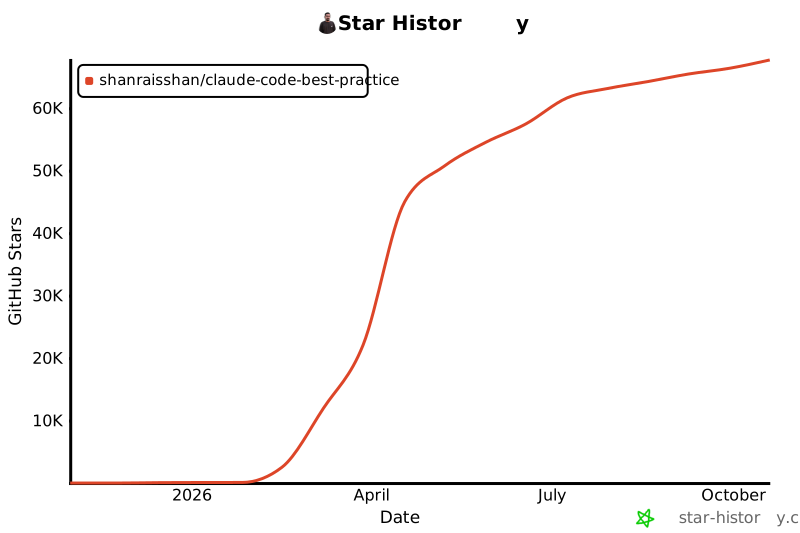](https://star-history.com/#shanraisshan/claude-code-best-practice&Date)
stars and counting
codex-cli-hooks
## 开发者

> | # | 工作流 | 描述 |
> |---|----------|-------------|
> | 1 | /workflows:development-workflows | 通过并行研究所有 10 个工作流仓库来更新 DEVELOPMENT WORKFLOWS 表和跨工作流分析报告 |
> | 2 | /workflows:best-practice:workflow-concepts | 使用最新的 Claude Code 功能更新 README CONCEPTS 部分 |
> | 3 | /workflows:best-practice:workflow-claude-settings | 追踪 Claude Code 设置报告的变更,找出需要更新的内容 |
> | 4 | /workflows:best-practice:workflow-claude-subagents | 追踪 Claude Code 子代理报告的变更,找出需要更新的内容 |
> | 5 | /workflows:best-practice:workflow-claude-commands | 追踪 Claude Code 命令报告的变更,找出需要更新的内容 |
> | 6 | /workflows:best-practice:workflow-claude-skills | 追踪 Claude Code 技能报告的变更,找出需要更新的内容 |
[](https://claude.com/contact-sales/claude-for-oss)
[](https://claude.com/community/ambassadors)
[](https://anthropic.skilljar.com/claude-certified-architect-foundations-access-request)
[](https://anthropic.skilljar.com/)
## Star 历史
[](https://star-history.com/#shanraisshan/claude-code-best-practice&Date)
stars and counting
##  赞助我的工作
如果你喜欢我的工作,请我喝一杯 doodh patti 🍵
赞助我的工作
如果你喜欢我的工作,请我喝一杯 doodh patti 🍵
 Polar
Polar