# ComfyUI-MultiGPU
**Repository Path**: godlin233/ComfyUI-MultiGPU
## Basic Information
- **Project Name**: ComfyUI-MultiGPU
- **Description**: comfyui插件
https://github.com/pollockjj/ComfyUI-MultiGPU
- **Primary Language**: Unknown
- **License**: GPL-3.0
- **Default Branch**: main
- **Homepage**: None
- **GVP Project**: No
## Statistics
- **Stars**: 0
- **Forks**: 0
- **Created**: 2025-07-02
- **Last Updated**: 2025-11-23
## Categories & Tags
**Categories**: Uncategorized
**Tags**: None
## README
# ComfyUI-MultiGPU v2: Universal .safetensors and GGUF Multi-GPU Distribution with DisTorch
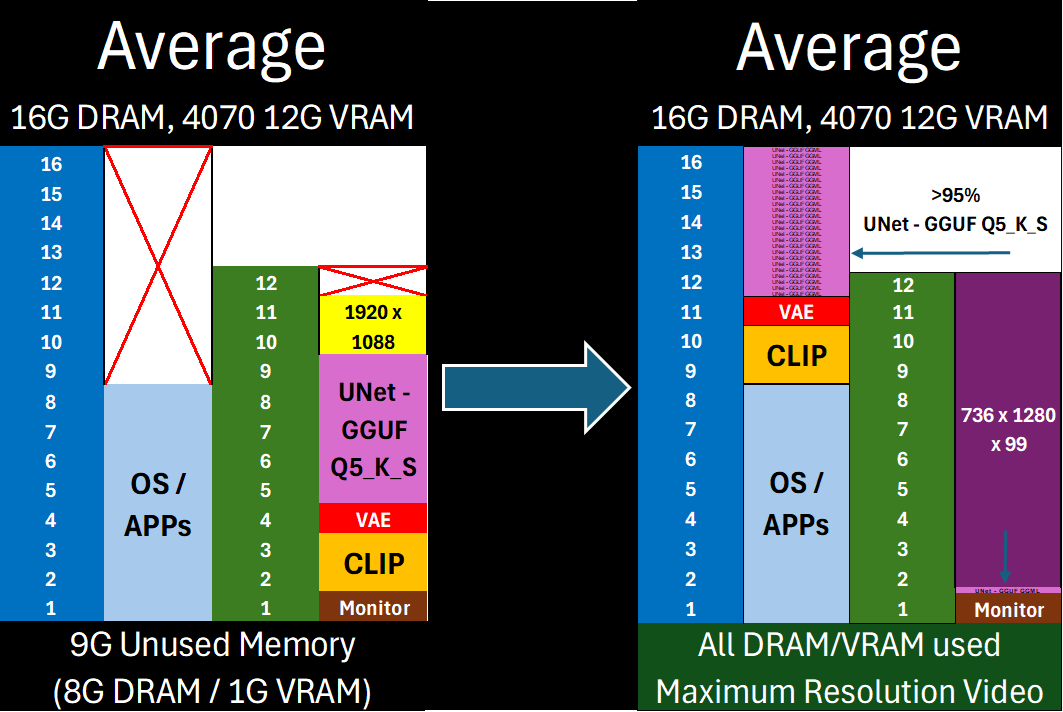
Free almost all of your GPU for what matters: Maximum latent space processing
## The Core of ComfyUI-MultiGPU v2:
[^1]: This **enhances memory management,** not parallel processing. Workflow steps still execute sequentially, but with components (in full or in part) loaded across your specified devices. *Performance gains* come from avoiding repeated model loading/unloading when VRAM is constrained. *Capability gains* come from offloading as much of the model (VAE/CLIP/UNet) off of your main **compute** device as possible—allowing you to maximize latent space for actual computation.
1. **Universal .safetensors Support**: Native DisTorch2 distribution for all `.safetensors` models.
2. **Up to 10% Faster GGUF Inference versus DisTorch1**: The new DisTorch2 logic provides potential speedups for GGUF models versus the DisTorch V1 method.
3. **Bespoke WanVideoWrapper Integration**: Tightly integrated, stable support for WanVideoWrapper with eight bespoke MultiGPU nodes.
4. **New Model-Driven Allocation Options**: Two new inutuitive model-driven Expert Modes to facilitate exact placement on all available devices - 'bytes' and 'ratio'
DisTorch: How It Works
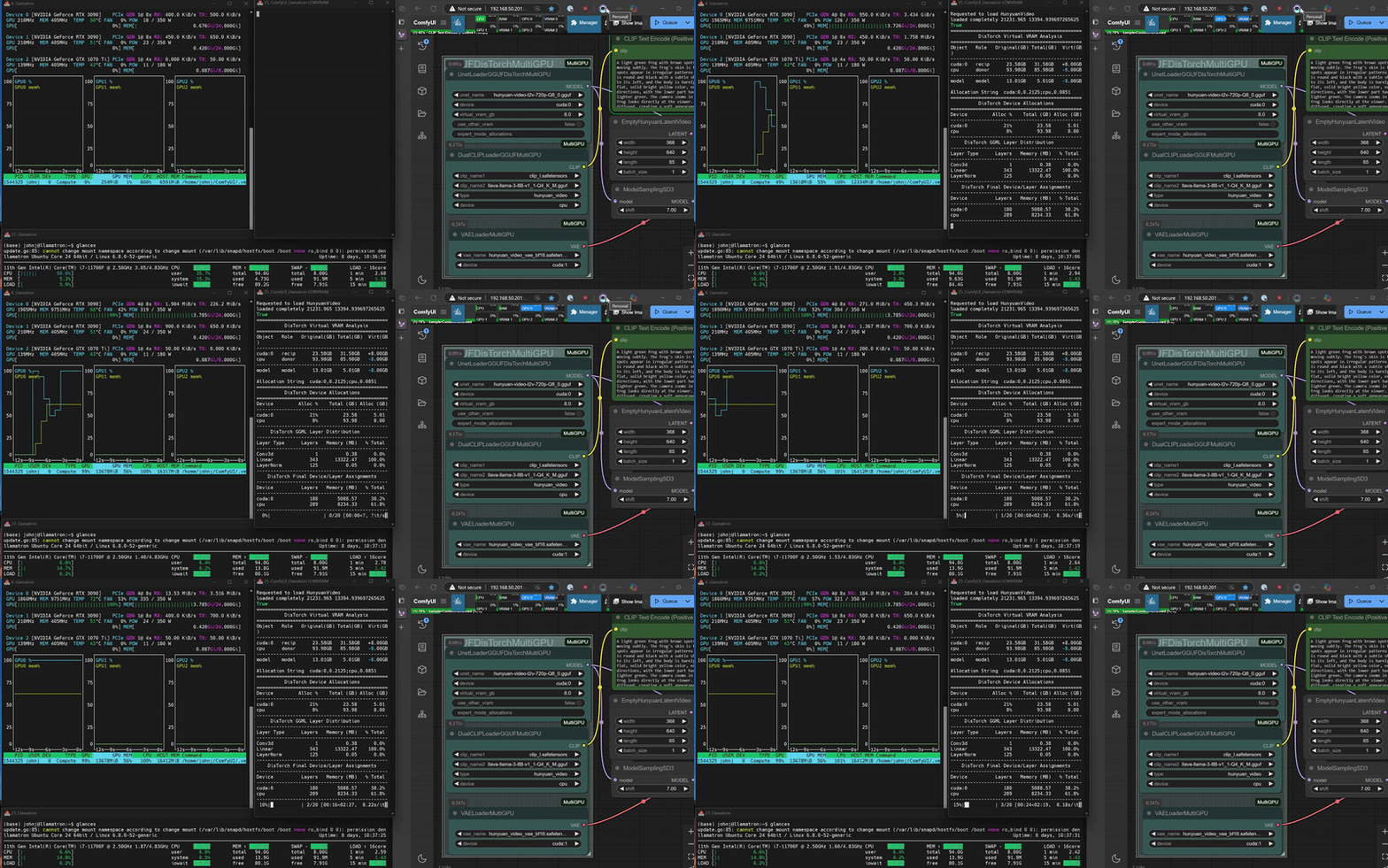
DisTorch 2.0 in Action
What is DisTorch? Standing for "distributed torch", the DisTorch nodes in this custom_node provide a way of moving the static parts of your main image generation model known as the `UNet` off your main compute card to somewhere slower, but one that is not taking up space that could be better used for longer videos or more concurrent images. By selecting one or more donor devices - main CPU DRAM or another cuda/xps device's VRAM - you can select how much of the model is loaded on that device instead of your main `compute` card. Just set how much VRAM you want to free up, and DisTorch handles the rest.
- **Two Modes**:
- **Normal Mode**: The standard `virtual_vram_gb` slider continues to let you select one donor device (like your system's RAM) to offload to. The more virtual VRAM you add, the more of the model is pushed to the donor device. Simple and effective.
- **Expert Mode**: For connoisseurs of performance, with two Expert Modes `byte` and `ratio` that allow you to specify exactly how the *model itself* is split across all your available devices as well as the legacy `fraction` method for *your devices* to have exact allocations. These modes are all accomplished via a single, flexible text string:
- **Bytes (Recommended)**: The most direct way to slice up your model. Inspired by Huggingface's `device_map`, you can specify the exact number of gigabytes or megabytes for each device. The wildcard `*` assigns the remainder of the model to a device, making it easy to offload. (The CPU acts as the default wildcard if none are specified.)
- **Example**: `cuda:0,2.5gb;cpu,*` will load the first 2.50GB of the model onto `cuda:0` and the rest onto the `cpu`.
- **Example**: `cuda:0,500mb;cuda:1,3.0g;cpu,5gb*` will put 0.50GB on `cuda:0`, 3.00GB on `cuda:1`, and 5.00GB (or the remainder) on `cpu`.
- **Ratio**: Love the simplicity of `llama.cpp`'s `tensor_split`? This mode is for you. Specify a ratio to distribute the model across devices.
- **Example**: `cuda:0,25%;cpu,75%` will split the model in a 1:3 ratio, loading 25% onto `cuda:0` and 75% onto the `cpu`.
- **Example**: `cuda:0,8%;cuda:1,8%;cpu,4%` uses an 8:8:4 ratio, putting 40% of the model on `cuda:0`, 40% on `cuda:1`, and 20% on `cpu`.
- **Fraction**: The original DisTorch expert mode. This mode splits the model based on the fraction of each device's *total VRAM* to be used.
- **Example**: `cuda:0,0.1;cpu,0.5` will use 10% of `cuda:0`'s VRAM and 50% of the `cpu`'s RAM to hold the model.
- **Example**: `cuda:0,0.0207;cuda:1,0.1273;cpu,0.0808` will use 2.1% of `cuda:0`'s VRAM, 12.7% of `cuda:1`'s VRAM, and 8.1% of the `cpu`'s RAM to hold the model.
## 🎯 Key Benefits
- Free up GPU VRAM instantly without complex settings
- Run larger models by offloading layers to other system RAM
- Use all your main GPU's VRAM for actual `compute` / latent processing, or fill it up just enough to suit your needs and the remaining with quick-access model blocks.
- Seamlessly distribute .safetensors and GGUF layers across multiple GPUs if available
- Allows **you** to easily shift from ___on-device speed___ to ___open-device latent space capability___ with a simple one-number change
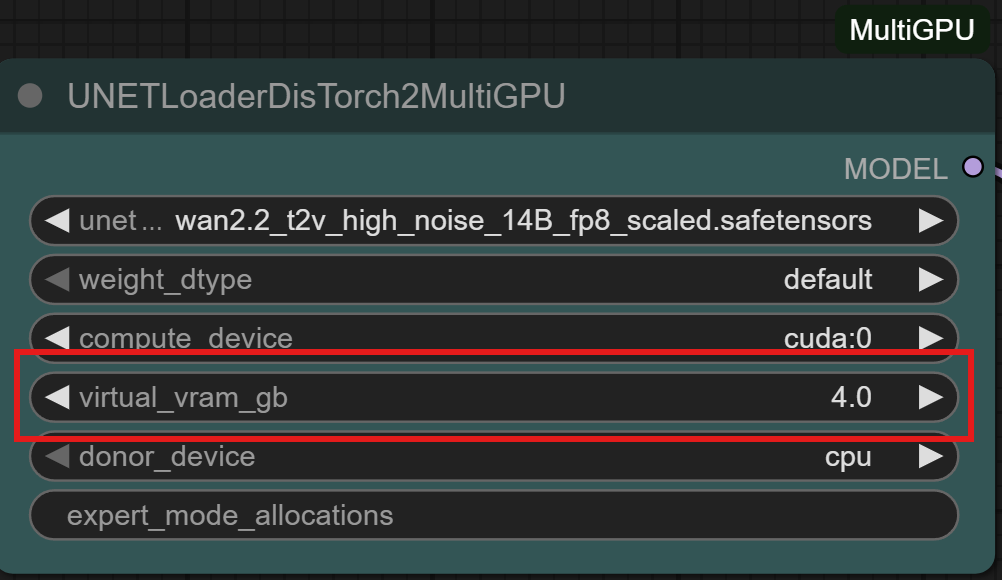
DisTorch Nodes with one simple number to tune its Vitual VRAM to your needs
## 🚀 Compatibility
Works with all .safetensors and GGUF-quantized models.
⚙️ Expert users: Like .gguf or exl2/3 LLM loaders, use the expert_mode_alloaction for exact allocations of model shards on as many devices as your setup has!
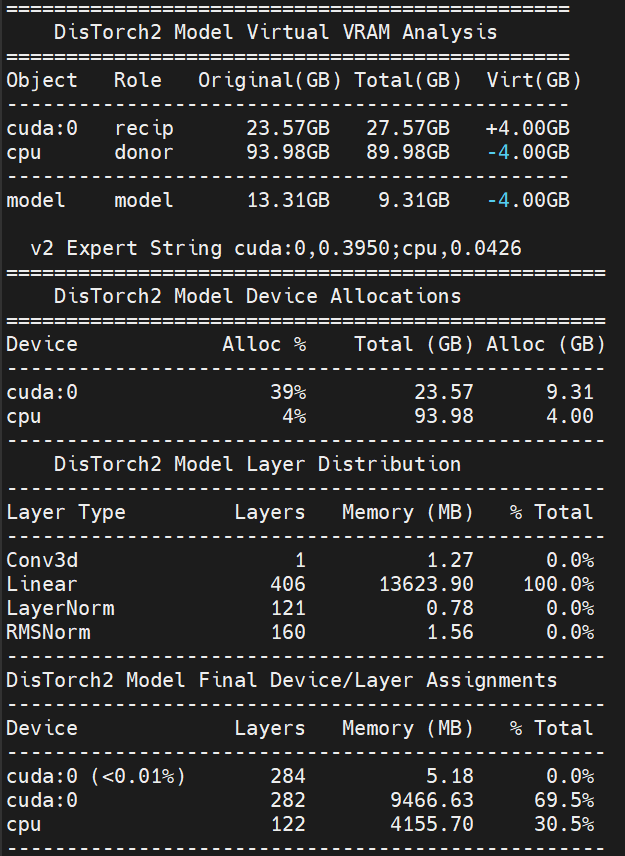
The new Virtual VRAM even lets you offload ALL of the model and still run compute on your CUDA device!
## Installation
Installation via [ComfyUI-Manager](https://github.com/ltdrdata/ComfyUI-Manager) is preferred. Simply search for `ComfyUI-MultiGPU` in the list of nodes and follow installation instructions.
## Manual Installation
Clone [this repository](https://github.com/pollockjj/ComfyUI-MultiGPU) inside `ComfyUI/custom_nodes/`.
## Nodes
The extension automatically creates MultiGPU versions of loader nodes. Each MultiGPU node has the same functionality as its original counterpart but adds a `device` parameter that allows you to specify the GPU to use.
Currently supported nodes (automatically detected if available):
- Standard [ComfyUI](https://github.com/comfyanonymous/ComfyUI) model loaders:
- [CheckpointLoaderAdvancedMultiGPU](web/docs/CheckpointLoaderAdvancedMultiGPU.md) / [CheckpointLoaderAdvancedDisTorch2MultiGPU](web/docs/CheckpointLoaderAdvancedDisTorch2MultiGPU.md)
- [CheckpointLoaderSimpleMultiGPU](web/docs/CheckpointLoaderSimpleMultiGPU.md) / [CheckpointLoaderSimpleDisTorch2MultiGPU](web/docs/CheckpointLoaderSimpleDisTorch2MultiGPU.md)
- [UNETLoaderMultiGPU](web/docs/UNETLoaderMultiGPU.md) / [UNETLoaderDisTorch2MultiGPU](web/docs/UNETLoaderDisTorch2MultiGPU.md)
- [UNetLoaderLP](web/docs/UNetLoaderLP.md)
- [VAELoaderMultiGPU](web/docs/VAELoaderMultiGPU.md) / [VAELoaderDisTorch2MultiGPU](web/docs/VAELoaderDisTorch2MultiGPU.md)
- [CLIPLoaderMultiGPU](web/docs/CLIPLoaderMultiGPU.md) / [CLIPLoaderDisTorch2MultiGPU](web/docs/CLIPLoaderDisTorch2MultiGPU.md)
- [DualCLIPLoaderMultiGPU](web/docs/DualCLIPLoaderMultiGPU.md) / [DualCLIPLoaderDisTorch2MultiGPU](web/docs/DualCLIPLoaderDisTorch2MultiGPU.md)
- [TripleCLIPLoaderMultiGPU](web/docs/TripleCLIPLoaderMultiGPU.md) / [TripleCLIPLoaderDisTorch2MultiGPU](web/docs/TripleCLIPLoaderDisTorch2MultiGPU.md)
- [QuadrupleCLIPLoaderMultiGPU](web/docs/QuadrupleCLIPLoaderMultiGPU.md) / [QuadrupleCLIPLoaderDisTorch2MultiGPU](web/docs/QuadrupleCLIPLoaderDisTorch2MultiGPU.md)
- [CLIPVisionLoaderMultiGPU](web/docs/CLIPVisionLoaderMultiGPU.md) / [CLIPVisionLoaderDisTorch2MultiGPU](web/docs/CLIPVisionLoaderDisTorch2MultiGPU.md)
- [ControlNetLoaderMultiGPU](web/docs/ControlNetLoaderMultiGPU.md) / [ControlNetLoaderDisTorch2MultiGPU](web/docs/ControlNetLoaderDisTorch2MultiGPU.md)
- [DiffusersLoaderMultiGPU](web/docs/DiffusersLoaderMultiGPU.md) / [DiffusersLoaderDisTorch2MultiGPU](web/docs/DiffusersLoaderDisTorch2MultiGPU.md)
- [DiffControlNetLoaderMultiGPU](web/docs/DiffControlNetLoaderMultiGPU.md) / [DiffControlNetLoaderDisTorch2MultiGPU](web/docs/DiffControlNetLoaderDisTorch2MultiGPU.md)
- WanVideoWrapper (requires [ComfyUI-WanVideoWrapper](https://github.com/kijai/ComfyUI-WanVideoWrapper)):
- [WanVideoModelLoaderMultiGPU](web/docs/WanVideoModelLoaderMultiGPU.md)
- [WanVideoVAELoaderMultiGPU](web/docs/WanVideoVAELoaderMultiGPU.md)
- [WanVideoTinyVAELoaderMultiGPU](web/docs/WanVideoTinyVAELoaderMultiGPU.md)
- [WanVideoBlockSwapMultiGPU](web/docs/WanVideoBlockSwapMultiGPU.md)
- [WanVideoImageToVideoEncodeMultiGPU](web/docs/WanVideoImageToVideoEncodeMultiGPU.md)
- [WanVideoEncodeMultiGPU](web/docs/WanVideoEncodeMultiGPU.md)
- [WanVideoDecodeMultiGPU](web/docs/WanVideoDecodeMultiGPU.md)
- [WanVideoSamplerMultiGPU](web/docs/WanVideoSamplerMultiGPU.md)
- [WanVideoVACEEncodeMultiGPU](web/docs/WanVideoVACEEncodeMultiGPU.md)
- [WanVideoClipVisionEncodeMultiGPU](web/docs/WanVideoClipVisionEncodeMultiGPU.md)
- [WanVideoControlnetLoaderMultiGPU](web/docs/WanVideoControlnetLoaderMultiGPU.md)
- [WanVideoUni3C_ControlnetLoaderMultiGPU](web/docs/WanVideoUni3C_ControlnetLoaderMultiGPU.md)
- [WanVideoTextEncodeMultiGPU](web/docs/WanVideoTextEncodeMultiGPU.md)
- [WanVideoTextEncodeCachedMultiGPU](web/docs/WanVideoTextEncodeCachedMultiGPU.md)
- [WanVideoTextEncodeSingleMultiGPU](web/docs/WanVideoTextEncodeSingleMultiGPU.md)
- [LoadWanVideoT5TextEncoderMultiGPU](web/docs/LoadWanVideoT5TextEncoderMultiGPU.md)
- [LoadWanVideoClipTextEncoderMultiGPU](web/docs/LoadWanVideoClipTextEncoderMultiGPU.md)
- [FantasyTalkingModelLoaderMultiGPU](web/docs/FantasyTalkingModelLoaderMultiGPU.md)
- [Wav2VecModelLoaderMultiGPU](web/docs/Wav2VecModelLoaderMultiGPU.md) / [DownloadAndLoadWav2VecModelMultiGPU](web/docs/DownloadAndLoadWav2VecModelMultiGPU.md)
- GGUF loaders (requires [ComfyUI-GGUF](https://github.com/city96/ComfyUI-GGUF)):
- UNet family: [UnetLoaderGGUFMultiGPU](web/docs/UnetLoaderGGUFMultiGPU.md) / [UnetLoaderGGUFDisTorch2MultiGPU](web/docs/UnetLoaderGGUFDisTorch2MultiGPU.md)
- UNet Advanced bundles: [UnetLoaderGGUFAdvancedMultiGPU](web/docs/UnetLoaderGGUFAdvancedMultiGPU.md) / [UnetLoaderGGUFAdvancedDisTorch2MultiGPU](web/docs/UnetLoaderGGUFAdvancedDisTorch2MultiGPU.md)
- CLIP family: [CLIPLoaderGGUFMultiGPU](web/docs/CLIPLoaderGGUFMultiGPU.md) / [CLIPLoaderGGUFDisTorch2MultiGPU](web/docs/CLIPLoaderGGUFDisTorch2MultiGPU.md)
- Dual CLIP: [DualCLIPLoaderGGUFMultiGPU](web/docs/DualCLIPLoaderGGUFMultiGPU.md) / [DualCLIPLoaderGGUFDisTorch2MultiGPU](web/docs/DualCLIPLoaderGGUFDisTorch2MultiGPU.md)
- Triple CLIP: [TripleCLIPLoaderGGUFMultiGPU](web/docs/TripleCLIPLoaderGGUFMultiGPU.md) / [TripleCLIPLoaderGGUFDisTorch2MultiGPU](web/docs/TripleCLIPLoaderGGUFDisTorch2MultiGPU.md)
- Quadruple CLIP: [QuadrupleCLIPLoaderGGUFMultiGPU](web/docs/QuadrupleCLIPLoaderGGUFMultiGPU.md) / [QuadrupleCLIPLoaderGGUFDisTorch2MultiGPU](web/docs/QuadrupleCLIPLoaderGGUFDisTorch2MultiGPU.md)
- XLabAI FLUX ControlNet (requires [x-flux-comfy](https://github.com/XLabAI/x-flux-comfyui)):
- [LoadFluxControlNetMultiGPU](web/docs/LoadFluxControlNetMultiGPU.md)
- Florence2 (requires [ComfyUI-Florence2](https://github.com/kijai/ComfyUI-Florence2)):
- [Florence2ModelLoaderMultiGPU](web/docs/Florence2ModelLoaderMultiGPU.md)
- [DownloadAndLoadFlorence2ModelMultiGPU](web/docs/DownloadAndLoadFlorence2ModelMultiGPU.md)
- LTX Video Custom Checkpoint Loader (requires [ComfyUI-LTXVideo](https://github.com/Lightricks/ComfyUI-LTXVideo)):
- [LTXVLoaderMultiGPU](web/docs/LTXVLoaderMultiGPU.md)
- NF4 Checkpoint Format Loader (requires [ComfyUI_bitsandbytes_NF4](https://github.com/comfyanonymous/ComfyUI_bitsandbytes_NF4)):
- [CheckpointLoaderNF4MultiGPU](web/docs/CheckpointLoaderNF4MultiGPU.md)
- MMAudio (requires [ComfyUI-MMAudio](https://github.com/comfyanonymous/ComfyUI-MMAudio)):
- [MMAudioModelLoaderMultiGPU](web/docs/MMAudioModelLoaderMultiGPU.md)
- [MMAudioFeatureUtilsLoaderMultiGPU](web/docs/MMAudioFeatureUtilsLoaderMultiGPU.md)
- [MMAudioSamplerMultiGPU](web/docs/MMAudioSamplerMultiGPU.md)
- Pulid (requires [PuLID_ComfyUI](https://github.com/cubiq/PuLID_ComfyUI)):
- [PulidModelLoaderMultiGPU](web/docs/PulidModelLoaderMultiGPU.md)
- [PulidInsightFaceLoaderMultiGPU](web/docs/PulidInsightFaceLoaderMultiGPU.md)
- [PulidEvaClipLoaderMultiGPU](web/docs/PulidEvaClipLoaderMultiGPU.md)
All MultiGPU nodes available for your install can be found in the "multigpu" category in the node menu.
## Node Documentation
Detailed technical documentation is available for all **automatically-detected core MultiGPU and DisTorch2 nodes**, covering 70+ documented nodes with comprehensive parameter details, output specifications, and DisTorch2 allocation guidance where applicable.
- **To access documentation**: Click on any core MultiGPU or DisTorch2 node in ComfyUI and select "Help" (question mark inside a circle) from the resultant menu
- **Coverage**: All standard ComfyUI loader nodes (UNet, VAE, Checkpoints, CLIP, ControlNet, Diffusers) plus popular GGUF loader variants
- **Contents**: Input parameters with data types and descriptions, output specifications, usage examples, and DisTorch2 distributed loading explanations with allocation modes and strategies
- **Note**: Documentation covers core ComfyUI-MultiGPU functionality only. Third-party custom node integrations (WanVideoWrapper, Florence2, etc.) have their own separate documentation.
## Example workflows
All workflows have been tested on a 2x 3090 + 1060ti linux setup, a 4070 win 11 setup, and a 3090/1070ti linux setup.
### DisTorch2
### WanVideoWrapper
### MultiGPU
### GGUF
### HunyuanVideoWrapper / Florence2
## Support
If you encounter problems, please [open an issue](https://github.com/pollockjj/ComfyUI-MultiGPU/issues/new). Attach the workflow if possible.
## Credits
Currently maintained by [pollockjj](https://github.com/pollockjj).
Originally created by [Alexander Dzhoganov](https://github.com/AlexanderDzhoganov).
With deepest thanks to [City96](https://v100s.net/). 


