# 多智能体强化AWorld
**Repository Path**: fsmyi/AWorld
## Basic Information
- **Project Name**: 多智能体强化AWorld
- **Description**: No description available
- **Primary Language**: Unknown
- **License**: MIT
- **Default Branch**: main
- **Homepage**: None
- **GVP Project**: No
## Statistics
- **Stars**: 0
- **Forks**: 0
- **Created**: 2025-08-22
- **Last Updated**: 2025-08-22
## Categories & Tags
**Categories**: Uncategorized
**Tags**: None
## README
# AWorld: 为智能体自我改进提供运行环境
*"自我意识:最难的问题不是解决限制,而是发现自己的局限性"*
[![Twitter Follow][twitter-image]][twitter-url]
[![WeChat QR Code][wechat-image]][wechat-url]
[![Discord][discord-image]][discord-url]
[![License: MIT][license-image]][license-url]
[![DeepWiki][deepwiki-image]][deepwiki-url]
[English](./README.md) |
[快速开始](#快速开始) |
[架构设计](#架构设计原则) |
[应用场景](#应用场景) |
[贡献指南](#贡献指南) |
[附录](#附录)

**AWorld (Agent World)** 是为大规模智能体自我改进而设计的下一代框架。我们通过综合智能体自身的知识和经验,使AI智能体能够持续进化。这一核心能力由以下三个要素驱动:
1. **多智能体系统 (MAS)**:使用我们的即插即用协议和强大的状态管理构建复杂的、相互作用的智能体社会。
2. **超越单一模型的智能**:生成高质量反馈和多样化的合成训练数据,推动个体智能体进化。
3. **云原生支持多样性和规模**:为训练更智能的智能体和实现自我改进提供高并发性和可扩展性。
AWorld 使您能够快速构建个体工具使用智能体、编排复杂的多智能体系统、有效训练智能体,并综合持续智能体进化所需的高质量数据——所有这些都汇聚于自主自我改进。
---
**集体智能成就展示** 🚀
展示群体智能在不同领域的SOTA效果。欢迎加入我们正在进行中的项目!
| **类别** | **成就** | **性能表现** | **核心创新** | **日期** |
|:-------------|:----------------|:----------------|:-------------------|:----------|
| **🤖 智能体** | **GAIA基准测试卓越表现** [![][GAIA]](https://huggingface.co/spaces/gaia-benchmark/leaderboard) | Pass@1: **67.89**, Pass@3: **83.49** (109个任务) [![][Code]](./examples/gaia/README_GUARD.md) | 多智能体系统稳定性与编排 [![][Paper]](https://arxiv.org/abs/2508.09889) | 2025/08/06 |
| **🧠 推理能力** | **IMO 2025问题求解** [![][IMO]](https://www.imo-official.org/year_info.aspx?year=2025) | 6小时内解决5/6道题 [![][Code]](examples/imo/README.md) | 多智能体协作超越单一模型 | 2025/07/25 |
🌏 查看进行中的项目
| **类别** | **成就** | **状态** | **预期影响** |
|:-------------|:----------------|:-----------|:-------------------|
| **🖼️ 多模态** | 领先的操作系统/网页交互 | 进行中 | 视觉推理与环境理解 |
| **💻 编程** | 领先的安装、编码、测试、调试等能力 | 进行中 | 自动化软件工程能力 |
| **🔧 工具使用** | 领先的多轮函数调用 | 即将推出 | 影响现实世界 |
---
# 快速开始
## 前置要求
> [!TIP]
> Python>=3.11
```bash
git clone https://github.com/inclusionAI/AWorld && cd AWorld
python setup.py install
```
## Hello world 示例
我们引入 `Agent` 和 `Runners` 的概念来帮助您快速上手。
```python
import os
from aworld.agents.llm_agent import Agent
from aworld.runner import Runners
summarizer = Agent(
name="Summary Agent",
system_prompt="You specialize at summarizing.",
)
result = Runners.sync_run(
input="Tell me a succint history about the universe",
agent=summarizer,
)
```
同时,我们引入 `Swarm` 的概念来构建智能体团队。
```python
import os
from aworld.agents.llm_agent import Agent
from aworld.runner import Runners
from aworld.core.agent.swarm import Swarm
researcher = Agent(
name="Research Agent",
system_prompt="You specialize at researching.",
)
summarizer = Agent(
name="Summary Agent",
system_prompt="You specialize at summarizing.",
)
# 创建具有协作工作流的智能体团队
team = Swarm(researcher, summarizer)
result = Runners.sync_run(
input="Tell me a complete history about the universe",
swarm=team,
)
```
最后,运行您自己的智能体或团队
```bash
# 设置LLM凭据
export LLM_MODEL_NAME="gpt-4"
export LLM_API_KEY="your-api-key-here"
export LLM_BASE_URL="https://api.openai.com/v1"
# 运行
python /path/to/agents/or/teams
```
🌏 点击查看高级用法
### 显式传递AgentConfig
```python
import os
from aworld.agents.llm_agent import Agent
from aworld.runner import Runners
from aworld.config.conf import AgentConfig
from aworld.core.agent.swarm import Swarm
gpt_conf = AgentConfig(
llm_provider="openai",
llm_model_name="gpt-4o",
llm_api_key="",
llm_temperature=0.1,
)
openrouter_conf = AgentConfig(
llm_provider="openai",
llm_model_name="google/gemini-2.5-pro",
llm_api_key="",
llm_base_url="https://openrouter.ai/api/v1"
llm_temperature=0.1,
)
researcher = Agent(
name="Research Agent",
conf=gpt_conf,
system_prompt="You specialize at researching.",
)
summarizer = Agent(
name="Summary Agent",
conf=openrouter_conf,
system_prompt="You specialize at summarizing.",
)
# 创建具有协作工作流的智能体团队
team = Swarm(researcher, summarizer)
result = Runners.sync_run(
input="Tell me a complete history about the universe",
swarm=team,
)
```
### 配备MCP工具的智能体
```python
import os
from aworld.agents.llm_agent import Agent
from aworld.runner import Runners
mcp_config = {
"mcpServers": {
"GorillaFileSystem": {
"type": "stdio",
"command": "python",
"args": ["examples/BFCL/mcp_tools/gorilla_file_system.py"],
},
}
}
file_sys = Agent(
name="file_sys_agent",
system_prompt=(
"You are a helpful agent to use "
"the standard file system to perform file operations."
),
mcp_servers=mcp_config.get("mcpServers", []).keys(),
mcp_config=mcp_config,
)
result = Runners.sync_run(
input=(
"use mcp tools in the GorillaFileSystem server "
"to perform file operations: "
"write the content 'AWorld' into "
"the hello_world.py file with a new line "
"and keep the original content of the file. "
"Make sure the new and old "
"content are all in the file; "
"and display the content of the file"
),
agent=file_sys,
)
```
### 集成记忆的智能体
建议使用 `MemoryFactory` 来初始化和访问Memory实例。
```python
from aworld.memory.main import MemoryFactory
from aworld.core.memory import MemoryConfig, MemoryLLMConfig
# 简单初始化
memory = MemoryFactory.instance()
# 使用LLM配置进行初始化
MemoryFactory.init(
config=MemoryConfig(
provider="aworld",
llm_config=MemoryLLMConfig(
provider="openai",
model_name=os.environ["LLM_MODEL_NAME"],
api_key=os.environ["LLM_API_KEY"],
base_url=os.environ["LLM_BASE_URL"]
)
)
)
memory = MemoryFactory.instance()
```
`MemoryConfig` 允许您集成不同的嵌入模型和向量数据库。
```python
import os
from aworld.core.memory import MemoryConfig, MemoryLLMConfig, EmbeddingsConfig, VectorDBConfig
MemoryFactory.init(
config=MemoryConfig(
provider="aworld",
llm_config=MemoryLLMConfig(
provider="openai",
model_name=os.environ["LLM_MODEL_NAME"],
api_key=os.environ["LLM_API_KEY"],
base_url=os.environ["LLM_BASE_URL"]
),
embedding_config=EmbeddingsConfig(
provider="ollama", # 或 huggingface, openai 等
base_url="http://localhost:11434",
model_name="nomic-embed-text"
),
vector_store_config=VectorDBConfig(
provider="chroma",
config={
"chroma_data_path": "./chroma_db",
"collection_name": "aworld",
}
)
)
)
```
### 多智能体系统
我们展示一个经典拓扑:`Leader-Executor`。
```python
"""
Leader-Executor 拓扑:
┌───── plan ───┐
exec1 exec2
每个智能体与单个监督智能体通信,
被公认为Leader-Executor拓扑,
在Aworld中也称为团队拓扑。
"""
from aworld.agents.llm_agent import Agent
from aworld.core.agent.swarm import TeamSwarm
plan = Agent(name="plan", conf=agent_conf)
exec1 = Agent(name="exec1", conf=agent_conf)
exec2 = Agent(name="exec2", conf=agent_conf)
swarm = TeamSwarm(plan, exec1, exec2)
```
可选地,您可以使用 `Handsoff` 机制来自定义您自己的拓扑。
```python
from aworld.core.agent.swarm import HandoffSwarm
swarm = HandoffSwarm((plan, exec1), (plan, exec2))
```
# 架构设计原则
AWorld 提供了一个全面的环境,支持多样化的应用,如 `产品原型验证`、`基础模型训练`,以及通过元学习设计 `多智能体系统 (MAS)`。
该框架被设计为高度适应性,使研究人员和开发人员能够在多个领域探索和创新,从而推进多智能体系统的能力和应用。
## 概念与框架
| 概念 | 描述 |
| :-------------------------------------- | ------------ |
| [`agent`](./aworld/core/agent/base.py) | 定义基础类、描述、输出解析和多智能体协作(群体)逻辑,用于在AWorld系统中定义、管理和编排智能体。 |
| [`runner`](./aworld/runners) | 包含管理环境中智能体执行循环的运行器类,处理情节回放和并行训练/评估工作流。 |
| [`task`](./aworld/core/task.py) | 定义封装环境目标、必要工具和智能体交互终止条件的基础Task类。 |
| [`swarm`](./aworld/core/agent/swarm.py) | 实现管理多智能体协调和通过去中心化策略出现的群体行为的SwarmAgent类。 |
| [`sandbox`](./aworld/sandbox) | 提供具有可配置场景的受控运行时,用于智能体行为的快速原型设计和验证。 |
| [`tools`](./aworld/tools) | 为AWorld系统中智能体-环境交互的工具定义、适配和执行提供灵活框架。 |
| [`context`](./aworld/core/context) | 为AWorld智能体提供全面的上下文管理系统,支持完整的状态跟踪、配置管理、提示优化、多任务状态处理和整个智能体生命周期中的动态提示模板。 |
| [`memory`](./aworld/memory) | 为智能体实现可扩展的记忆系统,支持短期和长期记忆、总结、检索、嵌入和集成。|
| [`trace`](./aworld/trace) | 为AWorld提供可观察的跟踪框架,支持分布式跟踪、上下文传播、跨度管理,以及与流行框架和协议的集成,以监控和分析智能体、工具和任务执行。|
> 💡 查看 [examples](./examples/) 目录以探索多样化的AWorld应用。
## 特性
| 智能体构建 | 拓扑编排 | 环境 |
|:---------------------------|:----------------------------|:-------------------------------|
| ✅ 集成MCP服务 | ✅ 封装的运行时 | ✅ 运行时状态管理 |
| ✅ 多模型提供商 | ✅ 灵活的MAS模式 | ✅ 高并发支持 |
| ✅ 自定义选项 | ✅ 清晰的状态跟踪 | ✅ 分布式训练 |
## 正向过程

这里是收集BFCL正向轨迹的正向说明:[`教程`](./examples/BFCL/README.md)。
## 反向过程
> 训练期间,使用 **AWorld的分布式环境** 进行动作-状态回放演示。

> [!NOTE]
> 下面展示了训练代码的说明,该代码将RL学习框架(在此示例中为Swift)与AWorld作为环境无缝集成。这种集成通过分布式环境执行实现可扩展和高效的智能体训练。(要运行高并发回放,您需要部署在线分布式环境。如需帮助,请联系 [chenyi.zcy@antgroup.com](mailto:chenyi.zcy@antgroup.com)。)
🌏 点击查看教程示例
要应用和使用此集成:
1. 克隆AWorld的 `agent_training_server` 分支:
```bash
git clone -b agent_training_server --single-branch https://github.com/inclusionAI/AWorld.git
```
2. 克隆ms-swift的v3.5.2分支(浅克隆):
```bash
git clone -b v3.5.2 --depth=1 https://github.com/modelscope/ms-swift.git ms-swift
```
3. 将补丁文件从AWorld复制到ms-swift:
```bash
cp -r AWorld/patches ms-swift/
```
4. 进入补丁目录并应用补丁:
```bash
cd ms-swift/patches
git apply 0001-feat-add-agent-training-support-with-aworld-server.patch
```
# 应用场景
AWorld 使您能够轻松构建 **智能体** 和 **多智能体系统**。
## 用于模型进化
AWorld 旨在达到模型的局限性,并通过构建多样化的运行时环境(如工具、智能体和模型)持续推动智能向前发展。
以下是成功提案的列表(包含开源模型、技术报告和代码):
| 类别 | 运行时 | 性能
| 关键信息
|
| --------------- | --------------------------------------- | ---------------------------------------------------------------------------------------- | ---------------------------------- |
| **工具使用** | 函数调用运行时构建 [`教程`][funreason-model-url] | 在BFCL基准测试中具有竞争力
 | ![Dataset][huggingface-dataset-image]
[![Model][huggingface-model-image]][funreason-model-url]
[![Paper][arxiv-image]][funreason-paper-url]
![Blog][blog-image]
[![Code][github-code-image]][funreason-code-url] |
| **深度搜索** | 搜索运行时即将发布 | 在HotpotQA基准测试中达到SOTA
 | [![Dataset][huggingface-dataset-image]][deepsearch-dataset-url]
[![Model][huggingface-model-image]][deepsearch-model-url]
[![Paper][arxiv-image]][deepsearch-paper-url]
[![Code][github-code-image]][deepsearch-code-url] |
## 用于产品应用
AWorld的即插即用MAS架构支持超越智能体训练的 **真实世界Web应用开发**。
构建处理复杂任务的生产就绪系统:
- **代码生成与执行**
- **浏览器自动化与工具使用**
- **多模态理解与生成**
- 还有更多即将出现!
查看 [附录:Web客户端使用](#附录-web客户端使用) 了解GAIA实现示例。
# 贡献指南
我们热烈欢迎开发者加入我们构建和改进AWorld!无论您对增强框架、修复错误还是添加新功能感兴趣,您的贡献对我们都很宝贵。
对于学术引用或希望联系我们,请使用以下BibTeX条目:
```bibtex
@software{aworld2025,
author = {Agent Team at InclusionAI},
title = {AWorld: Enabling Agent Self-Improvement through Interactive Experience with Dynamic Runtime},
year = {2025},
url = {https://github.com/inclusionAI/AWorld},
version = {0.1.0},
publisher = {GitHub},
email = {chenyi.zcy at antgroup.com}
}
```
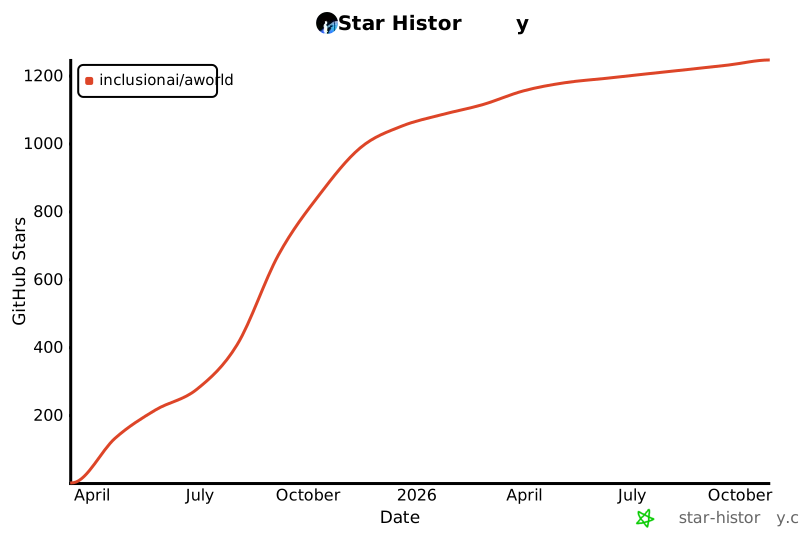
# Star历史
# 附录
Web客户端使用

您的项目结构应该如下所示:
```text
agent-project-root-dir/
agent_deploy/
my_first_agent/
__init__.py
agent.py
```
创建项目文件夹。
```shell
mkdir my-aworld-project && cd my-aworld-project # project-root-dir
mkdir -p agent_deploy/my_first_agent
```
#### 步骤1:定义您的智能体
在 `agent_deploy/my_first_agent` 中创建您的第一个智能体:
`__init__.py`:创建空的 `__init__.py` 文件。
```shell
cd agent_deploy/my_first_agent
touch __init__.py
```
`agent.py`:定义您的智能体逻辑:
```python
import logging
import os
from aworld.cmd.data_model import BaseAWorldAgent, ChatCompletionRequest
from aworld.config.conf import AgentConfig, TaskConfig
from aworld.agents.llm_agent import Agent
from aworld.core.task import Task
from aworld.runner import Runners
logger = logging.getLogger(__name__)
class AWorldAgent(BaseAWorldAgent):
def __init__(self, *args, **kwargs):
super().__init__(*args, **kwargs)
def name(self):
return "My First Agent"
def description(self):
return "A helpful assistant that can answer questions and help with tasks"
async def run(self, prompt: str = None, request: ChatCompletionRequest = None):
# Load LLM configuration from environment variables
agent_config = AgentConfig(
llm_provider=os.getenv("LLM_PROVIDER", "openai"),
llm_model_name=os.getenv("LLM_MODEL_NAME", "gpt-4"),
llm_api_key=os.getenv("LLM_API_KEY"),
llm_base_url=os.getenv("LLM_BASE_URL"),
llm_temperature=float(os.getenv("LLM_TEMPERATURE", "0.7"))
)
# Validate required configuration
if not agent_config.llm_model_name or not agent_config.llm_api_key:
raise ValueError("LLM_MODEL_NAME and LLM_API_KEY must be set!")
# Optional: Configure MCP tools for enhanced capabilities
mcp_config = {
"mcpServers": {
"amap-mcp": {
"type": "sse",
"url": "https://mcp.example.com/sse?key=YOUR_API_KEY", # Replace Your API Key
"timeout": 30,
"sse_read_timeout": 300
}
}
}
# Create the agent instance
agent = Agent(
conf=agent_config,
name="My First Agent",
system_prompt="""You are a helpful AI assistant. Your goal is to:
- Answer questions accurately and helpfully
- Provide clear, step-by-step guidance when needed
- Be friendly and professional in your responses""",
mcp_servers=["amap-mcp"],
mcp_config=mcp_config
)
# Extract user input
user_input = prompt or (request.messages[-1].content if request else "")
# Create and execute task
task = Task(
input=user_input,
agent=agent,
conf=TaskConfig(max_steps=5),
session_id=getattr(request, 'session_id', None)
)
# Stream the agent's response
async for output in Runners.streamed_run_task(task).stream_events():
yield output
```
#### 步骤2:运行智能体
设置环境变量:
```shell
# 导航回项目根目录
cd ${agent-project-root-dir}
# 设置您的LLM凭据
export LLM_MODEL_NAME="gpt-4"
export LLM_API_KEY="your-api-key-here"
export LLM_BASE_URL="https://api.openai.com/v1" # Optional for OpenAI
```
启动您的智能体:
```shell
# 选项1:使用Web UI启动
aworld web
# 然后在浏览器中打开 http://localhost:8000
# 选项2:启动REST API(用于集成)
aworld api
# 然后访问 http://localhost:8000/docs 查看API文档
```
成功!您的智能体现在正在运行并准备聊天!
---
[arxiv-image]: https://img.shields.io/badge/Paper-arXiv-B31B1B?style=for-the-badge&logo=arxiv&logoColor=white
[blog-image]: https://img.shields.io/badge/Blog-Coming%20Soon-FF5722?style=for-the-badge&logo=blogger&logoColor=white
[deepwiki-image]: https://img.shields.io/badge/DeepWiki-Explore-blueviolet?logo=wikipedia&logoColor=white
[discord-image]: https://img.shields.io/badge/Discord-Join%20us-blue?logo=discord&logoColor=white
[github-code-image]: https://img.shields.io/badge/Code-GitHub-181717?style=for-the-badge&logo=github&logoColor=white
[huggingface-dataset-image]: https://img.shields.io/badge/Dataset-Coming%20Soon-007ACC?style=for-the-badge&logo=dataset&logoColor=white
[huggingface-model-image]: https://img.shields.io/badge/Model-Hugging%20Face-FF6B6B?style=for-the-badge&logo=huggingface&logoColor=white
[license-image]: https://img.shields.io/badge/License-MIT-yellow.svg
[twitter-image]: https://img.shields.io/twitter/follow/AWorld_AI?style=social
[wechat-image]: https://img.shields.io/badge/WeChat-Add%20us-green?logo=wechat&logoColor=white
[deepwiki-url]: https://deepwiki.com/inclusionAI/AWorld
[discord-url]: https://discord.gg/b4Asj2ynMw
[license-url]: https://opensource.org/licenses/MIT
[twitter-url]: https://x.com/InclusionAI666
[wechat-url]: https://raw.githubusercontent.com/inclusionAI/AWorld/main/readme_assets/aworld_wechat.png
[funreason-code-url]: https://github.com/BingguangHao/FunReason
[funreason-model-url]: https://huggingface.co/Bingguang/FunReason
[funreason-paper-url]: https://arxiv.org/pdf/2505.20192
[deepsearch-code-url]: https://github.com/inclusionAI/AgenticLearning
[deepsearch-dataset-url]: https://github.com/inclusionAI/AgenticLearning
[deepsearch-model-url]: https://huggingface.co/collections/endertzw/rag-r1-68481d7694b3fca8b809aa29
[deepsearch-paper-url]: https://arxiv.org/abs/2507.02962
[MAS]: https://img.shields.io/badge/Mutli--Agent-System-EEE1CE
[IMO]: https://img.shields.io/badge/IMO-299D8F
[BFCL]: https://img.shields.io/badge/BFCL-8AB07D
[GAIA]: https://img.shields.io/badge/GAIA-E66F51
[Runtime]: https://img.shields.io/badge/AWorld-Runtime-287271
[Leaderboard]: https://img.shields.io/badge/Leaderboard-FFE6B7
[Benchmark]: https://img.shields.io/badge/Benchmark-FFE6B7
[Cloud-Native]: https://img.shields.io/badge/Cloud--Native-B19CD7
[Code]: https://img.shields.io/badge/Code-FF6B6B
[Paper]: https://img.shields.io/badge/Paper-4ECDC4