# Guard
**Repository Path**: emaiqi/Guard
## Basic Information
- **Project Name**: Guard
- **Description**: Guard 套件是 Authing 提供的浏览器端单点登录解决方案,开发者可基于此框架在浏览器端实现单点登录的页面及逻辑
- **Primary Language**: JavaScript
- **License**: MIT
- **Default Branch**: master
- **Homepage**: None
- **GVP Project**: No
## Statistics
- **Stars**: 0
- **Forks**: 7
- **Created**: 2019-08-18
- **Last Updated**: 2020-12-28
## Categories & Tags
**Categories**: Uncategorized
**Tags**: None
## README
# Guard
[Authing](https://authing.cn) 是一个企业级身份认证提供商,其集成了 OAuth、LDAP、OIDC 等多种身份认证和授权解决方案。
Guard 套件是 Authing 提供的浏览器端单点登录解决方案,开发者可基于此框架在浏览器端实现单点登录的页面及逻辑。
Guard 提供的表单拥有以下基本功能:
- 邮箱密码登录注册
- 手机验证码登录
- 用户名密码登录
- 忘记密码以及重置密码
- 记住账号功能(加密信息存储到浏览器本地)
- 社会化登录(微信、Github)
- 小程序扫码登录
- 响应式特性
- SSO(支持 SAML、LDAP、OIDC)
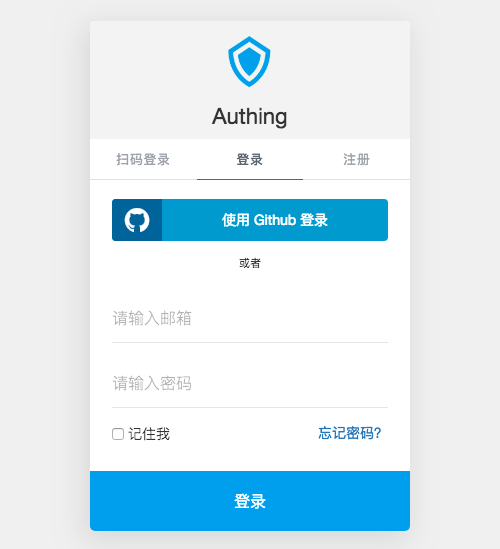
[点击体验](https://sample.authing.cn/#/) 或 [在 jsfiddle 上尝试](https://jsfiddle.net/yelexin/Lanvjpct)。
## 安装
### 通过 CDN 安装
```html
```
### 通过 NPM 安装
```shell
$ npm install @authing/guard --save
```
接着你可以使用以下方式引入 `Guard`:
```javascript
import Guard from '@authing/guard';
```
## 非 SSO 场景
开发者直接从 Authing 的用户池中获取用户数据,**不走** OAuth、OIDC 等**协议流程**。如果用户登录成功,你将在前端**直接获取**到他的数据。Guard 此场景下用于为开发者快速生成登录表单 UI,快速接入用户系统。
这里以一个简单的 HTML 为例:
```html
Guard Example
```
[点击查看用户信息示例](https://docs.authing.cn/authing/sdk/authing-sdk-for-web#deng-lu)
## SSO 场景
你想为其他人**提供**身份服务或**使用**他人提供的身份服务。此部分供私有部署用户参考,使用 SaaS 的用户直接使用 Authing 云上部署的 Guard,无需操心 Guard 部署问题,只需关注[如何发起 SSO 登录请求](https://docs.authing.cn/authing/advanced/oidc/oidc-authorization#fa-qi-shou-quan)。
作为 IdP(身份提供商),**对外提供身份服务**,Guard 此场景下用于 IdP 确认用户身份。支持的协议有 OAuth 2.0,OIDC,SAML,LDAP。
作为**与其他 IdP 通信**的客户端,Guard 此场景下充当 SP 和其他 IdP 通信,用于完成相应登录协议发起授权的环节,例如向其他 SAML IdP 发送 SAML Request请求。
部署示例:
```html
Authing SSO
```
## API
### 构造函数 new Guard(clientId, options)
初始化一个新的 `Guard` 实例。SSO 场景和非 SSO 场景下传参方式有所不同。
#### 非 SSO 场景
只需提供用户池 id。
- **clientId**: 用户池 id
- **options {Object}**: 允许你自定义表单的 UI,相关参数请参考 [自定义](https://github.com/Authing/Guard#自定义)
#### SSO 场景
供私有化部署用户参考,SaaS 用户无需操心 Guard SSO 场景部署。
需要提供用户池 id,在 options 对象中,传入你在 [Authing](https://authing.cn/dashboard) 对应应用中的 appId 和域名信息。
- **clientId**: 用户池 id
- **options {Object}**: 允许你自定义表单的 UI,相关参数请参考 [自定义](https://github.com/Authing/Guard#自定义)
- **options.appId {String}**: Authing SSO 类应用的 _appId_;
- **options.domain {String}**: Authing 中配置的 _域名_. 通常是 \.authing.cn;
### authing 对象
如果你想获取 authing 对象以调用[用户管理接口](https://docs.authing.cn/authing/sdk/authing-sdk-for-web),请使用如下代码:
`authing-load` 事件是 `Authing` 对象初始化后的回调事件。
``` javascript
guard.on('authing-load', (authing) => {
console.log('Authing 实例初始化成功', authing);
// authing.login
// authing.register
// authing.logout
// authing.checkLoginStatus
// ...
// 更多请参考:https://docs.authing.cn/authing/sdk/authing-sdk-for-web
});
```
### show(mountId)
显示登录表单,同时允许覆盖初始化时的配置。
- **mountId {String}**: 指定 Guard 将在何处显示,接受一个 html 元素 id,不含 # 号,不指定则直接生成在网页中间。
#### 示例
```js
// 没有 mountId,会全屏挂载
guard.show();
// 将会挂载在 id 为 mountId 的标签上
guard.show('mountId');
```
### hide()
隐藏表单
#### 示例
```js
guard.hide();
```
### on(event, callback)
Guard 会在以下生命周期中触发相应事件:
事件名称 | 事件说明 | 事件参数 | 事件参数说明
--------------- | -------------------- | --------| --------
authing-load | Authing Client ID 验证通过,加载完成 | authing | authing 对象,可直接操作 ``login``,``register`` 等方法
authing-unload | Authing Client ID 验证失败 | ``error`` | 错误信息
social-load | 社会化登录列表加载完成 | oauthList | 完整的 OAuth 列表,若用户未在后台配置过则为空
social-unload | 社会化登录列表加载失败 | ``error`` | 错误信息
login/authenticated | 用户登录成功 | user | 用户数据
login-error/authenticated-error | 用户登录失败 | ``error`` | 错误信息,包含字段缺失/非法或服务器错误等信息
register | 用户注册成功 | user | 用户数据
register-error | 用户注册失败 | ``error`` | 错误信息,包含字段缺失/非法或服务器错误等信息
email-sent | 忘记密码邮件发送成功 | data | 发送的结果
email-sent-error | 忘记密码邮件发送失败 | ``error`` | 错误信息
reset-password | 重置密码成功 | data | 重置密码结果
reset-password-error | 重置密码失败 | ``error`` | 错误信息
scanned-success | 扫码登录成功 | user | 用户数据
scanned-error | 扫码登录失败 | ``error`` | 错误信息
scanning-interval-starting | 开始监听扫码事件 | interval | 用户可使用 ``clearInterval`` 停止监听
form-closed | Guard 关闭事件 | null | 用户按下 ESC 或点击右上方的关闭按钮后会触发此事件
### 自定义
### UI 定制
以下是完整的参数列表:
参数名称 | 是否必填 | 默认值 | 类型 |参数说明|
--------------- | -------------------- | --------| --------|------------|
nonce | 否 | [Random] | Number | 随机数,用于防范网络攻击 |
timpstamp | 否 | 当前时间戳 | Number | 初始化时的时间戳,用于防范网络攻击 |
mountId | 否 |无|String|指定 Guard 表单将在何处显示,接受一个 html 元素 id,不含 `#` 号。不指定则默认全屏弹出 Modal 登录框|
title | 否 | Authing | String |**产品名称**|
logo | 否 | [Authing LOGO] | String |**产品logo**,默认为 Authing 的官方 Logo|
forceLogin | 否 | false | Boolean |**是否将注册和登录合并**,合并后如果用户不存在将自动注册|
hideQRCode | 否 | false | Boolean |**是否隐藏小程序扫码登录**,在开发者在 Authing 控制台开启小程序扫码登录后,若此项为 true 将不显示小程序扫码登录|
hideUP | 否 | false | Boolean |**是否隐藏用户名-密码登陆**,隐藏后将不显示用户名-密码登录框|
hideUsername | 否 | false | Boolean |**是否隐藏注册时的用户名填写**,隐藏后将不显示用户名输入框|
hideRegister | 否 | false | Boolean | **是否隐藏注册框**,隐藏后将不显示注册框
hideSocial | 否 | false | Boolean |**是否隐藏社会化登录**,在开发者在 Authing 控制台开启社会化登录后,若此项为 true 将隐藏全部社会化登录|
hideClose|否|false|Boolean|**是否隐藏登录框右上角的关闭按钮**,如果隐藏,用户将不能通过点击按钮或按 ESC 关闭登录框|
**placeholder** | 否 | {} | Object |**定制输入框的 paceholder**|
**placeholder**.username | 否 | 请输入用户名 | String |**定制输入框的 paceholder**|
**placeholder**.email | 否 | 请输入邮箱 | String |**用户名输入框的 paceholder**|
**placeholder**.password | 否 | 请输入密码 | String |**邮箱输入框的 paceholder**|
**placeholder**.confirmPassword | 否 | 请确认密码 | String |**密码输入框的 paceholder**|
**placeholder**.verfiyCode | 否 | 请输入验证码 | String |**验证码输入框的 paceholder**|
**placeholder**.newPassword | 否 | 请输入新密码 | String |**新密码输入框的 paceholder**|
**placeholder**.phone | 否 | 请输入手机号 | String |**手机号输入框的 paceholder**|
**placeholder**.phoneCode | 否 | 4 位验证码 | String |**手机验证码输入框的 paceholder**|
**qrcodeScanning** | 否 | {} | Object |**小程序扫码登录的配置项**|
**qrcodeScanning**.redirect | 否 | true | Boolean |**是否执行跳转(在用户后台配置的URL)**,若值为false,用户数据会通过 onSuccess 回调函数返回|
**qrcodeScanning**.interval | 否 | 1500 | Number |每隔多少秒检查一次是否扫码,默认1500 |
**qrcodeScanning**.tips | 否 | 使用 微信 或小程序 身份管家 扫码登录 | String |提示信息,可写HTML |
**以下供私有部署用户查看**
参数名称 | 是否必填 | 默认值 | 类型 |参数说明|
--------------- | -------------------- | --------| --------|------------|
**useSelfWxapp** | 否 | false | Boolean | 是否使用私有部署的小程序提供二维码,此选项仅供私有部署用户使用 |
**host** | 否 | {} | Object |**GraphqlQL 通讯地址配置项**|
**host**.user | 否 | [Authing 官方链接] | String |**GraphQL 链接**,默认 Authing 官方链接,此处用于私有部署 Authing 的用户使用|
**host**.oauth | 否 | [Authing 官方链接] | String |**GraphQL 链接**,默认 Authing 官方链接,此处用于私有部署 Authing 的用户使用|
**appId** | 是 | 无 | String | SSO 应用的云上 ID |
**domain** | 否 | 无 | String | SSO 类应用云上域名 |
protocol | 否 | oauth | String | 用于显示指定 SSO 应用类型,可选值为 oauth、oidc、saml |
SSOHost | 否 | https://sso.authing.cn | String | SSO 类应用的通讯地址,默认 Authing 官方链接,此处用于私有部署 Authing 的用户使用 |
isSSO | 否 | false | Boolean | 用于标识当前是否为 SSO 模式,如果只是想简单生成登录表单,使用默认 false 即可 |
## 浏览器兼容性
兼容 Chrome、Safari、Firefox 和 Edge。
## 问题报告
如果你遇到问题,请打开 Issue 提出问题。
## 开发者信息
[Authing](https://authing.cn)
## License
This project is licensed under the MIT license. See the [LICENSE](./LICENSE) file for more info.