# DubboFirstDemo
**Repository Path**: eason93/DubboFirstDemo
## Basic Information
- **Project Name**: DubboFirstDemo
- **Description**: No description available
- **Primary Language**: Unknown
- **License**: Not specified
- **Default Branch**: master
- **Homepage**: None
- **GVP Project**: No
## Statistics
- **Stars**: 0
- **Forks**: 0
- **Created**: 2019-06-04
- **Last Updated**: 2020-12-19
## Categories & Tags
**Categories**: Uncategorized
**Tags**: None
## README
## Zookeeper
### 介绍
ZooKeeper是一个分布式的,开放源码的分布式应用程序协调服务,是Google的Chubby一个开源的实现,是Hadoop和Hbase的重要组件。它是一个为分布式应用提供一致性服务的软件,提供的功能包括:配置维护、域名服务、分布式同步、组服务等。(来自于百度百科)
### Win安装调试
下载地址:https://www.apache.org/dyn/closer.cgi/zookeeper/
运行的地址是bin/zkServer.cmd
在你执行启动脚本之前,还有几个基本的配置项需要配置一下,Zookeeper 的配置文件在 conf 目录下,这个目录下有 zoo_sample.cfg 和 log4j.properties,你需要做的就是将 zoo_sample.cfg 改名为 zoo.cfg,因为 Zookeeper 在启动时会找这个文件作为默认配置文件。下面详细介绍一下,这个配置文件中各个配置项的意义。
```
# The number of milliseconds of each tick
tickTime=2000
# The number of ticks that the initial
# synchronization phase can take
initLimit=10
# The number of ticks that can pass between
# sending a request and getting an acknowledgement
syncLimit=5
# the directory where the snapshot is stored.
# do not use /tmp for storage, /tmp here is just
# example sakes.
dataDir=/tmp/zookeeper
# the port at which the clients will connect
clientPort=2181
# the maximum number of client connections.
# increase this if you need to handle more clients
#maxClientCnxns=60
#
# Be sure to read the maintenance section of the
# administrator guide before turning on autopurge.
#
# http://zookeeper.apache.org/doc/current/zookeeperAdmin.html#sc_maintenance
#
# The number of snapshots to retain in dataDir
#autopurge.snapRetainCount=3
# Purge task interval in hours
# Set to "0" to disable auto purge feature
#autopurge.purgeInterval=1
```
配置详情:
tickTime=2000 ##ZK服务器与客户端之间的心跳间隔
initLimit=10 ##**集群中使用**,集群中可以忍耐的心跳间隔数
syncLimit=5 ##**集群中使用**,请求和应答之间最长等待
dataDir=/tmp/zookeeper ##保存数据的位置。默认log也在一起
### 调试界面
zkui的下载地址:https://codeload.github.com/DeemOpen/zkui/zip/master
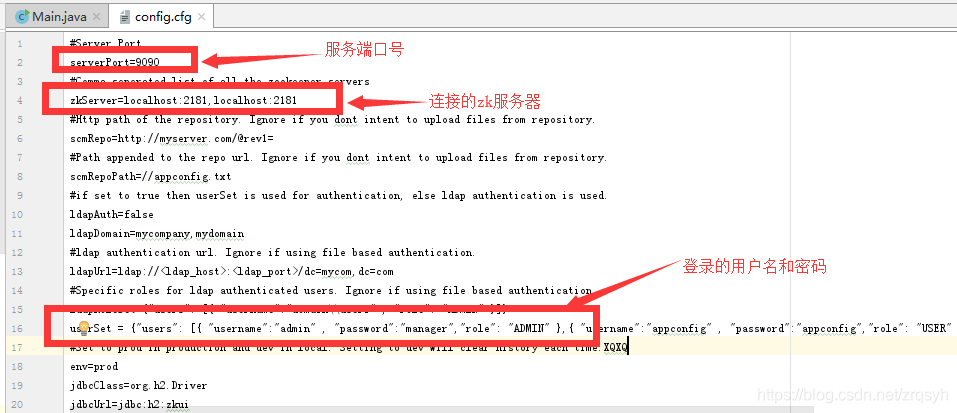
界面:

## Dubbo
dubbo的组成部分分为四个:consumer(消费者),register(注册中心,即zookeeper),provider(服务者),monitor(监控中心)
项目的类图:
```
├─api
│ └─src
│ └─main
│ └─java
│ └─com
│ └─example
│ └─api
│ └─api
│ └─TestService
├─carFactory
│ └─src
│ └─main
│ └─java
│ └─com
│ └─example
│ └─factory
│ │─Impl
│ │ └─TestServiceImpl
│ └─carFactory
└─carShop
└─src
└─main
└─java
└─com
└─example
└─carShop
```
### Dubbo使用ZK
```
org.apache.dubbo
dubbo
${dubbo.version}
org.apache.dubbo
dubbo-dependencies-zookeeper
${dubbo.version}
```
### 服务端
简单api:
```
package com.example.api.api;
public interface TestService {
public String test();
}
```
服务端的xml文件
```
//显示在界面的标识名字
//注册ZooKeeper的地址
//启动线上日志
//interface和name的对应,ref的testService没有关系,主要是在consumer中使用
//注册到bean的,可以有两种方式1)注解。类似于@Service 2)xml文件
//扫描的地址
```
**Note:注册到bean的方法,可以有两种方式1)注解。类似于@Service 2)xml文件**
服务端提供:
```
public class TestServiceImpl implements TestService {
public String test() {
return "This a TestServiceImpl";
}
}
```
启动服务:
```
public class carFactory {
public static void main(String[] args){
//读取相关配置文件
ClassPathXmlApplicationContext context = new ClassPathXmlApplicationContext(
"classpath*:applicationContext.xml");
context.start();
try {
//卡死进程
System.in.read();
} catch (IOException e) {
e.printStackTrace();
}
}
}
```
### 消费端
配置信息:
```
//显示在界面的标识名字
//消费的地址
```
启动服务:
```
public class carShopApp {
public static void main(String[] args){
ClassPathXmlApplicationContext context = new ClassPathXmlApplicationContext("applicationContext.xml");
context.start();
TestService demoService = (TestService)context.getBean("testService");
System.out.println(demoService.test());
}
}
```
### Spring MVC + ZooKeeper
#### 服务端
服务实现:
```
import com.example.api.api.TestService;
import org.springframework.stereotype.Service;
@Service
public class TestServiceImpl implements TestService {
public String test() {
return "webapp:SpringMVC";
}
}
```
Spring MVC 的XML配置:
```
springmvcdemo
org.springframework.web.context.ContextLoaderListener
provider
org.springframework.web.servlet.DispatcherServlet
contextConfigLocation
WEB-INF/applicationContext.xml,WEB-INF/applicationContext-servlet.xml
1
provider
*.do
Set Character Encoding
org.springframework.web.filter.CharacterEncodingFilter
encoding
UTF-8
Set Character Encoding
/*
```
关于这个的改造,可以查看博客[关于“Could not open ServletContext resource [/WEB-INF/applicationContext.xml]”解决方案](https://blog.csdn.net/wlwlwlwl015/article/details/48134763)
其他一些文件没啥太大作用
#### 客户端
从注册中心中获取,然后去消费
```
@RestController
@RequestMapping
public class TestController {
@Autowired
private TestService testService;
@GetMapping("/test.do")
public String test(){
return testService.test();
}
@GetMapping({"/test123.do"})
public String test123() {
return "test123";
}
}
```
其余的都和之前的差不多