# push-all-in-one
**Repository Path**: dext7r/push-all-in-one
## Basic Information
- **Project Name**: push-all-in-one
- **Description**: No description available
- **Primary Language**: Unknown
- **License**: MIT
- **Default Branch**: master
- **Homepage**: None
- **GVP Project**: No
## Statistics
- **Stars**: 0
- **Forks**: 0
- **Created**: 2025-09-15
- **Last Updated**: 2026-03-01
## Categories & Tags
**Categories**: Uncategorized
**Tags**: None
## README
push-all-in-one





> Push All In One!支持 Server 酱(以及 Server 酱³)、自定义邮件、钉钉机器人、企业微信机器人、企业微信应用、飞书、pushplus、WxPusher、iGot 、Qmsg、息知、PushDeer、Discord、OneBot、Telegram、ntfy 等多种推送方式。
>
> Push All In One! Supports multiple push methods including Server Chan (and Server Chan³), custom email, DingTalk robot, WeChat Work robot, WeChat Work application, Feishu, pushplus, WxPusher, iGot, Qmsg, XiZhi, PushDeer, Discord, OneBot, Telegram, ntfy and more.
>
> 温馨提示:出于安全考虑, **所有** 推送方式请在 **服务端** 使用!请勿在 **客户端(网页端)** 使用!
>
> Friendly Reminder: For security reasons, **all** push methods should be used on the **server side**! Do not use them on the **client side (web page)**!
>
> 基于 push-all-in-one 和 hono 开发的云函数推送服务——[push-all-in-cloud](https://github.com/CaoMeiYouRen/push-all-in-cloud) 。支持 nodejs/docker/vercel 等部署方式 ,可一键部署到 vercel 。
>
> **问题反馈和交流群**:
> - QQ 群: [807530287](http://qm.qq.com/cgi-bin/qm/qr?_wv=1027&k=K3QRQlxv_y7KqLhdEZmfouxKv9WHLN_v&authKey=pfdJX4EkvKGQXQrtM5BR968EbtFc9WnVvz8AtLiSUTGZRgw3P1wBWESSDcEjoCZB&noverify=0&group_code=807530287)
> - Discord: [草梅友仁的交流群](https://discord.gg/6bfPevfyr6)
**重大更新提示:** `push-all-in-one` v4 版本不兼容 v3 及以下低版本,请查看 [CHANGELOG](./CHANGELOG.md) 了解改动。
**BREAKING CHANGES**: `push-all-in-one` v4 version is not compatible with v3 and lower versions. Please refer to [CHANGELOG](./CHANGELOG.md) for changes.
建议根据 TypeScript 的类型提示进行修改。
Suggest modifying according to TypeScript's type prompts.
## 🏠 主页
[https://github.com/CaoMeiYouRen/push-all-in-one#readme](https://github.com/CaoMeiYouRen/push-all-in-one#readme)
## ✨ Demo
[https://github.com/CaoMeiYouRen/push-all-in-one/tree/master/examples](https://github.com/CaoMeiYouRen/push-all-in-one/tree/master/examples)
## 📦 依赖要求/Requirements
- node >=18
## 🚀 安装/Installation
```sh
npm i push-all-in-one -S
```
## 👨💻 使用/Usage
所有推送方式均实现了 `send(title: string, desp?: string, options?: any):` 方法。
`title` 为 `消息标题`,`desp` 为 `消息描述`,`options` 为该推送方式的`额外推送选项`,具体请参考各个推送渠道的注释。
> 不知道如何设置配置?请前往 [push-all-in-cloud 配置生成器](https://push.cmyr.dev/) 在线生成 `push-all-in-one` 和 `push-all-in-cloud` 通用配置。
调用方式举例:
```ts
import { ServerChanTurbo, ServerChanV3, CustomEmail, Dingtalk, WechatRobot, WechatApp, PushPlus, WxPusher, IGot, Qmsg, XiZhi, PushDeer, Discord, OneBot, Telegram, Feishu, Ntfy, runPushAllInOne, runPushAllInCloud } from 'push-all-in-one'
// 通过 runPushAllInOne 统一调用
runPushAllInOne('测试推送', '测试推送', {
type: 'ServerChanTurbo',
config: {
SERVER_CHAN_TURBO_SENDKEY: '',
},
option: {
},
})
// 通过 runPushAllInCloud 调用 push-all-in-cloud 服务
// `runPushAllInCloud` 会将消息发送到自建的 push-all-in-cloud 服务,并由云函数代为转发;`baseUrl` 应指向 push-all-in-cloud 部署地址(包含协议),`authToken` 对应服务端环境变量 `AUTH_FORWARD_KEY`。其余配置与 `runPushAllInOne` 完全一致。
// `runPushAllInCloud` sends the payload to your self-hosted push-all-in-cloud service, which relays the request to the selected channel. Set `baseUrl` to the deployment URL (with protocol) and `authToken` to the server-side `AUTH_FORWARD_KEY`. Other configuration fields mirror `runPushAllInOne`.
runPushAllInCloud('测试推送', '测试推送', {
type: 'ServerChanTurbo',
config: {
SERVER_CHAN_TURBO_SENDKEY: '',
},
option: {
},
baseUrl: 'https://push.example.com',
authToken: 'YOUR_AUTH_FORWARD_KEY',
})
// Server酱·Turbo。官方文档:https://sct.ftqq.com/r/13172
const SCTKEY = 'SCTxxxxxxxxxxxxxxxxxxx'
const serverChanTurbo = new ServerChanTurbo({
SERVER_CHAN_TURBO_SENDKEY: SCTKEY,
})
serverChanTurbo.send('你好', '你好,我很可爱 - Server酱·Turbo', {})
// 【推荐】Server酱³
// Server酱3。官方文档:https://sc3.ft07.com/doc
const SERVER_CHAN_V3_SENDKEY = 'sctpXXXXXXXXXXXXXXXXXXXXXXXX'
const serverChanV3 = new ServerChanV3({
SERVER_CHAN_V3_SENDKEY,
})
serverChanV3.send('你好', '你好,我很可爱 - Server酱³', {})
// 【推荐】自定义邮件,基于 nodemailer 实现,官方文档: https://github.com/nodemailer/nodemailer
const customEmail = new CustomEmail({
EMAIL_TYPE: 'text',
EMAIL_TO_ADDRESS: 'xxxxx@qq.com',
EMAIL_AUTH_USER: 'yyyyy@qq.com',
EMAIL_AUTH_PASS: '123456',
EMAIL_HOST: 'smtp.qq.com',
EMAIL_PORT: 465,
})
customEmail.send('你好', '你好,我很可爱 - 自定义邮件', {})
// 【推荐】钉钉机器人。官方文档:https://developers.dingtalk.com/document/app/custom-robot-access
const DINGTALK_ACCESS_TOKEN = 'xxxxxxxxxxxxxxxxxx'
const DINGTALK_SECRET = 'SECxxxxxxxxxxxxxxxx'
const dingtalk = new Dingtalk({
DINGTALK_ACCESS_TOKEN,
DINGTALK_SECRET,
})
dingtalk.send('你好', '你好,我很可爱 - 钉钉机器人', { msgtype: 'markdown' })
// 企业微信群机器人。官方文档:https://developer.work.weixin.qq.com/document/path/91770
// 企业微信群机器人的使用需要两人以上加入企业,如果个人使用微信推送建议使用 企业微信应用+微信插件 推送。虽然需要配置的内容更多了,但是无需下载企业微信,网页端即可完成操作。
const WECHAT_ROBOT_KEY = 'xxxxxxxxxxxxxxxxxxxxxxx'
const wechatRobot = new WechatRobot({
WECHAT_ROBOT_KEY,
})
wechatRobot.send('你好,我很可爱- 企业微信群机器人', '', { msgtype: 'text' })
// 【推荐】企业微信应用推送,官方文档:https://developer.work.weixin.qq.com/document/path/90664
// 微信插件 https://work.weixin.qq.com/wework_admin/frame#profile/wxPlugin
// 参数的介绍请参考:https://developer.work.weixin.qq.com/document/path/90665
// 支持 text 和 markdown 格式,但 markdown 格式仅可在企业微信中查看
const wechatApp = new WechatApp({
WECHAT_APP_CORPID: 'wwxxxxxxxxxxxxxxxxxxxx',
WECHAT_APP_AGENTID: 10001, // 请更换为自己的 AGENTID
WECHAT_APP_SECRET: 'xxxxxxxxxxxxxxxxxxxxxxxxxxxxxx',
})
wechatApp.send('你好,我很可爱 - 企业微信应用推送', '', {
msgtype: 'text',
touser: '@all',
})
// 【推荐】飞书 推送。官方文档:https://open.feishu.cn/document/home/index
const feishu = new Feishu({
FEISHU_APP_ID: 'xxxxxxx',
FEISHU_APP_SECRET: 'yyyyyyyy',
})
feishu.send('你好,我很可爱 - 飞书', '', {
receive_id_type: 'open_id',
receive_id: 'zzzzzzzzzzzzzzzz',
msg_type: 'text',
})
// pushplus 推送,官方文档:https://www.pushplus.plus/doc/
const PUSH_PLUS_TOKEN = 'xxxxxxxxxxxxxxxxxxxxx'
const pushplus = new PushPlus({ PUSH_PLUS_TOKEN })
pushplus.send('你好', '你好,我很可爱 - PushPlus', {
template: 'html',
channel: 'wechat',
})
// iGot 推送,官方文档:http://hellyw.com/#/
const I_GOT_KEY = 'xxxxxxxxxx'
const iGot = new IGot({ I_GOT_KEY })
iGot.send('你好', '你好,我很可爱 - iGot', {
url: 'https://github.com/CaoMeiYouRen/push-all-in-one',
topic: 'push-all-in-one',
})
// Qmsg 酱 推送,官方文档:https://qmsg.zendee.cn
const QMSG_KEY = 'xxxxxxxxxxxx'
const qmsg = new Qmsg({ QMSG_KEY })
qmsg.send('你好,我很可爱 - Qmsg', '', {
type: 'send',
qq: '123456,654321',
}) // msg:要推送的消息内容;qq:指定要接收消息的QQ号或者QQ群,多个以英文逗号分割,例如:12345,12346
// 息知 推送,官方文档:https://xz.qqoq.net/#/index
const XI_ZHI_KEY = 'xxxxxxxxxxxxx'
const xiZhi = new XiZhi({ XI_ZHI_KEY })
xiZhi.send('你好', '你好,我很可爱 - XiZhi')
// PushDeer 推送,官方文档:https://github.com/easychen/pushdeer
const PUSH_DEER_PUSH_KEY = 'xxxxxxxxxx'
const pushDeer = new PushDeer({ PUSH_DEER_PUSH_KEY })
pushDeer.send('你好', '你好,我很可爱 - PushDeer', {
type: 'markdown',
})
// 【推荐】Discord Webhook 推送,官方文档:https://support.discord.com/hc/zh-tw/articles/228383668-%E4%BD%BF%E7%94%A8%E7%B6%B2%E7%B5%A1%E9%89%A4%E6%89%8B-Webhooks-
// [Recommended] Discord Webhook push. Official documentation: https://support.discord.com/hc/en-us/articles/228383668-Intro-to-Webhooks
const DISCORD_WEBHOOK = 'https://discord.com/api/webhooks/xxxxxxxxxxxxxxxxxxxxxxxxxxx'
const DISCORD_USERNAME = 'My Bot'
const PROXY_URL = 'http://127.0.0.1:8101'
const discord = new Discord({ DISCORD_WEBHOOK, PROXY_URL })
// Discord 也支持以下方式添加代理地址
// Discord also supports adding proxy addresses in the following ways
// discord.proxyUrl = 'http://127.0.0.1:8101'
discord.send('你好,我很可爱 - Discord', '', {
username: DISCORD_USERNAME,
})
// 【推荐】Telegram Bot 推送。官方文档:https://core.telegram.org/bots/api#making-requests
// [Recommended] Telegram Bot push. Official documentation: https://core.telegram.org/bots/api#making-requests
const telegram = new Telegram({
TELEGRAM_BOT_TOKEN: '111111:xxxxxxxxxxxxxx',
TELEGRAM_CHAT_ID: 100000,
// PROXY_URL: 'http://127.0.0.1:8101',
})
// Telegram 也支持以下方式添加代理地址
// Telegram also supports adding proxy addresses in the following ways
// telegram.proxyUrl = 'http://127.0.0.1:8101'
telegram.send('你好,我很可爱 - Telegram', '', {
disable_notification: true,
})
// OneBot 推送。官方文档:https://github.com/botuniverse/onebot-11
// 本项目实现的版本为 OneBot 11
// 在 mirai 环境下实现的插件版本可参考:https://github.com/yyuueexxiinngg/onebot-kotlin
const ONE_BOT_BASE_URL = 'http://127.0.0.1:5700'
const ONE_BOT_ACCESS_TOKEN = 'xxxxxxxxxxx'
const oneBot = new OneBot({ ONE_BOT_BASE_URL, ONE_BOT_ACCESS_TOKEN })
oneBot.send('你好,我很可爱 - OneBot 11', '', {
message_type: 'private',
user_id: 123456789,
})
// 【推荐】Ntfy 推送。官方文档:https://ntfy.sh/docs/publish/
const ntfy = new Ntfy({
NTFY_URL: 'https://ntfy.sh',
NTFY_TOPIC: 'push_all_in_one_test',
})
await ntfy.send('Ntfy - 标题支持中文', '你好,我很可爱 - Ntfy', {
})
// WxPusher 推送。官方文档:https://wxpusher.zjiecode.com/docs
// WxPusher 是一个开源的微信消息推送平台,支持多种消息格式,包括文本、HTML、Markdown
// 使用前需要:
// 1. 在 https://wxpusher.zjiecode.com/admin/main/app/appToken 申请 appToken
// 2. 在 https://wxpusher.zjiecode.com/admin/main/wxuser/list 获取接收消息用户的 uid
const WX_PUSHER_APP_TOKEN = 'xxxxxxxxxxxxxxxxxx'
const WX_PUSHER_UID = 'yyyyyyyyyyyyyyyyyyy'
const wxPusher = new WxPusher({
WX_PUSHER_APP_TOKEN,
WX_PUSHER_UID,
})
// 基础用法
wxPusher.send('你好', '你好,我很可爱 - WxPusher')
// 高级用法
wxPusher.send('你好', '你好,我很可爱 - WxPusher', {
contentType: 3, // 内容类型:1=文本,2=HTML,3=Markdown,默认为1
summary: '消息摘要', // 显示在微信聊天页面的消息摘要,限制长度20,不传则自动截取content
url: 'https://wxpusher.zjiecode.com', // 点击消息时打开的链接,可选
topicIds: [123], // 发送目标的主题ID数组,可以实现群发,可选
save: 1, // 是否保存消息:0=不保存,1=保存,默认0
verifyPayload: 'test', // 验证负载,仅针对text消息类型有效,可选
})
// HTML 格式示例
wxPusher.send('HTML 消息', '标题
红色文字
', {
contentType: 2,
summary: 'HTML示例',
})
// Markdown 格式示例
wxPusher.send('Markdown 消息', '## 二级标题\n- 列表项1\n- 列表项2', {
contentType: 3,
summary: 'Markdown示例',
})
// 群发示例
wxPusher.send('群发消息', '这是一条群发消息', {
contentType: 1,
topicIds: [123, 456], // 可以发送给多个主题
uids: ['UID_1', 'UID_2'], // 可以同时发送给多个用户
})
```
更多例子请参考 [examples](https://github.com/CaoMeiYouRen/push-all-in-one/tree/master/examples)
**代理支持**
| 环境变量 | 作用 | 例子 |
| ----------- | ------------------------------------------ | ---------------------- |
| NO_PROXY | 设置是否禁用代理 | true |
| HTTP_PROXY | 设置 http/https 代理 | http://127.0.0.1:8101 |
| HTTPS_PROXY | 设置 http/https 代理 | http://127.0.0.1:8101 |
| SOCKS_PROXY | 通过 socks/socks5 协议设置 http/https 代理 | socks://127.0.0.1:8100 |
本项目通过环境变量来支持请求代理
```ts
// 在 nodejs 项目中可通过直接设置环境变量来设置代理
process.env.HTTP_PROXY = 'http://127.0.0.1:8101' // 当请求是 http/https 的时候走 HTTP_PROXY
process.env.HTTPS_PROXY = 'http://127.0.0.1:8101' // 当请求是 http/https 的时候走 HTTPS_PROXY,HTTPS_PROXY 优先
process.env.SOCKS_PROXY = 'socks://127.0.0.1:8100' // 当 HTTP_PROXY 设置时走 SOCKS_PROXY
// process.env.NO_PROXY = true // 设置 NO_PROXY 可禁用代理
```
在命令行中可手动设置环境变量
```sh
set HTTP_PROXY='http://127.0.0.1:8101' # Windows
export HTTP_PROXY='http://127.0.0.1:8101' # Linux
cross-env HTTP_PROXY='http://127.0.0.1:8101' # 通过 cross-env 这个包来跨平台
```
## 🛠️ 开发/Development
本项目采用 TypeScript 开发,使用 tsup 打包,可以完美实现类型提示和摇树优化,对于未使用到的模块,会在编译阶段去除。
```sh
npm run dev
```
## 🐛 debug
本项目使用 `debug` 这个包来 debug ,如果要开启调试则设置环境变量为 `DEBUG=push:*` 即可,例如
```sh
cross-env DEBUG=push:* NODE_ENV=development ts-node-dev test/index.test.ts # 因为一些原因该文件未上传,可自行编写测试用例
```
## 🔧 编译/Build
```sh
npm run build
```
## 🔍 Lint
```sh
npm run lint
```
## 💾 Commit
```sh
npm run commit
```
## 👤 作者/Author
**CaoMeiYouRen**
* Website: [https://blog.cmyr.ltd/](https://blog.cmyr.ltd/)
* GitHub: [@CaoMeiYouRen](https://github.com/CaoMeiYouRen)
## 🤝 贡献/Contribution
欢迎 贡献、提问或提出新功能!
如有问题请查看 [issues page](https://github.com/CaoMeiYouRen/push-all-in-one/issues).
贡献或提出新功能可以查看[contributing guide](https://github.com/CaoMeiYouRen/push-all-in-one/blob/master/CONTRIBUTING.md).
Welcome to contribute, ask questions or propose new features!
If you have any questions, please check the [issues page](https://github.com/CaoMeiYouRen/push-all-in-one/issues).
For contributions or new feature proposals, please refer to the [contributing guide](https://github.com/CaoMeiYouRen/push-all-in-one/blob/master/CONTRIBUTING.md).
## 💰 支持/Support
如果觉得这个项目有用的话请给一颗⭐️,非常感谢。
If you find this project useful, please give it a ⭐️. Thank you very much.

 ## 🌟 Star History
[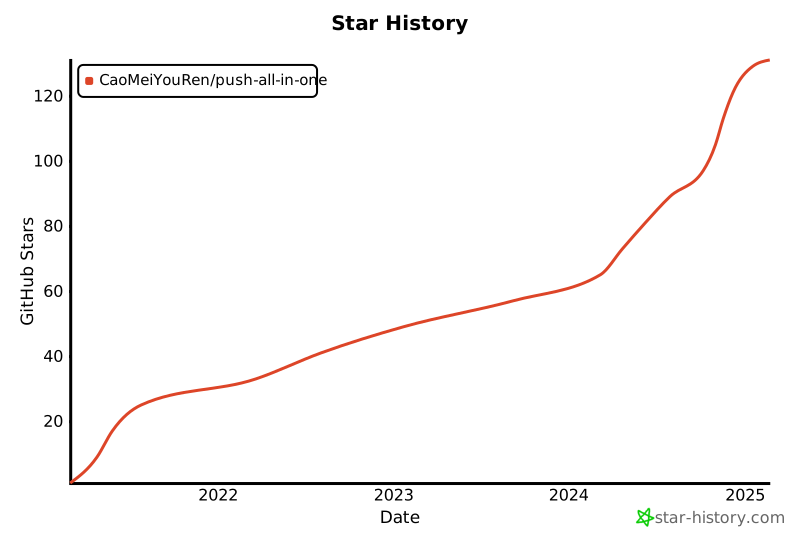](https://star-history.com/#CaoMeiYouRen/push-all-in-one&Date)
## 📝 License
Copyright © 2022 [CaoMeiYouRen](https://github.com/CaoMeiYouRen).
## 🌟 Star History
[](https://star-history.com/#CaoMeiYouRen/push-all-in-one&Date)
## 📝 License
Copyright © 2022 [CaoMeiYouRen](https://github.com/CaoMeiYouRen).
This project is [MIT](https://github.com/CaoMeiYouRen/push-all-in-one/blob/master/LICENSE) licensed.
***
_This README was generated with ❤️ by [cmyr-template-cli](https://github.com/CaoMeiYouRen/cmyr-template-cli)_