# autodev
**Repository Path**: bytebuilder-tr/autodev
## Basic Information
- **Project Name**: autodev
- **Description**: itBuilder是一款多智能体协作开发平台,可以借助人工智能完成软件开发工作
- **Primary Language**: JavaScript
- **License**: Apache-2.0
- **Default Branch**: master
- **Homepage**: https://www.itbuilder.cn/
- **GVP Project**: No
## Statistics
- **Stars**: 0
- **Forks**: 700
- **Created**: 2025-07-10
- **Last Updated**: 2025-07-10
## Categories & Tags
**Categories**: Uncategorized
**Tags**: None
## README
English • [Català](locales/ca/README.md) • [Deutsch](locales/de/README.md) • [Español](locales/es/README.md) • [Français](locales/fr/README.md) • [हिंदी](locales/hi/README.md) • [Bahasa Indonesia](locales/id/README.md) • [Italiano](locales/it/README.md) • [日本語](locales/ja/README.md)
[한국어](locales/ko/README.md) • [Nederlands](locales/nl/README.md) • [Polski](locales/pl/README.md) • [Português (BR)](locales/pt-BR/README.md) • [Русский](locales/ru/README.md) • [Türkçe](locales/tr/README.md) • [Tiếng Việt](locales/vi/README.md) • [简体中文](locales/zh-CN/README.md) • [繁體中文](locales/zh-TW/README.md)
Roo Code (prev. Roo Cline)
Connect with developers, contribute ideas, and stay ahead with the latest AI-powered coding tools.


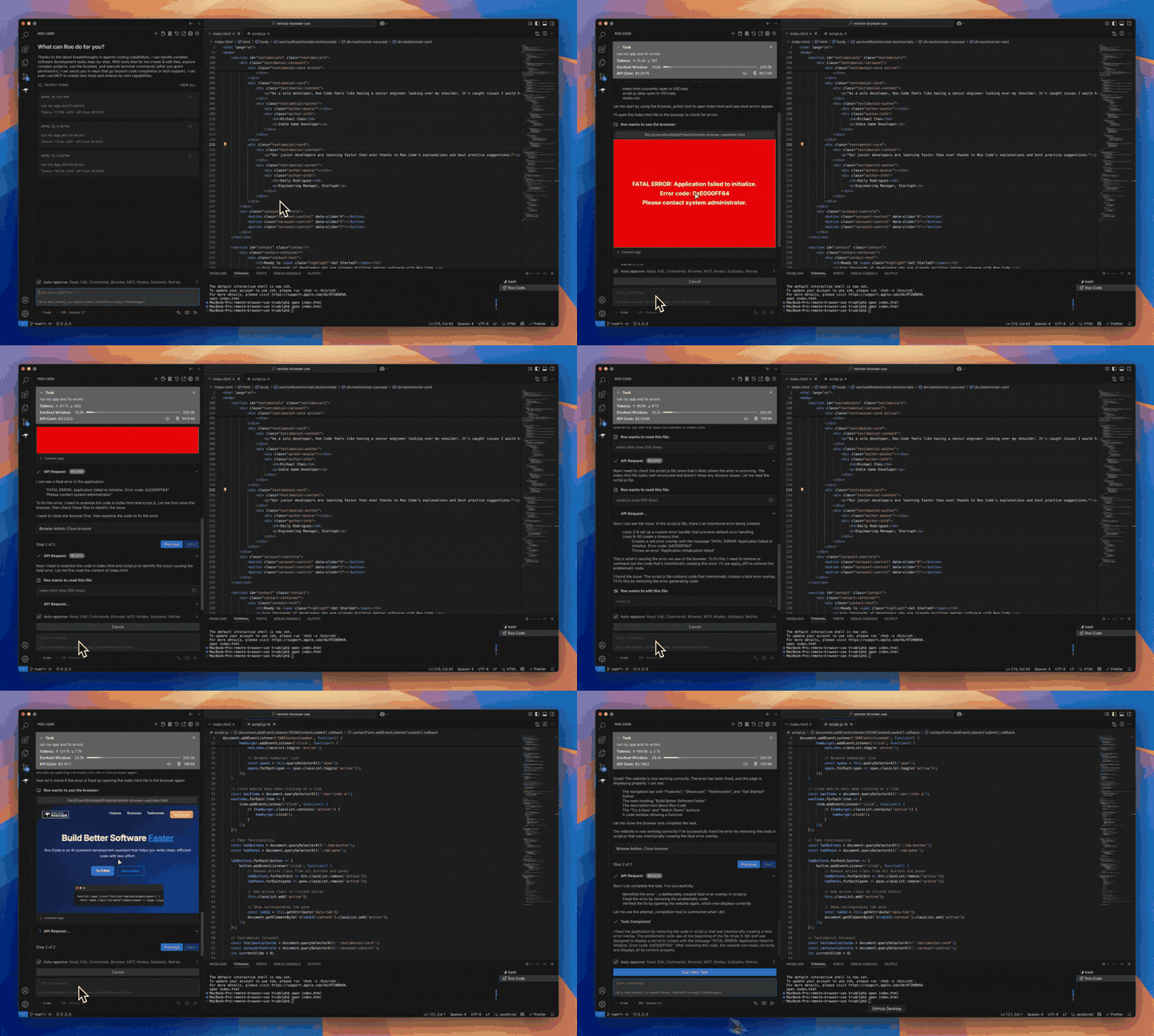
**Roo Code** is an AI-powered **autonomous coding agent** that lives in your editor. It can:
- Communicate in natural language
- Read and write files directly in your workspace
- Run terminal commands
- Automate browser actions
- Integrate with any OpenAI-compatible or custom API/model
- Adapt its “personality” and capabilities through **Custom Modes**
Whether you’re seeking a flexible coding partner, a system architect, or specialized roles like a QA engineer or product manager, Roo Code can help you build software more efficiently.
Check out the [CHANGELOG](CHANGELOG.md) for detailed updates and fixes.
---
## 🎉 Roo Code 3.21 Released
Roo Code 3.21 brings major new features and improvements based on your feedback!
- **Roo Marketplace Launch** - The marketplace is now live! The marketplace is now live! Discover and install modes and MCPs easier than ever before.
- **Gemini 2.5 Models** - Added support for new Gemini 2.5 Pro, Flash, and Flash Lite models.
- **Excel File Support & More** - Added Excel (.xlsx) file support and numerous bug fixes and improvements!
---
## What Can Roo Code Do?
- 🚀 **Generate Code** from natural language descriptions
- 🔧 **Refactor & Debug** existing code
- 📝 **Write & Update** documentation
- 🤔 **Answer Questions** about your codebase
- 🔄 **Automate** repetitive tasks
- 🏗️ **Create** new files and projects
## Quick Start
1. [Install Roo Code](https://docs.roocode.com/getting-started/installing)
2. [Connect Your AI Provider](https://docs.roocode.com/getting-started/connecting-api-provider)
3. [Try Your First Task](https://docs.roocode.com/getting-started/your-first-task)
## Key Features
### Multiple Modes
Roo Code adapts to your needs with specialized [modes](https://docs.roocode.com/basic-usage/using-modes):
- **Code Mode:** For general-purpose coding tasks
- **Architect Mode:** For planning and technical leadership
- **Ask Mode:** For answering questions and providing information
- **Debug Mode:** For systematic problem diagnosis
- **[Custom Modes](https://docs.roocode.com/advanced-usage/custom-modes):** Create unlimited specialized personas for security auditing, performance optimization, documentation, or any other task
### Smart Tools
Roo Code comes with powerful [tools](https://docs.roocode.com/basic-usage/how-tools-work) that can:
- Read and write files in your project
- Execute commands in your VS Code terminal
- Control a web browser
- Use external tools via [MCP (Model Context Protocol)](https://docs.roocode.com/advanced-usage/mcp)
MCP extends Roo Code's capabilities by allowing you to add unlimited custom tools. Integrate with external APIs, connect to databases, or create specialized development tools - MCP provides the framework to expand Roo Code's functionality to meet your specific needs.
### Customization
Make Roo Code work your way with:
- [Custom Instructions](https://docs.roocode.com/advanced-usage/custom-instructions) for personalized behavior
- [Custom Modes](https://docs.roocode.com/advanced-usage/custom-modes) for specialized tasks
- [Local Models](https://docs.roocode.com/advanced-usage/local-models) for offline use
- [Auto-Approval Settings](https://docs.roocode.com/advanced-usage/auto-approving-actions) for faster workflows
## Resources
### Documentation
- [Basic Usage Guide](https://docs.roocode.com/basic-usage/the-chat-interface)
- [Advanced Features](https://docs.roocode.com/advanced-usage/auto-approving-actions)
- [Frequently Asked Questions](https://docs.roocode.com/faq)
### Community
- **Discord:** [Join our Discord server](https://discord.gg/roocode) for real-time help and discussions
- **Reddit:** [Visit our subreddit](https://www.reddit.com/r/RooCode) to share experiences and tips
- **GitHub:** Report [issues](https://github.com/RooCodeInc/Roo-Code/issues) or request [features](https://github.com/RooCodeInc/Roo-Code/discussions/categories/feature-requests?discussions_q=is%3Aopen+category%3A%22Feature+Requests%22+sort%3Atop)
---
## Local Setup & Development
1. **Clone** the repo:
```sh
git clone https://github.com/RooCodeInc/Roo-Code.git
```
2. **Install dependencies**:
```sh
pnpm install
```
3. **Run the extension**:
There are several ways to run the Roo Code extension:
### Development Mode (F5)
For active development, use VSCode's built-in debugging:
Press `F5` (or go to **Run** → **Start Debugging**) in VSCode. This will open a new VSCode window with the Roo Code extension running.
- Changes to the webview will appear immediately.
- Changes to the core extension will also hot reload automatically.
### Automated VSIX Installation
To build and install the extension as a VSIX package directly into VSCode:
```sh
pnpm install:vsix [-y] [--editor=]
```
This command will:
- Ask which editor command to use (code/cursor/code-insiders) - defaults to 'code'
- Uninstall any existing version of the extension.
- Build the latest VSIX package.
- Install the newly built VSIX.
- Prompt you to restart VS Code for changes to take effect.
Options:
- `-y`: Skip all confirmation prompts and use defaults
- `--editor=`: Specify the editor command (e.g., `--editor=cursor` or `--editor=code-insiders`)
### Manual VSIX Installation
If you prefer to install the VSIX package manually:
1. First, build the VSIX package:
```sh
pnpm vsix
```
2. A `.vsix` file will be generated in the `bin/` directory (e.g., `bin/roo-cline-.vsix`).
3. Install it manually using the VSCode CLI:
```sh
code --install-extension bin/roo-cline-.vsix
```
---
We use [changesets](https://github.com/changesets/changesets) for versioning and publishing. Check our `CHANGELOG.md` for release notes.
---
## Disclaimer
**Please note** that Roo Code, Inc does **not** make any representations or warranties regarding any code, models, or other tools provided or made available in connection with Roo Code, any associated third-party tools, or any resulting outputs. You assume **all risks** associated with the use of any such tools or outputs; such tools are provided on an **"AS IS"** and **"AS AVAILABLE"** basis. Such risks may include, without limitation, intellectual property infringement, cyber vulnerabilities or attacks, bias, inaccuracies, errors, defects, viruses, downtime, property loss or damage, and/or personal injury. You are solely responsible for your use of any such tools or outputs (including, without limitation, the legality, appropriateness, and results thereof).
---
## Contributing
We love community contributions! Get started by reading our [CONTRIBUTING.md](CONTRIBUTING.md).
---
## Contributors
Thanks to all our contributors who have helped make Roo Code better!
| 
mrubens | 
saoudrizwan | 
cte | 
samhvw8 | 
daniel-lxs | 
hannesrudolph |
| :---------------------------------------------------------------------------------------------------------------------------------------------------------------------------------------------------------: | :----------------------------------------------------------------------------------------------------------------------------------------------------------------------------------------------------------------------: | :-------------------------------------------------------------------------------------------------------------------------------------------------------------------------------------------------: | :--------------------------------------------------------------------------------------------------------------------------------------------------------------------------------------------------------: | :---------------------------------------------------------------------------------------------------------------------------------------------------------------------------------------------------------: | :-------------------------------------------------------------------------------------------------------------------------------------------------------------------------------------------------------------------: |
| 
KJ7LNW | 
a8trejo | 
ColemanRoo | 
canrobins13 | 
stea9499 | 
joemanley201 |
| 
System233 | 
jr | 
nissa-seru | 
jquanton | 
NyxJae | 
MuriloFP |
| 
elianiva | 
d-oit | 
punkpeye | 
wkordalski | 
xyOz-dev | 
feifei325 |
| 
qdaxb | 
zhangtony239 | 
cannuri | 
monotykamary | 
sachasayan | 
Smartsheet-JB-Brown |
| 
dtrugman | 
lloydchang | 
pugazhendhi-m | 
shariqriazz | 
vigneshsubbiah16 | 
chrarnoldus |
| 
Szpadel | 
lupuletic | 
kiwina | 
Premshay | 
psv2522 | 
olweraltuve |
| 
diarmidmackenzie | 
PeterDaveHello | 
aheizi | 
hassoncs | 
ChuKhaLi | 
nbihan-mediware |
| 
RaySinner | 
afshawnlotfi | 
StevenTCramer | 
SannidhyaSah | 
pdecat | 
noritaka1166 |
| 
kyle-apex | 
emshvac | 
Lunchb0ne | 
SmartManoj | 
vagadiya | 
slytechnical |
| 
dleffel | 
arthurauffray | 
upamune | 
NamesMT | 
taylorwilsdon | 
sammcj |
| 
Ruakij | 
p12tic | 
gtaylor | 
aitoroses | 
axkirillov | 
ross |
| 
mr-ryan-james | 
heyseth | 
taisukeoe | 
avtc | 
dlab-anton | 
eonghk |
| 
kcwhite | 
ronyblum | 
teddyOOXX | 
vincentsong | 
yongjer | 
zeozeozeo |
| 
ashktn | 
franekp | 
yt3trees | 
benzntech | 
anton-otee | 
bramburn |
| 
olearycrew | 
brunobergher | 
catrielmuller | 
snoyiatk | 
GitlyHallows | 
jcbdev |
| 
Chenjiayuan195 | 
julionav | 
KanTakahiro | 
SplittyDev | 
mdp | 
napter |
| 
philfung | 
dairui1 | 
dqroid | 
forestyoo | 
GOODBOY008 | 
hatsu38 |
| 
hongzio | 
im47cn | 
shoopapa | 
jwcraig | 
kinandan | 
nevermorec |
| 
bannzai | 
axmo | 
asychin | 
amittell | 
Yoshino-Yukitaro | 
Yikai-Liao |
| 
zxdvd | 
vladstudio | 
tmsjngx0 | 
tgfjt | 
maekawataiki | 
PretzelVector |
| 
zetaloop | 
cdlliuy | 
user202729 | 
student20880 | 
shohei-ihaya | 
shivamd1810 |
| 
shaybc | 
seedlord | 
samir-nimbly | 
robertheadley | 
refactorthis | 
qingyuan1109 |
| 
pokutuna | 
philipnext | 
village-way | 
oprstchn | 
nobu007 | 
mosleyit |
| 
moqimoqidea | 
mlopezr | 
mecab | 
olup | 
lightrabbit | 
kohii |
| 
linegel | 
edwin-truthsearch-io | 
EamonNerbonne | 
dbasclpy | 
dflatline | 
Deon588 |
| 
dleen | 
devxpain | 
CW-B-W | 
chadgauth | 
thecolorblue | 
bogdan0083 |
| 
benashby | 
Atlogit | 
atlasgong | 
andreastempsch | 
alasano | 
QuinsZouls |
| 
HadesArchitect | 
alarno | 
nexon33 | 
adilhafeez | 
adamwlarson | 
adamhill |
| 
AMHesch | 
AlexandruSmirnov | 
samsilveira | 
01Rian | 
RSO | 
SECKainersdorfer |
| 
R-omk | 
Sarke | 
OlegOAndreev | 
kvokka | 
ecmasx | 
mollux |
| 
marvijo-code | 
markijbema | 
mamertofabian | 
monkeyDluffy6017 | 
libertyteeth | 
shtse8 |
| 
Rexarrior | 
ksze | 
Jdo300 | 
hesara | 
DeXtroTip | 
pfitz |
| 
ExactDoug | 
celestial-vault | | | | |
## License
[Apache 2.0 © 2025 Roo Code, Inc.](./LICENSE)
---
**Enjoy Roo Code!** Whether you keep it on a short leash or let it roam autonomously, we can’t wait to see what you build. If you have questions or feature ideas, drop by our [Reddit community](https://www.reddit.com/r/RooCode/) or [Discord](https://discord.gg/roocode). Happy coding!