# ChubaoFS
**Repository Path**: ansj/chubaofs
## Basic Information
- **Project Name**: ChubaoFS
- **Description**: ChubaoFS(储宝文件系统)是为大规模容器平台设计的分布式文件系统
- **Primary Language**: Go
- **License**: Apache-2.0
- **Default Branch**: master
- **Homepage**: https://www.oschina.net/p/chubaofs
- **GVP Project**: No
## Statistics
- **Stars**: 0
- **Forks**: 7
- **Created**: 2020-04-14
- **Last Updated**: 2020-12-19
## Categories & Tags
**Categories**: Uncategorized
**Tags**: None
## README
# ChubaoFS
[](https://www.cncf.io/sandbox-projects)
[](https://travis-ci.org/chubaofs/chubaofs)
[](https://github.com/chubaofs/chubaofs/blob/master/LICENSE)
[](https://golang.org/)
[](https://goreportcard.com/report/github.com/chubaofs/chubaofs)
[](https://chubaofs.readthedocs.io/en/latest/?badge=latest)
[](https://app.fossa.io/projects/git%2Bgithub.com%2Fchubaofs%2Fcfs?ref=badge_shield)
[](https://bestpractices.coreinfrastructure.org/projects/2761)
 ## Overview
ChubaoFS (储宝文件系统 in Chinese) is a cloud-native storage platform that provides both POSIX-compliant and S3-compatible interfaces. It is hosted by the [Cloud Native Computing Foundation](https://cncf.io) (CNCF) as a [sandbox](https://www.cncf.io/sandbox-projects/) project.
ChubaoFS has been commonly used as the underlying storage infrastructure for online applications, database or data processing services and machine learning jobs orchestrated by Kubernetes.
An advantage of doing so is to separate storage from compute - one can scale up or down based on the workload and independent of the other, providing total flexibility in matching resources to the actual storage and compute capacity required at any given time.
Some key features of ChubaoFS include:
- Scale-out metadata management
- Strong replication consistency
- Specific performance optimizations for large/small files and sequential/random writes
- Multi-tenancy
- POSIX-compatible and mountable
- S3-compatible object storage interface
We are committed to making ChubaoFS better and more mature. Please stay tuned.
## Document
https://chubaofs.readthedocs.io/en/latest/
https://chubaofs.readthedocs.io/zh_CN/latest/
## Benchmark
Small file operation performance and scalability benchmark test by [mdtest](https://github.com/LLNL/mdtest).
## Overview
ChubaoFS (储宝文件系统 in Chinese) is a cloud-native storage platform that provides both POSIX-compliant and S3-compatible interfaces. It is hosted by the [Cloud Native Computing Foundation](https://cncf.io) (CNCF) as a [sandbox](https://www.cncf.io/sandbox-projects/) project.
ChubaoFS has been commonly used as the underlying storage infrastructure for online applications, database or data processing services and machine learning jobs orchestrated by Kubernetes.
An advantage of doing so is to separate storage from compute - one can scale up or down based on the workload and independent of the other, providing total flexibility in matching resources to the actual storage and compute capacity required at any given time.
Some key features of ChubaoFS include:
- Scale-out metadata management
- Strong replication consistency
- Specific performance optimizations for large/small files and sequential/random writes
- Multi-tenancy
- POSIX-compatible and mountable
- S3-compatible object storage interface
We are committed to making ChubaoFS better and more mature. Please stay tuned.
## Document
https://chubaofs.readthedocs.io/en/latest/
https://chubaofs.readthedocs.io/zh_CN/latest/
## Benchmark
Small file operation performance and scalability benchmark test by [mdtest](https://github.com/LLNL/mdtest).
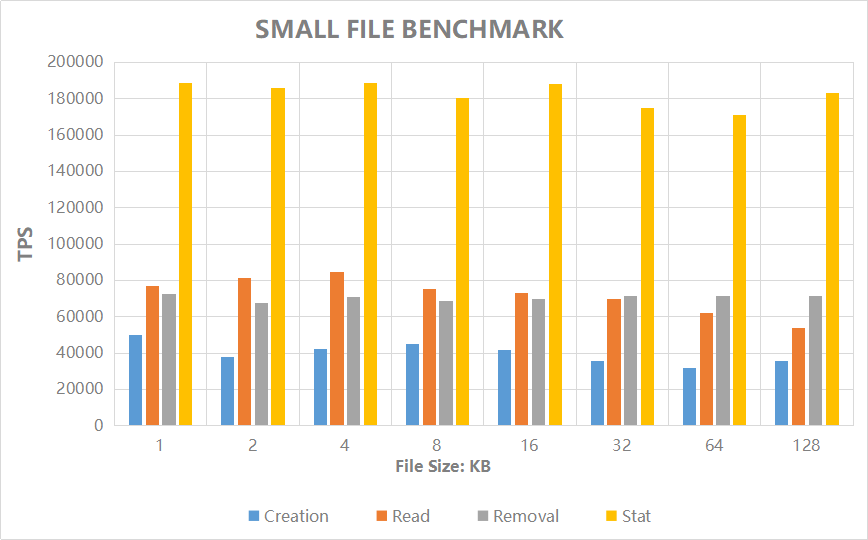 |File Size (KB) | 1 | 2 | 4 | 8 | 16 | 32 | 64 | 128 |
|:-|:-|:-|:-|:-|:-|:-|:-|:-|
|Creation (TPS) |70383 |70383 |73738 |74617 |69479 |67435 |47540 |27147 |
|Read (TPS) |108600 |118193 |118346 |122975 |116374 |110795 |90462 |62082 |
|Removal (TPS) |87648 |84651 |83532 |79279 |85498 |86523 |80946 |84441 |
|Stat (TPS) |231961 |263270 |264207 |252309 |240244 |244906 |273576 |242930|
Refer to [chubaofs.readthedocs.io](https://chubaofs.readthedocs.io/en/latest/evaluation.html) for performance and scalability of `IO` and `Metadata`.
## Build ChubaoFS
```
$ git clone http://github.com/chubaofs/chubaofs.git
$ cd chubaofs
$ make
```
## Yum Tools to Run a ChubaoFS Cluster for CentOS 7+
The list of RPM packages dependencies can be installed with:
```
$ yum install http://storage.jd.com/chubaofsrpm/latest/cfs-install-latest-el7.x86_64.rpm
$ cd /cfs/install
$ tree -L 2
.
├── install_cfs.yml
├── install.sh
├── iplist
├── src
└── template
├── client.json.j2
├── create_vol.sh.j2
├── datanode.json.j2
├── grafana
├── master.json.j2
└── metanode.json.j2
```
Set parameters of the ChubaoFS cluster in `iplist`.
1. `[master]`, `[datanode]`, `[metanode]`, `[monitor]`, `[client]` modules define IP addresses of each role.
2. `#datanode config` module defines parameters of DataNodes. `datanode_disks` defines `path` and `reserved space` separated by ":". The `path` is where the data store in, so make sure it exists and has at least 30GB of space; `reserved space` is the minimum free space(Bytes) reserved for the path.
3. `[cfs:vars]` module defines parameters for SSH connection. So make sure the port, username and password for SSH connection is unified before start.
4. `#metanode config` module defines parameters of MetaNodes. `metanode_totalMem` defines the maximum memory(Bytes) can be use by MetaNode process.
```yaml
[master]
10.196.0.1
10.196.0.2
10.196.0.3
[datanode]
...
[cfs:vars]
ansible_ssh_port=22
ansible_ssh_user=root
ansible_ssh_pass="password"
...
#datanode config
...
datanode_disks = '"/data0:10737418240","/data1:10737418240"'
...
#metanode config
...
metanode_totalMem = "28589934592"
...
```
For more configurations please refer to [documentation](https://chubaofs.readthedocs.io/en/latest/user-guide/master.html).
Start the resources of ChubaoFS cluster with script `install.sh`. (make sure the Master is started first)
```
$ bash install.sh -h
Usage: install.sh [-r --role datanode or metanode or master or monitor or client or all ] [-v --version 1.5.1 or latest]
$ bash install.sh -r master
$ bash install.sh -r metanode
$ bash install.sh -r datanode
$ bash install.sh -r monitor
$ bash install.sh -r client
```
Check mount point at `/cfs/mountpoint` on `client` node defined in `iplist`.
Open [http://10.196.0.1:8500](https:/github.com/chubaofs/chubaofs) through a browser for monitoring system(the IP of monitoring system is defined in `iplist`).
## Run a ChubaoFS Cluster within Docker
A helper tool called `run_docker.sh` (under the `docker` directory) has been provided to run ChubaoFS with [docker-compose](https://docs.docker.com/compose/).
```
$ docker/run_docker.sh -r -d /data/disk
```
Note that **/data/disk** can be any directory but please make sure it has at least 10G available space.
To check the mount status, use the `mount` command in the client docker shell:
```
$ mount | grep chubaofs
```
To view grafana monitor metrics, open http://127.0.0.1:3000 in browser and login with `admin/123456`.
To run server and client separately, use the following commands:
```
$ docker/run_docker.sh -b
$ docker/run_docker.sh -s -d /data/disk
$ docker/run_docker.sh -c
$ docker/run_docker.sh -m
```
For more usage:
```
$ docker/run_docker.sh -h
```
## Helm chart to Run a ChubaoFS Cluster in Kubernetes
The [chubaofs-helm](https://github.com/chubaofs/chubaofs-helm) repository can help you deploy ChubaoFS cluster quickly in containers orchestrated by kubernetes.
Kubernetes 1.16+ and Helm 3 are required.
Initialize Helm:
```
$ helm init
```
Add repository to download Helm chart of ChubaoFS:
```
$ helm repo add chubaofs https://chubaofs.github.io/chubaofs-charts
$ helm repo update
```
Create the configuration file `chubaofs.yaml` and put it in a user-defined path.
```
$ cat ~/chubaofs.yaml
```
``` yaml
path:
data: /chubaofs/data
log: /chubaofs/log
datanode:
disks:
- disk: "/data0:21474836480"
- disk: "/data1:21474836480"
metanode:
total_mem: "2147483648"
```
> Note that `chubaofs-helm/chubaofs/values.yaml` includes all the parameters of ChubaoFS.
> Parameters `path.data` and `path.log` define paths to store the data and logs of ChubaoFS server, respectively.
Label the nodes in Kubernetes according to different roles(master/metanode/datanode):
```
$ kubectl label node chuabaofs-master=enabled
$ kubectl label node chuabaofs-metanode=enabled
$ kubectl label node chuabaofs-datanode=enabled
```
Install ChubaoFS cluster with Helm:
```
$ helm install chubaofs chubaofs/chubaofs --version 1.5.0 -f ~/chubaofs.yaml
```
Delete ChubaoFS cluster:
```
$ helm delete chubaofs
```
Refer to [chubaofs-helm](https://github.com/chubaofs/chubaofs-helm/blob/master/README.md) for deployment with Helm 2 and deployment of monitoring system.
## License
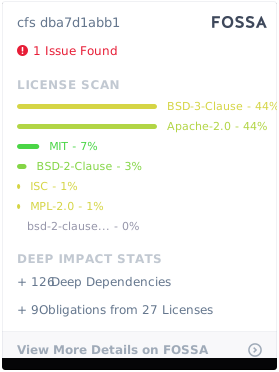
ChubaoFS is licensed under the [Apache License, Version 2.0](http://www.apache.org/licenses/LICENSE-2.0).
For detail see [LICENSE](LICENSE) and [NOTICE](NOTICE).
[](https://app.fossa.io/projects/git%2Bgithub.com%2Fchubaofs%2Fcfs?ref=badge_large)
## Reference
Haifeng Liu, et al., CFS: A Distributed File System for Large Scale Container Platforms. SIGMOD‘19, June 30-July 5, 2019, Amsterdam, Netherlands.
For more information, please refer to https://dl.acm.org/citation.cfm?doid=3299869.3314046 and https://arxiv.org/abs/1911.03001
## Community
- Twitter: [@ChubaoFS](https://twitter.com/ChubaoFS)
- Mailing list: chubaofs-users@groups.io
- Slack: [chubaofs.slack.com](https://chubaofs.slack.com/)
|File Size (KB) | 1 | 2 | 4 | 8 | 16 | 32 | 64 | 128 |
|:-|:-|:-|:-|:-|:-|:-|:-|:-|
|Creation (TPS) |70383 |70383 |73738 |74617 |69479 |67435 |47540 |27147 |
|Read (TPS) |108600 |118193 |118346 |122975 |116374 |110795 |90462 |62082 |
|Removal (TPS) |87648 |84651 |83532 |79279 |85498 |86523 |80946 |84441 |
|Stat (TPS) |231961 |263270 |264207 |252309 |240244 |244906 |273576 |242930|
Refer to [chubaofs.readthedocs.io](https://chubaofs.readthedocs.io/en/latest/evaluation.html) for performance and scalability of `IO` and `Metadata`.
## Build ChubaoFS
```
$ git clone http://github.com/chubaofs/chubaofs.git
$ cd chubaofs
$ make
```
## Yum Tools to Run a ChubaoFS Cluster for CentOS 7+
The list of RPM packages dependencies can be installed with:
```
$ yum install http://storage.jd.com/chubaofsrpm/latest/cfs-install-latest-el7.x86_64.rpm
$ cd /cfs/install
$ tree -L 2
.
├── install_cfs.yml
├── install.sh
├── iplist
├── src
└── template
├── client.json.j2
├── create_vol.sh.j2
├── datanode.json.j2
├── grafana
├── master.json.j2
└── metanode.json.j2
```
Set parameters of the ChubaoFS cluster in `iplist`.
1. `[master]`, `[datanode]`, `[metanode]`, `[monitor]`, `[client]` modules define IP addresses of each role.
2. `#datanode config` module defines parameters of DataNodes. `datanode_disks` defines `path` and `reserved space` separated by ":". The `path` is where the data store in, so make sure it exists and has at least 30GB of space; `reserved space` is the minimum free space(Bytes) reserved for the path.
3. `[cfs:vars]` module defines parameters for SSH connection. So make sure the port, username and password for SSH connection is unified before start.
4. `#metanode config` module defines parameters of MetaNodes. `metanode_totalMem` defines the maximum memory(Bytes) can be use by MetaNode process.
```yaml
[master]
10.196.0.1
10.196.0.2
10.196.0.3
[datanode]
...
[cfs:vars]
ansible_ssh_port=22
ansible_ssh_user=root
ansible_ssh_pass="password"
...
#datanode config
...
datanode_disks = '"/data0:10737418240","/data1:10737418240"'
...
#metanode config
...
metanode_totalMem = "28589934592"
...
```
For more configurations please refer to [documentation](https://chubaofs.readthedocs.io/en/latest/user-guide/master.html).
Start the resources of ChubaoFS cluster with script `install.sh`. (make sure the Master is started first)
```
$ bash install.sh -h
Usage: install.sh [-r --role datanode or metanode or master or monitor or client or all ] [-v --version 1.5.1 or latest]
$ bash install.sh -r master
$ bash install.sh -r metanode
$ bash install.sh -r datanode
$ bash install.sh -r monitor
$ bash install.sh -r client
```
Check mount point at `/cfs/mountpoint` on `client` node defined in `iplist`.
Open [http://10.196.0.1:8500](https:/github.com/chubaofs/chubaofs) through a browser for monitoring system(the IP of monitoring system is defined in `iplist`).
## Run a ChubaoFS Cluster within Docker
A helper tool called `run_docker.sh` (under the `docker` directory) has been provided to run ChubaoFS with [docker-compose](https://docs.docker.com/compose/).
```
$ docker/run_docker.sh -r -d /data/disk
```
Note that **/data/disk** can be any directory but please make sure it has at least 10G available space.
To check the mount status, use the `mount` command in the client docker shell:
```
$ mount | grep chubaofs
```
To view grafana monitor metrics, open http://127.0.0.1:3000 in browser and login with `admin/123456`.
To run server and client separately, use the following commands:
```
$ docker/run_docker.sh -b
$ docker/run_docker.sh -s -d /data/disk
$ docker/run_docker.sh -c
$ docker/run_docker.sh -m
```
For more usage:
```
$ docker/run_docker.sh -h
```
## Helm chart to Run a ChubaoFS Cluster in Kubernetes
The [chubaofs-helm](https://github.com/chubaofs/chubaofs-helm) repository can help you deploy ChubaoFS cluster quickly in containers orchestrated by kubernetes.
Kubernetes 1.16+ and Helm 3 are required.
Initialize Helm:
```
$ helm init
```
Add repository to download Helm chart of ChubaoFS:
```
$ helm repo add chubaofs https://chubaofs.github.io/chubaofs-charts
$ helm repo update
```
Create the configuration file `chubaofs.yaml` and put it in a user-defined path.
```
$ cat ~/chubaofs.yaml
```
``` yaml
path:
data: /chubaofs/data
log: /chubaofs/log
datanode:
disks:
- disk: "/data0:21474836480"
- disk: "/data1:21474836480"
metanode:
total_mem: "2147483648"
```
> Note that `chubaofs-helm/chubaofs/values.yaml` includes all the parameters of ChubaoFS.
> Parameters `path.data` and `path.log` define paths to store the data and logs of ChubaoFS server, respectively.
Label the nodes in Kubernetes according to different roles(master/metanode/datanode):
```
$ kubectl label node chuabaofs-master=enabled
$ kubectl label node chuabaofs-metanode=enabled
$ kubectl label node chuabaofs-datanode=enabled
```
Install ChubaoFS cluster with Helm:
```
$ helm install chubaofs chubaofs/chubaofs --version 1.5.0 -f ~/chubaofs.yaml
```
Delete ChubaoFS cluster:
```
$ helm delete chubaofs
```
Refer to [chubaofs-helm](https://github.com/chubaofs/chubaofs-helm/blob/master/README.md) for deployment with Helm 2 and deployment of monitoring system.
## License
ChubaoFS is licensed under the [Apache License, Version 2.0](http://www.apache.org/licenses/LICENSE-2.0).
For detail see [LICENSE](LICENSE) and [NOTICE](NOTICE).
[](https://app.fossa.io/projects/git%2Bgithub.com%2Fchubaofs%2Fcfs?ref=badge_large)
## Reference
Haifeng Liu, et al., CFS: A Distributed File System for Large Scale Container Platforms. SIGMOD‘19, June 30-July 5, 2019, Amsterdam, Netherlands.
For more information, please refer to https://dl.acm.org/citation.cfm?doid=3299869.3314046 and https://arxiv.org/abs/1911.03001
## Community
- Twitter: [@ChubaoFS](https://twitter.com/ChubaoFS)
- Mailing list: chubaofs-users@groups.io
- Slack: [chubaofs.slack.com](https://chubaofs.slack.com/)