# Fdog-Kit **Repository Path**: amwox/Fdog-Kit ## Basic Information - **Project Name**: Fdog-Kit - **Description**: No description available - **Primary Language**: Unknown - **License**: Apache-2.0 - **Default Branch**: main - **Homepage**: None - **GVP Project**: No ## Statistics - **Stars**: 0 - **Forks**: 2 - **Created**: 2025-02-27 - **Last Updated**: 2026-07-17 ## Categories & Tags **Categories**: Uncategorized **Tags**: None ## README

Fdog-Kit

GitHub Repo stars GitHub forks
GitHub Created At GitHub License Static Badge
GitHub Release GitHub code size in bytes GitHub top language GitHub Downloads (specific asset, all releases)

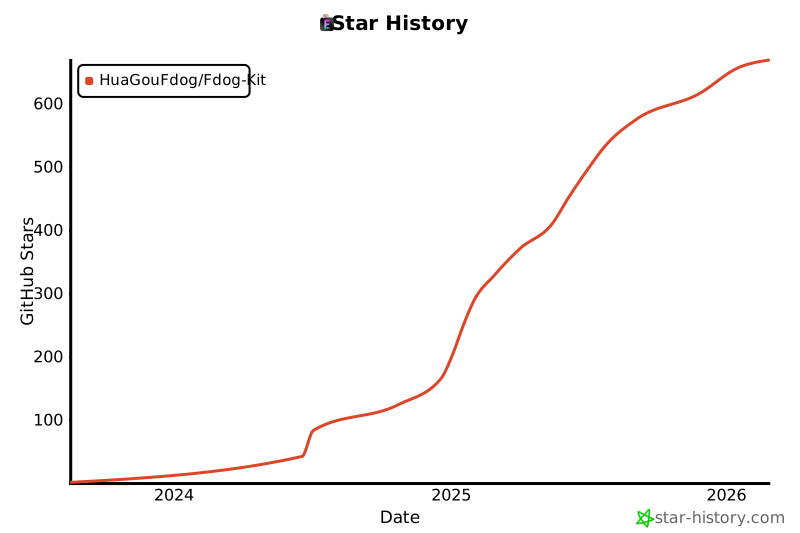
最新版本:V.0.7 [Fdog-Kit安装包](https://github.com/HuaGouFdog/Fdog-Kit/releases/download/V1.0.7/FdogKitsetup.exe) 目前支持windows10, windows11,有问题,请提Issues。 如果对您有帮助,帮忙点一个小小的star! ---- ## 无边框窗口基础框架 在Fdog-Kit的基础上,提取了MainWindows,BaseWindows两个无边框窗口,BaseWindows在MainWindows的基础上增加一个侧边栏,已经实现最小化,最大化,关闭,全屏,拖拽,阴影,任务栏托盘等,可以直接在此基础上进行二次开发。 | BaseWindows | MainWindows | | ---- | ---- | | ![image](https://github.com/user-attachments/assets/496e7339-8eed-4f45-86a2-166afd1d09cc) | ![image](https://github.com/user-attachments/assets/27592b54-6d58-46e4-9bee-8c9cfcb48e17) | ---- ## 支持主题 目前支持暗黑系,蓝色系,明亮系三种主题。 | 暗黑系 | 蓝色系 | 明亮系 | | ---- | ---- | ---- | | ![image](https://github.com/user-attachments/assets/e328507d-f8d3-43e5-b1fd-f9bb0f198a12) | ![image](https://github.com/user-attachments/assets/e57fbcf5-d660-4052-a15d-b4e0cab021bb) | ![image](https://github.com/user-attachments/assets/1b26191c-6880-40b1-88c2-ef5c5fc6951f)| ---- ## zookeeper可视化工具 目前支持连接信息缓存,同时连接多个zk,支持增删改查,节点实时更新,快速搜索,支持json数据格式化,节点url解码,编辑区等。 | 欢迎页 | 使用界面 | | ---- | ---- | | ![image](https://github.com/user-attachments/assets/1fdf00ef-00f3-4736-8412-f628e207e98d) | ![image](https://github.com/user-attachments/assets/cb5a64d6-7fa3-4ac6-948a-40fa2994408b) | ---- ## thrift协议接口工具 这个工具最方便的就是直接导入thrift文件即可调用,不需要编译thrift接口,工具会根据thrift文件生成参数,非常方便。 目前支持: 传输层协议支持TFramedTransport,THTTPTransport,协议层仅支持TBinaryProtocol。 可以手动创建接口以及参数,也可以导入thrift文件自动生成接口数据。 支持识别必选字段以及可选字段。 解析报文,并生成可读的json格式数据,并且数据高亮。 显示原二进制报文,并对报文进行染色,方便学习阅读排查等,如果您想了解TBinaryProtocol,这是一个不错的选择。 显示响应类型,调用接口名,接口返回值,以及数据长度。 支持接口压测,可配置线程数,并发数,生成压测报告,包括文字和图列。 | 基础模式 | 压测模式 | | ---- | ---- | |![image](https://github.com/user-attachments/assets/eb82f969-f62a-438c-9e29-bc6729cb25f2)|![image](https://github.com/user-attachments/assets/2212564d-c9e3-4f33-b0e6-7c4f98e94c7d)| |![image](https://github.com/user-attachments/assets/cbc6aac0-600e-41c8-a09d-46f8ae4423e5)|![image](https://github.com/user-attachments/assets/143c5fe9-ea09-4230-a236-e8b4a931f140)| ---- ## 终端工具 使用libssh2为底层编写的终端工具,由于需要对大量控制序列进行解析,目前还无法做到完整使用,仅实现基础命令的交互,虽然如此,但是一定比某些挂羊头的程序好,目前支持简单命令,显示服务器信息,上传,下载,历史命令,添加快捷命令等。 | 历史连接 | 终端界面 | | ---- | ---- | | ![image](https://github.com/user-attachments/assets/fee865e7-db2e-490a-9f54-46aab21bc495)| ![image](https://github.com/user-attachments/assets/f0e95d87-1bc7-4969-8762-dac7bc2d0b05)| | ![image](https://github.com/user-attachments/assets/0da36ad2-3b7b-4a73-b333-751653a20720)| ![image](https://github.com/user-attachments/assets/655ade2f-d9ce-4854-ba15-5d2ad8d07c81)| ---- ## 数据库工具 | 操作界面 | | ---- | |![image](https://github.com/user-attachments/assets/bba22261-c5fa-4aa2-9fd6-5c6507db89aa)| ## 设置 | 设置界面1 | 设置界面2 | | ---- | ---- | | ![image](https://github.com/user-attachments/assets/2144bf4a-05ea-4657-a716-3a653b270fd7)| ![image](https://github.com/user-attachments/assets/5e884309-b05f-412e-b921-6e909b0476b7)| ---- ## 其他界面 | 初始化模块界面 | 综合连接界面 | | ---- | ---- | | ![image](https://github.com/user-attachments/assets/edc61a5c-fcaa-44bc-874f-696e28797761) |![image](https://github.com/user-attachments/assets/6d93ad86-b1b4-4d1a-89d0-5ce3d6e7cd80)| ---- ## Star History [![Star History Chart](https://api.star-history.com/svg?repos=HuaGouFdog/Fdog-Kit&type=Date)](https://star-history.com/#HuaGouFdog/Fdog-Kit&Date)