# dompdf2.js
**Repository Path**: aisajan/dompdf2.js
## Basic Information
- **Project Name**: dompdf2.js
- **Description**: No description available
- **Primary Language**: Unknown
- **License**: MIT
- **Default Branch**: main
- **Homepage**: None
- **GVP Project**: No
## Statistics
- **Stars**: 0
- **Forks**: 0
- **Created**: 2026-04-23
- **Last Updated**: 2026-04-23
## Categories & Tags
**Categories**: Uncategorized
**Tags**: None
## README
# dompdf.js
[English](./README.md) | [中文](./README_CN.md)
该脚本允许您直接在用户浏览器上将网页或部分网页生成为可编辑、非图片式、可打印的矢量 pdf。支持分页,最多可以生成上数千页的 pdf 文件。由于生成是基于 DOM 的,因此可能与实际表现不会 100% 一致。如果是复杂的 pdf 生成需求,不建议使用。
在线体验:[在线体验](https://dompdfjs.lisky.com.cn)
### 📄 pdf 生成示例

### 🛠️ 它是如何工作的
该脚本基于[html2canvas](https://github.com/niklasvh/html2canvas)和[jspdf](https://github.com/MrRio/jsPDF),与以往将 html 页面通过 html2canvas 渲染为图片,再通过 jspdf 将图片生成 pdf 文件不同,该脚本通过读取 DOM 和应用于元素的不同样式,改造了 html2canvas 的 canvas-renderer 文件,调用 jspdf 的方法生成 pdf 文件。
所以他有以下优势:
1. 不需要服务器端的任何渲染,因为整个 pdf 是在**客户端浏览器**上创建的。
2. 生成的是真正的 pdf 文件,而不是图片式的,这样生成的 pdf 质量更高,您也可以编辑和打印生成 pdf 文件。
3. 更小的 pdf 文件体积。
4. 不受 canvas 渲染高度限制,可以生成数千页的 pdf 文件。
当然,它也有一些缺点:
1. 由于是基于 DOM 的,所以可能与实际表现不会 100% 一致。
2. 有的 css 属性还没有被支持,查看[支持的 css 属性](https://www.html2canvas.cn/html2canvas-features.html)。
### ✨ 已实现功能
| 功能 | 状态 | 说明 |
| -------- | ---- | --------------------------------------------------------------------------------------------------------- |
| 分页 | ✅ | 支持 PDF 分页渲染,可生成数千页的 PDF 文件 |
| 文本渲染 | ✅ | 支持基础文本内容渲染,font-family,font-size,font-style,font-variant,color 等,支持文字描边,不支持文字阴影 |
| 图片渲染 | ✅ | 支持网络图片,base64 图片,svg 图片 |
| 边框 | ✅ | 支持 border-width,border-color,border-style,border-radius,暂时只实现了实线边框 |
| 背景 | ✅ | 支持背景颜色,背景图片,背景渐变 |
| canvas | ✅ | 支持渲染 canvas |
| svg | ✅ | 支持渲染 svg |
| 阴影渲染 | ✅ | 使用 foreignObjectRendering,支持边框阴影渲染 |
| 渐变渲染 | ✅ | 使用 foreignObjectRendering,支持背景渐变渲染 |
| iframe | ❌ | 暂不支持渲染 iframe |
### 📦 使用方法
dompdf 库使用 `Promise` 并期望它们在全局上下文中可用。如果您希望支持不原生支持 `Promise` 的[较旧浏览器](http://caniuse.com/#search=promise),请在引入 `dompdf` 之前包含一个 polyfill,比如 [es6-promise](https://github.com/jakearchibald/es6-promise)。
安装:
npm install dompdf.js --save
CDN 引入:
```html
```
#### 🚀 基础用法
```js
import dompdf from 'dompdf.js';
dompdf(document.querySelector('#capture'), options)
.then((blob) => {
const url = URL.createObjectURL(blob);
const a = document.createElement('a');
a.href = url;
a.download = 'example.pdf';
document.body.appendChild(a);
a.click();
})
.catch((err) => {
console.error(err);
});
```
#### 📄 PDF 分页渲染
默认情况下,dompdf 会将整个文档渲染到单页中。
您可以通过设置 `pagination` 选项为 `true` 来开启分页渲染。通过 pageConfig 字段自定义页眉页脚的尺寸,内容,字体颜色/大小,位置等信息。
**_ 需要注意,将要生成 PDF 的 dom 节点设置为对应的页面宽度(px),比如 a4 要设置宽度为 794px,这里是页面尺寸对照表:[page_sizes.md](./page_sizes.md) _**
```js
import dompdf from 'dompdf.js';
dompdf(document.querySelector('#capture'), {
pagination: true,
format: 'a4',
pageConfig: {
header: {
content: '这是页眉',
height: 50,
contentColor: '#333333',
contentFontSize: 12,
contentPosition: 'center',
padding: [0, 0, 0, 0]
},
footer: {
content: '第${currentPage}页/共${totalPages}页',
height: 50,
contentColor: '#333333',
contentFontSize: 12,
contentPosition: 'center',
padding: [0, 0, 0, 0]
}
}
})
.then((blob) => {
const url = URL.createObjectURL(blob);
const a = document.createElement('a');
a.href = url;
a.download = 'example.pdf';
document.body.appendChild(a);
a.click();
})
.catch((err) => {
console.error(err);
});
```
##### 更精准的分页控制-`divisionDisable` 属性
如果您不希望某个容器在分页时被拆分时,为该元素添加 `divisionDisable` 属性,跨页时它会整体移至下一页。
##### 强制从下一页开始渲染-`pageBreak` 属性
如果您希望某个元素不在当前页渲染,而是直接从下一页开始显示,请为该元素添加 `pageBreak` 属性。触发后,该元素以及它后续的内容都会按新的分页偏移继续排版。
```html
这块内容会从下一页开始渲染
```
#### ⚙️ options 参数
| 参数名 | 必传 | 默认值 | 类型 | 说明 |
| ------------------ | ---- | ------------- | ------------------------ | --------------------------------------------------------------------------------------------------------------------------------------------------------------------------------------------------------------------------------------------- |
| `useCORS` | 否 | `false` | `boolean` | 允许跨域资源(需服务端 CORS 配置) |
| `backgroundColor` | 否 | 自动解析/白色 | `string \| null` | 覆盖页面背景色;传 `null` 生成透明背景 |
| `fontConfig` | 否 | - | `object \| Array` | 非英文字体配置,见下表 |
| `encryption` | 否 | 空配置 | `object` | PDF 加密配置,属性`userPassword` 用于给定权限列表下用户的密码;属性`ownerPassword` 需要设置 userPassword 和 ownerPassword 以进行正确的身份验证;属性`userPermissions` 用于指定用户权限,可选值为 `['print', 'modify', 'copy', 'annot-forms']` |
| `precision` | 否 | `16` | `number` | 元素位置的精度 |
| `compress` | 否 | `false` | `boolean` | 是否压缩 PDF |
| `putOnlyUsedFonts` | 否 | `false` | `boolean` | 仅将实际使用的字体嵌入 PDF |
| `pagination` | 否 | `false` | `boolean` | 开启分页渲染 |
| `format` | 否 | `'a4'` | `string` | 页面规格,支持 `a0–a10`、`b0–b10`、`c0–c10`、`letter` 等 |
| `pageConfig` | 否 | 见下表 | `object` | 页眉页脚配置 |
| `onJspdfReady` | 否 | `` | `Function(jspdf: jsPDF)` | jspdf 实例初始化 |
| `onJspdfFinish` | 否 | `` | `Function(jspdf: jsPDF)` | jspdf 实例绘制 pdf 完成 |
##### `pageConfig`字段:
| 参数名 | 默认值 | 类型 | 说明 |
| -------- | ------------------------ | ------ | -------- |
| `header` | 见下表 pageConfigOptions | object | 页眉设置 |
| `footer` | 见下表 pageConfigOptions | object | 页脚设置 |
##### `pageConfigOptions` 字段:
| 参数名 | 默认值 | 类型 | 说明 |
| ----------------- | --------------------------------------------------------- | ---------------------------------- | ----------------------------------------------------------------------------------------------------------------------------------------------------- |
| `content` | 页眉默认值为空,页脚默认值为`${currentPage}/${totalPages}` | `string \| Function` | 文本内容,支持 `${currentPage}`、`${totalPages}` 占位符。也可以是函数 `(renderer, pageNum) => void` 用于使用 jsPDF API 自定义绘制 |
| `height` | `50` | `number` | 区域高度(px) |
| `contentPosition` | `'center'` | `string \| [number, number]` | 文本位置枚举 `center`、`centerLeft` 、 `centerRight`、`centerTop`、 `centerBottom`、`leftTop`、 `leftBottom`、`rightTop`、`rightBottom`或坐标 `[x,y]` |
| `contentColor` | `'#333333'` | `string` | 文本颜色 |
| `contentFontSize` | `16` | `number` | 文本字号(px) |
| `padding` | `[0,24,0,24]` | `[number, number, number, number]` | 上/右/下/左内边距(px) |
##### 字体配置(`fontConfig`)字段:
| 字段 | 必传 | 默认值 | 类型 | 说明 |
| ------------ | ------------------------------ | ------- | --------------------- | ------------------------------------------------------------------- |
| `fontFamily` | 是(启用自定义字体时) | `''` | `string` | 字体家族名(与注入的 `.ttf` 同名) |
| `fontBase64` | 是(启用自定义字体时) | `''` | `string` | `.ttf` 的 Base64 字符串内容 |
| `fontStyle` | 是(启用自定义字体时) | `''` | `string` | `normal \| italic` |
| `fontWeight` | 是(启用自定义字体时字体加粗) | `''` | `number` | `400 \| 700` |
| `iconFont` | 否 | `false` | `boolean` | `false \| true` |
#### 🔣 乱码问题-字体导入支持
由于 jspdf 只支持英文,所以其他语言会出现乱码的问题,需要导入对应的字体文件来解决,如果需要自定义字体,在[这里](https://github.com/lmn1919/dompdf.js/tree/main/fontconverter)将字体 tff 文件转化成 base64 格式的 js 文件,中文字体推荐使用[思源黑体](https://github.com/lmn1919/dompdf.js/blob/main/examples/SourceHanSansSC-Normal-Min-normal.js),体积较小。
在代码中引入该文件即可。
> **注意:导入字体会导致最终的 pdf 体积增大,如果对最终 pdf 体积有要求的,建议精简字体,可以剔除不需要的字体。或者使用`Fontmin`等工具对字体进行瘦身**
```js
```
#### 🌍 多语言字体支持 - `langFontConfig`
> **⚠️ 注意:请不要混合使用 `fontConfig` 和 `langFontConfig`。如果同时配置了两者,`langFontConfig` 会完全顶掉 `fontConfig`,`fontConfig` 将被忽略。**
对于混合语言场景(中英阿拉伯日韩等语言混排),若你想精准控制每个字可使用 `langFontConfig` 进行逐字字体匹配:
```js
dompdf(element, {
langFontConfig: [
{
fontFamily: 'Roboto',
fontBase64: window.robotoNormal,
fontWeight: 400,
fontStyle: 'normal',
isDefault: true // 默认兜底字体
},
{
fontFamily: 'Roboto',
fontBase64: window.robotoBold,
fontWeight: 700,
fontStyle: 'normal',
isDefault: true
},
// 中文字体 - 指定 CJK 字符范围
{
fontFamily: 'NotoSansSC',
fontBase64: window.notoSansSCNormal,
fontWeight: 400,
fontStyle: 'normal',
charRange: [
[0x4E00, 0x9FFF], // CJK 统一表意文字
[0x3000, 0x303F], // CJK 符号和标点
[0xFF00, 0xFFEF], // 全角 ASCII、全角标点
[0x2190, 0x21FF] // 箭头符号
]
},
{
fontFamily: 'NotoSansSC',
fontBase64: window.notoSansSCBold,
fontWeight: 700,
fontStyle: 'normal',
charRange: [[0x4E00, 0x9FFF], [0x3000, 0x303F], [0xFF00, 0xFFEF]]
}
]
});
```
##### 语言字体配置(`langFontConfig`)字段:
| 字段 | 必传 | 默认值 | 类型 | 说明 |
| ------------ | ------------------------------ | ------- | --------------------- | ------------------------------------------------------------------- |
| `fontFamily` | 是 | `''` | `string` | 字体家族名(与注入的 `.ttf` 同名) |
| `fontBase64` | 是 | `''` | `string` | `.ttf` 的 Base64 字符串内容 |
| `fontStyle` | 是 | `''` | `'normal' \| 'italic'`| 字体样式:`normal` 为正体,`italic` 为斜体 |
| `fontWeight` | 是 | `''` | `400 \| 700` | 字体粗细:`400` 为正常,`700` 为粗体 |
| `charRange` | 否 | - | `[number, number][]` | 该字体负责的 Unicode 字符范围,如 `[[0x4E00, 0x9FFF]]` 表示中文 CJK |
| `isDefault` | 否 | `false` | `boolean` | 标记为默认兜底字体,用于不匹配任何 `charRange` 的字符 |
**工作原理**:
- 库会根据字符的 Unicode 值自动选择字体
- 带有 `charRange` 的字体优先匹配(如中文字符使用中文字体)
- 如果没有 `charRange` 匹配,使用标记为 `isDefault: true` 的字体作为兜底
- 如果 `isDefault` 也没有,使用 jsPDF 原生的 Helvetica 字体(中文会乱码)
- `fontWeight` 和 `fontStyle` 决定使用哪个字体变体(正常/粗体/斜体)
#### 🎨 绘制渐变色、阴影等复杂样式-foreignObjectRendering 使用
在 dom 十分复杂,或者 pdf 无法绘制的情况(比如:复杂的表格,边框阴影,渐变等),可以考虑使用 foreignObjectRendering。
给要渲染的元素添加 foreignObjectRendering 属性,就可以通过 svg 的 foreignObject 将它渲染成一张背景图插入到 pdf 文件中。
但是,由于 foreignObject 元素的渲染依赖于浏览器的实现,因此在不同的浏览器中可能会有不同的表现。
所以,在使用 foreignObjectRendering 时,需要注意以下事项:
1. foreignObject 元素的渲染依赖于浏览器的实现,因此在不同的浏览器中可能会有不同的表现。
2. IE 浏览器完全不支持,推荐在 chrome 和 firefox,edge 中使用。
3. 生成的图片会导致 pdf 文件体积变大。
示例
```html
```
### 🌐 浏览器兼容性
该库应该可以在以下浏览器上正常工作(需要 `Promise` polyfill):
- Firefox 3.5+
- Google Chrome
- Opera 12+
- IE9+
- Safari 6+
### 🏗️ 构建
克隆 git 仓库:
$ git clone git@github.com:lmn1919/dompdf.js.git
安装依赖:
$ npm install
构建浏览器包:
$ npm run build
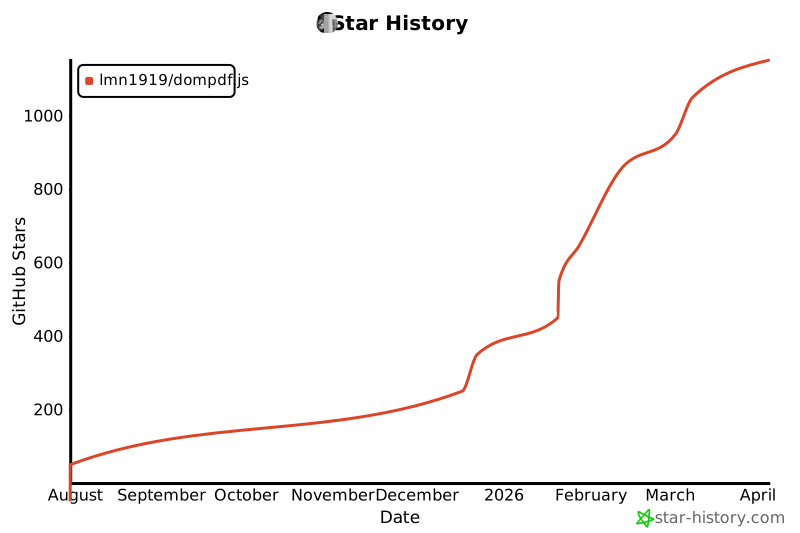
## 📈 Star History
[](https://www.star-history.com/#lmn1919/dompdf.js&Date)