# zenoh-bridge-dds
**Repository Path**: agiros/zenoh-bridge-dds
## Basic Information
- **Project Name**: zenoh-bridge-dds
- **Description**: No description available
- **Primary Language**: Unknown
- **License**: EPL-2.0
- **Default Branch**: master
- **Homepage**: None
- **GVP Project**: No
## Statistics
- **Stars**: 0
- **Forks**: 2
- **Created**: 2025-03-11
- **Last Updated**: 2025-12-03
## Categories & Tags
**Categories**: Uncategorized
**Tags**: None
## README
 [](https://github.com/eclipse-zenoh/zenoh-plugin-dds/actions?query=workflow%3ARust)
[](https://choosealicense.com/licenses/epl-2.0/)
[](https://opensource.org/licenses/Apache-2.0)
# DDS plugin for Eclipse zenoh
## Background
The Data Distribution Service (DDS) is a standard for data-centric publish subscribe. Whilst DDS has been around for quite some time and has a long history of deployments in various industries, it has recently gained quite a bit of attentions thanks to its adoption by the Robotic Operating System (ROS2) -- where it is used for communication between ROS2 nodes.
## Robot Swarms and Edge Robotics
As mentioned above, ROS2 has adopted DDS as the mechanism to exchange data between nodes within and potentially across a robot. That said, due to some of the very core assumptions at the foundations of the DDS wire-protocol, beside the fact that it leverages UDP/IP multicast for communication, it is not so straightforward to scale DDS communication over a WAN or across multiple LANs. Zenoh, on the other hand was designed since its inception to operate at Internet Scale.
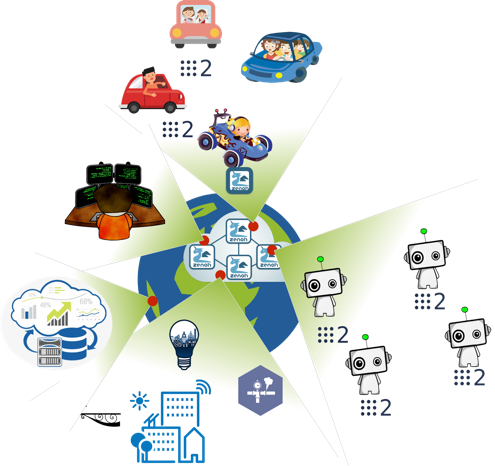
Thus, the main motivations to have a **zenoh bridge** for **DDS** are:
- Facilitate the interconnection of robot swarms.
- Support use cases of edge robotics.
- Give the possibility to use **zenoh**'s geo-distributed storage and query system to better manage robot's data.
## How to build it
In order to build the zenoh bridge for DDS you need first to install the following dependencies:
- [Rust](https://www.rust-lang.org/tools/install)
- On Linux, make sure the `llvm` and `clang` development packages are installed:
- on Debians do: `sudo apt install llvm-dev libclang-dev`
- on CentOS or RHEL do: `sudo yum install llvm-devel clang-devel`
- on Alpine do: `apk install llvm11-dev clang-dev`
- [CMake](https://cmake.org/download/) (to build CycloneDDS which is a native dependency)
Once these dependencies are in place, you may clone the repository on your machine:
```bash
$ git clone https://github.com/eclipse-zenoh/zenoh-plugin-dds.git
$ cd zenoh-plugin-dds
```
You can then choose between building the zenoh bridge for DDS:
- as a dynamically loaded plugin:
```bash
$ cd zplugin-dds
$ cargo build --release
```
The plugin shared library (`*.so` on Linux, `*.dylib` on Mac OS, `*.dll` on Windows) will be generated in the `target/release` subdirectory.
- or as a standalone executable binary:
```bash
$ cd zenoh-bridge-dds
$ cargo build --release
```
The **`zenoh-bridge-dds`** binary will be generated in the `target/release` sub-directory.
### ROS2 package
If you're a ROS2 user, you can also build `zenoh-bridge-dds` as a ROS package running:
```bash
rosdep install --from-paths . --ignore-src -r -y
colcon build --packages-select zenoh-bridge-dds
```
The `rosdep` command will automatically install *Rust* and *clang* as build dependencies.
## Docker image
The **`zenoh-bridge-dds`** standalone executable is also available as a [Docker images](https://hub.docker.com/r/eclipse/zenoh-bridge-dds/tags?page=1&ordering=last_updated) for both amd64 and arm64. To get it, do:
- `docker pull eclipse/zenoh-bridge-dds:master` for the master branch version
:warning: **However, notice that it's usage is limited to Docker on Linux and using the `--net host` option.**
The cause being that DDS uses UDP multicast and Docker doesn't support UDP multicast between a container and its host (see cases [moby/moby#23659](https://github.com/moby/moby/issues/23659), [moby/libnetwork#2397](https://github.com/moby/libnetwork/issues/2397) or [moby/libnetwork#552](https://github.com/moby/libnetwork/issues/552)). The only known way to make it work is to use the `--net host` option that is [only supported on Linux hosts](https://docs.docker.com/network/host/).
Usage: **`docker run --init --net host eclipse/zenoh-bridge-dds`**
It supports the same command line arguments than the `zenoh-bridge-dds` (see below or check with `-h` argument).
## For a quick test with ROS2 turtlesim
Prerequisites:
- A [ROS2 environment](http://docs.ros.org/en/galactic/Installation.html) (no matter the DDS implementation as soon as it implements the standard DDSI protocol - the default [Eclipse CycloneDDS](https://github.com/eclipse-cyclonedds/cyclonedds) being just fine)
- The [turtlesim package](http://docs.ros.org/en/galactic/Tutorials/Turtlesim/Introducing-Turtlesim.html#install-turtlesim)
### _1 host, 2 ROS domains_
For a quick test on a single host, you can run the `turtlesim_node` and the `turtle_teleop_key` on distinct ROS domains. As soon as you run 2 `zenoh-bridge-dds` (1 per domain) the `turtle_teleop_key` can drive the `turtlesim_node`.
Here are the commands to run:
- `ROS_DOMAIN_ID=1 ros2 run turtlesim turtlesim_node`
- `ROS_DOMAIN_ID=2 ros2 run turtlesim turtle_teleop_key`
- `./target/release/zenoh-bridge-dds -d 1`
- `./target/release/zenoh-bridge-dds -d 2`
Notice that by default the 2 bridges will discover each other using UDP multicast.
### _2 hosts, avoiding UDP multicast communication_
By default DDS (and thus ROS2) uses UDP multicast for discovery and publications. But on some networks, UDP multicast is not or badly supported.
In such cases, deploying the `zenoh-bridge-dds` on both hosts will make it to:
- limit the DDS discovery traffic, as detailled in [this blog](https://zenoh.io/blog/2021-03-23-discovery/#leveraging-resource-generalisation)
- route all the DDS publications made on UDP multicast by each node through the zenoh protocol that by default uses TCP.
Here are the commands to test this configuration with turtlesim:
- on host 1:
- `ROS_DOMAIN_ID=1 ros2 run turtlesim turtlesim_node`
- `./target/release/zenoh-bridge-dds -d 1`
- on host 2:
- `ROS_DOMAIN_ID=2 ros2 run turtlesim turtle_teleop_key`
- `./target/release/zenoh-bridge-dds -d 2 -e tcp/:7447` - where `` is the IP of host 1
Notice that to avoid unwanted direct DDS communication, 2 disctinct ROS domains are still used.
### _2 hosts, with an intermediate zenoh router in the cloud_
In case your 2 hosts can't have a point-to-point communication, you could leverage a [zenoh router](https://github.com/eclipse-zenoh/zenoh#how-to-build-it) deployed in a cloud instance (any Linux VM will do the job). You just need to configure your cloud instanse with a public IP and authorize the TCP port **7447**.
:warning: the zenoh protocol is still under development leading to possible incompatibilities between the bridge and the router if their zenoh version differ. Please make sure you use a zenoh router built from a recent commit id from its `master` branch.
Here are the commands to test this configuration with turtlesim:
- on cloud VM:
- `zenohd`
- on host 1:
- `ros2 run turtlesim turtlesim_node`
- `./target/release/zenoh-bridge-dds -e tcp/:7447`
_where `` is the IP of your cloud instance_
- on host 2:
- `ros2 run turtlesim turtle_teleop_key`
- `./target/release/zenoh-bridge-dds -e tcp/:7447`
_where `` is the IP of your cloud instance_
Notice that there is no need to use distinct ROS domain here, since the 2 hosts are not supposed to directly communicate with each other.
## More advanced usage for ROS2
### _Limiting the ROS2 topics, services, parameters or actions to be routed_
By default 2 zenoh bridges will route all ROS2 topics and services for which they detect a Writer on one side and a Reader on the other side. But you might want to avoid some topics and services to be routed by the bridge.
Starting `zenoh-bridge-dds` you can use the `--dds-allow` argument to specify the subset of topics and services that will be routed by the bridge. This argument accepts a string wich is a regular expression that must match a substring of an allowed zenoh resource (see details of [mapping of ROS2 names to zenoh resources](#mapping-ros2-names-to-zenoh-resources)).
Here are some examples of usage:
| `--dds-allow` value | allowed ROS2 communication |
| :-- | :-- |
| `/rosout` | `/rosout`|
| `/rosout\|/turtle1/cmd_vel\|/turtle1/rotate_absolute` | `/rosout`
[](https://github.com/eclipse-zenoh/zenoh-plugin-dds/actions?query=workflow%3ARust)
[](https://choosealicense.com/licenses/epl-2.0/)
[](https://opensource.org/licenses/Apache-2.0)
# DDS plugin for Eclipse zenoh
## Background
The Data Distribution Service (DDS) is a standard for data-centric publish subscribe. Whilst DDS has been around for quite some time and has a long history of deployments in various industries, it has recently gained quite a bit of attentions thanks to its adoption by the Robotic Operating System (ROS2) -- where it is used for communication between ROS2 nodes.
## Robot Swarms and Edge Robotics
As mentioned above, ROS2 has adopted DDS as the mechanism to exchange data between nodes within and potentially across a robot. That said, due to some of the very core assumptions at the foundations of the DDS wire-protocol, beside the fact that it leverages UDP/IP multicast for communication, it is not so straightforward to scale DDS communication over a WAN or across multiple LANs. Zenoh, on the other hand was designed since its inception to operate at Internet Scale.

Thus, the main motivations to have a **zenoh bridge** for **DDS** are:
- Facilitate the interconnection of robot swarms.
- Support use cases of edge robotics.
- Give the possibility to use **zenoh**'s geo-distributed storage and query system to better manage robot's data.
## How to build it
In order to build the zenoh bridge for DDS you need first to install the following dependencies:
- [Rust](https://www.rust-lang.org/tools/install)
- On Linux, make sure the `llvm` and `clang` development packages are installed:
- on Debians do: `sudo apt install llvm-dev libclang-dev`
- on CentOS or RHEL do: `sudo yum install llvm-devel clang-devel`
- on Alpine do: `apk install llvm11-dev clang-dev`
- [CMake](https://cmake.org/download/) (to build CycloneDDS which is a native dependency)
Once these dependencies are in place, you may clone the repository on your machine:
```bash
$ git clone https://github.com/eclipse-zenoh/zenoh-plugin-dds.git
$ cd zenoh-plugin-dds
```
You can then choose between building the zenoh bridge for DDS:
- as a dynamically loaded plugin:
```bash
$ cd zplugin-dds
$ cargo build --release
```
The plugin shared library (`*.so` on Linux, `*.dylib` on Mac OS, `*.dll` on Windows) will be generated in the `target/release` subdirectory.
- or as a standalone executable binary:
```bash
$ cd zenoh-bridge-dds
$ cargo build --release
```
The **`zenoh-bridge-dds`** binary will be generated in the `target/release` sub-directory.
### ROS2 package
If you're a ROS2 user, you can also build `zenoh-bridge-dds` as a ROS package running:
```bash
rosdep install --from-paths . --ignore-src -r -y
colcon build --packages-select zenoh-bridge-dds
```
The `rosdep` command will automatically install *Rust* and *clang* as build dependencies.
## Docker image
The **`zenoh-bridge-dds`** standalone executable is also available as a [Docker images](https://hub.docker.com/r/eclipse/zenoh-bridge-dds/tags?page=1&ordering=last_updated) for both amd64 and arm64. To get it, do:
- `docker pull eclipse/zenoh-bridge-dds:master` for the master branch version
:warning: **However, notice that it's usage is limited to Docker on Linux and using the `--net host` option.**
The cause being that DDS uses UDP multicast and Docker doesn't support UDP multicast between a container and its host (see cases [moby/moby#23659](https://github.com/moby/moby/issues/23659), [moby/libnetwork#2397](https://github.com/moby/libnetwork/issues/2397) or [moby/libnetwork#552](https://github.com/moby/libnetwork/issues/552)). The only known way to make it work is to use the `--net host` option that is [only supported on Linux hosts](https://docs.docker.com/network/host/).
Usage: **`docker run --init --net host eclipse/zenoh-bridge-dds`**
It supports the same command line arguments than the `zenoh-bridge-dds` (see below or check with `-h` argument).
## For a quick test with ROS2 turtlesim
Prerequisites:
- A [ROS2 environment](http://docs.ros.org/en/galactic/Installation.html) (no matter the DDS implementation as soon as it implements the standard DDSI protocol - the default [Eclipse CycloneDDS](https://github.com/eclipse-cyclonedds/cyclonedds) being just fine)
- The [turtlesim package](http://docs.ros.org/en/galactic/Tutorials/Turtlesim/Introducing-Turtlesim.html#install-turtlesim)
### _1 host, 2 ROS domains_
For a quick test on a single host, you can run the `turtlesim_node` and the `turtle_teleop_key` on distinct ROS domains. As soon as you run 2 `zenoh-bridge-dds` (1 per domain) the `turtle_teleop_key` can drive the `turtlesim_node`.
Here are the commands to run:
- `ROS_DOMAIN_ID=1 ros2 run turtlesim turtlesim_node`
- `ROS_DOMAIN_ID=2 ros2 run turtlesim turtle_teleop_key`
- `./target/release/zenoh-bridge-dds -d 1`
- `./target/release/zenoh-bridge-dds -d 2`
Notice that by default the 2 bridges will discover each other using UDP multicast.
### _2 hosts, avoiding UDP multicast communication_
By default DDS (and thus ROS2) uses UDP multicast for discovery and publications. But on some networks, UDP multicast is not or badly supported.
In such cases, deploying the `zenoh-bridge-dds` on both hosts will make it to:
- limit the DDS discovery traffic, as detailled in [this blog](https://zenoh.io/blog/2021-03-23-discovery/#leveraging-resource-generalisation)
- route all the DDS publications made on UDP multicast by each node through the zenoh protocol that by default uses TCP.
Here are the commands to test this configuration with turtlesim:
- on host 1:
- `ROS_DOMAIN_ID=1 ros2 run turtlesim turtlesim_node`
- `./target/release/zenoh-bridge-dds -d 1`
- on host 2:
- `ROS_DOMAIN_ID=2 ros2 run turtlesim turtle_teleop_key`
- `./target/release/zenoh-bridge-dds -d 2 -e tcp/:7447` - where `` is the IP of host 1
Notice that to avoid unwanted direct DDS communication, 2 disctinct ROS domains are still used.
### _2 hosts, with an intermediate zenoh router in the cloud_
In case your 2 hosts can't have a point-to-point communication, you could leverage a [zenoh router](https://github.com/eclipse-zenoh/zenoh#how-to-build-it) deployed in a cloud instance (any Linux VM will do the job). You just need to configure your cloud instanse with a public IP and authorize the TCP port **7447**.
:warning: the zenoh protocol is still under development leading to possible incompatibilities between the bridge and the router if their zenoh version differ. Please make sure you use a zenoh router built from a recent commit id from its `master` branch.
Here are the commands to test this configuration with turtlesim:
- on cloud VM:
- `zenohd`
- on host 1:
- `ros2 run turtlesim turtlesim_node`
- `./target/release/zenoh-bridge-dds -e tcp/:7447`
_where `` is the IP of your cloud instance_
- on host 2:
- `ros2 run turtlesim turtle_teleop_key`
- `./target/release/zenoh-bridge-dds -e tcp/:7447`
_where `` is the IP of your cloud instance_
Notice that there is no need to use distinct ROS domain here, since the 2 hosts are not supposed to directly communicate with each other.
## More advanced usage for ROS2
### _Limiting the ROS2 topics, services, parameters or actions to be routed_
By default 2 zenoh bridges will route all ROS2 topics and services for which they detect a Writer on one side and a Reader on the other side. But you might want to avoid some topics and services to be routed by the bridge.
Starting `zenoh-bridge-dds` you can use the `--dds-allow` argument to specify the subset of topics and services that will be routed by the bridge. This argument accepts a string wich is a regular expression that must match a substring of an allowed zenoh resource (see details of [mapping of ROS2 names to zenoh resources](#mapping-ros2-names-to-zenoh-resources)).
Here are some examples of usage:
| `--dds-allow` value | allowed ROS2 communication |
| :-- | :-- |
| `/rosout` | `/rosout`|
| `/rosout\|/turtle1/cmd_vel\|/turtle1/rotate_absolute` | `/rosout`
`/turtle1/cmd_vel`
`/turtle1/rotate_absolute` |
| `/rosout\|/turtle1/` | `/rosout` and all `/turtle1` topics, services, parameters and actions |
| `/turtle1/.*` | all topics and services with name containing `/turtle1/` |
| `/turtle1/` | same: all topics, services, parameters and actions with name containing `/turtle1/` |
| `/rt/turtle1` | all topics with name containing `/turtle1` (no services, parameters or actions) |
| `/rq/turtle1\|/rr/turtle1` | all services and parameters with name containing `/turtle1` (no topics or actions) |
| `/rq/turtlesim/.*parameter\|/rr/turtlesim/.*parameter` | all parameters with name containing `/turtlesim` (no topics, services or actions) |
| `/rq/turtle1/.*/_action\|/rr/turtle1/.*/_action` | all actions with name containing `/turtle1` (no topics, services or parameters) |
### _Running several robots without changing the ROS2 configuration_
If you run similar robots in the same network, they will by default all us the same DDS topics, leading to interferences in their operations.
A simple way to address this issue using the zenoh bridge is to:
- deploy 1 zenoh bridge per robot
- have each bridge started with the `--dds-scope "/"` argument, each robot having its own id.
- make sure each robot cannot directly communicate via DDS with another robot by setting a distinct domain per robot, or configuring its network interface to not route UDP multicast outside the host.
Using the `--dds-scope` option, a prefix is added to each zenoh resource published/subscribed by the bridge (more details in [mapping of ROS2 names to zenoh resources](#mapping-ros2-names-to-zenoh-resources)). To interact with a robot, a remote ROS2 application must use a zenoh bridge configured with the same scope than the robot.
### _Closer integration of ROS2 with zenoh_
As you understood, using the zenoh bridge, each ROS2 publications and subscriptions are mapped to a zenoh resource. Therefore, its relatively easy to develop an application using one of the [zenoh APIs](https://zenoh.io/docs/apis/apis/) to interact with one or more robot at the same time.
See in details how to achieve that in [this blog](https://zenoh.io/blog/2021-04-28-ros2-integration/).
## All zenoh-bridge-dds command line arguments
`zenoh-bridge-dds` accepts the following arguments:
* zenoh-related arguments:
- `-m, --mode ` : The zenoh session mode. Default: `peer` Possible values: `peer` or `client`.
See [zenoh documentation](https://zenoh.io/docs/getting-started/key-concepts/#deployment-units) for more details.
- `-l, --listener ` : The locators the bridge will listen on for zenoh protocol. Can be specified multiple times. Example of locator: `tcp/localhost:7447`.
- `-e, --peer ` : zenoh peers locators the bridge will try to connect to (typically another bridge or a zenoh router). Example of locator: `tcp/:7447`.
- `--no-multicast-scouting` : disable the zenoh scouting protocol that allows automatic discovery of zenoh peers and routers.
- `--rest-plugin` : activate the [zenoh REST API](https://zenoh.io/docs/apis/apis/#rest-api), available by default on port 8000.
- `--rest-http-port ` : set the REST API http port (default: 8000)
* DDS-related arguments:
- `-d, --dds-domain ` : The DDS Domain ID (if using with ROS this should be the same as `ROS_DOMAIN_ID`)
- `-s, --dds-scope ` : A string used as prefix to scope DDS traffic when mapped to zenoh resources.
- `-a, --dds-allow `: A regular expression matching the set of 'partition/topic-name' that must
be routed. By default, all partitions and topic are allowed.
Examples of expressions:
- `.*/TopicA` will allow only the `TopicA` to be routed, whatever the partition.
- `PartitionX/.*` will allow all the topics to be routed, but only on `PartitionX`.
- `cmd_vel|rosout` will allow only the topics containing `cmd_vel` or `rosout` in their name or partition name to be routed.
- `-w, --dds-generalise-pub ` : A list of key expressions to use for generalising the declaration of
the zenoh publications, and thus minimizing the discovery traffic (usable multiple times).
See [this blog](https://zenoh.io/blog/2021-03-23-discovery/#leveraging-resource-generalisation) for more details.
- `-r, --dds-generalise-sub ` : A list of key expressions to use for generalising the declaration of
the zenoh subscriptions, and thus minimizing the discovery traffic (usable multiple times).
See [this blog](https://zenoh.io/blog/2021-03-23-discovery/#leveraging-resource-generalisation) for more details.
## Admin space
The zenoh bridge for DDS exposes and administration space allowing to browse the DDS entities that have been discovered (with their QoS), and the routes that have been established between DDS and zenoh.
This administration space is accessible via any zenoh API, including the REST API that you can activate at `zenoh-bridge-dds` startup using the `--rest-plugin` argument.
The `zenoh-bridge-dds` exposes this administration space with paths prefixed by `/@/service//dds` (where `` is the unique identifier of the bridge instance). The informations are then organized with such paths:
- `/@/service//dds/version` : the bridge version
- `/@/service//dds/config` : the bridge configuration
- `/@/service//dds/participant//reader//` : a discovered DDS reader on ``
- `/@/service//dds/participant//writer//` : a discovered DDS reader on ``
- `/@/service//dds/route/from_dds/` : a route established from a DDS writer to a zenoh resource named `` (see [mapping rules](#mapping-dds-topics-to-zenoh-resources)).
- `/@/service//dds/route/to_dds/` : a route established from a zenoh resource named `` (see [mapping rules](#mapping-dds-topics-to-zenoh-resources))..
Example of queries on administration space using the REST API with the `curl` command line tool (don't forget to activate the REST API with `--rest-plugin` argument):
- List all the DDS entities that have been discovered:
```bash
curl http://localhost:8000:/@/service/**/participant/**
```
- List all established routes:
```bash
curl http://localhost:8000:/@/service/**/route/**
```
- List all discovered DDS entities and established route for topic `cmd_vel`:
```bash
curl http://localhost:8000:/@/service/**/cmd_vel
```
> _Pro tip: pipe the result into [**jq**](https://stedolan.github.io/jq/) command for JSON pretty print or transformation._
## Architecture details
Whether it's built as a library or as a standalone executable, the **zenoh bridge for DDS** do the same things:
- it discovers the DDS readers and writers declared by any DDS application, via the standard DDS discovery protocol (that uses UDP multicast)
- it creates a mirror DDS writer or reader for each discovered reader or writer (using the same QoS)
- if maps the discovered DDS topics and partitions to zenoh resources (see mapping details below)
- it forwards user's data from a DDS topic to the corresponding zenoh resource, and vice versa
### _Routing of DDS discovery information_
:warning: **Important notice** :warning: :
The DDS discovery protocol is not routed through zenoh.
Meaning that, in case you use 2 **`zenoh-bridge-dds`** to interconnect 2 DDS domains, the DDS entities discovered in one domain won't be advertised in the other domain. Thus, the DDS data will be routed between the 2 domains only if matching readers and writers are declared in the 2 domains independently.
This has an impact on ROS2 behaviour: on one side of the bridge the ROS graph might not reflect all the nodes from the other side of the bridge. And the `ros2 topic list` command might not list all the topics declared on the other side.
### _Mapping of DDS topics to zenoh resources_
The mapping between DDS and zenoh is rather straightforward. Given a DDS Reader/Writer for topic **`A`** in a given partition **`P`**, then the equivalent zenoh resource will be named as **`/P/A`**. If no partition is defined, the equivalent zenoh resource will be named as **`/A`**.
Optionally, the bridge can be configured with a **scope** that will be used as a prefix to each zenoh resource. That is, for scope **`/S`** the equivalent zenoh resource will be **`/S/P/A`** for a topic **`A`** and a partition **`P`**, and **`/S/A`** for a topic without partition.
### _Mapping ROS2 names to zenoh resources_
The mapping from ROS2 topics and services name to DDS topics is specified [here](https://design.ros2.org/articles/topic_and_service_names.html#mapping-of-ros-2-topic-and-service-names-to-dds-concepts).
Notice that ROS2 does not use the DDS partitions.
As a consequence of this mapping and of the DDS to zenoh mapping specified above, here are some examples of mapping from ROS2 names to zenoh resources:
| ROS2 names | DDS Topics names | zenoh resources names (no scope) | zenohs resources names (if scope="`/scope`") |
| --- | --- | --- | --- |
| topic: `/rosout` | `rt/rosout` | `/rt/rosout` | `/scope/rt/rosout` |
| topic: `/turtle1/cmd_vel` | `rt/turtle1/cmd_vel` | `/rt/turtle1/cmd_vel` | `/scope/rt/turtle1/cmd_vel` |
| service: `/turtle1/set_pen` | `rq/turtle1/set_penRequest`
`rr/turtle1/set_penReply` | `/rq/turtle1/set_penRequest`
`/rr/turtle1/set_penReply` | `/scope/rq/turtle1/set_penRequest`
`/scope/rr/turtle1/set_penReply` |
| action: `/turtle1/rotate_absolute` | `rq/turtle1/rotate_absolute/_action/send_goalRequest`
`rr/turtle1/rotate_absolute/_action/send_goalReply`
`rq/turtle1/rotate_absolute/_action/cancel_goalRequest`
`rr/turtle1/rotate_absolute/_action/cancel_goalReply`
`rq/turtle1/rotate_absolute/_action/get_resultRequest`
`rr/turtle1/rotate_absolute/_action/get_resultReply`
`rt/turtle1/rotate_absolute/_action/status`
`rt/turtle1/rotate_absolute/_action/feedback` | `/rq/turtle1/rotate_absolute/_action/send_goalRequest`
`/rr/turtle1/rotate_absolute/_action/send_goalReply`
`/rq/turtle1/rotate_absolute/_action/cancel_goalRequest`
`/rr/turtle1/rotate_absolute/_action/cancel_goalReply`
`/rq/turtle1/rotate_absolute/_action/get_resultRequest`
`/rr/turtle1/rotate_absolute/_action/get_resultReply`
`/rt/turtle1/rotate_absolute/_action/status`
`/rt/turtle1/rotate_absolute/_action/feedback` | `/scope/rq/turtle1/rotate_absolute/_action/send_goalRequest`
`/scope/rr/turtle1/rotate_absolute/_action/send_goalReply`
`/scope/rq/turtle1/rotate_absolute/_action/cancel_goalRequest`
`/scope/rr/turtle1/rotate_absolute/_action/cancel_goalReply`
`/scope/rq/turtle1/rotate_absolute/_action/get_resultRequest`
`/scope/rr/turtle1/rotate_absolute/_action/get_resultReply`
`/scope/rt/turtle1/rotate_absolute/_action/status`
`/scope/rt/turtle1/rotate_absolute/_action/feedback` |
| all parameters for node `turtlesim`| `rq/turtlesim/list_parametersRequest`
`rr/turtlesim/list_parametersReply`
`rq/turtlesim/describe_parametersRequest`
`rr/turtlesim/describe_parametersReply`
`rq/turtlesim/get_parametersRequest`
`rr/turtlesim/get_parametersReply`
`rr/turtlesim/get_parameter_typesReply`
`rq/turtlesim/get_parameter_typesRequest`
`rq/turtlesim/set_parametersRequest`
`rr/turtlesim/set_parametersReply`
`rq/turtlesim/set_parameters_atomicallyRequest`
`rr/turtlesim/set_parameters_atomicallyReply` | `/rq/turtlesim/list_parametersRequest`
`/rr/turtlesim/list_parametersReply`
`/rq/turtlesim/describe_parametersRequest`
`/rr/turtlesim/describe_parametersReply`
`/rq/turtlesim/get_parametersRequest`
`/rr/turtlesim/get_parametersReply`
`/rr/turtlesim/get_parameter_typesReply`
`/rq/turtlesim/get_parameter_typesRequest`
`/rq/turtlesim/set_parametersRequest`
`/rr/turtlesim/set_parametersReply`
`/rq/turtlesim/set_parameters_atomicallyRequest`
`/rr/turtlesim/set_parameters_atomicallyReply` | `/scope/rq/turtlesim/list_parametersRequest`
`/scope/rr/turtlesim/list_parametersReply`
`/scope/rq/turtlesim/describe_parametersRequest`
`/scope/rr/turtlesim/describe_parametersReply`
`/scope/rq/turtlesim/get_parametersRequest`
`/scope/rr/turtlesim/get_parametersReply`
`/scope/rr/turtlesim/get_parameter_typesReply`
`/scope/rq/turtlesim/get_parameter_typesRequest`
`/scope/rq/turtlesim/set_parametersRequest`
`/scope/rr/turtlesim/set_parametersReply`
`/scope/rq/turtlesim/set_parameters_atomicallyRequest`
`/scope/rr/turtlesim/set_parameters_atomicallyReply` |
| specific ROS discovery topic | `ros_discovery_info` | `/ros_discovery_info` | `/scope/ros_discovery_info`