# gohumanloop
**Repository Path**: RRRSH/gohumanloop
## Basic Information
- **Project Name**: gohumanloop
- **Description**: 💯 Perfecting AI workflows with human intelligence
- **Primary Language**: Unknown
- **License**: MIT
- **Default Branch**: main
- **Homepage**: None
- **GVP Project**: No
## Statistics
- **Stars**: 0
- **Forks**: 0
- **Created**: 2025-12-08
- **Last Updated**: 2026-03-04
## Categories & Tags
**Categories**: Uncategorized
**Tags**: None
## README
[](https://www.gohumanloop.com)
Perfecting AI workflows with human intelligence
**GoHumanLoop**: A Python library empowering AI agents to dynamically request human input (approval/feedback/conversation) at critical stages. Core features:
- `Human-in-the-loop control`: Lets AI agent systems pause and escalate decisions, enhancing safety and trust.
- `Multi-channel integration`: Supports Terminal, Email, API, and frameworks like LangGraph/CrewAI/...(soon)
- `Flexible workflows`: Combines automated reasoning with human oversight for reliable AI operations.
Ensures responsible AI deployment by bridging autonomous agents and human judgment.
✈️ Introduction:[https://www.gohumanloop.com](https://www.gohumanloop.com)
## Table of contents
- [🌍 Ecosystem Architecture](#🌍-ecosystem-architecture)
- [🚀 Getting Started](#🚀-getting-started)
- [🎵 Why GoHumanloop](#🎵-why-gohumanloop)
- [📚 Key Features](#📚-key-features)
- [📅 Roadmap](#📅-roadmap)
- [🤝 Contributing](#🤝-contributing)
- [📱 Contact](#📱-contact)
## 🌍 Ecosystem Architecture
 GoHumanLoop生态架构
1. 基于 LangGraph、CrewAI 等 Agent 框架构建的智能体时,使用`GoHumanLoop`SDK 能更好进行人机协同,特别是在类似 Manus 长耗时场景,需要异步与 Agent 进行交互的场景,通过简单的封装即可增强人机协同能力
2. `GoHumanLoop`内部提供 HumanLoop 任务管理器和请求处理提供者(Provider),通过 API 方式与 GoHumanLoopHub 进行交互
3. `GoHumanLoopHub`还能与飞书、企业微信等进行集成,实现与飞书、企业微信等应用的无缝对接。需要依赖一层转换层,目前已提供对应的服务程序例子[gohumanloop-feishu](https://github.com/ptonlix/gohumanloop-feishu)和[gohumanloop-wework](https://github.com/ptonlix/gohumanloop-wework) 后续还会继续拓展其它 OA 平台,让人机协同更好的集成到业务当中
4. 管理人员通过`GoHumanLoopHub`提供的 API 接口,Agent 进行交互,提供用户信息、反馈、审批等信息。
5. `GoHumanLoopHub`还提供了任务数据管理功能,Agent 可以将任务数据同步到`GoHumanLoopHub`中,方便后续分析和管理。
### 相关仓库
- [gohumanloop-hub](https://github.com/ptonlix/gohumanloop-hub): GoHumanLoop 官方服务平台。
- [gohumanloop-examples](https://github.com/ptonlix/gohumanloop-examples): 使用 GoHumanLoop 与不同框架的示例。
- [gohumanloop-feishu](https://github.com/ptonlix/gohumanloop-feishu): 飞书与 GoHumanLoop 的集成层。
- [gohumanloop-wework](https://github.com/ptonlix/gohumanloop-wework): 企业微信与 GoHumanLoop 的集成层。
## 🚀 Getting Started
快速开始,请查看以下示例或直接跳转到[示例仓库](https://github.com/ptonlix/gohumanloop-examples)中的案例:
- 🦜⛓️ [LangGraph](https://github.com/ptonlix/gohumanloop-examples/tree/main/LangGraph)
- 🚣 [CrewAI](https://github.com/ptonlix/gohumanloop-examples/tree/main/CrewAI)
### Installation
**GoHumanLoop** 目前支持`Python`
- 安装
```shell
pip install gohumanloop
```
### Example
以下基于 [LangGraph 官方例子](https://langchain-ai.github.io/langgraph/tutorials/get-started/4-human-in-the-loop/#5-resume-execution) 通过 `GoHumanLoop`升级 `human-in-the-loop`
> 💡 默认采用 `Terminal` 作为 `langgraph_adapter` 人机交互方式
```python
import os
from langchain.chat_models import init_chat_model
from typing import Annotated
from langchain_tavily import TavilySearch
from langchain_core.tools import tool
from typing_extensions import TypedDict
from langgraph.checkpoint.memory import MemorySaver
from langgraph.graph import StateGraph, START, END
from langgraph.graph.message import add_messages
from langgraph.prebuilt import ToolNode, tools_condition
# from langgraph.types import Command, interrupt # Don't use langgraph, use gohumanloop instead
from gohumanloop.adapters.langgraph_adapter import interrupt, create_resume_command
# Please replace with your Deepseek API Key from https://platform.deepseek.com/usage
os.environ["DEEPSEEK_API_KEY"] = "sk-xxx"
# Please replace with your Tavily API Key from https://app.tavily.com/home
os.environ["TAVILY_API_KEY"] = "tvly-xxx"
llm = init_chat_model("deepseek:deepseek-chat")
class State(TypedDict):
messages: Annotated[list, add_messages]
graph_builder = StateGraph(State)
@tool
def human_assistance(query: str) -> str:
"""Request assistance from a human."""
human_response = interrupt({"query": query})
return human_response
tool = TavilySearch(max_results=2)
tools = [tool, human_assistance]
llm_with_tools = llm.bind_tools(tools)
def chatbot(state: State):
message = llm_with_tools.invoke(state["messages"])
# Because we will be interrupting during tool execution,
# we disable parallel tool calling to avoid repeating any
# tool invocations when we resume.
assert len(message.tool_calls) <= 1
return {"messages": [message]}
graph_builder.add_node("chatbot", chatbot)
tool_node = ToolNode(tools=tools)
graph_builder.add_node("tools", tool_node)
graph_builder.add_conditional_edges(
"chatbot",
tools_condition,
)
graph_builder.add_edge("tools", "chatbot")
graph_builder.add_edge(START, "chatbot")
memory = MemorySaver()
graph = graph_builder.compile(checkpointer=memory)
user_input = "I need some expert guidance for building an AI agent. Could you request assistance for me?"
config = {"configurable": {"thread_id": "1"}}
events = graph.stream(
{"messages": [{"role": "user", "content": user_input}]},
config,
stream_mode="values",
)
for event in events:
if "messages" in event:
event["messages"][-1].pretty_print()
# LangGraph code:
# human_response = (
# "We, the experts are here to help! We'd recommend you check out LangGraph to build your agent."
# "It's much more reliable and extensible than simple autonomous agents."
# )
# human_command = Command(resume={"data": human_response})
# GoHumanLoop code:
human_command = create_resume_command() # Use this command to resume the execution,instead of using the command above
events = graph.stream(human_command, config, stream_mode="values")
for event in events:
if "messages" in event:
event["messages"][-1].pretty_print()
```
- 部署测试
运行上述代码
```shell
# 1.Initialize environment
uv init gohumanloop-example
cd gohumanloop-example
uv venv .venv --python=3.10
# 2.Copy the above code to main.py
# 3.Deploy and test
uv pip install langchain
uv pip install langchain_tavily
uv pip install langgraph
uv pip install langchain-deepseek
uv pip install gohumanloop
python main.py
```
- 交互信息
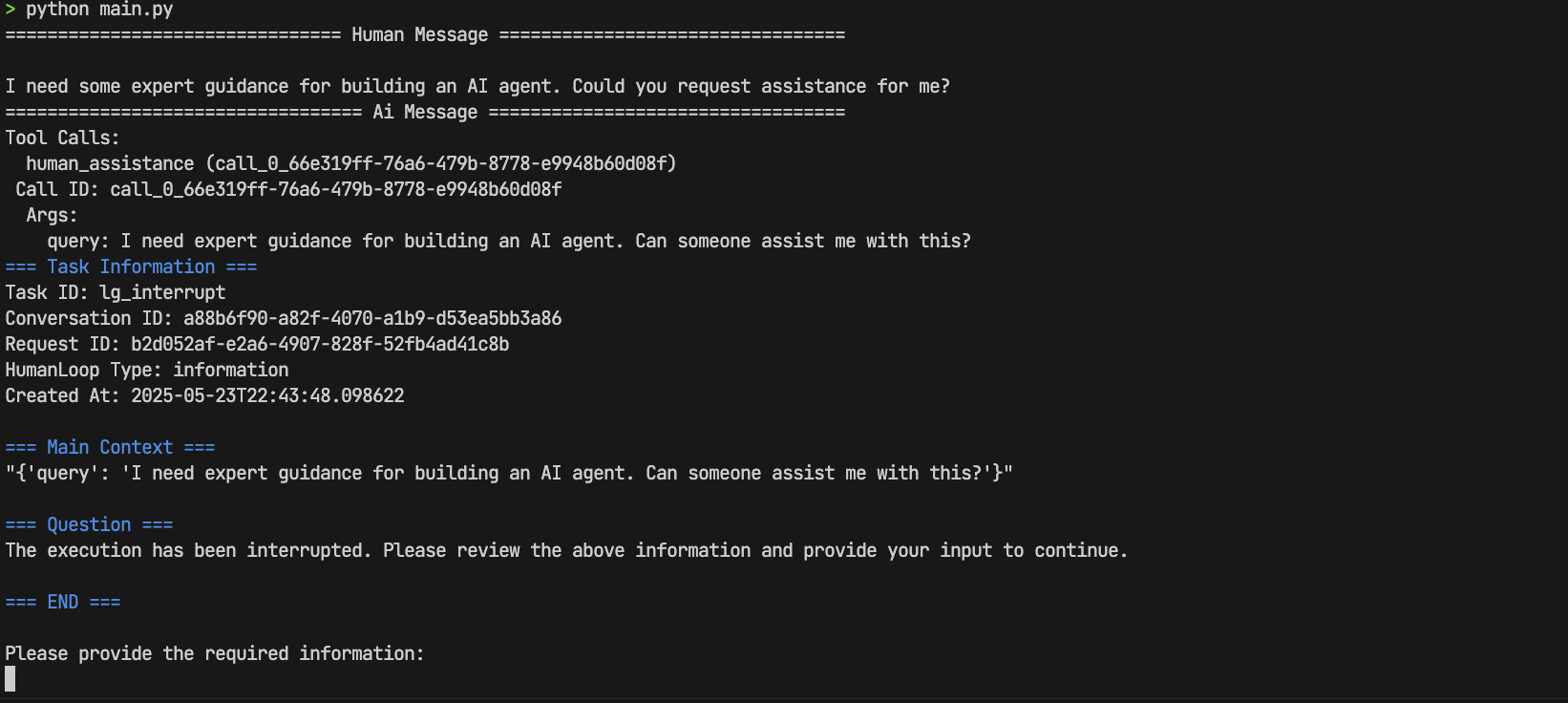
进行 `human-in-the-loop` 交互, 输入信息
> We, the experts are here to help! We'd recommend you check out LangGraph to build your agent.It's much more reliable and extensible than simple autonomous agents.
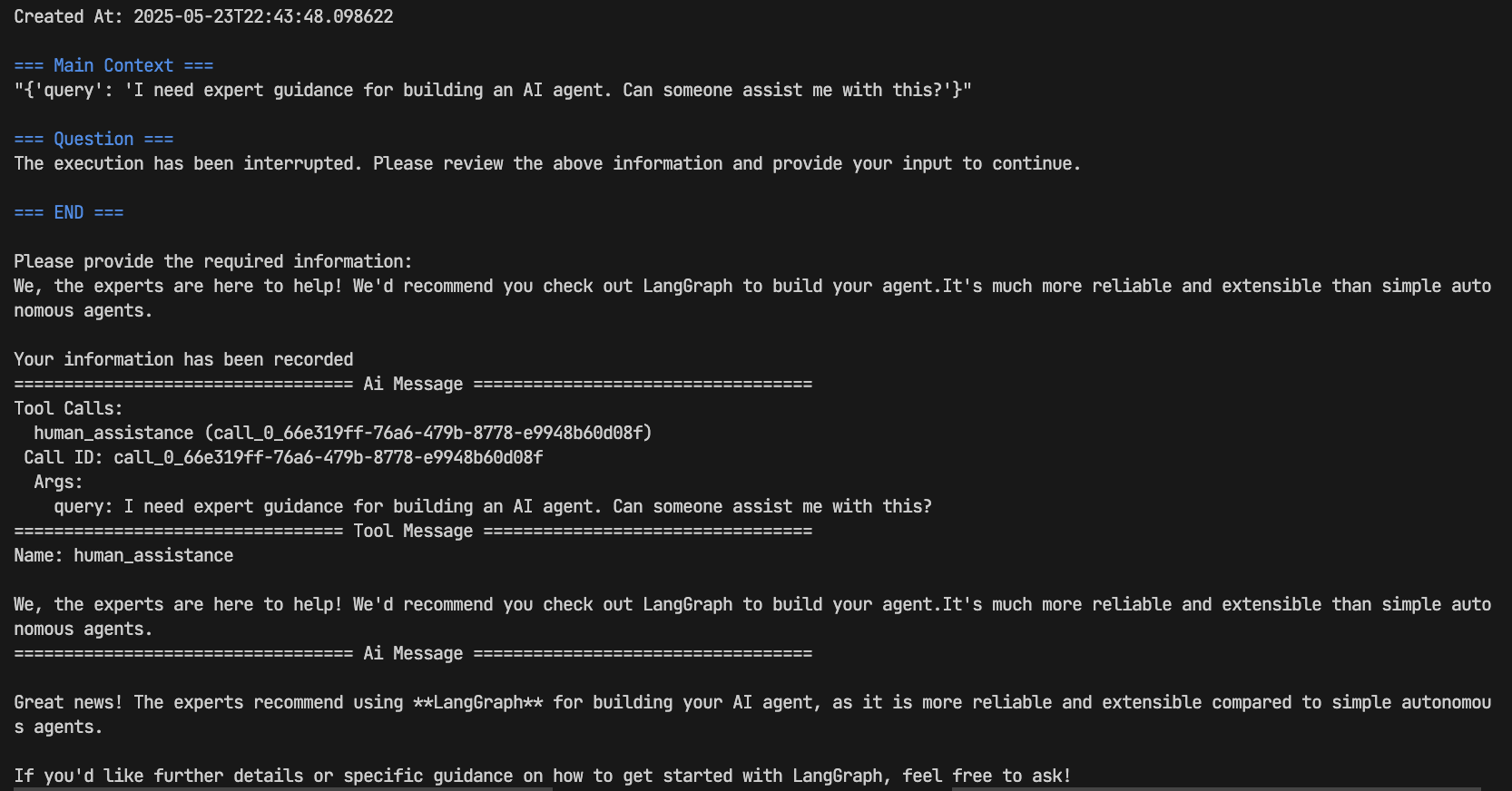
完成 🚀🚀🚀
➡️ 更多示例请查看[示例仓库](https://github.com/ptonlix/gohumanloop-examples),并期待你的分享~
### Apiservices
`Apiservices` 提供一系列对接`GoHumanLoop`的`APIProvider`示例服务。让`GoHumanLoop`轻松将 AI Agent 框架审批和获取信息的能力,拓展到`GoHumanLoophub`或更多第三方服务中,比`飞书`、`企业微信`和`钉钉`等常见的企业内部 OA 系统。
目前支持:
- Mock: 模拟 API 服务
- WeWork: 审批和信息获取
- Feishu: 审批和信息获取
- DingTalk, Personal WeChat: 正在开发,即将上线
✈️ 详情见 [Apiservices](./apiservices/README.md)
## 🎵 Why GoHumanloop
### Human-in-the-loop
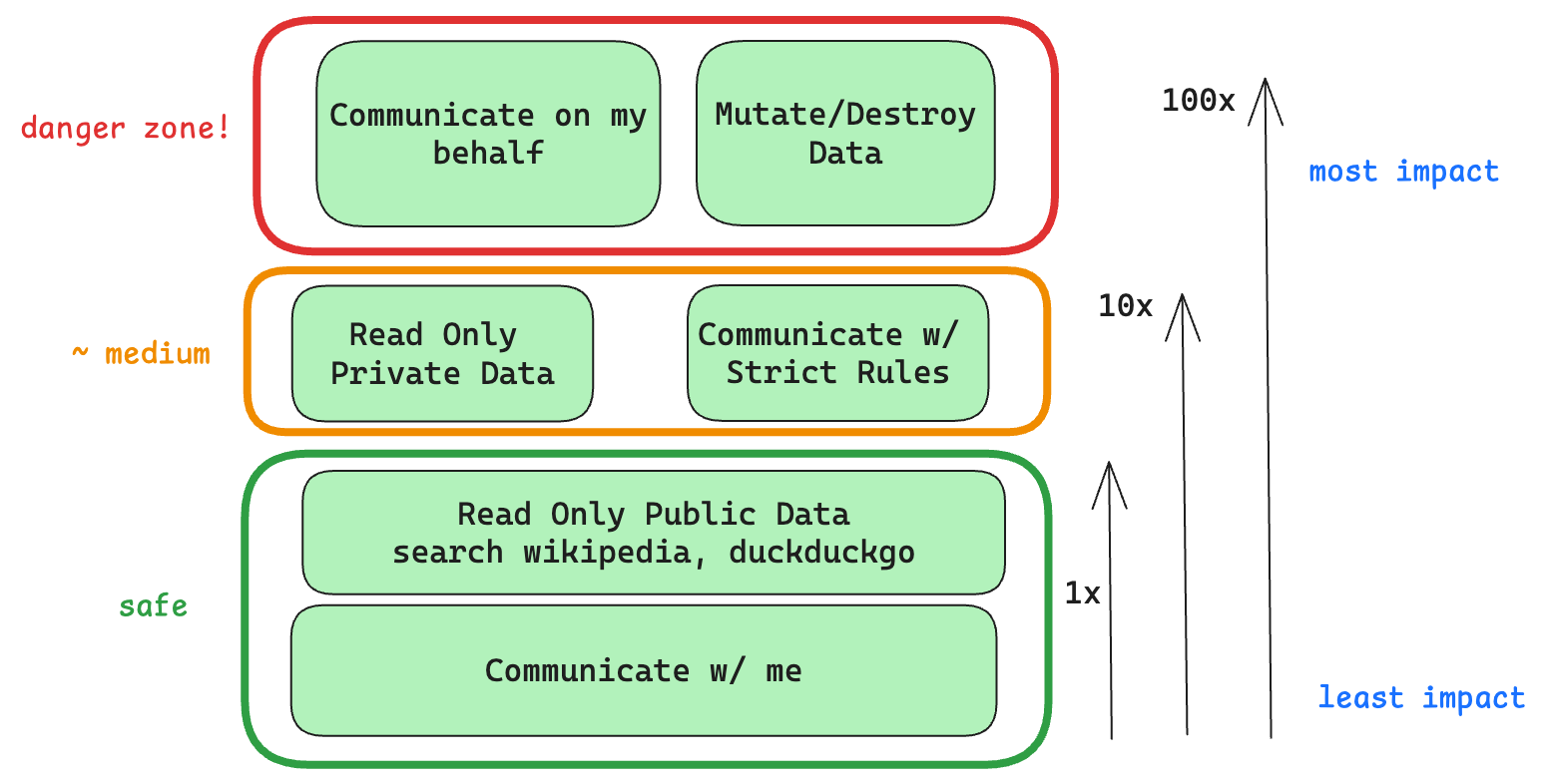 Even with state-of-the-art agentic reasoning and prompt routing, LLMs are not sufficiently reliable to be given access to high-stakes functions without human oversight
`Human-in-the-loop` 是一种 AI 系统设计理念,它将人类判断和监督整合到 AI 决策过程中。在 AI Agent 系统中,这一概念尤为重要:
- **安全性保障**: 允许人类在关键决策点进行干预和审核,防止 AI 做出潜在有害的决策
- **质量控制**: 通过人类专家的反馈来提升 AI 输出的准确性和可靠性
- **持续学习**: AI 系统可以从人类反馈中学习和改进,形成良性循环
- **责任明确**: 在重要决策上保持人类的最终控制权,明确决策责任
在实际应用中,Human-in-the-loop 可以是多种形式:从简单的决策确认到深度的人机协作对话,确保 AI 系统在自主性和人类监督之间达到最佳平衡,发挥出 AI Agent 系统的最大潜力。
#### 典型应用场景
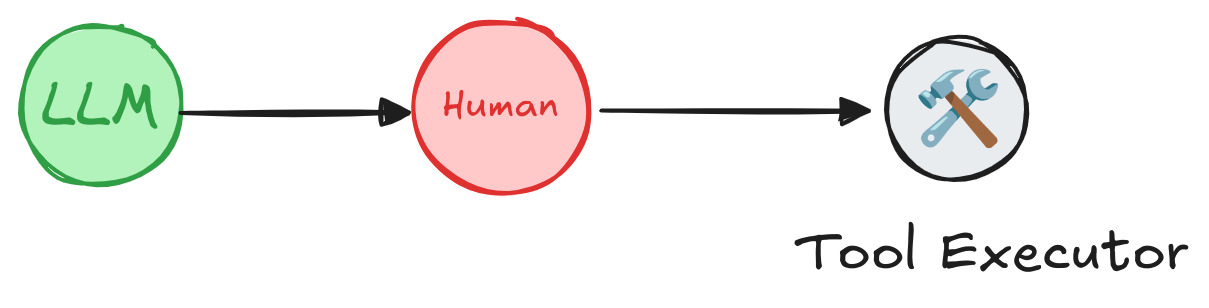 A human can review and edit the output from the agent before proceeding. This is particularly critical in applications where the tool calls requested may be sensitive or require human oversight.
- 🛠️ 审核工具调用:在工具执行前,人工可审核、编辑或批准由大语言模型(LLM)发起的工具调用请求。
- ✅ 验证模型输出:人工可审核、编辑或批准大语言模型生成的内容(如文本、决策等)。
- 💡 提供上下文:允许大语言模型主动请求人工输入,以获取澄清、补充细节或支持多轮对话的上下文信息。
### 安全高效 Go➡Humanloop
`GoHumanloop`提供了一套工具深度集成在 AI Agent 内部,确保始终存在`Human-in-the-loop`的监督机制,能够以确定性的方式确保高风险函数调用必须经过人工审核,同时也能够获取人类专家反馈,从而提升 AI 系统的可靠性和安全性,减少 LLM 幻觉导致的风险。
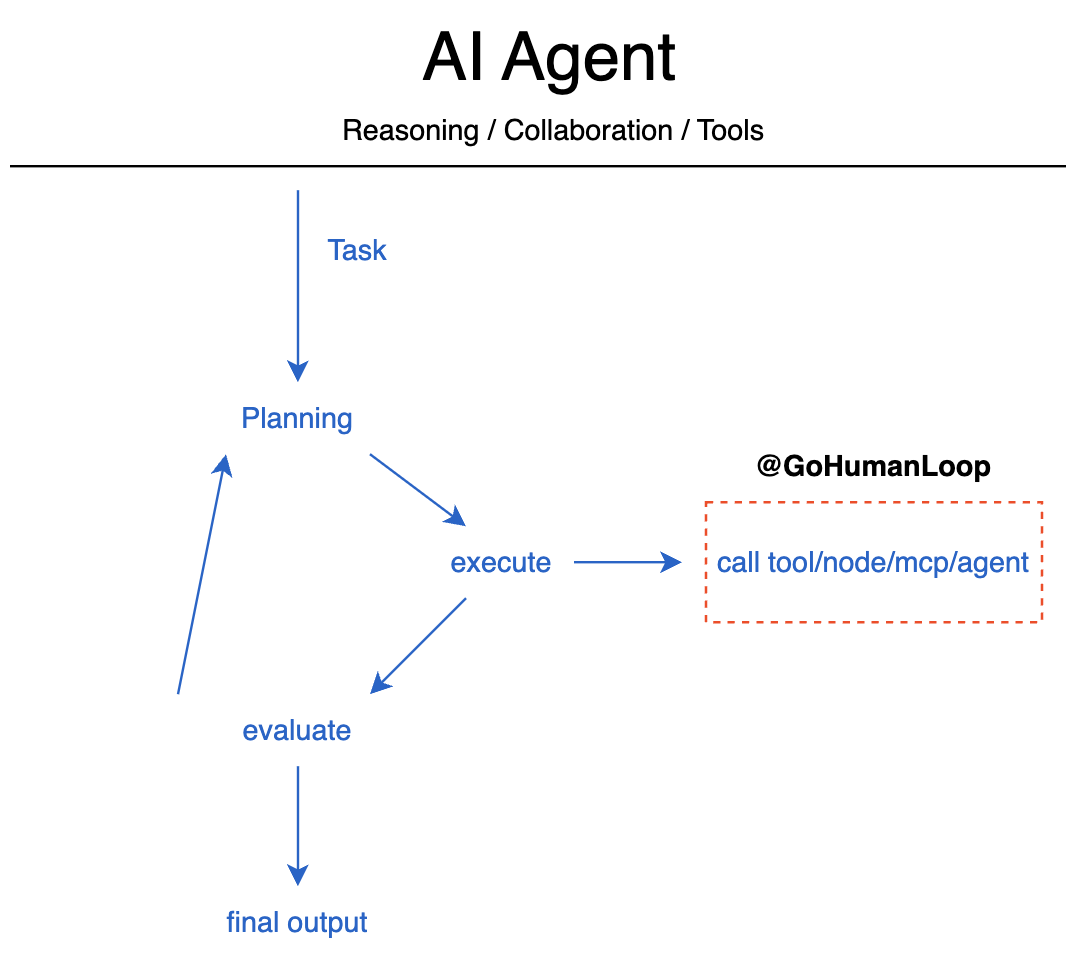 The Outer-Loop and Inversion of Control
通过`GoHumanloop`的封装可以帮助你在请求工具、Agent 节点、MCP 服务和其它 Agent 时,实现安全高效的`Human-in-the-loop`。
## 📚 Key Features
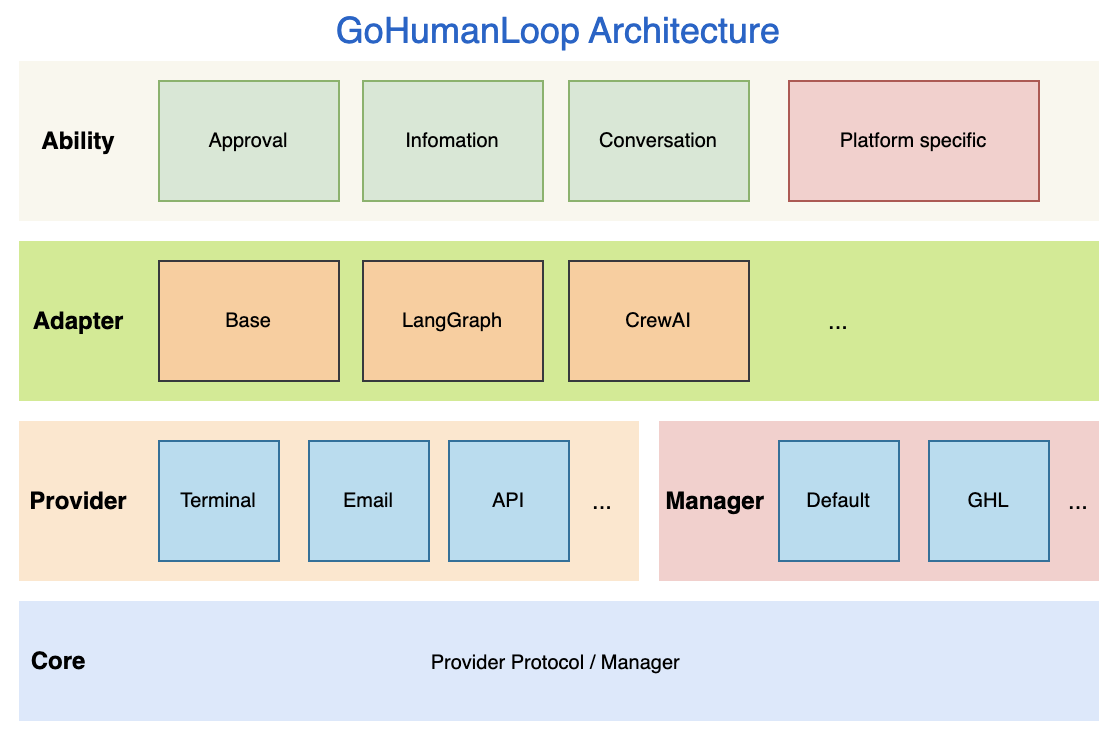 GoHumanLoop Architecture
`GoHumanloop` 提供了对外提供以下核心能力:
- **Approval:** 在执行特定工具调用或 Agent 节点时,请求人工审核或批准
- **Information:** 在执行任务时,获取人类关键信息,减少 LLM 幻觉风险
- **Conversation:** 通过对话形式与人类进行多轮交互,获取更丰富的上下文信息
- **Specific:** 针对特定 Agent 框架,提供特定的集成方式,如`LangGraph`的`interrupt`和`resume`
## 📅 Roadmap
| Feature | Status |
| ------------------ | ------- |
| Approval | ⚙️ Beta |
| Information | ⚙️ Beta |
| Conversation | ⚙️ Beta |
| Email Provider | ⚙️ Beta |
| Terminal Provider | ⚙️ Beta |
| API Provider | ⚙️ Beta |
| Default Manager | ⚙️ Beta |
| GLH Manager | ⚙️ Beta |
| Langchain Support | ⚙️ Beta |
| CrewAI Support | ⚙️ Beta |
| MCP Support | ⚙️ Beta |
| ApiServices-WeWork | ⚙️ Beta |
| ApiServices-FeiShu | ⚙️ Beta |
- 💡 GLH Manager - GoHumanLoop Manager 将对接正在打造的集成平台 GoHumanLoop Hub,为用户提供更灵活的管理方式。
## 🤝 Contributing
GoHumanLoop SDK 和文档是开源的,我们欢迎以问题、文档和 PR 等形式做出贡献。有关更多详细信息,请参阅[CONTRIBUTING.md](./CONTRIBUTING.md)
## 📱 Contact
 🎉 如果你对本项目感兴趣,欢迎扫码联系作者交流
## 🌟 Star History
[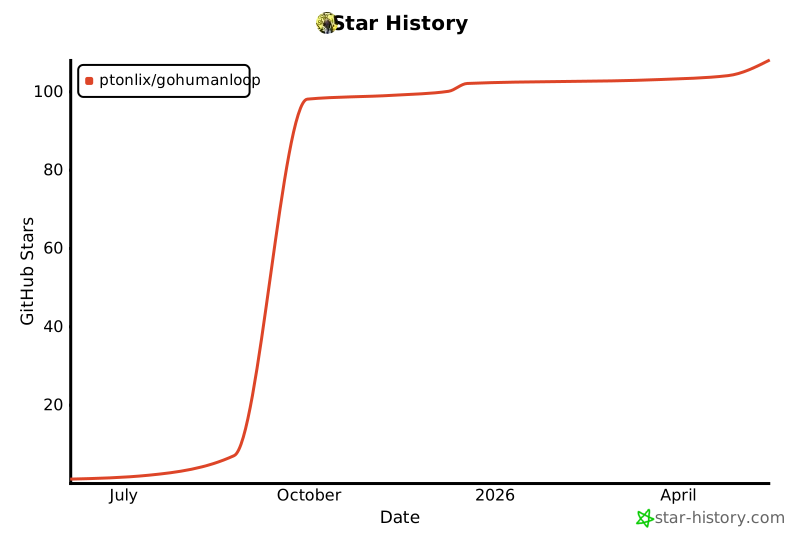](https://www.star-history.com/#ptonlix/gohumanloop&Date)
🎉 如果你对本项目感兴趣,欢迎扫码联系作者交流
## 🌟 Star History
[](https://www.star-history.com/#ptonlix/gohumanloop&Date) 

 [简体中文](README-zh.md) | English