# OpenRLHF
**Repository Path**: NJUSTgzy/OpenRLHF
## Basic Information
- **Project Name**: OpenRLHF
- **Description**: No description available
- **Primary Language**: Unknown
- **License**: Apache-2.0
- **Default Branch**: async_rlhf
- **Homepage**: None
- **GVP Project**: No
## Statistics
- **Stars**: 0
- **Forks**: 0
- **Created**: 2025-05-20
- **Last Updated**: 2025-05-20
## Categories & Tags
**Categories**: Uncategorized
**Tags**: None
## README
[ English | 中文 | 日本語 ]
OpenRLHF 是第一个基于 Ray、vLLM、ZeRO-3 和 HuggingFace Transformers 构建的开源高性能 RLHF 框架,旨在让 RLHF 训练变得简单易用:
- **基于 Ray 的分布式架构**
OpenRLHF 利用 [Ray](https://github.com/ray-project/ray) 实现高效的分布式调度。它将 Actor、Reward、Reference 和 Critic 模型分布到不同的 GPU 上,支持高达 70B 参数模型的训练。
它还支持 **Hybrid Engine** 调度,允许所有模型和 vLLM 引擎共享 GPU 资源,最大限度地减少空闲时间并提高 GPU 利用率。
- **vLLM 推理加速 + AutoTP**
RLHF 训练中 80% 的时间都花在样本生成阶段。基于 [vLLM](https://github.com/vllm-project/vllm) 和自动张量并行 (AutoTP),OpenRLHF 提供高吞吐量、内存高效的推理。与 HuggingFace Transformers 的原生集成确保了无缝且快速的生成,使其成为目前最快的 RLHF 框架。
- **基于 ZeRO-3 / AuoTP 的内存高效训练**
基于 [DeepSpeed](https://github.com/deepspeedai/DeepSpeed) 的 ZeRO-3, [deepcompile](https://github.com/deepspeedai/DeepSpeed/blob/master/blogs/deepcompile/README.md) 以及 [AutoTP](https://github.com/deepspeedai/DeepSpeed/blob/master/blogs/huggingface-tp/README.md),OpenRLHF 无需重量级框架即可实现大模型训练。它直接与 HuggingFace 配合使用,方便加载和微调预训练模型。
- **优化的 PPO 实现**
集成了受实践指南和社区最佳实践启发的先进 PPO 技巧,提高了 RLHF 工作流程中的训练稳定性和奖励质量。参考 [知乎](https://zhuanlan.zhihu.com/p/622134699) 和 [Advanced Tricks for Training Large Language Models with Proximal Policy Optimization](https://hijkzzz.notion.site/rlhf-implementation-tricks?v=158d9a33ecc98132bf9e000c39227361)。
更多细节请参考 [PPT](https://docs.google.com/presentation/d/1JRhB1d7csofx0PIZBmfyBdMluxNd5JLPpUHrrvVhGnk/edit?usp=sharing) | [技术报告](https://arxiv.org/abs/2405.11143) | [使用文档](https://openrlhf.readthedocs.io/)
## 新闻
- [2025/5] OpenRLHF 0.8.0 支持 [Async Pipeline RLHF](./examples/scripts/train_reinforce_baseline_llama_ray_async.sh) (`--async_train`) 和 [Async Agent RLHF](./examples/scripts/train_reinforce_baseline_llama_ray_agent_async.sh)(`--agent_func_path`)
- [2025/4] 发布博客 [Accelerating RLHF with vLLM, Best Practice from OpenRLHF](https://blog.vllm.ai/2025/04/23/openrlhf-vllm.html)
- [2025/4] Clean OpenRLHF: 基于 Single Controller 和 Unified Packing Samples 重构了源码
- [2025/3] CMU的[2025春季高级自然语言处理课程](https://cmu-l3.github.io/anlp-spring2025/)使用OpenRLHF作为RLHF框架教学案例。
- [2025/2] [Logic-RL](https://arxiv.org/abs/2502.14768) 和 [PRIME](https://arxiv.org/abs/2502.01456) 展示了 REINFORCE++ 在训练稳定性上优于 GRPO 并且比 PPO 更快。
- [2025/2] [LMM-R1](https://github.com/TideDra/lmm-r1) 是 OpenRLHF 的一个分支,旨在为多模态任务上复现 DeepSeek-R1 提供高性能的 RL 基础设施。
- [2025/2] MIT & Microsoft 提出了 [On the Emergence of Thinking in LLMs I: Searching for the Right Intuition](https://arxiv.org/pdf/2502.06773) 基于 OpenRLHF
- [2025/1] 港科大复现了 [DeepSeek-R1-Zero and DeepSeek-R1 training on small models 使用 OpenRLHF](https://github.com/hkust-nlp/simpleRL-reason)
- [2024/12] 我们"提出"了 😊 [REINFORCE++ 对齐算法](https://www.researchgate.net/publication/387487679_REINFORCE_A_SIMPLE_AND_EFFICIENT_APPROACH_FOR_ALIGNING_LARGE_LANGUAGE_MODELS).
- [2024/12] 在 [Notion Blog](https://hijkzzz.notion.site/unraveling-rlhf-and-its-variants-engineering-insights#147d9a33ecc9806090f3d5c749d31f05) 中,我们对 PPO、REINFORCE++、GRPO 和 RLOO 进行了分析。
- [2023/8] OpenRLHF 开启开源之旅.
## 特性
- 基于 Ray 的分布式 [PPO](./examples/scripts/train_ppo_llama_ray.sh) 和 [REINFORCE++/REINFORCE++-baseline/GRPO/RLOO](./examples/scripts/train_reinforce_llama_ray.sh) 实现。
- 支持对 [超过 700 亿参数的模型](./examples/scripts/train_ppo_llama_ray_70b.sh) 进行完整的 RLHF 微调。
- 支持基于 Ray 和 Hybrid Engine 的 [PPO](./examples/scripts/train_ppo_llama_ray_hybrid_engine.sh) 和 [REINFORCE++/REINFORCE++-baseline/GRPO/RLOO](./examples/scripts/train_reinforce_llama_ray_hybrid_engine.sh) (`--colocate_all_models`, `--vllm_enable_sleep` and `--vllm_gpu_memory_utilization 0.5`)
- [Ray-based Reinforced Finetuning](./examples/scripts/train_ppo_llama_with_reward_fn.sh)
- 支持 [DeepSpeed AutoTP 训练]((./examples/scripts/train_sft_llama_tensor_parallelism.sh)) (`--ds_tensor_parallel_size`)
- 集成 vLLM,加速 RLHF 任务中的样本生成(`--vllm_num_engines`)。
- 支持多个奖励模型(`--reward_pretrain model1,model2...`)和远程奖励模型(`--remote_rm_url`)。
- 实现 [DPO(直接偏好优化)/IPO/cDPO](./examples/scripts/train_dpo_llama.sh) 和 [Kahneman-Tversky Optimization(KTO)](./examples/scripts/train_kto_llama.sh)。
- 支持 [迭代 DPO](./examples/scripts/train_iterative_dpo_llama.sh)([GitHub: Online-RLHF](https://github.com/RLHFlow/Online-RLHF))。
- 支持 [拒绝采样](./examples/scripts/train_rejection_sampling_llama.sh)。
- 实现 [条件 SFT](./examples/scripts/train_conditional_llama.sh)([arXiv:2308.12050](https://arxiv.org/abs/2308.12050))。
- 支持 [知识蒸馏](./examples/scripts/train_knowledge_distillation.sh)([Microsoft: minillm](https://github.com/microsoft/LMOps/tree/main/minillm))。
- 集成 [过程奖励模型(PRM)](./examples/scripts/train_prm_mistral.sh)。
- 支持 SFT、DPO、RM、PRM 和 PPO 的训练样本打包(`--packing_samples`)。
- 实现 [RingAttention](./examples/scripts/train_dpo_ring_llama.sh)(`--ring_attn_size`,`--ring_head_stride`)。
- 支持 [专家混合模型(MoE)](./examples/test_scripts/train_sft_mixtral_lora.sh)(`--aux_loss_coef`)。
- 集成 FlashAttention2(`--flash_attn`)。
- 支持 QLoRA(`--load_in_4bit`)和 [LoRA](./examples/scripts/train_sft_mixtral_lora.sh)(`--lora_rank`,`--target_modules`)。
- 兼容 HuggingFace 的 `tokenizer.apply_chat_template` 数据集格式(`--apply_chat_template` 和 `--input_key`)。
- 支持使用 Wandb(`--use_wandb`)和 TensorBoard(`--use_tensorboard`)进行日志记录。
- 支持从检查点恢复训练(`--load_checkpoint` 和 `--save_steps`)。
- 提供了多节点训练脚本, 比如 [DPO](./examples/scripts/train_llama_slurm.sh) 和 [RLHF](./examples/scripts/train_ppo_llama_ray_slurm.sh)
## 快速开始
### 安装
要使用 OpenRLHF,首先启动 Docker 容器(**推荐**)然后执行 `pip install` 安装 `openrlhf`:
```bash
# 启动 docker container
docker run --runtime=nvidia -it --rm --shm-size="10g" --cap-add=SYS_ADMIN -v $PWD:/openrlhf nvcr.io/nvidia/pytorch:24.07-py3 bash
sudo pip uninstall xgboost transformer_engine flash_attn pynvml -y
# pip install
pip install openrlhf
# 如果你需要使用 vLLM 加速 (安装 vLLM 0.8.5.post1)
pip install openrlhf[vllm]
# 最新的 vLLM 也是支持的
pip install openrlhf[vllm_latest]
# pip install GitHub 上的最新版
pip install git+https://github.com/OpenRLHF/OpenRLHF.git
# 或者 git clone
git clone https://github.com/OpenRLHF/OpenRLHF.git
cd OpenRLHF
pip install -e .
```
> [!NOTE]
>我们推荐使用 vLLM 0.8.5.post1 及以上版本。
>我们也提供了 [Dockerfiles for vLLM](./dockerfile/) 和 [Nvidia-Docker 一键安装脚本](./examples/scripts/nvidia_docker_install.sh)。
### 准备数据集
OpenRLHF 在其数据集类中提供了多种数据处理方法。
例如在 [Prompt Dataset](https://github.com/OpenRLHF/OpenRLHF/blob/main/openrlhf/datasets/prompts_dataset.py#L6) 中:
```python
def preprocess_data(data, input_template=None, input_key="input", apply_chat_template=None) -> str:
if apply_chat_template:
chat = data[input_key]
if isinstance(chat, str):
chat = [{"role": "user", "content": chat}]
prompt = apply_chat_template(chat, tokenize=False, add_generation_prompt=True)
else:
prompt = data[input_key]
if input_template:
prompt = input_template.format(prompt)
return prompt
```
- 我们可以使用 `--input_key` 指定 `JSON key name` 为输入数据集 `--prompt_data {name or path}` (PPO) 或 `--dataset {name or path}`,并使用 `--apply_chat_template` 利用 [Huggingface Tokenizer](https://huggingface.co/docs/transformers/main/en/chat_templating) 中的 `chat_template`。
- 如果不想使用 `--apply_chat_template`,可以改用 `--input_template`,或预先离线处理数据集。
- OpenRLHF 还支持使用 `--prompt_data_probs 0.1,0.4,0.5` (PPO) 或 `--dataset_probs 0.1,0.4,0.5` 混合多个数据集。
Chat Templating 的工作原理如下:
```python
dataset = [{"input_key": [
{"role": "user", "content": "Hello, how are you?"},
{"role": "assistant", "content": "I'm doing great. How can I help you today?"},
{"role": "user", "content": "I'd like to show off how chat templating works!"},
]}]
tokenizer.apply_chat_template(dataset[0]["input_key"], tokenize=False)
"[INST] Hello, how are you? [/INST]I'm doing great. How can I help you today? [INST] I'd like to show off how chat templating works! [/INST]"
```
如何指定训练和测试数据分区 ?
你可以使用 `data_type@data_dir` 的方式指定, 比如下面的数据集可以设置为 `--dataset json@./data`
```
data
├── test.jsonl
└── train.jsonl
```
如何指定测试数据集 ?
请使用 ``--eval_dataset {name or path}`` 来设置测试数据集路径。
> [!NOTE]
> ``JSON key`` 选项取决于具体的数据集。请参阅 [Reward Dataset](https://github.com/OpenRLHF/OpenRLHF/blob/main/openrlhf/datasets/reward_dataset.py#L10) 和 [SFT Dataset](https://github.com/OpenRLHF/OpenRLHF/blob/main/openrlhf/datasets/sft_dataset.py#L9)
### Supervised Fine-tuning
OpenRLHF 的模型检查点完全兼容 HuggingFace 模型。您可以使用 `--pretrain {name or path}`、`--reward_pretrain {name or path}` 和 `--critic_pretrain {name or path}` 指定模型名称或路径。我们在 [HuggingFace OpenRLHF](https://huggingface.co/OpenRLHF) 上提供了一些预训练的检查点和数据集。
然后您可以使用我们在 [examples/scripts](./examples/scripts/) 目录中提供的启动脚本,或者使用以下命令启动训练:
```bash
deepspeed --module openrlhf.cli.train_sft \
--max_len 4096 \
--dataset Open-Orca/OpenOrca \
--input_key question \
--output_key response \
--input_template $'User: {}\nAssistant: ' \
--train_batch_size 256 \
--micro_train_batch_size 2 \
--max_samples 500000 \
--pretrain meta-llama/Meta-Llama-3-8B \
--save_path ./checkpoint/llama3-8b-sft \
--save_steps -1 \
--logging_steps 1 \
--eval_steps -1 \
--zero_stage 2 \
--max_epochs 1 \
--bf16 \
--flash_attn \
--learning_rate 5e-6 \
--gradient_checkpointing \
--packing_samples \
--load_checkpoint \
--use_wandb {wandb_token}
# 支持 HF tokenizer.apply_chat_template
# --apply_chat_template
# --tokenizer_chat_template {HF Chat Template}
# 支持 RingAttention
# pip install ring_flash_attn
# --ring_attn_size 2 \
# --ring_head_stride 2 \
# 也可用于 continued pre-training
# --pretrain_mode
```
> [!NOTE]
> OpenRLHF SFT/DPO/RewardModel/PPO 训练支持 `--packing_samples` [基于 `--flash_attn`](https://github.com/MeetKai/functionary/tree/main/functionary/train/packing)
### Reward Model Training
```bash
deepspeed --module openrlhf.cli.train_rm \
--save_path ./checkpoint/llama3-8b-rm \
--save_steps -1 \
--logging_steps 1 \
--eval_steps -1 \
--train_batch_size 256 \
--micro_train_batch_size 1 \
--pretrain OpenRLHF/Llama-3-8b-sft-mixture \
--bf16 \
--max_epochs 1 \
--max_len 8192 \
--zero_stage 3 \
--learning_rate 9e-6 \
--dataset OpenRLHF/preference_dataset_mixture2_and_safe_pku \
--apply_chat_template \
--chosen_key chosen \
--rejected_key rejected \
--flash_attn \
--packing_samples \
--gradient_checkpointing \
--load_checkpoint \
--use_wandb {wandb_token}
```
推荐设置 Reward Model 的 `--value_prefix_head` 选项为 `score`, 这样使得我们可以用 `AutoModelForSequenceClassification` 加载模型:
```python
reward_model = AutoModelForSequenceClassification.from_pretrained(
reward_model_path,
num_labels=1,
torch_dtype=torch.bfloat16,
attn_implementation="flash_attention_2",
use_cache=False,
)
inputs = xxxx (Left Padding Input Tokens)
reward = reward_model.model(*inputs).last_hidden_state
reward = reward_model.score(reward)[:, -1]
```
### 使用 Ray 和 vLLM 的 PPO/REINFORCE++
为了提高 RLHF 训练速度或支持 70B 模型,我们可以使用 Ray 和 vLLM 加速的 PPO (Hybrid Engine)
```bash
# 在容器中启动 Ray 的主节点
ray start --head --node-ip-address 0.0.0.0 --num-gpus 8
# 如果要在更多节点上启动 Ray,请使用
ray start --address {MASTER-NODE-ADDRESS}:6379 --num-gpus 8
ray job submit --address="http://127.0.0.1:8265" \
--runtime-env-json='{"working_dir": "/openrlhf"}' \
-- python3 -m openrlhf.cli.train_ppo_ray \
--vllm_num_engines 4 \
--vllm_tensor_parallel_size 2 \
--colocate_all_models \
--vllm_gpu_memory_utilization 0.5 \
--pretrain OpenRLHF/Llama-3-8b-sft-mixture \
--reward_pretrain OpenRLHF/Llama-3-8b-rm-700k \
--save_path /openrlhf/examples/test_scripts/final/llama3-8b-rlhf \
--ckpt_path /openrlhf/examples/test_scripts/ckpt/llama3-8b-rlhf \
--save_hf_ckpt \
--micro_train_batch_size 8 \
--train_batch_size 128 \
--micro_rollout_batch_size 16 \
--rollout_batch_size 1024 \
--n_samples_per_prompt 1 \
--max_epochs 1 \
--prompt_max_len 1024 \
--max_samples 100000 \
--generate_max_len 1024 \
--zero_stage 3 \
--bf16 \
--actor_learning_rate 5e-7 \
--critic_learning_rate 9e-6 \
--init_kl_coef 0.01 \
--prompt_data OpenRLHF/prompt-collection-v0.1 \
--input_key context_messages \
--apply_chat_template \
--normalize_reward \
--gradient_checkpointing \
--packing_samples \
--vllm_sync_backend nccl \
--enforce_eager \
--vllm_enable_sleep \
--deepspeed_enable_sleep \
--use_wandb {wandb_token}
# 支持 REINFORCE++ | RLOO | REINFORCE++-baseline | GRPO | Dr. GRPO
# --advantage_estimator reinforce | rloo | reinforce_baseline | group_norm | dr_grpo
# 设置 --init_kl_coef 为 0 将不会启动参考模型
# 支持远程奖励模型 (HTTP)
# --remote_rm_url http://localhost:5000/get_reward
# 支持 N 个样本
# --n_samples_per_prompt 4
```
> [!NOTE]
> 你也可以使用 ``setup_commands`` 让 Ray 自动部署环境,例如 `--runtime-env-json='{"setup_commands": ["pip install openrlhf[vllm]"]}'`。
> [!NOTE]
> OpenRLHF 中的 RLOO 和 REINFORCE++-baseline 是基于 REINFORCE++ 的修改版本:
> - REINFORCE++ 集成了 PPO 的关键优化技术(如优势归一化和 PPO-clip loss)到 REINFORCE,同时消除了对 Critic 网络的需求。
> - REINFORCE++-baseline 使用`来自同一个 prompt 的多个样本的平均奖励`作为基线来重塑奖励(使用全局批次归一化 `/std`)。
> - OpenRLHF 中的 RLOO 通过引入`per token 的 KL 奖励`并使用 `PPO-clip loss` 来修改原始版本。
> - Dr. GRPO 移除了 GRPO 中的组归一化 `/std`。
> [!NOTE]
> 如果遇到 deepspeed 设置 GPU 设备时出现索引越界错误,可以尝试设置环境变量 [`RAY_EXPERIMENTAL_NOSET_*_VISIBLE_DEVICES`](openrlhf/trainer/ray/utils.py) 作为临时解决方案。
> ```bash
> # 对于 NVIDIA GPU:
> export RAY_EXPERIMENTAL_NOSET_CUDA_VISIBLE_DEVICES=1
> ```
所有支持算法的启动脚本和文档在 [example/scripts](./examples/scripts/) 和 [Documents - Usage](https://openrlhf.readthedocs.io/en/latest/usage.html)
### Reinforced Fine-tuning
OpenRLHF 支持便捷高效的 Reinforced Fine-tuning。您只需要实现一个包含自定义 `reward_func` 函数的[文件](./examples/scripts/reward_func.py)并将其路径传递给 `remote_rm_url` 参数即可。例如:
```python
# reward_func.py
import torch
def reward_func(queries, prompts, labels):
# queries 是 prompts + responses
# labels 是 answers
print(queries)
return torch.randn(len(queries))
```
然后只需设置:
```shell
ray job submit --address="http://127.0.0.1:8265" \
--runtime-env-json='{"working_dir": "/openrlhf"}' \
-- python3 -m openrlhf.cli.train_ppo_ray \
...
--remote_rm_url /path/to/reward_func.py \
--label_key answer
```
其中 `label_key` 参数用于向奖励函数传递额外的样本信息比如答案。
### Async RLHF & Agent RLHF
OpenRLHF 提供了对异步 RLHF 和基于代理的 RLHF 实现的全面支持。要使用这些功能,只需在训练配置中包含 `--async_train` 和 `--agent_func_path` 参数即可。
```python
# agent_func.py
step_idx = 0
max_steps = 2
async def step(state, action, label, **kwargs) -> Tuple[float, Dict[str, Any], bool]:
global step_idx, max_steps
# 验证后结束
if step_idx >= max_steps:
done = True
# 使用 torch.rand 生成随机奖励
reward = torch.rand(1)
next_state = state + action + " The answer is correct. <|endoftext|>"
else:
done = False
reward = torch.tensor(0)
# 更新状态
next_state = state + action + " The answer is not correct, please try again: "
step_idx += 1
# 额外信息
extra_info = {}
return reward, next_state, done, extra_info
```
您还可以通过设置 `export OPENRLHF_ASYNC_NUM_TASKS=128` 来配置每个 vLLM 引擎的最大并发代理数。
此外,您可以通过在环境中设置 `export OPENRLHF_ASYNC_QUEUE_SIZE=1`(此参数控制缓冲区最多可以存储多少批数据)来控制离策略采样的程度。
> [!NOTE] OpenRLHF的Agent RLHF也支持混合引擎训练。要启用此功能,请移除`--async_train`标志并启用`--colocate_all_models`。此外,请设置`PYTORCH_NVML_BASED_CUDA_CHECK=1`和`export VLLM_USE_V1=1`。
> [!WARNING] 异步训练可能会影响训练稳定性. 推荐优先考虑同步训练和 Hybrid Engine.
### LoRA
如果您使用 `LoRA (Low-Rank Adaptation)`,`OpenRLHF` 默认不会保存完整的权重,而是保存 `LoRA Adapter`。要正常继续您的任务,您需要将 `Adapter` 与基础模型的权重合并
```bash
python -m openrlhf.cli.lora_combiner \
--model_path meta-llama/Meta-Llama-3-8B \
--lora_path ./checkpoint/llama3-8b-rm \
--output_path ./checkpoint/llama-3-8b-rm-combined \
--is_rm \
--bf16
```
## 性能
我们通过启用 Adam offload、奖励模型(RM)和参考模型(Ref)offload 等技术,最大限度地优化了 DSChat 的性能,以增加推理阶段的微批次大小并避免内存不足问题。我们甚至修复了 DSChat 中的一些错误,为 LLaMA2 启用了 Hybrid Engine(HE)。使用优化后的 DSChat 和 OpenRLHF 训练 1024 个提示的 1 个 PPO epoch 所需的平均时间(秒):
| **大小** | **NVIDIA A800-80GB GPUs** | **优化后的 DSChat (带 Hybrid Engine)** | **OpenRLHF** | **加速比** |
| :---: | :---: | :---: | :---: | :---: |
| 7B | 16 | 855.09 | 471.11 | 1.82x |
| 13B | 32 | 1528.93 | 608.93 | 2.5x |
| 34B | 32 | 3634.98 | 1526.4 | 2.4x |
| 70B | 32 | 10407.0 | 4488.53 | 2.3x |
> [!NOTE]
> 这些数据已经过时,请参考性能调优部分进行重新测试。
### 性能调优指南
为了获得最佳性能,我们建议按 `vLLM:Actor:Critic = 1:1:1` 的比例分配节点。
- 例如,对于 70B 模型和 48 个 A100 GPU,建议将 16 个 A100 GPU 分配给 vLLM 引擎,16 个 GPU 分配给 Actor 模型,剩余的 16 个 GPU 分配给 Critic 模型。
- 当有足够的 GPU 内存时,使用 hybrid engine `--colocate_all_models` 和 `--vllm_enable_sleep` 以及 `--deepspeed_enable_sleep`,而不是分布式 RLHF。
- 启用 `--colocate_critic_reward`、`--colocate_actor_ref` 选项来合并节点。
- 应该尽可能增加 `rollout_micro_batch_size`(并最小化 vLLM 引擎的 TP 大小)。在训练阶段,较大的 `--micro_train_batch_size` 更好,并启用 `--packing_samples`。
- 当有足够的 GPU 内存时,请禁用 `--adam_offload` 并启用 `--overlap_comm`。同时启用 `--deepcompile` 来加速训练。
- 对于 vLLM,请使用 `--vllm_sync_backend nccl`
- 当 `n_samples_per_prompts` > 1 时,在 vLLM 生成中启用 [enable_prefix_caching](https://docs.vllm.ai/en/stable/automatic_prefix_caching/apc.html)。
- 对于大型基础模型,如果发生 OOM,不要使用任何 `--colocate_xxxx` 选项。
## 使用 OpenRLHF 的公司和组织
- Google
- ByteDance
- Tencent
- Alibaba
- Baidu
- China Telecom
- Allen AI
- Vivo
- NexusFlow
- Jülich Supercomputing Centre (JSC)
- Berkeley Starling Team
- M-A-P
- ...
## 加入我们
**如何加入?**
1. 通过联系邮箱 janhu9527@gmail.com 或者加入 [GitHub Organization](https://github.com/OpenRLHF)。请包含以下信息:
- 您的姓名
- 您的 GitHub 用户名
- 您感兴趣的领域
- 您在 NLP 和/或 AI 相关的技能和经验
2. 您也可以通过官方 GitHub [OpenRLHF ↗](https://github.com/OpenRLHF/OpenRLHF) 项目页面加入我们。只需创建一个关于您想要贡献的兴趣的 issue,我们会与您联系。
**您能做什么?**
1. 加入团队,参与 OpenRLHF 项目的开发。
2. 通过提交 pull 请求来为项目做出贡献。
3. 帮助改进文档,修复 bugs 或创建新功能。
4. 分享项目并帮助我们发展社区。
## 赞助我们
您的赞助可以帮助我们维护和改进 OpenRLHF。如果您觉得这个项目有用,请考虑赞助我们。您可以在 [Open Collective ↗](https://opencollective.com/OpenRLHF) 上赞助我们。
## 星图
[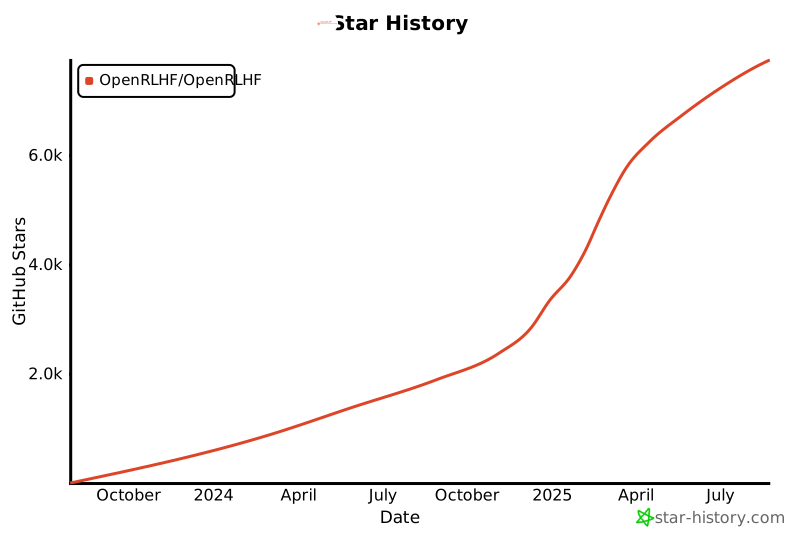](https://star-history.com/#OpenRLHF/OpenRLHF&Date)
## 贡献者
非常感谢所有的贡献者!如果您想贡献,请随时创建 pull 请求或创建 issue。
 ## 引用与致谢
我们想要对以下项目和组织在 AI 和 NLP 领域的贡献表示感谢:
- [Hugging Face Transformers ↗](https://github.com/huggingface/transformers)
- [OpenAI GPT ↗](https://github.com/openai/gpt-3)
- [LLaMA ↗](https://llama.meta.com/)
- [DeepSpeed ↗](https://github.com/microsoft/DeepSpeed)
- [Ray ↗](https://github.com/ray-project/ray)
我们的项目还想要感谢 [ColossalChat](https://github.com/hpcaitech/ColossalAI/tree/main/applications/Chat) 和 [DeepSpeedChat](https://github.com/microsoft/DeepSpeedExamples/tree/master/applications/DeepSpeed-Chat)。在项目的早期阶段,我们参考了他们的代码设计。
我们的项目还想要感谢 [Netmind.AI](https://www.netmind.ai/) 对于ring attention开发的GPU支持。
(2024/7) 我们的 GitHub 组织从 OpenLLMAI 迁移到了 OpenRLHF.
## 引用
```
@article{hu2024openrlhf,
title={OpenRLHF: An Easy-to-use, Scalable and High-performance RLHF Framework},
author={Jian Hu and Xibin Wu and Zilin Zhu and Xianyu and Weixun Wang and Dehao Zhang and Yu Cao},
journal={arXiv preprint arXiv:2405.11143},
year={2024}
}
```
______________________________________________________________________
*OpenRLHF © 2025 OpenRLHF. 版权所有。*
## 引用与致谢
我们想要对以下项目和组织在 AI 和 NLP 领域的贡献表示感谢:
- [Hugging Face Transformers ↗](https://github.com/huggingface/transformers)
- [OpenAI GPT ↗](https://github.com/openai/gpt-3)
- [LLaMA ↗](https://llama.meta.com/)
- [DeepSpeed ↗](https://github.com/microsoft/DeepSpeed)
- [Ray ↗](https://github.com/ray-project/ray)
我们的项目还想要感谢 [ColossalChat](https://github.com/hpcaitech/ColossalAI/tree/main/applications/Chat) 和 [DeepSpeedChat](https://github.com/microsoft/DeepSpeedExamples/tree/master/applications/DeepSpeed-Chat)。在项目的早期阶段,我们参考了他们的代码设计。
我们的项目还想要感谢 [Netmind.AI](https://www.netmind.ai/) 对于ring attention开发的GPU支持。
(2024/7) 我们的 GitHub 组织从 OpenLLMAI 迁移到了 OpenRLHF.
## 引用
```
@article{hu2024openrlhf,
title={OpenRLHF: An Easy-to-use, Scalable and High-performance RLHF Framework},
author={Jian Hu and Xibin Wu and Zilin Zhu and Xianyu and Weixun Wang and Dehao Zhang and Yu Cao},
journal={arXiv preprint arXiv:2405.11143},
year={2024}
}
```
______________________________________________________________________
*OpenRLHF © 2025 OpenRLHF. 版权所有。*




