# screenity
**Repository Path**: KANLON/screenity
## Basic Information
- **Project Name**: screenity
- **Description**: The most powerful screen recorder & annotation tool for Chrome 🎥
- **Primary Language**: Unknown
- **License**: MIT
- **Default Branch**: master
- **Homepage**: None
- **GVP Project**: No
## Statistics
- **Stars**: 0
- **Forks**: 0
- **Created**: 2021-05-23
- **Last Updated**: 2021-05-23
## Categories & Tags
**Categories**: Uncategorized
**Tags**: None
## README
# Screenity
The most powerful screen recorder & annotation tool for Chrome 🎥
[Get it now - it's free!](https://chrome.google.com/webstore/detail/screenity-screen-recorder/kbbdabhdfibnancpjfhlkhafgdilcnji)
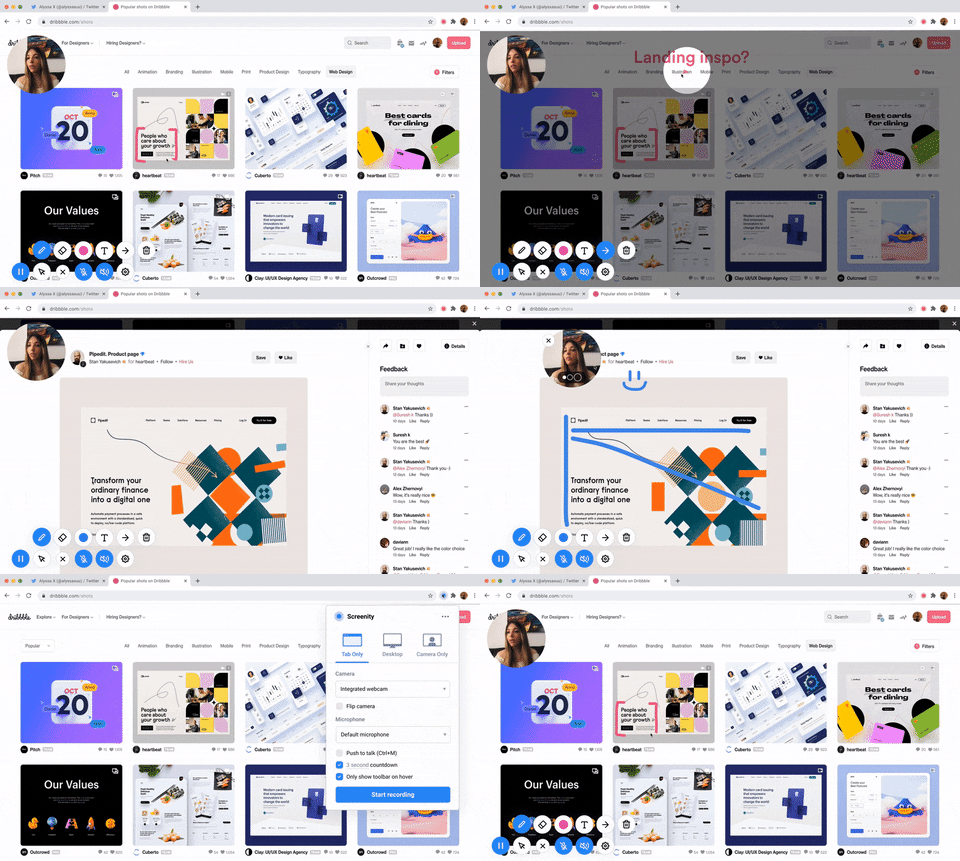
Screenity is a feature-packed screen and camera recorder for Chrome. Annotate your screen to give feedback, emphasize your clicks, edit your recording, and much more.
Made by [Alyssa X](https://alyssax.com)

 ## Features
🎥 Make unlimited recordings of your tab, desktop, any application, and camera
## Features
🎥 Make unlimited recordings of your tab, desktop, any application, and camera
✏️ Annotate by drawing anywhere on the screen, adding text, and creating arrows
👀 Highlight your clicks, focus on your mouse, or hide it from the recording
🎙️ Individual microphone and computer audio controls, push to talk, and more
⚙️ Custom countdowns, show controls only on hover, and many other customization options
💾 Export as mp4, gif, and webm, or save the video directly to Google Drive
✂️ Trim or remove sections of your recording
🌐 Available in English, Catalan, Spanish (by [Carmen Madrazo](https://twitter.com/Carmen_M_A)), French (by [Marie](https://twitter.com/marie_dm_)), Portuguese, and Brazilian Portuguese. More languages coming soon!
...and much more - all for free & no sign in needed!
[Here's a Google Sheet](https://docs.google.com/spreadsheets/d/1juc1zWC2QBxYqlhpDZZUNHl3P6Tens6YiChchFcEJVw/edit?usp=sharing) to compare Screenity's features with other free & premium screen recorders available for Chrome.
## Libraries used
- [jQuery](https://jquery.com/) - for better event handling and DOM manipulation
- [FabricJs](http://fabricjs.com/) - for interactive text and arrows (optimized custom build)
- [FFMPEG](https://www.ffmpeg.org/) - to convert the video to GIF or MP4
- [Jquery Nice Select](https://hernansartorio.com/jquery-nice-select/) - for better, more stylish dropdowns
- [Nouislider](https://github.com/leongersen/noUiSlider) - for the range sliders used for trimming / removing parts of the recording
- [Pickr](https://github.com/Simonwep/pickr) - for the color picker
- [Plyr](https://github.com/sampotts/plyr) - for the video player shown when editing the recording
#
Feel free to reach out to me through email at hi@alyssax.com or [on Twitter](https://twitter.com/alyssaxuu) if you have any questions or feedback! Hope you find this useful 💜