# android-image-picker
**Repository Path**: 670696652/android-image-picker
## Basic Information
- **Project Name**: android-image-picker
- **Description**: Image Picker for Android 🤖
- **Primary Language**: Unknown
- **License**: Apache-2.0
- **Default Branch**: master
- **Homepage**: None
- **GVP Project**: No
## Statistics
- **Stars**: 0
- **Forks**: 0
- **Created**: 2021-03-11
- **Last Updated**: 2024-05-29
## Categories & Tags
**Categories**: Uncategorized
**Tags**: None
## README
# ImagePicker
[](https://circleci.com/gh/esafirm/android-image-picker)
[](https://android-arsenal.com/details/1/4618)
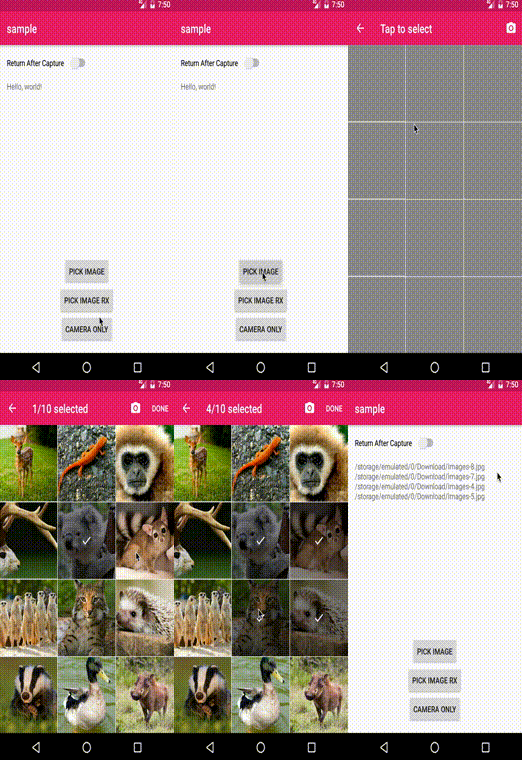
 A simple library to select images from the gallery and camera.
# Screenshot
A simple library to select images from the gallery and camera.
# Screenshot
Click to see how image picker looks…
## Download [](https://jitpack.io/#esafirm/android-image-picker)
Add this to your project's `build.gradle`
```groovy
allprojects {
repositories {
maven { url "https://jitpack.io" }
}
}
```
And add this to your module's `build.gradle`
```groovy
dependencies {
implementation 'com.github.esafirm.android-image-picker:imagepicker:x.y.z'
// for experimental rx picker
implementation 'com.github.esafirm.android-image-picker:rximagepicker:x.y.z'
// If you have a problem with Glide, please use the same Glide version or simply open an issue
implementation 'com.github.bumptech.glide:glide:4.5.0'
}
```
change `x.y.z` to version in the [release page](https://github.com/esafirm/android-image-picker/releases)
**Breaking changes**
If you're not using custom image loader and have Glide v3 in your classpath, please using version `1.8.0` below!
Will improve this image loader compatibility issue in ImagePicker v2!
# Usage
For full example, please refer to the `sample` app.
Also you can browse the issue labeled as question [here](https://github.com/esafirm/android-image-picker/issues?utf8=%E2%9C%93&q=label%3Aquestion+)
## Start image picker activity
The simplest way to start
```java
ImagePicker.create(this) // Activity or Fragment
.start();
```
Complete features of what you can do with ImagePicker
```java
ImagePicker.create(this)
.returnMode(ReturnMode.ALL) // set whether pick and / or camera action should return immediate result or not.
.folderMode(true) // folder mode (false by default)
.toolbarFolderTitle("Folder") // folder selection title
.toolbarImageTitle("Tap to select") // image selection title
.toolbarArrowColor(Color.BLACK) // Toolbar 'up' arrow color
.includeVideo(true) // Show video on image picker
.single() // single mode
.multi() // multi mode (default mode)
.limit(10) // max images can be selected (99 by default)
.showCamera(true) // show camera or not (true by default)
.imageDirectory("Camera") // directory name for captured image ("Camera" folder by default)
.origin(images) // original selected images, used in multi mode
.exclude(images) // exclude anything that in image.getPath()
.excludeFiles(files) // same as exclude but using ArrayList
.theme(R.style.CustomImagePickerTheme) // must inherit ef_BaseTheme. please refer to sample
.enableLog(false) // disabling log
.start(); // start image picker activity with request code
```
You also can change how to process the image and how to get the image files through `ImageLoader` and `ImageFileLoader`
To change this, simply set it on `ImagePickerComponentHolder`
```java
ImagePickerCompomnentHolder.getInstance()
.setImageLoader(new GrayScaleImageLoader())
.setImageFileLoader(new WebpImageFileLoader())
```
If you want to call it outside `Activity` or `Fragment`, you can simply get the `Intent` from the builder
```java
ImagePicker.create(activity).getIntent(context)
```
## Receive result
```java
@Override
protected void onActivityResult(int requestCode, final int resultCode, Intent data) {
if (ImagePicker.shouldHandle(requestCode, resultCode, data)) {
// Get a list of picked images
List images = ImagePicker.getImages(data)
// or get a single image only
Image image = ImagePicker.getFirstImageOrNull(data)
}
super.onActivityResult(requestCode, resultCode, data);
}
```
## Camera Only
```java
ImagePicker.cameraOnly().start(activity) // Could be Activity, Fragment, Support Fragment
// You could also get the Intent
ImagePicker.cameraOnly().getIntent(context)
```
You also still can use the `DefaultCameraModule` but discouraged to do it.
## Return Mode
There's 4 mode available:
1. `ReturnMode.NONE` -> When image is picked, ImagePickerActivity will not dismissed even in Single Mode
2. `ReturnMode.ALL` -> When image is picked dismiss then deliver result
3. `ReturnMode.CAMERA_ONLY` -> When image is picked with Camera, dismiss then deliver the result
4. `ReturnMode.GALLERY_ONLY` -> Same as CAMERA_ONLY but with Gallery
You can define your selected mode with `setReturnMode()` method.
## Set Save Location
By default, ImagePicker will try to save the image generated from camera to `Environment.DIRECTORY_PICTURES` with directory name `"Camera"`.
You can change the directory name only by using:
```java
ImagePicker.create(activity).imageDiretory(String dirName)
```
Or you can change the full path of the save location by using:
```java
ImagePicker.create(activity).imageFullDirectory(String fullPath)
```
## Using Another Image Loader Library
By default, Image picker is using [Glide](https://github.com/bumptech/glide) as its image loader library.
You can change this by using:
```java
ImagePicker.create(activity).imageLoader(ImageLoader customImageLoader)
```
Next thing you wanna do is excluding Glide library from ImagePicker. You can achieve this with Gradle. Ex:
```groovy
implementation("com.github.esafirm.android-image-picker:imagepicker:x.y.z") {
exclude group: 'com.github.bumptech.glide', module: 'glide'
})
```
You can find more about this in [here](https://github.com/esafirm/android-image-picker/issues/105). Thanks to [Galaxer](https://github.com/Galaxer) 🙏
# AndroidX and version 2.0.0 above
As version 2.0.0 above, we already use AndroidX artifact in our library.
If you have any trouble adding this version to your current project like [this](https://github.com/esafirm/android-image-picker/issues/226)
Please add this to your `gradle.properties` :
```
android.useAndroidX=true
android.enableJetifier=true
```
# Credits
- AIP Logo by [anaufalm](https://github.com/anaufalm)
# Modification License
```
Copyright (c) 2016 Esa Firman
Permission is hereby granted, free of charge, to any person obtaining a copy of this software and associated documentation files (the "Software"), to deal in the Software without restriction, including without limitation the rights to use, copy, modify, merge, publish, distribute, sublicense, and/or sell copies of the Software, and to permit persons to whom the Software is furnished to do so, subject to the following conditions:
The above copyright notice and this permission notice shall be included in all copies or substantial portions of the Software.
THE SOFTWARE IS PROVIDED "AS IS", WITHOUT WARRANTY OF ANY KIND, EXPRESS OR IMPLIED, INCLUDING BUT NOT LIMITED TO THE WARRANTIES OF MERCHANTABILITY, FITNESS FOR A PARTICULAR PURPOSE AND NONINFRINGEMENT. IN NO EVENT SHALL THE AUTHORS OR COPYRIGHT HOLDERS BE LIABLE FOR ANY CLAIM, DAMAGES OR OTHER LIABILITY, WHETHER IN AN ACTION OF CONTRACT, TORT OR OTHERWISE, ARISING FROM, OUT OF OR IN CONNECTION WITH THE SOFTWARE OR THE USE OR OTHER DEALINGS IN THE SOFTWARE.
```
# Original License
[The Original Image Picker](https://github.com/nguyenhoanglam/ImagePicker)
[You can find the original lincense here ](https://raw.githubusercontent.com/esafirm/ImagePicker/master/ORIGINAL_LICENSE)